

QUOTE(TristanX @ Dec 1 2020, 08:44 PM)
Gigabyte latest BIOS can touch FCLK now. Stable.
[attachmentid=10709396]

3800 c16?[attachmentid=10709396]
AMD Ryzen, AM4 / AM5 Platform
|
|
 Dec 1 2020, 09:06 PM Dec 1 2020, 09:06 PM
Return to original view | IPv6 | Post
#41
|
 
Senior Member
682 posts Joined: Mar 2016  
|
QUOTE(TristanX @ Dec 1 2020, 08:44 PM) Gigabyte latest BIOS can touch FCLK now. Stable. 3800 c16?[attachmentid=10709396] |
|
|
|
|
|
Dec 2 2020, 11:13 AM
Return to original view | IPv6 | Post
#42
|
|
Senior Member
682 posts Joined: Mar 2016
|
QUOTE(yimingwuzere @ Dec 2 2020, 09:31 AM) Looking to grab a new ITX board. can confirmed msi and gigbyte b550i dont haveAnyone knows which B550/X570 supports voltage control for 3-pin fans controlled by GPU temps? Out of the game for new mobo advancements. |
|
|
Dec 5 2020, 07:28 PM
Return to original view | Post
#43
|
|
Senior Member
682 posts Joined: Mar 2016
|
A fatal hardware error has occurred.
Reported by component: Processor Core Error Source: Machine Check Exception Error Type: Cache Hierarchy Error Processor APIC ID: 2 The details view of this entry contains further information. Hello, this error crash my pc.. is it because of the ram or the processor? |
|
|
Dec 5 2020, 08:03 PM
Return to original view | Post
#44
|
|
Senior Member
682 posts Joined: Mar 2016
|
QUOTE(TristanX @ Dec 5 2020, 07:43 PM) When you get errors. At least provide full system spec... Ryzen 5600x, now on PBO limit based on motherboard.Update to latest BIOS as well. Msi b550i G.skill 3600c15 8 x2gb overclock to 4000mhz cl 16, stress test with tm5 no error before. Gigabyte gtx1080 windforce OC. sf750 psu. Bios not the latest, the latest one is the beta version not sure want to update or not. This error shut down my pc twice dy, only occurs when I play monster hunter world but not everything lah. Any ideal what when wrong? |
|
|
Dec 5 2020, 08:55 PM
Return to original view | Post
#45
|
|
Senior Member
682 posts Joined: Mar 2016
|
QUOTE(TristanX @ Dec 5 2020, 08:41 PM) Is the current BIOS using AGESA 1.1.0.0? You supposed to have it for 5000 series CPU. AGESA ComboAm4v2PI 1.1.0.0 Patch C, will try go to xmp if it happen again. kinda frustrated because crash in middle of game Go stock XMP and see if you still get those error or not.  |
|
|
Dec 5 2020, 09:55 PM
Return to original view | IPv6 | Post
#46
|
|
Senior Member
682 posts Joined: Mar 2016
|
QUOTE(targon @ Dec 5 2020, 09:29 PM) Shared here from another forum. This guy having random boots with a 5650x on a Msi x570 Unify. pls update us, i suspect mine having problem also.Presumably he RMAed the cpu and his response below: I'm talked to guy from warranty department. He said if what I'm describing will be confirmed during their testing, CPU will be replaced. Also he was not surprised at all and said it's very high percent of defective Ryzen CPUs, up to 10%. Tommorow I'm giving them my CPU for testing. |
|
|
|
|
|
Dec 5 2020, 10:13 PM
Return to original view | IPv6 | Post
#47
|
|
Senior Member
682 posts Joined: Mar 2016
|
QUOTE(targon @ Dec 5 2020, 10:01 PM) Did u oc the ram ? Go lower at 3200 and see if problem persist. I did, if pc crash again will just run it at 3200mhz. Tomorrow probably will play again haha |
|
|
Dec 7 2020, 12:07 AM
Return to original view | IPv6 | Post
#48
|
|
Senior Member
682 posts Joined: Mar 2016
|
QUOTE(nrw @ Dec 6 2020, 11:04 PM) Wanna bet that issue is gone if you drop fclk? 😉 What does c state do?If you're lucky disabling c-states will do. Oh n share your memory oc results with some stability tests. |
|
|
Dec 7 2020, 10:51 AM
Return to original view | Post
#49
|
|
Senior Member
682 posts Joined: Mar 2016
|
QUOTE(iZuDeeN @ Dec 7 2020, 10:45 AM) 5600x should be good enough for normal gaming but if you do other than gaming.. i.e encoding etc.. go for 5900x how is your temp with auto oc? i keep getting temperature spike with pbo and auto oc so I closed both of them. so far no effect on my game fps yetWith default setting (and auto OC) 5600x can get to 4.85Mhz @ 1.425V With the new agesa coming out soon.. i bet it can reach this clock at much lower voltage 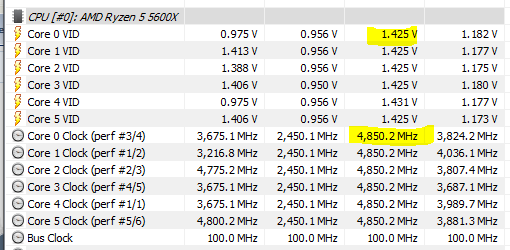 |
|
|
Dec 7 2020, 11:26 AM
Return to original view | Post
#50
|
|
Senior Member
682 posts Joined: Mar 2016
|
QUOTE(iZuDeeN @ Dec 7 2020, 10:57 AM) i only use this for gaming & office work.. oh even on 360 rad it behave like this, guess my temperature is normal then. Thanks for the sharingWhile gaming max temp is 80C ... on 360 rad AIO ( with Arctic F12 fans).. Average in game is 75C.. But in idle my temp would be 50C  Fan intake is set to 68% PWM.. i cant stand noise higher than this |
|
|
Dec 8 2020, 03:20 AM
Return to original view | IPv6 | Post
#51
|
|
Senior Member
682 posts Joined: Mar 2016
|
QUOTE(Bonchi @ Dec 8 2020, 01:30 AM) Gigabyte seems to fit the nicest in the spec/budget and not expensive/overkill like the MSI and most importantly.... it’s not an asus Gigabyte b550i mine is having problems. The voltage forever stuck at 1.5V or 1.35V, no in between. The bios sucks as a whole. Now collecting dust in my box dy. Why not just remove that block of metal haha but yeah that front usbC header may come useful for some people. |
|
|
Dec 8 2020, 08:54 AM
Return to original view | Post
#52
|
|
Senior Member
682 posts Joined: Mar 2016
|
QUOTE(Bonchi @ Dec 8 2020, 08:52 AM) willing to sell cheap? motherboard got problem actually, got 1 broken cap. havent go through rma process because mco. If u can wait la haha |
|
|
Dec 8 2020, 09:02 AM
Return to original view | Post
#53
|
|
Senior Member
682 posts Joined: Mar 2016
|
QUOTE(Bonchi @ Dec 8 2020, 09:00 AM) aisehh that will take weeks ... owell. anyways high idle voltage is a windows power plan issue along with chipset drivers. Dont wanna rip you off. Welcome to da amd experience. not really ripping off la, want to sell it after rma also. I heard dual ccx ryzen actually easier to cool because bigger die surface to transfer heat to IHS. hope someone with 5600x and 5900x can do comparison haha |
|
|
|
|
|
Dec 8 2020, 09:20 AM
Return to original view | Post
#54
|
|
Senior Member
682 posts Joined: Mar 2016
|
QUOTE(Bonchi @ Dec 8 2020, 09:15 AM) Your first time with ryzen? It’s completely normal for high idle temps due to its eagerness to boost up. Thus it’s usually powerplan settings and background softwares that triggers it.... especially RGB and monitoring tools. i see. actually msi bios is top 2 ba? asus no.1 then msi no.2 based on what i see on forumsMSI components a lil overkill haha.... dont think it’s worth paying close to RM300 more... and seems like it has the weakest bios of the top3. Asus B550i have very stable memory OC .. better to even their atx x570 but the cpu boosts iinm loses out abit to the gaygaybird. However for those who plays 3D benchmark, asus is the best choice. |
|
|
Dec 8 2020, 12:43 PM
Return to original view | IPv6 | Post
#55
|
|
Senior Member
682 posts Joined: Mar 2016
|
QUOTE(Bonchi @ Dec 8 2020, 09:33 AM) msi bios can be a bit janky out of the box as im personally also using MSI. But they do tend to be easier for average users with alot of presets for overclocking although if left on auto, some values can be abit too much. However i tweak my RAM settings manually and i dont overclock the cpu so they generally makes no difference to me. Try gigabyte ram overclock, really headache. Got two set of memory timing setting at different place, change one place wont change another then dont know which one is applied.. fclk vddp etc setting all over the place need patience to find one by one haha |
|
|
Dec 8 2020, 08:27 PM
Return to original view | IPv6 | Post
#56
|
|
Senior Member
682 posts Joined: Mar 2016
|
QUOTE(Bonchi @ Dec 8 2020, 08:21 PM) like what that other guy say.. it’s your problem not amd’s problem the stock cooler is bad, even the one come with 3700x is whiny af  amd is the best. amd is the best. If your fan is ramping up and down due to over sensitive boosts, throw your wraith stealth, throw you 360 aio.. get a 480 rad custom loop to solve it.  after owning 3700x, i buy third party cooler straight after i get my 5600x after owning 3700x, i buy third party cooler straight after i get my 5600x |
|
|
Jan 10 2021, 08:40 PM
Return to original view | IPv6 | Post
#57
|
|
Senior Member
682 posts Joined: Mar 2016
|
QUOTE(JohnLai @ Jan 10 2021, 06:43 PM) Set "CPU Vcore" to "Normal" and "Dynamic Vcore(DVID)" is available for modification. normal ba, my 4000 OC also 3:60. btw the 4 sticks ram OC stable?Put -0.100000v at "Dynamic Vcore(DVID)", correct? Bootable and running fine. Eco mode 65W activated So, both eco mode and -0.1v are in use and the result is......no difference in idle temp, still 53'C. On full load, temp maxed at 88-90'C compared to 99'C HWmonitor reports CPU VCORE at min 0.900v and max 1.356v. EDIT: CPU VDD min 0.881v and max 1.375v Speaking of which, I attempted to OC my 4 DIMMs of RAM. [attachmentid=10753175] Did I mess up? Cause FSB:DRAM isn't 1:1, but 3:60 as indicated in the screenshot. |
| Change to: |  0.2256sec 0.2256sec
 0.58 0.58
 7 queries 7 queries
 GZIP Disabled GZIP Disabled
Time is now: 12th December 2025 - 12:02 PM |
 Quote
Quote