Welcome Guest ( Log In | Register )

22 Pages < 1 2 3 4 > » Bottom

Outline · [ Standard ] · Linear+

Hardware Lenovo Miix 510 Review and AMA, Coz there's no actual thread for it lol

views
     
SUSgogo2
post Feb 7 2017, 02:14 PM

gogo2
********
All Stars
18,672 posts

Joined: Jan 2003
From: Penang


QUOTE(Eiraku @ Feb 7 2017, 01:58 PM)
Well, can always just get the parts to "make" it the LTE version lol. The modem and SIM slots are there, just unfilled and blanked out with a plastic insert.

Though for my on the move purposes adding those parts will just add to the base battery drain, so no. I always have my phone close by to tether anyway.
*
Webe does not work with Tether.
Imagine you laptop always connected with unlimited data. rclxms.gif Not sure if Webe can detect usb tethering to phone.
TSEiraku
post Feb 7 2017, 02:33 PM

Geeking since 1985!
*******
Senior Member
7,037 posts

Joined: Apr 2006


QUOTE(gogo2 @ Feb 7 2017, 02:14 PM)
Webe does not work with Tether.
Imagine you laptop always connected with unlimited data.  rclxms.gif Not sure if Webe can detect usb tethering to phone.
*
Oh yeaaaaaaaaa. But I guess the infra can detect the fact that your "phone" doesn't have phone capabilites and mark you as tethering anyway lol.

Or do they? How's the peeps with iPads and Webe?
SUSgogo2
post Feb 7 2017, 02:40 PM

gogo2
********
All Stars
18,672 posts

Joined: Jan 2003
From: Penang


QUOTE(Eiraku @ Feb 7 2017, 02:33 PM)
Oh yeaaaaaaaaa. But I guess the infra can detect the fact that your "phone" doesn't have phone capabilites and mark you as tethering anyway lol.

Or do they? How's the peeps with iPads and Webe?
*
In my opinion they don't detect its a phone or not. It just detect whether it is used out the MAC address of the LTE modem. So Lenovo Miix with LTE will work with Webe. But Miix cannot do hotspot to other device with another MAC address else its considered as tether.
TSEiraku
post Feb 7 2017, 04:06 PM

Geeking since 1985!
*******
Senior Member
7,037 posts

Joined: Apr 2006


QUOTE(gogo2 @ Feb 7 2017, 02:40 PM)
In my opinion they don't detect its a phone or not. It just detect whether it is used out the MAC address of the LTE modem. So Lenovo Miix with LTE will work with Webe. But Miix cannot do hotspot to other device with another MAC address else its considered as tether.
*
Meaning tied to one MAC? Hmmm. Quite smart that.

However, that begs the question, do they keep tabs on how much data you use. .. y'know, maybe go pick out people doing exactly THIS?

If they have a fair use clause its a clear violation lol.

Annnnnnnnd, if they have no system in place to track user utilisation... Well, I NEED MY LTE PARTS STAT LENOVO!

Anyway, I also heard Webe needs a specialised slice of the LTE spectrum to work, hence only certain phones can use Webe to begin with. Any truth there? Later I go order LTE parts also kenot use sienz only.

*Besides, I live in a literal jungle 80% of the year anyway... So probably no Webe LTE coverage to begin with lol*

This post has been edited by Eiraku: Feb 7 2017, 04:11 PM
SUSgogo2
post Feb 7 2017, 05:18 PM

gogo2
********
All Stars
18,672 posts

Joined: Jan 2003
From: Penang


QUOTE(Eiraku @ Feb 7 2017, 04:06 PM)
Meaning tied to one MAC? Hmmm. Quite smart that.

However, that begs the question, do they keep tabs on how much data you use. .. y'know, maybe go pick out people doing exactly THIS?

If they have a fair use clause its a clear violation lol.

Annnnnnnnd, if they have no system in place to track user utilisation... Well, I NEED MY LTE PARTS STAT LENOVO!

Anyway, I also heard Webe needs a specialised slice of the LTE spectrum to work, hence only certain phones can use Webe to begin with. Any truth there? Later I go order LTE parts also kenot use sienz only.

*Besides, I live in a literal jungle 80% of the year anyway... So probably no Webe LTE coverage to begin with lol*
*
Only LTE Band 5. I already check Miix LTE which support Band 5. So I assume Miix LTE will work with Webe. drool.gif
TSEiraku
post Feb 7 2017, 08:27 PM

Geeking since 1985!
*******
Senior Member
7,037 posts

Joined: Apr 2006


QUOTE(gogo2 @ Feb 7 2017, 05:18 PM)
Only LTE Band 5. I already check Miix LTE which support Band 5. So I assume Miix LTE will work with Webe.  drool.gif
*
Nice find bro. Like I said, I'm out of coverage idea most of the time so it might not apply to me personally, but might be useful for someone else.

It's really tempting me to start looking for the LTE parts from Lenovo though lol.

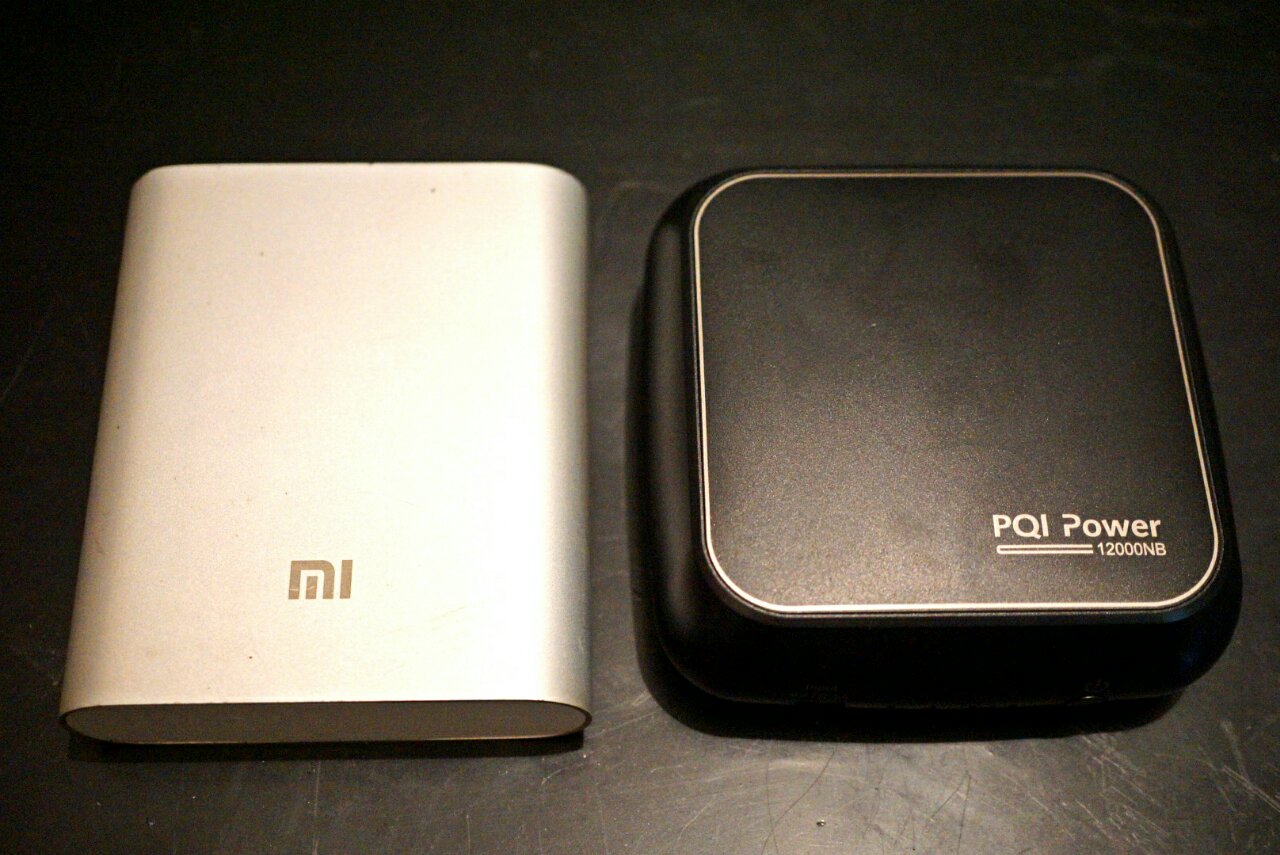
BTW folks, remember this little black thang from last page?

user posted image

Apparently it managed to charge my Miix batt from 10% to about 90% in around 3-4 hours. For a dinky thing the size of a Mi PB I'm pretty impressed really... never thought it could even charge the Miix any more than half.

Gonna recharge the thing for further testing, but yeah, I'm liking it so far, especially for the price it's sold at (half what other "Laptop" PBs are going for).

Also, being 19V, there's a good chance that this will work as a battery extender for my Sony mirrorless too, with the correct dummy battery adapter. So yeah, pretty exciting stuff.

Will link back here as usual once I'm done with the full review.

This post has been edited by Eiraku: Feb 7 2017, 11:19 PM
SUStalzer
post Feb 9 2017, 12:49 PM

bagusnya
*****
Senior Member
757 posts

Joined: Mar 2010


can try download photoshop trial and test the pen? any issue such as palm rejection etc.

interested to use it as a drawing tablet haha.

any screen protector or protection case needed? just asking since never use any 2in1 or big tablet like this before.

thanks!
TSEiraku
post Feb 9 2017, 03:53 PM

Geeking since 1985!
*******
Senior Member
7,037 posts

Joined: Apr 2006


QUOTE(talzer @ Feb 9 2017, 12:49 PM)
can try download photoshop trial and test the pen? any issue such as palm rejection etc.

interested to use it as a drawing tablet haha.

any screen protector or protection case needed? just asking since never use any 2in1 or big tablet like this before.

thanks!
*
I have Ps/Ai/Lr CC and let me tell you that for an "optimal" touch experience, you're gonna need CC minimum. CS6 = tiny UI everything, unless you do the manifest hack. Ai/Ps CC even comes with a dedicated "touch" mode that embiggens the buttons even further for finger use, though I often just use them in "normal" mode.

With the manifest hack, CS6 works well enough too, though it's far less touch "aware" then CC which complicates things somewhat.

SAI should also work fine due to the fact that the Miix uses a "full" Wacom setup and runs the same Feel drivers that most drawing tablets do.

That said, I don't really draw (Ps is more my photo editor, and Ai more for logos/typography/publications) but I do take a shit tonne of written notes (Squid on Win10 is so much winz that it's not funny lol).

Also, one of the latest Win10 updates sort of added system-wide palm rejection of sorts, as it disables touch input when the pen is within hover distance EVERYWHERE. Which helps A LOT when I take notes (and should help for folks drawing too).

It's not "perfect" though (sometimes, while resting your palm on the device you pull the pen tip a tad too far from the the surface and your palm starts registering again) but it's much better than the Win 8 days that's for sure.

As for other issues, you need to understand that by nature Wacom AES (Miix) isn't like EMR (Samsung Note). It's more accurate and doesn't suffer from corner issues, but conversely it jitters somewhat if you draw too slowly and hover distance is slightly suckier than EMR.

Otherwise, it's a pretty awesome experience really, and decently comparable to my experiences with my old Note 3, but now with the power of full desktop software.

It's especially good compared to the epileptically jitter happy Synaptic pen on the Switch Alpha 12. I can't even take notes decently with that one, and not being native Wacom, you'll need all sorts of drivers and stuff to make Ps/SAI even notice it's existence.

BTW, I if you haven't figured out by now, I actually picked the Miix 510 over the Switch primarily because of how much better the Wacom pen experience was. So yeah, if you need a pen, get one.

This post has been edited by Eiraku: Feb 9 2017, 04:17 PM

SUStalzer
post Feb 9 2017, 04:13 PM

bagusnya
*****
Senior Member
757 posts

Joined: Mar 2010


QUOTE(Eiraku @ Feb 9 2017, 03:53 PM)
I have Ps/Ai/Lr CC and let me tell you that for an "optimal" touch experience, you're gonna need CC minimum. CS6 = tiny UI everything, unless you do the manifest hack. Ai/Ps CC even comes with a dedicated "touch" mode that embiggens the buttons even further for finger use, though I often just use them in "normal" mode.

With the manifest hack, CS6 works well enough too, though it's far less touch "aware" then CC which complicates things somewhat.

SAI should also work fine due to the fact that the Miix uses a "full" Wacom setup and runs the same Feel drivers that most drawing tablets do.

That said, I don't really draw (Ps is more my photo editor, and Ai more for logos/typography/publications) but I do take a shit tonne of written notes (Squid on Win10 is so much winz that it's not funny lol).

Also, one of the latest Win10 updates sort of added system-wide palm rejection of sorts, as it disables touch input when the pen is within hover distance EVERYWHERE. Which helps A LOT when I take notes (and should help for folks drawing too).

It's not "perfect" though (sometimes, while resting your palm on the device you pull the pen tip a tad too far from the the surface and your palm starts registering again) but it's much better than the Win 8 days that's for sure.

As for other issues, you need to understand that by nature Wacom AES (Miix) isn't like EMR (Samsung Note). It's more accurate and doesn't suffer from corner issues, but conversely it jitters somewhat if you draw too slowly and hover distance is slightly suckier than EMR.

Otherwise, it's a pretty awesome experience really, and decently comparable to my experiences with my old Note 3, but now with the power of full desktop software. 

It's especially good compared to the epileptically jitter happy Synaptic pen on the Switch Alpha 12. I can't even take notes decently with that one, and not being native Wacom, you'll need all sorts of drivers and stuff to make Ps/SAI even notice it's existence.

BTW, I if you haven't figured out by now, I actually picked the Miix 510 over the Switch primarily because of how much better the Wacom pen experience was. So yeah, if you need a pen, get one.
*
thumbs up for the detailed explanation thumbsup.gif

yup they say switch pen was crap. anything with wacom is really reassuring having own a wacom drawing tablet myself (not sure integration for 2in1)
jittering wise will not be an issue. software like Lazy Nezumi pro can address this issue.

overall, thanks for the detailed explanation, will be exploring i5 version or i3 if bajet constraint laugh.gif

TSEiraku
post Feb 9 2017, 04:16 PM

Geeking since 1985!
*******
Senior Member
7,037 posts

Joined: Apr 2006


QUOTE(talzer @ Feb 9 2017, 04:13 PM)
thumbs up for the detailed explanation :thumbsup:

yup they say switch pen was crap. anything with wacom is really reassuring having own a wacom drawing tablet myself (not sure integration for 2in1)
jittering wise will not be an issue. software like Lazy Nezumi pro can address this issue.

overall, thanks for the detailed explanation, will be exploring i5 version or i3 if bajet constraint  laugh.gif
*
And I'm not even finished yet lol.

As for screen protection, I currently have a tempered glass protector I got off the 'Bay. It works very well and doesn't really mess with the pen all that much, but it's slippery and depending on how you draw, you might need to order "matte" protectors for it for better pen "feel".

An alternative is to go to Mobile Outfitters in Times Square/Sunway as they do custom SPs in both matte and glossy, even up to laptop size.

As for cases, I ordered a folio case once, but trashed it soon after getting it - as it just makes the Miix even bulkier and prevents you from using that awesome kickstand.

In the end, I realised that I only really use my Miix as a "laptop" replacement, so I don't think such levels of protection is needed. I settled with wrapping it with some CF vinyl for scratch protection and getting a sleeve for it (as I don't use it with the keyboard cover attached. If you plan to keep the keyboard on, you might not even need a sleeve).

If you're gonna need more protection though, a folio case would be okay probably, or you can even get a full-body silicone protector for the Miix from Gumdrop Cases.

Also Drawing Tabs are primarily EMR, so there will be a sliiiiight difference in operational "feel" when using the Miix's AES pen (as per my EMR/AES explaination before)... just so that you are aware.

So yeah, hope that was helpful for you.

This post has been edited by Eiraku: Feb 9 2017, 04:24 PM
SUStalzer
post Feb 9 2017, 08:01 PM

bagusnya
*****
Senior Member
757 posts

Joined: Mar 2010


QUOTE(Eiraku @ Feb 9 2017, 04:16 PM)
And I'm not even finished yet lol.

As for screen protection, I currently have a tempered glass protector I got off the 'Bay. It works very well and doesn't really mess with the pen all that much, but it's slippery and depending on how you draw, you might need to order "matte" protectors for it for better pen "feel".

An alternative is to go to Mobile Outfitters in Times Square/Sunway as they do custom SPs in both matte and glossy, even up to laptop size.

As for cases, I ordered a folio case once, but trashed it soon after getting it - as it just makes the Miix even bulkier and prevents you from using that awesome kickstand.

In the end, I realised that I only really use my Miix as a "laptop" replacement, so I don't think such levels of protection is needed. I settled with wrapping it with some CF vinyl for scratch protection and getting a sleeve for it (as I don't use it with the keyboard cover attached. If you plan to keep the keyboard on, you might not even need a sleeve).

If you're gonna need more protection though, a folio case would be okay probably, or you can even get a full-body silicone protector for the Miix from Gumdrop Cases.

Also Drawing Tabs are primarily EMR, so there will be a sliiiiight difference in operational "feel" when using the Miix's AES pen (as per my EMR/AES explaination before)... just so that you are aware.

So yeah, hope that was helpful for you.
*
great advice thumbup.gif thumbup.gif
hope your accessories doesn't cost you 10% of your whole unit biggrin.gif
TSEiraku
post Feb 9 2017, 08:37 PM

Geeking since 1985!
*******
Senior Member
7,037 posts

Joined: Apr 2006


QUOTE(talzer @ Feb 9 2017, 08:01 PM)
great advice  thumbup.gif  thumbup.gif
hope your accessories doesn't cost you 10% of your whole unit  biggrin.gif
*
Nah, just got cheap stuff from eBay lol. Thankfully there ARE cheap stuff for the Miix, thank God, considering just how niche it is. With my spare ori Active Stylus included its nearly 10% though... but that's fortunate as most other brands' active styli is sold AT 10% of the Miix price on its own already.

That said, that laptop PB takes it over the edge but considering its a powerbank (and can charge my other laptops/gadgets as well), I'll just turn a blind eye to it lol.

This post has been edited by Eiraku: Feb 9 2017, 08:38 PM
mactreouser
post Feb 10 2017, 10:50 AM

Look at all my stars!!
*******
Senior Member
2,512 posts

Joined: Sep 2007


Hi,
I just walked around in mall, noticed this Miix 5 babe is awesome! In fact, I'm still wondering whether i3 or i5? Perhaps you may give me some advices?

Most Usage:
* Chrome Browsing, Googling, FB, IM,
* Work on Google Docs, Google Drive, PowerPoint Presentation via Google Slides & WPS
* Low YouTube

Still, if the PEN isn't the concern, which mode else should I consider? Yup, love 2 in 1 with Detachable Keyboard, so that I can sometimes use it as a tablet in stead.

Your advices are appreciated!
SUStalzer
post Feb 10 2017, 04:29 PM

bagusnya
*****
Senior Member
757 posts

Joined: Mar 2010


QUOTE(Eiraku @ Feb 9 2017, 08:37 PM)
Nah, just got cheap stuff from eBay lol. Thankfully there ARE cheap stuff for the Miix, thank God, considering just how niche it is. With my spare ori Active Stylus included its nearly 10% though... but that's fortunate as most other brands' active styli is sold AT 10% of the Miix price on its own already.

That said, that laptop PB takes it over the edge but considering its a powerbank (and can charge my other laptops/gadgets as well), I'll just turn a blind eye to it lol.
*
All these details really make me craving for it haha

TSEiraku
post Feb 10 2017, 06:36 PM

Geeking since 1985!
*******
Senior Member
7,037 posts

Joined: Apr 2006


QUOTE(mactreouser @ Feb 10 2017, 10:50 AM)
Hi,
I just walked around in mall, noticed this Miix 5 babe is awesome! In fact, I'm still wondering whether i3 or i5? Perhaps you may give me some advices?

Most Usage:
* Chrome Browsing, Googling, FB, IM,
* Work on Google Docs, Google Drive, PowerPoint Presentation via Google Slides & WPS
* Low YouTube

Still, if the PEN isn't the concern, which mode else should I consider? Yup, love 2 in 1 with Detachable Keyboard, so that I can sometimes use it as a tablet in stead.

Your advices are appreciated!
*
From your usage pattern the i3/4GB seems to be enough. All models of the Miix 510 come with the pen, not sure about the back lighted KB though.

And yes, with Win 10's touch improvements I actually very rarely use the keyboard cover anyway lol. It's like an add on extra I use only when I need to type, otherwise it's full on tablet mode for me (though people keep giving me a second glance looking at how huge the "tablet" is lol).

Unfortunately, use it like I do and you're gonna need a screen cleaning cloth and cleaning solution close at hand lol as the screen gets pretty greasy pretty quick. Also a tempered glass protector just in case.

Additionally, like I said before, warranty coverage is awesome for the 510: You get 2 years WITH accident cover. Meaning even if you DROP your 510, it's still covered under warranty.

This post has been edited by Eiraku: Feb 10 2017, 06:39 PM
MaL
post Feb 10 2017, 07:04 PM

Getting Started
**
Junior Member
130 posts

Joined: Sep 2006
how about this comparing to asus transformer 3?
mactreouser
post Feb 10 2017, 08:47 PM

Look at all my stars!!
*******
Senior Member
2,512 posts

Joined: Sep 2007


QUOTE(MaL @ Feb 10 2017, 07:04 PM)
how about this comparing to asus transformer 3?
*
As well as Acer Alpha 12 rclxms.gif
TSEiraku
post Feb 10 2017, 09:30 PM

Geeking since 1985!
*******
Senior Member
7,037 posts

Joined: Apr 2006


QUOTE(MaL @ Feb 10 2017, 07:04 PM)
how about this comparing to asus transformer 3?
*
I haven't tried yet the Trans3, but I have read some T3 reviews a while back but all I remember was I wasn't really impressed by much. Also, last I checked Asus warranty service was atrocious, not so sure now though.

As for the Switch 12, it's heavier, has a worse pen (much worse), worse battery life (4h vs 5-6h), zero upgradability (by yourself I mean, I can upgrade the SSD on the Miix), worse kickstand, worse chassis (thin metal + plastic vs Miix full aluminum unibody), no keyboard backlighting (at least in some of the stocks) and only a 1 year warranty with no Accident coverage (extendable to 3 years, but still no Accident coverage).

On the plus side, the Switch is smaller, has a sharper, brighter screen; a microSD slot, a USB-C that supports charging and is passively cooled (quieter with no fan but runs hotter).

So yeah. Plusses and minuses.

This post has been edited by Eiraku: Feb 10 2017, 10:27 PM
mactreouser
post Feb 10 2017, 10:46 PM

Look at all my stars!!
*******
Senior Member
2,512 posts

Joined: Sep 2007


QUOTE(Eiraku @ Feb 10 2017, 09:30 PM)
I haven't tried yet the Trans3, but I have read some T3 reviews a while back but all I remember was I wasn't really impressed by much. Also, last I checked Asus warranty service was atrocious, not so sure now though.

As for the Switch 12, it's heavier, has a worse pen (much worse), worse battery life (4h vs 5-6h), zero upgradability (by yourself I mean, I can upgrade the SSD on the Miix), worse kickstand, worse chassis (thin metal + plastic vs Miix full aluminum unibody), no keyboard backlighting (at least in some of the stocks) and only a 1 year warranty with no Accident coverage (extendable to 3 years, but still no Accident coverage).

On the plus side, the Switch is smaller, has a sharper, brighter screen; a microSD slot, a USB-C that supports charging and is passively cooled (quieter with no fan but runs hotter).

So yeah. Plusses and minuses.
*
Wow... you are awesome! Seems Miix 510 still the goal
TSEiraku
post Feb 11 2017, 01:30 AM

Geeking since 1985!
*******
Senior Member
7,037 posts

Joined: Apr 2006


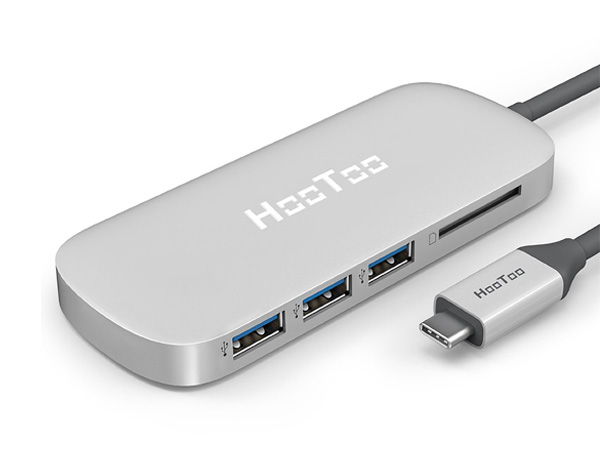
BTW folks... just got my Hootoo annnnnnd it seems that it's actually not the model I wanted do'oh. Rather than the HDMI equipped, no PD one... I got the NO HDMI one.

Was pretty sure I got the right one, according to the pics on the eBay page, but it seems that the listing itself wasn't for what the pics showed. No wonder it was considerably cheaper than your average Hootoo HDMI Type-C.

Not sure if I can open a eBay dispute for something like this though (the listing was clear and the price was about right for the item listed... but the pictures were misleading), so I might just put it up over in Garage Sales.

Anybody interested in a brand new Hootoo Type-C, 3x USB + SD card reader hub? PM me, at least before I go put it up on GS. Here's what it looks like:

user posted image

ON THE PLUS SIDE, my new 512GB NVMe SSD is here (an actual Sammy PM961 wooo). Did consider a 1TB disk but was kinda afraid that a dual-sided stick might not fit into the limited space available (plus, y'know, cost).

Currently getting prepared for the surgery: Getting tools (silicone picks and levers), thermal pads (for the SSD, as Sammy disks are well known to run hot), maybe some thermal paste to repaste the proc with, transferring files to external stores, imaging the current SSD for migration...

This is gonna be fun lol... I regularly open up my other laptops for servicing and upgrades, but a 2-in-1? This is gonna be a fresh one for me.

This post has been edited by Eiraku: Feb 11 2017, 01:13 PM

22 Pages < 1 2 3 4 > » Top
 

Change to:
| Lo-Fi Version
0.0296sec    0.61    6 queries    GZIP Disabled
Time is now: 20th December 2025 - 02:01 AM