Outline ·
[ Standard ] ·
Linear+
Unifi Official TM UniFi High Speed Broadband Thread V29, Speed Upgrade Starting Soon!
|
vez
|
 Feb 24 2017, 10:16 PM Feb 24 2017, 10:16 PM
|

|
QUOTE(young_97 @ Feb 24 2017, 10:00 PM) keep buffering... feels like youtube didnt use full 50mbps speed i5 skylake and gtx 1060 mine with 50Mbps upgraded few days ago... CPU just sandy bridge use to be smooth @ 30Mbps, now buffer health is better with 50Mbps  This post has been edited by vez: Feb 24 2017, 10:16 PM
 |
|
|
|
|
|
shetty
|
Feb 24 2017, 10:18 PM
|
Getting Started

|
Hi guys, need abit of advice here. Just got new 30mbps unifi & try setting up google dns via router config page.
Thing is both IPV4 & IPV6 been changed but ipconfig still showing default dns & still unable to access to certain websites?
Any idea why? Using DIR850L with FW : 2.08TM
This post has been edited by shetty: Feb 24 2017, 10:20 PM
|
|
|
|
|
|
vez
|
Feb 24 2017, 10:18 PM
|
|
|
QUOTE(shetty @ Feb 24 2017, 10:18 PM) Hi guys, need abit of advice here. Just got new 30mbos unifi & try setting up google dns. Thing is both IPV4 & IPV6 been changed but ipconfig still showing default dns & still unable to access to certain websites? Any idea why? Using DIR850L with FW : 2.08TM you set google dns in router config page? |
|
|
|
|
|
shetty
|
Feb 24 2017, 10:19 PM
|
Getting Started
|
QUOTE(vez @ Feb 24 2017, 10:18 PM) you set google dns in router config page? Yeah, confirmed is right numbers. |
|
|
|
|
|
vez
|
Feb 24 2017, 10:20 PM
|
|
|
QUOTE(shetty @ Feb 24 2017, 10:19 PM) Yeah, confirmed is right numbers. or you want screen shot whether right place?  |
|
|
|
|
|
buyoq
|
Feb 24 2017, 10:20 PM
|
|
|
QUOTE(shetty @ Feb 24 2017, 10:18 PM) Hi guys, need abit of advice here. Just got new 30mbps unifi & try setting up google dns. Thing is both IPV4 & IPV6 been changed but ipconfig still showing default dns & still unable to access to certain websites? Any idea why? Using DIR850L with FW : 2.08TM where did you set the DNS ? from the router itself or from windows settings ? |
|
|
|
|
|
young_97
|
Feb 24 2017, 10:24 PM
|
|
|
QUOTE(vez @ Feb 24 2017, 10:16 PM) mine with 50Mbps upgraded few days ago... CPU just sandy bridge use to be smooth @ 30Mbps, now buffer health is better with 50Mbps
Youtube only use around 15mbps of my speed to buffer  Attached thumbnail(s) Attached thumbnail(s)
|
|
|
|
|
|
shetty
|
Feb 24 2017, 10:24 PM
|
Getting Started
|
QUOTE(vez @ Feb 24 2017, 10:20 PM)   QUOTE(buyoq @ Feb 24 2017, 10:20 PM) where did you set the DNS ? from the router itself or from windows settings ? Router config page |
|
|
|
|
|
vez
|
Feb 24 2017, 10:25 PM
|
|
|
QUOTE(shetty @ Feb 24 2017, 10:24 PM) Router config page u using ipv6 have ipv6 google dns i think, refer above link This post has been edited by vez: Feb 24 2017, 10:26 PM |
|
|
|
|
|
buyoq
|
Feb 24 2017, 10:26 PM
|
|
|
QUOTE(shetty @ Feb 24 2017, 10:24 PM) Router config page should be all good MIGHT be windows only detect the settings from the windows network configuration why dont you just put in the DNS ip in windows configurations ? here's my settings 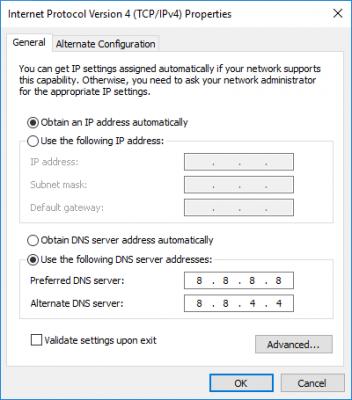

|
|
|
|
|
|
SUSg104
|
Feb 24 2017, 10:27 PM
|
|
|
young_97 3840 x 2160 @ 60 fps damn demanding & even single Titan XP also suffered.
|
|
|
|
|
|
jiaen0509
|
Feb 24 2017, 10:28 PM
|
|
|
QUOTE(shetty @ Feb 24 2017, 10:24 PM) Router config page Me2... I am using ASUS... In router already 8.8.8.8... But phone still not 8.8.8.8 |
|
|
|
|
|
vez
|
Feb 24 2017, 10:28 PM
|
|
|
QUOTE(buyoq @ Feb 24 2017, 10:26 PM) should be all good MIGHT be windows only detect the settings from the windows network configuration why dont you just put in the DNS ip in windows configurations ? here's my settings
router config easier  for all devices connected to that router |
|
|
|
|
|
buyoq
|
Feb 24 2017, 10:32 PM
|
|
|
QUOTE(vez @ Feb 24 2017, 10:28 PM) router config easier for all devices connected to that router surprisingly,it used to work before. but then suddenly i cant access few pages that are blocked by our beloved MCMC (malaysiakini for example) but once i set the dns thru windows settings, it works just fine. lol |
|
|
|
|
|
shetty
|
Feb 24 2017, 10:36 PM
|
Getting Started
|
QUOTE(vez @ Feb 24 2017, 10:25 PM) https://developers.google.com/speed/public-dns/docs/usingu using ipv6 have ipv6 google dns i think, refer above link Yeah, because i cahnged it manually earlier, want to use google dns. QUOTE(buyoq @ Feb 24 2017, 10:26 PM) should be all good MIGHT be windows only detect the settings from the windows network configuration why dont you just put in the DNS ip in windows configurations ? here's my settings » Click to show Spoiler - click again to hide... « Prefer it to be done via router tbh, troublesome to setup all my devices one at a time  |
|
|
|
|
|
calvinlaw510
|
Feb 24 2017, 10:37 PM
|
|
|
QUOTE(g104 @ Feb 24 2017, 10:27 PM) young_97 3840 x 2160 @ 60 fps damn demanding & even single Titan XP also suffered. Not very demanding la, my 970 can play 4k 60fps smoothly without buffering.  |
|
|
|
|
|
SUSg104
|
Feb 24 2017, 10:39 PM
|
|
|
QUOTE(calvinlaw510 @ Feb 24 2017, 10:37 PM) Not very demanding la, my 970 can play 4k 60fps smoothly without buffering. your speed is 100 Mbps? but he had a lot dropped frames. try play 4K60 on your 4K60 monitor. This post has been edited by g104: Feb 24 2017, 10:41 PM |
|
|
|
|
|
vez
|
Feb 24 2017, 10:41 PM
|
|
|
QUOTE(shetty @ Feb 24 2017, 10:36 PM) Yeah, because i cahnged it manually earlier, want to use google dns. Prefer it to be done via router tbh, troublesome to setup all my devices one at a time but you using ipv6, how come your google dns you use ipv4? |
|
|
|
|
|
calvinlaw510
|
Feb 24 2017, 10:44 PM
|
|
|
QUOTE(g104 @ Feb 24 2017, 10:39 PM) your speed is 100 Mbps? but he had a lot dropped frames. ya i am 100Mbps, young_97 dropped frames should be line issue. You see his line activity only busy around 1000kb, smooth connection line activity should be more higher. |
|
|
|
|
|
young_97
|
Feb 24 2017, 10:45 PM
|
|
|
QUOTE(calvinlaw510 @ Feb 24 2017, 10:44 PM) ya i am 100Mbps, young_97 dropped frames should be line issue. You see his line activity only busy around 1000kb, smooth connection line activity should be more higher. Not sure what happen. speedtest and download can get 50mbps but youtube buffering only use around 10mbps speed |
|
|
|
|



 Quote
Quote





 0.0190sec
 0.59
0.59
 6 queries
 GZIP Disabled