Welcome Guest ( Log In | Register )

26 Pages « < 3 4 5 6 7 > » Bottom

Outline · [ Standard ] · Linear+

Huawei Huawei Mate 8 forum discussion V3, The truly premium flagship?

views
     
dexz
post Feb 4 2017, 10:12 PM

Getting Started
**
Junior Member
88 posts

Joined: Aug 2008


QUOTE(samsungXP @ Feb 4 2017, 06:01 PM)
u mean after dl then select check md5 the unpack download and last download ? how bout upgrade to nougat ? data still lost ?
*
Please read through my steps again.

Any upgrade firmware via OTA won't lost any data but always backup first before installing it.

QUOTE(plain_white @ Feb 4 2017, 08:40 PM)
The B521 update came out in my updater after I follow the instructions. Downloading  now. Keeping my fingers crossed
*
Good luck!
simonkc
post Feb 4 2017, 10:23 PM

Getting Started
**
Junior Member
177 posts

Joined: Jun 2009
Guys, do share your comment on nougat. Any software bugs looks happen in mate 9
simonkc
post Feb 4 2017, 10:24 PM

Getting Started
**
Junior Member
177 posts

Joined: Jun 2009
Guys, do share your comment on nougat. Any software bugs looks happen in mate 9?
samsungXP
post Feb 4 2017, 10:30 PM

Look at all my stars!!
*******
Senior Member
5,284 posts

Joined: Nov 2011
QUOTE(plain_white @ Feb 4 2017, 08:40 PM)
The B521 update came out in my updater after I follow the instructions. Downloading  now. Keeping my fingers crossed
*
can show me the step u do it ? yours is b321 ? u download the nougat ota from firmwares finder ?

This post has been edited by samsungXP: Feb 4 2017, 10:33 PM
plain_white
post Feb 4 2017, 11:00 PM

Casual
***
Junior Member
444 posts

Joined: Apr 2010
QUOTE(samsungXP @ Feb 4 2017, 10:30 PM)
can show me the step u do it ? yours is b321 ? u download the nougat ota from firmwares finder ?
*
Yes, I'm using B321
1.open the firmware finder apps
2.go to settings
3.enable installation via system updates( u need to install the proxy)
4.in the settings, enable view OTA updates
5. Go back to main page and find firmware. U should able to see the B521 version
5.choose the firmware and and tap on send firmware to updater
6.there will be instructions to change the proxy
7.once u changed ur wifi proxy, go to updater and u will see the latest firmware
samsungXP
post Feb 4 2017, 11:15 PM

Look at all my stars!!
*******
Senior Member
5,284 posts

Joined: Nov 2011
QUOTE(plain_white @ Feb 4 2017, 11:00 PM)
Yes, I'm using B321
1.open the firmware finder apps
2.go to settings
3.enable installation via system updates( u need to install the proxy)
4.in the settings, enable view OTA updates
5. Go back to main page and find firmware. U should able to see the B521 version
5.choose the firmware and and tap on send firmware to updater
6.there will be instructions to change the proxy
7.once u changed ur wifi proxy, go to updater and u will see the latest firmware
*
get it.u ord finish downloading ? after this upgrade we still can get official ota from huawei in future ?

This post has been edited by samsungXP: Feb 4 2017, 11:34 PM
samsungXP
post Feb 4 2017, 11:26 PM

Look at all my stars!!
*******
Senior Member
5,284 posts

Joined: Nov 2011
heard nougat not stable and drain battery a lot.so thinking wan to upgrade or not.pls give some comment
thankyou
post Feb 4 2017, 11:50 PM

Regular
******
Senior Member
1,941 posts

Joined: Jan 2003
QUOTE(samsungXP @ Feb 4 2017, 11:26 PM)
heard nougat not stable and drain battery a lot.so thinking wan to upgrade or not.pls give some comment
*
If B521 then don't upgrade. wait for newer Nougat build...
samsungXP
post Feb 5 2017, 12:06 AM

Look at all my stars!!
*******
Senior Member
5,284 posts

Joined: Nov 2011
QUOTE(thankyou @ Feb 4 2017, 11:50 PM)
If B521 then don't upgrade. wait for newer Nougat build...
*
can give some reviews of this firmwares ?
samsungXP
post Feb 5 2017, 12:07 AM

Look at all my stars!!
*******
Senior Member
5,284 posts

Joined: Nov 2011
QUOTE(dexz @ Feb 4 2017, 03:07 AM)
You can even get Nougat OTA from B321.
You don't need to downgrade to B211
Since My phone is already in Nougat Beta program. I will always received Nougat OTA. So I purposely debrand my phone to C432 region and try it. To answer your question. Yes I've tried it and it worked.
*
it is b521 stable ? can we flash to b560 after upgrade to b521 ?

This post has been edited by samsungXP: Feb 5 2017, 12:36 AM
Crystal2
post Feb 5 2017, 08:02 AM

Casual
***
Junior Member
450 posts

Joined: Mar 2011
QUOTE(plain_white @ Feb 4 2017, 11:00 PM)
Yes, I'm using B321
1.open the firmware finder apps
...
*
I am also using B321 but can't find the 'firmware finder apps', pls do a screenshot. Thanks
plain_white
post Feb 5 2017, 10:48 AM

Casual
***
Junior Member
444 posts

Joined: Apr 2010
QUOTE(Crystal2 @ Feb 5 2017, 08:02 AM)
I am also using B321 but can't find the 'firmware finder apps', pls do a screenshot. Thanks
*
Firmware finder can be downloaded from Google play
plain_white
post Feb 5 2017, 10:57 AM

Casual
***
Junior Member
444 posts

Joined: Apr 2010
QUOTE(dexz @ Feb 4 2017, 10:12 PM)
Please read through my steps again.

Any upgrade firmware via OTA won't lost any data but always backup first before installing it.
Good luck!
*
I can't install the update after finish downloading...The msg displayed was failed to verify update package and need to reboot normally. Not sure what's the problem
samsungXP
post Feb 5 2017, 11:36 AM

Look at all my stars!!
*******
Senior Member
5,284 posts

Joined: Nov 2011
QUOTE(plain_white @ Feb 5 2017, 10:57 AM)
I can't install the update after finish downloading...The msg displayed was failed to verify update package and need to reboot normally. Not sure what's the problem
*
@dexz
Crystal2
post Feb 5 2017, 11:50 AM

Casual
***
Junior Member
450 posts

Joined: Mar 2011
QUOTE(plain_white @ Feb 5 2017, 10:48 AM)
Firmware finder can be downloaded from Google play
*
Noted, TQ. I will download the apps.

I thought it was an in-built apps in Huawei systems.

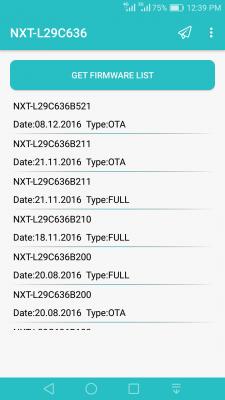
Attached is the Firmware Finder AppsAttached Image from Google Playstore.

This post has been edited by Crystal2: Feb 5 2017, 12:44 PM
yeohkc
post Feb 5 2017, 02:11 PM

On my way
****
Senior Member
557 posts

Joined: Feb 2010


Hi guys! Any way to set 4G only on mate 8? Thanks
samsungXP
post Feb 5 2017, 02:15 PM

Look at all my stars!!
*******
Senior Member
5,284 posts

Joined: Nov 2011
QUOTE(plain_white @ Feb 5 2017, 10:57 AM)
I can't install the update after finish downloading...The msg displayed was failed to verify update package and need to reboot normally. Not sure what's the problem
*
u juz try once ?
monkiwa
post Feb 5 2017, 02:51 PM

Getting Started
**
Junior Member
240 posts

Joined: Jul 2009
QUOTE(samsungXP @ Feb 5 2017, 02:15 PM)
u juz try once ?
*
I also had the same problem. I tried twice already still same.
samsungXP
post Feb 5 2017, 04:54 PM

Look at all my stars!!
*******
Senior Member
5,284 posts

Joined: Nov 2011
QUOTE(monkiwa @ Feb 5 2017, 02:51 PM)
I also had the same problem. I tried twice already still same.
*
maybe @rexz can explain wat the problem coz he say he can flash.i try also fail

This post has been edited by samsungXP: Feb 5 2017, 07:40 PM
Crystal2
post Feb 6 2017, 10:06 AM

Casual
***
Junior Member
450 posts

Joined: Mar 2011
Downloaded firmware twice, followed the steps, MD5 verified, Update App transferred to Upload folder, but still failed.

I also tried using USB thumbdrive - fail, fail, fail. 3 times knocked out.

Very frustrating.Attached Image

This post has been edited by Crystal2: Feb 6 2017, 10:22 AM

26 Pages « < 3 4 5 6 7 > » Top
 

Change to:
| Lo-Fi Version
0.4457sec    0.56    6 queries    GZIP Disabled
Time is now: 4th December 2025 - 10:06 AM