Welcome Guest ( Log In | Register )

Bump Topic Topic Closed RSS Feed
4 Pages  1 2 3 > » Bottom

Outline · [ Standard ] · Linear+

Samsung Samsung pay beta launched!

views
     
moonsatelite
post Jan 21 2017, 07:57 PM

Enthusiast
*****
Junior Member
737 posts

Joined: Mar 2016
QUOTE(azhar75 @ Jan 21 2017, 07:52 PM)
Just to share that certain credit card terminal does require us to sign the transaction slip... I did not notice any physical differences between these CC terminals...I went to MPH Subang Parade and this CC terminal require us to sign the transaction slip...

Other merchants so far no need to sign anything...
*
I want to share with you of what I found out is that if you used MST then you WILL have to sign on the sales draft, if you're using contactless then no signature is required for transactions below RM 250.

MST, your card credit limit is the maximum limit.
NFC, RM 250 Max
moonsatelite
post Jan 21 2017, 08:10 PM

Enthusiast
*****
Junior Member
737 posts

Joined: Mar 2016
QUOTE(azhar75 @ Jan 21 2017, 08:01 PM)
user posted image
*
user posted image

Gotcha back. I just hope that other bank supports will come very soon. Cause CIMB, Citi, and Standard Chartered have announced support.
moonsatelite
post Feb 27 2017, 08:59 PM

Enthusiast
*****
Junior Member
737 posts

Joined: Mar 2016
QUOTE(reileong88 @ Feb 25 2017, 11:41 PM)
If the cashier terminal is MST only, I need to wait until cashier key in the amount and press ok, then I only put my phone on the terminal?
*
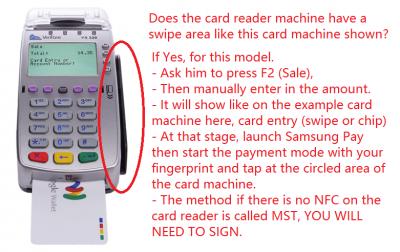
Yes, you are right. They must enter the amount and etc then when it prompts for the card chip/swipe then put your phone near the swipe area.
moonsatelite
post Feb 27 2017, 10:30 PM

Enthusiast
*****
Junior Member
737 posts

Joined: Mar 2016
QUOTE(xisan @ Feb 27 2017, 10:13 PM)
If you encountered cashier like this, ask for other person or manager.

My experience today was really headache. The bank said as long as our credit limit is not full, we still can use this Samsung Pay. While I tried to use with amount of RM1000+, DO NOT HONOUR is stated on the terminal.

Tried 3 terminals. Wireless, wired and old terminals.
• wireless cannot bypass enter pin, error
• wired, DO NOT HONOUR
• old, must key-in 3 pin numbers at the back of the card, keyed-in, Transaction Declined

Called the bank, said no problem, already override, allowed it, give extra time before trying again.
Still the same problem until they gave up said try tomorrow.
I think there is a limit per day that we can use with Samsung Pay that both parties don't know.
Maybe only for credit card? I will try both tomorrow. Debit for backup.
Still, so many cashier/merchants don't know their terminal can be use with Samsung Pay. When told them, said our terminal still no Visa Wave, so cannot use. laugh.gif
*
As for Standard Chartered cards, (MST) up to RM 250 or below ONLY for MST regardless of credit limit per transaction.
, (NFC) can exceed RM 250 but a PIN will be required or any other verification method.

As for Citibank Cards, (MST) up to RM 250 or below ONLY regardless of credit limit per transaction.
Capped at RM 750 per day.

, (NFC) (NFC) can exceed RM 250 but a PIN will be required or any other verification method.
Capped at RM 750 per day.

Maybank or CIMB, please contact customer support. As our local Malaysian banks do not provide any info on transaction limits with Samsung Pay unlike international banks Citi or Standard Chartered.

This post has been edited by moonsatelite: Feb 27 2017, 10:30 PM

moonsatelite
post Feb 27 2017, 10:34 PM

Enthusiast
*****
Junior Member
737 posts

Joined: Mar 2016
QUOTE(reileong88 @ Feb 27 2017, 09:16 PM)
but today I tried, the cashier said their device cant key in amount without card insert, i'm quite confused
*
I have hands on experience with a credit card machine before, most terminals WILL have a 'Sale' on the F2 button.
Ask the cashier to press Sale, key in the amount and then tap your phone at the area.
moonsatelite
post Feb 27 2017, 10:37 PM

Enthusiast
*****
Junior Member
737 posts

Joined: Mar 2016
QUOTE(azhar75 @ Feb 27 2017, 10:35 PM)
I encountered the DO NOT HONOR error before. Apparently, we need to increase the daily credit limit via Maybank2U.

We have to give the merchants ample time to explore and discover Sammy Pay service. "Rome wasn't built in a day"...
*
May I know what card you use so that we users can know your experience, you can either share via PM for privacy reasons or share here. Thank you.
moonsatelite
post Feb 27 2017, 11:06 PM

Enthusiast
*****
Junior Member
737 posts

Joined: Mar 2016
QUOTE(xisan @ Feb 27 2017, 11:04 PM)
I use both Maybank and Cimb, apparently DO NOT HONOUR or transaction declined is stated.
I think there is a daily limit on them too, as I asked the merchant to try key-in amount that more than RM750, then failed. After that I changed product that priced less than RM100, it pass.

Maybank and CIMB don't know what's the issue, so they also don't know about the daily limit.
*
If you say "Maybank and CIMB don't know what's the issue, so they also don't know about the daily limit."
does it mean that you have already gave them a call?
moonsatelite
post Feb 27 2017, 11:36 PM

Enthusiast
*****
Junior Member
737 posts

Joined: Mar 2016
QUOTE(xisan @ Feb 27 2017, 11:11 PM)
Of course. After my transaction was declined and do not honour. I straight away call them, said should be no problem as long as not over the credit limit. Even Samsung rep told me that.
*

What is the merchant that required you to enter your CVV number when using Samsung Pay? What bank card did you use at the time?
moonsatelite
post Feb 28 2017, 12:02 AM

Enthusiast
*****
Junior Member
737 posts

Joined: Mar 2016
QUOTE(xisan @ Feb 27 2017, 11:52 PM)
That one is old terminal that she said not supported but I insist to try. All-IT Hypermarket and Cimb bank.
*
I contacted Samsung customer care and they say that if it prompts for the CVV number then you can try and press enter/ green button to bypass the CVV number prompt. I don't know, and I feel that the Samsung Pay rep is not sure what to do as well.
moonsatelite
post Mar 1 2017, 04:57 PM

Enthusiast
*****
Junior Member
737 posts

Joined: Mar 2016
QUOTE(xisan @ Mar 1 2017, 12:34 AM)
Just an update here.

Paid 3x RM3000+ transactions today. It went through for my CiMB CC but not for my Maybank Debit.
I guess it's true, no limit per day for local bank maybe?
*
As for CIMB, I am really not sure. But I've gone through the Maybank Samsung Pay T&C and it says that the Maybank debit card only allows for the amount that you may have set or set by default by Maybank.

Eg. You got your Maybank debit card,
you didn't change the transaction limit,
the default limit is RM 1000,
then pay above RM 1000 = blocked, less than that will pass.

So if you wanna use your Maybank debit card for high volume transactions, get a Platinum Visa Debit Card which can go up to RM 10,000 or set your existing Maybank debit transaction limit to RM 5000.
moonsatelite
post Mar 1 2017, 05:03 PM

Enthusiast
*****
Junior Member
737 posts

Joined: Mar 2016
QUOTE(xisan @ Mar 1 2017, 05:01 PM)
Yup, purposely changed my debit card to Platinum Visa Debit for this Samsung Pay. Also already changed to RM10K max. Wish to get more higher but.. oh well. It still didn't go thru yesterday. Then I gave up, just use my CiMB CC.
*
You tried using your Maybank Debit with MST or NFC? To know, you will see 'Contactless' or 'Swipe' on your card sales draft receipt.

This post has been edited by moonsatelite: Mar 1 2017, 05:04 PM
moonsatelite
post Mar 1 2017, 05:10 PM

Enthusiast
*****
Junior Member
737 posts

Joined: Mar 2016
QUOTE(xisan @ Mar 1 2017, 05:06 PM)
I tried on MST for both wireless and wired terminals. DO NOT HONOUR still coming up.
*
Your luck has been pretty bad, that places I shop or visit mostly have Contactless terminals so it will default to NFC. I have never encountered problems with Samsung Pay before, just get weird or intrigued reactions by the cashier.

Just drop this here for you. What is Do Not Honor decline code?

This post has been edited by moonsatelite: Mar 1 2017, 05:11 PM
moonsatelite
post Mar 3 2017, 03:15 PM

Enthusiast
*****
Junior Member
737 posts

Joined: Mar 2016
To those who wanted to use Samsung Pay at the petrol station pumps, I think your chances of it working is very slim cause I read that if you use a business card and slide it in the slot then use Samsung Pay and tap at the reader then it might work, but for my case at the pump it came out with something like "N2 error" and it didnt read the card data.

I tried at Petron.

This post has been edited by moonsatelite: Mar 3 2017, 03:15 PM
moonsatelite
post Mar 4 2017, 05:04 PM

Enthusiast
*****
Junior Member
737 posts

Joined: Mar 2016
QUOTE(azhar75 @ Mar 4 2017, 04:59 PM)
This is dangerous... using mobile devices near the pump hose can cause hazard...just be extra careful...
*
Please don't believe that nonsense that you are believing right now. The mobile phone will cause fire/ explosions at petrol pumps is PURE NONSENSE.

Fact or Fiction: Using a Cell Phone at the Gas Station Can Cause a Fire

Mobile Phone Petrol Station Explosion: Mythbusters

This post has been edited by moonsatelite: Mar 4 2017, 05:07 PM
moonsatelite
post Mar 14 2017, 10:45 PM

Enthusiast
*****
Junior Member
737 posts

Joined: Mar 2016
QUOTE(DannyOP @ Mar 14 2017, 10:41 PM)
The pin is samsung pay pin right and not atm pin?

Anyone know what is the minimum amount to purchase for latest promotion of free Samsung S7E?
*
It is your credit card or debit card PIN that you must enter, not the Samsung Pay PIN.
moonsatelite
post Mar 17 2017, 09:11 AM

Enthusiast
*****
Junior Member
737 posts

Joined: Mar 2016
QUOTE(CyberKewl @ Mar 16 2017, 09:07 PM)
anyone paid using samsung pay at mcdonalds drive thru? How does that work? Do you pass the phone to the cashier..or?
*
At McDonalds drive through, just tell them that you wanna pay by card and they will hand over their card machine with a big handle attached to it then you just tap your phone on the card machine. (You don't get to hold the card machine)
moonsatelite
post Mar 21 2017, 05:46 PM

Enthusiast
*****
Junior Member
737 posts

Joined: Mar 2016
Just sharing my experience, I made a payment of over RM 600++ with Citibank Cash Back card and it went through without any problems. But the verification procedure applies that I was required to sign for the purchase as it exceeded NFC policies of RM 250 or below for no signature required.

Your experiences might differ from mine, as it can either be:
1) Rejected and have to use the physical card OR
2) Accepted, but sign or PIN entry.

Never encountered any problems with Samsung Pay as all my usage is always approved, if there are problems then it was started by the cashiers as they don't know and think you might be some con artist. The cashier even consulted their superiors and they said no but I force the cashier to try and it worked and the cashier was Very surprised and excited.

Merchant Card Terminal provider: Ambank
moonsatelite
post Mar 21 2017, 11:11 PM

Enthusiast
*****
Junior Member
737 posts

Joined: Mar 2016
QUOTE(loselegend @ Mar 21 2017, 08:16 PM)
I have try use NFC for amount more than RM 250.
I'm required to enter PIN.
For MST, all required to sign.
I don't think will disqualified though.
Because follow the rule.

I understand your frustration on all the cashier that reluctant to use Samsung Pay.
I would just walk away (just like you) if the merchant don't want to accept Samsung Pay.
*
Actually, the need to sign or enter a PIN is up to the banks policy. I am sure that I used NFC but I was required to sign because maybe Ambank haven't update their policy to PIN yet. Maybe for Ambank it's only for physical cards that PIN is used.

Another case is that when I used Samsung Pay at Caltex, I used MST and was required to do both entering my PIN and sign (double verification) like what Unionpay credit card networks require.

This post has been edited by moonsatelite: Mar 21 2017, 11:12 PM
moonsatelite
post Mar 31 2017, 11:02 PM

Enthusiast
*****
Junior Member
737 posts

Joined: Mar 2016
QUOTE(mhter.ji @ Dec 11 2016, 10:18 PM)
For anyone who are using samsung pay now, lets share your experience here.

Store name/location:
Nfc/non nfc terminal:
Success/fail:
Credit card details leak/hacked/fraud (if any):
*
This thread is seriously misused, the TS original intention was to share how is the experience of people using Samsung Pay at shops but it has been misused to share about the ranking system to win a S7 Edge. I advise TS to close this thread.

This post has been edited by moonsatelite: Mar 31 2017, 11:03 PM
moonsatelite
post May 8 2017, 01:22 PM

Enthusiast
*****
Junior Member
737 posts

Joined: Mar 2016
QUOTE(Velocity @ May 8 2017, 10:05 AM)
Guys wanna ask.if the vendor don't have nfc got magnetic strip but his type is insert the card from bottom does it work with Samsung pay? He looks more confuse than me when I pass him my phone.
*
This post has been edited by moonsatelite: May 8 2017, 01:29 PM


Attached thumbnail(s)
Attached Image

4 Pages  1 2 3 > » Top
Topic ClosedOptions
 

Change to:
| Lo-Fi Version
0.1134sec    0.18    7 queries    GZIP Disabled
Time is now: 7th December 2025 - 04:50 AM