Outline ·
[ Standard ] ·
Linear+
BEELINK SEA I / GT1/ ULTIMATE / MX III / MX III-II, BEELINK ANDROID BOX
|
mikeeeee
|
 Sep 30 2016, 11:29 PM Sep 30 2016, 11:29 PM
|

|
The new update is nice ! So far haven't seen any green flickering screen after 4 hours of continuous play.
Edit:spoke too soon.. Its still there but lesser
khalid, just tested DTS and Dolby 5.1 pass thru to my amp. Working fine here.
Another thing I noticed is now in Kodi, we finally have the option to use amlogic codec for hardware video acceleration. Choosing this option hopefully maximizes native HW video acceleration finally ! Brightness option is available no longer hidden with this option.
Pretty happy with this update !
This post has been edited by mikeeeee: Oct 1 2016, 01:56 AM
|
|
|
|
|
|
mikeeeee
|
Oct 3 2016, 11:18 AM
|
|
|
QUOTE(Khalid21 @ Oct 3 2016, 07:13 AM) KODI always stop working.... last 2 day I found out the issue that is causing the crash. Its due to the new hardware acceleration option. Go to into Kodi settings for video acceleration, unselect AMLOGIC option. Then restart Kodi, the crashes should be gone. Looks like the amlogic codec is not stable yet. |
|
|
|
|
|
mikeeeee
|
Oct 11 2016, 09:17 PM
|
|
|
QUOTE(MAAG @ Oct 11 2016, 05:49 PM) Great bargain  |
|
|
|
|
|
mikeeeee
|
Oct 12 2016, 01:17 PM
|
|
|
QUOTE(cawan @ Oct 12 2016, 01:11 PM) Anyone with gt1 share your audio setup? -if I connect gt1 spdif to audio player, will there still sound out from tv? Mine like this GT1 HDMI to DTS/Dolby receiver HDMI to TV. If I turn on receiver, sound goes to my external speakers only. If I let receiver on standby then sound goes to my TV only. |
|
|
|
|
|
mikeeeee
|
Oct 13 2016, 07:08 PM
|
|
|
QUOTE(blurjoey @ Oct 13 2016, 06:34 PM) Mine also s912 but not facing any issues on WiFi ... Currently not using Bluetooth. Still need to update ? |
|
|
|
|
|
mikeeeee
|
Oct 13 2016, 10:03 PM
|
|
|
QUOTE(topeng perak @ Oct 13 2016, 07:48 PM) No need. This only for SN A912 Oh no wonder no issue la.... Thanks bro |
|
|
|
|
|
mikeeeee
|
Oct 15 2016, 03:48 PM
|
|
|
QUOTE I think I found a cure for the green flickering. Since I enabled the "Force GPU rendering" in the developer options, I got no green flicker. Could someone confirm this or it's just pure coincidence? Anyone tried the above ? Couldn't test at the moment, not at home haha |
|
|
|
|
|
mikeeeee
|
Oct 23 2016, 12:16 PM
|
|
|
Dam, dunno what happened. Tried OTA and the box says system damage, wireless update disabled.
Anyone got link for the manual update?
|
|
|
|
|
|
mikeeeee
|
Oct 23 2016, 12:51 PM
|
|
|
QUOTE(Khalid21 @ Oct 23 2016, 12:47 PM) do factory reset and update again Already factory reset just now. Same error. That's y looking for manual flash, hopefully can over write whatever the actual problem is This post has been edited by mikeeeee: Oct 23 2016, 12:51 PM |
|
|
|
|
|
mikeeeee
|
Oct 23 2016, 01:30 PM
|
|
|
QUOTE(Khalid21 @ Oct 23 2016, 01:11 PM) just flash 104 first... download from beelink forum ya, trying that now. finger crossed |
|
|
|
|
|
mikeeeee
|
Oct 23 2016, 02:31 PM
|
|
|
Damn, manual update also giving error at the end of the flash. Looks like need to use the amlogic burner but I don't have the 2 headed USB  |
|
|
|
|
|
mikeeeee
|
Oct 25 2016, 07:43 PM
|
|
|
Kudos to bee link for quick actions
|
|
|
|
|
|
mikeeeee
|
Oct 27 2016, 05:51 PM
|
|
|
QUOTE(Khalid21 @ Oct 27 2016, 05:49 PM) Beelink GT1 firmware download: https://mega.nz/#F!eUtWxTpB!2n1q7F3ZsiTdn2DM1Eo4-ASN A912 with 6255 SN S/G 912 with 9377 These are 106?? |
|
|
|
|
|
mikeeeee
|
Nov 1 2016, 04:20 PM
|
|
|
Just bought a new remote, now waiting it to delivered. Anybody using mx3-m remote ?
Just hope that the IR learning capability is as per advertised. Then I can consolidate all 3 of my remote into 1. Currently need to use 3 remotes whenever want to switch on my entertainment system haha
|
|
|
|
|
|
mikeeeee
|
Nov 4 2016, 09:17 PM
|
|
|
Finally my remote reached. LOVE it ! Although quality might not be the best, but functionality is top notch for the small price ... Successfully configure it to replace all the original remote haha. Now only need 1 remote to control TV, amp and GT1. Bonus feature would be the mic on the remote. Now I can OK google on GT1 hahaha 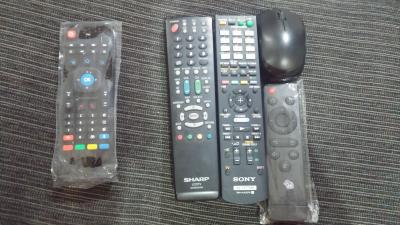
|
|
|
|
|
|
mikeeeee
|
Nov 4 2016, 11:52 PM
|
|
|
QUOTE(Khalid21 @ Nov 4 2016, 10:30 PM) where you get that one link Got it from 11th street seller. Use this link. http://m.11street.my/productdetail/mx3-m-a...ice-ir-20857369There are many similar remote, but most are mx3 not mx3-m. Try ask seller to confirm if I) ALL frontal keys are programmable thru IR learning II) mic is usable For mx3, there are no mic and only the bottom 4 colored buttons and the power button programmable thru IR learning. |
|
|
|
|
|
mikeeeee
|
Nov 10 2016, 02:11 PM
|
|
|
QUOTE(aizuddinmanap @ Nov 9 2016, 05:22 PM) anyone have a trick for opening astro on the go? As astro on the go detect my MXIII is rooted. Tried with SuperSU, successfully disable root, but astro on go the still detect my device is rooted. U can totally hide root from astro on the go but no point. I've done it, the app works . can list out all the channels and programs but when u try to play the videos in your subscription list, it will give u unknown error with error code 2000040. Only manage to watch trailers, awani and go shop without problem. Contacted astro and they simply say our device is not supported. Boooo ! |
|
|
|
|
|
mikeeeee
|
Nov 15 2016, 01:49 PM
|
|
|
QUOTE(Khalid21 @ Nov 15 2016, 10:40 AM) GT1 user .. new firmware 107 coming end this month 😋😏😏 What are the enhancement ? 106 seems to be pretty stable apart from the darker screen... |
|
|
|
|
|
mikeeeee
|
Jan 4 2017, 01:32 PM
|
|
|
QUOTE(topeng perak @ Jan 4 2017, 01:27 PM) Found a simple solution for GT1 dark screen issue. Using root explorer, go to System \ build.prop > modify service.bootvideo = 1. The boot animation will no longer show beelink animation but it fix the brightness. Now my box is perfect for my daily usage. Good stuff, gotta test this out later |
|
|
|
|
|
mikeeeee
|
Jan 4 2017, 10:22 PM
|
|
|
QUOTE(topeng perak @ Jan 4 2017, 01:27 PM) Found a simple solution for GT1 dark screen issue. Using root explorer, go to System \ build.prop > modify service.bootvideo = 1. The boot animation will no longer show beelink animation but it fix the brightness. Now my box is perfect for my daily usage. Followed your instructions and did a reboot. It showed me the big red bee link logo and then mbox logo ! 😨😨😨 WTH man .... It does seems to fix the brightness though |
|
|
|
|



 Quote
Quote

 0.0557sec
 0.54
0.54
 7 queries
 GZIP Disabled