Outline ·
[ Standard ] ·
Linear+
Samsung Galaxy Note 7 Official Discussion V4!, Release date postponed to September 2016
|
viknela
|
 Aug 22 2016, 09:17 PM Aug 22 2016, 09:17 PM
|
Getting Started


|
guys moving over from a huawei mate 7 i had it for two years and till date a full charge would last me at least from 7am to 2-4am. but my note with similar usage(mainly whatsapp,fb,insta,always on display clock ) my bat hits a 15% at 2pm from 7.30am.. is this expected or something is up with my battery?
|
|
|
|
|
|
bansai
|
Aug 22 2016, 09:17 PM
|
|
|
QUOTE(shockk @ Aug 22 2016, 08:40 PM) Oh my God... this is bad. So when you got it, it was fine for the first few days with no issues? Did you encounter any freeze or crash on the first few days? If like this, then perhaps all Note 7 units are not safe from the hang / crash / bootloop issue.  Not sure bout the first few days as i dont set any lock or pin. Even if it restarts i wouldnt notice. During the weekends wanna know more bout the phone, thats when i notice restarts, then on sunday evening sudden loop when i noticed the phone getting hot. |
|
|
|
|
|
JonnY
|
Aug 22 2016, 09:23 PM
|
|
|
QUOTE(shockk @ Aug 22 2016, 08:40 PM) Oh my God... this is bad. So when you got it, it was fine for the first few days with no issues? Did you encounter any freeze or crash on the first few days? If like this, then perhaps all Note 7 units are not safe from the hang / crash / bootloop issue. My note 7 so far so good. Haven't got this problem. Touch wood. QUOTE(teckyang97 @ Aug 22 2016, 08:44 PM) Peace out bro, everyone has their own beliefs and preference. These type of stuff can only be determine by experience as there's no scientific prove currently  Maybe different ppl different phone different experience. My S3 overnight charge till battery only can stay 3 hours. S5 seldom overnight and it manage a day. Both phone based on 2 years usage. This post has been edited by JonnY: Aug 22 2016, 09:24 PM |
|
|
|
|
|
amenlo9
|
Aug 22 2016, 09:35 PM
|
|
|
Why after wake up from idle cant use fingerprint but Pin?? I never reboot my phone. If after reboot first attempt using Pin is normal. How to prevent this? Not so convenient 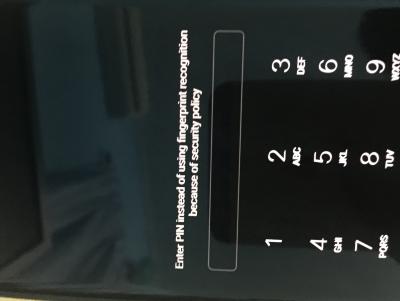
|
|
|
|
|
|
jacky91
|
Aug 22 2016, 09:39 PM
|
|
|
So...after reading so many comments from this thread and also other forums.. most ppl had gave the same answer, if you are serious in taking care of your battery life, don't charge it on fast charge mode that often. Leaving the phone charging overnight is fine as long as not on fast charge mode. Don't stress charge the battery too often (e.g: 100% > 5% > 100%) In summary, fast charge is like an emergency tool I bet for now, most ppl will use normal mode first...but after a few months...  |
|
|
|
|
|
GymBoi
|
Aug 22 2016, 09:40 PM
|
|
|
QUOTE(amenlo9 @ Aug 22 2016, 09:35 PM) Why after wake up from idle cant use fingerprint but Pin?? I never reboot my phone. If after reboot first attempt using Pin is normal. How to prevent this? Not so convenient
did u use any app to close your screen ? or how long you never unlock your phone ? more than 24h? |
|
|
|
|
|
zoozooka
|
Aug 22 2016, 09:40 PM
|
|
|
After turned off the fast charging option, i feel that the charging is still very fast. Almost same as fast charging.
I'm not sure if the fast charging option works.
|
|
|
|
|
|
GymBoi
|
Aug 22 2016, 09:41 PM
|
|
|
QUOTE(jacky91 @ Aug 22 2016, 09:39 PM) So...after reading so many comments from this thread and also other forums.. most ppl had gave the same answer, if you are serious in taking care of your battery life, don't charge it on fast charge mode that often. Leaving the phone charging overnight is fine as long as not on fast charge mode. Don't stress charge the battery too often (e.g: 100% > 5% > 100%) In summary, fast charge is like an emergency tool I bet for now, most ppl will use normal mode first...but after a few months... Hmm seems like it ... abit scared to use fast charge now ... question is how not to fast charge ? both adapter provided by samsung is fast charge right ? |
|
|
|
|
|
billy_overheat
|
Aug 22 2016, 09:41 PM
|
|
|
QUOTE(shockk @ Aug 22 2016, 08:19 PM) Anyone who used overnight fast charging on the same phone for few years can confirm that battery life span affected? I've been charging my nexus 6 every night for 2 years. Everything is still fine even with wireless charging. Wife just bought gn7 and she asked the same thing as we'll. I suppose it is fine? Unless the charging adapter or the chip is spoiled? |
|
|
|
|
|
jerryhean
|
Aug 22 2016, 09:43 PM
|
|
|
QUOTE(amenlo9 @ Aug 22 2016, 09:35 PM) Why after wake up from idle cant use fingerprint but Pin?? I never reboot my phone. If after reboot first attempt using Pin is normal. How to prevent this? Not so convenient
Your phone rebooted without you knowing? |
|
|
|
|
|
eddmecha
|
Aug 22 2016, 09:47 PM
|
|
|
QUOTE(amenlo9 @ Aug 22 2016, 09:35 PM) Why after wake up from idle cant use fingerprint but Pin?? I never reboot my phone. If after reboot first attempt using Pin is normal. How to prevent this? Not so convenient
i think ur phone have been rebooted without u noticing it.bcoz only after reboot will need to use pin to unlock |
|
|
|
|
|
amenlo9
|
Aug 22 2016, 09:49 PM
|
|
|
QUOTE(jerryhean @ Aug 22 2016, 09:43 PM) Your phone rebooted without you knowing? No rebooted. Because if reboot i will need to unlock my sim again. Oh yea, i am using double tab to sleep features via nova launcher. |
|
|
|
|
|
jacky91
|
Aug 22 2016, 09:49 PM
|
|
|
QUOTE(zoozooka @ Aug 22 2016, 09:40 PM) After turned off the fast charging option, i feel that the charging is still very fast. Almost same as fast charging. I'm not sure if the fast charging option works. turn off fast chargin option? mohon tunjuk ajar! QUOTE(GymBoi @ Aug 22 2016, 09:41 PM) Hmm seems like it ... abit scared to use fast charge now ... question is how not to fast charge ? both adapter provided by samsung is fast charge right ? ur old phone charger? QUOTE(billy_overheat @ Aug 22 2016, 09:41 PM) I've been charging my nexus 6 every night for 2 years. Everything is still fine even with wireless charging. Wife just bought gn7 and she asked the same thing as we'll. I suppose it is fine? Unless the charging adapter or the chip is spoiled? was ur nexus 6 on fast charge mode? or juz normal wireless charge? |
|
|
|
|
|
GymBoi
|
Aug 22 2016, 09:51 PM
|
|
|
QUOTE(amenlo9 @ Aug 22 2016, 09:49 PM) No rebooted. Because if reboot i will need to unlock my sim again. Oh yea, i am using double tab to sleep features via nova launcher. I ask this before, seems like no app can turn off the screen and can turn on back again with biometrics besides using assesiblity settings ... or the sview cover ... QUOTE(jacky91 @ Aug 22 2016, 09:49 PM) turn off fast chargin option? mohon tunjuk ajar! ur old phone charger? was ur nexus 6 on fast charge mode? or juz normal wireless charge? my old phone is note3 .... the connector is long type ... can use ? i'm always skeptical to use charger that doesn't come with the package ... if got option to turn off fast charging then is better ... This post has been edited by GymBoi: Aug 22 2016, 09:52 PM |
|
|
|
|
|
aromachong
|
Aug 22 2016, 09:52 PM
|
Look at all my stars!!

|
QUOTE(Gan0788 @ Aug 22 2016, 09:09 PM)  Samsung treated us as lab rat! Samsung did not point gun at your head forcing u to buy it is user who bought first batch phone and blame samsung its just like car.. first batch always hav prob |
|
|
|
|
|
Inject
|
Aug 22 2016, 09:53 PM
|
Getting Started
|
QUOTE(amenlo9 @ Aug 22 2016, 09:49 PM) No rebooted. Because if reboot i will need to unlock my sim again. Oh yea, i am using double tab to sleep features via nova launcher. Any third party apps that uses API to lock or wake the screen you'll need to use pin/pattern/password to unlock. |
|
|
|
|
|
jacky91
|
Aug 22 2016, 09:54 PM
|
|
|
QUOTE(GymBoi @ Aug 22 2016, 09:51 PM) I ask this before, seems like no app can turn off the screen and can turn on back again with biometrics besides using assesiblity settings ... or the sview cover ... my old phone is note3 .... the connector is long type ... can use ? i'm always skeptical to use charger that doesn't come with the package ... if got option to turn off fast charging then is better ... was the cable connected to the adapter? if yes, i dun think u can...as N7 is using usb c... might need to get a 3rd party adapter and a usb c cable there are many good adapter out there, like Aukey. Can get those without fast charge punya |
|
|
|
|
|
zoozooka
|
Aug 22 2016, 09:55 PM
|
|
|
Fast charging on/off option:
Settings > Device maintenance > Battery > Advanced Settings
|
|
|
|
|
|
GymBoi
|
Aug 22 2016, 09:56 PM
|
|
|
QUOTE(jacky91 @ Aug 22 2016, 09:54 PM) was the cable connected to the adapter? if yes, i dun think u can...as N7 is using usb c... might need to get a 3rd party adapter and a usb c cable there are many good adapter out there, like Aukey. Can get those without fast charge punya not connected ... so i juz use the old "kepala" and use the usb c cable ? aii samsung susah susah invent fast charge but in the end not good for battery ... |
|
|
|
|
|
jacky91
|
Aug 22 2016, 09:57 PM
|
|
|
QUOTE(zoozooka @ Aug 22 2016, 09:55 PM) Fast charging on/off option: Settings > Device maintenance > Battery > Advanced Settings was about to reply this  QUOTE(GymBoi @ Aug 22 2016, 09:56 PM) not connected ... so i juz use the old "kepala" and use the usb c cable ? aii samsung susah susah invent fast charge but in the end not good for battery ... bro, check the comment above |
|
|
|
|



 Quote
Quote





 0.0285sec
 0.34
0.34
 6 queries
 GZIP Disabled