Welcome Guest ( Log In | Register )

Bump Topic Topic Closed RSS Feed
64 Pages « < 61 62 63 64 >Bottom

Outline · [ Standard ] · Linear+

 ILLEGEAR Custom Gaming Laptops v.3, RTX ON! ILLEGEAR RTX Gaming Notebook.

views
     
TSPrince J
post Apr 8 2019, 11:39 AM

Regular
******
Senior Member
1,272 posts

Joined: May 2010
From: Team ILLEGEAR


QUOTE(k!nex @ Apr 8 2019, 03:58 AM)
Took me awhile to figure it out. I took out the SSD, cleaned the contact pins and reseat it.
Now its alot better.
[attachmentid=10221563]

You guys should have done a better QC check prior to delivery on this type of matter in future. I was doing a review on my unit and that really gave me a shock.

Anyways, thanks for replying. I'm disappointed now only got free Samsung PM981 SSD upgrade. It's just 1 week only after I bought my unit.
I roughly figure out that mine is using a Phison E12 controller with Toshiba 64-layer TLC NAND.
*
Hi k!nex,

Thank you for your screenshot and glad to hear your ssd performs well. I have talked to our tech support head and according to him if the SSD connector is not clean your system will either not detect the SSD or you will get blue screen. We suspect your first attempt of inaccurate test result is related to the software / testing environment. If you needed any help, we can always help you to check your system and your ssd.

Every ILLEGEAR laptop is tested with multiple stress-testing software to make sure the system performs accordingly before we deliver to our end users. Hope clarifies and sorry for the inconvenience caused.

QUOTE(pluginbaby @ Apr 8 2019, 08:20 AM)
I have the same SSD as you in my onyx. Btw how much faster is Samsung pm981? I'm itching to change to sx8200pro 512GB but not sure how significant of an upgrade it will be.

Onyx supports two m.2 pcie nvme right? Or is it one is nvme and another is SATA like on Raven?
*
According to benchmark, the default 512GB NVMe drive actually performs better than Samsung PM981.

This post has been edited by Prince J: Apr 8 2019, 11:44 AM
dylan_chng
post Apr 9 2019, 12:36 PM

On my way
****
Junior Member
693 posts

Joined: Jul 2017
Below are questions I had that were answered by emailing Illegear support. Response are not directly quotated but rather my interpration.

Qeustion 1)
QUOTE(dylan_chng @ Mar 23 2019, 02:55 PM)
Where can I view the user's manual for the Raven?[attachmentid=10209206]
*
Answer - Raven does not have user manual for the time being.


Question 2)
QUOTE(dylan_chng @ Mar 24 2019, 09:38 PM)
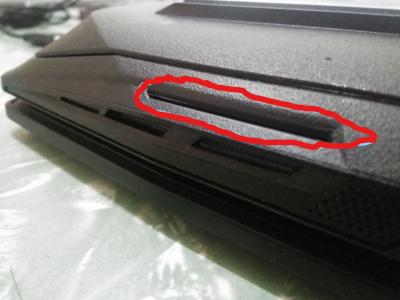
Where is the speakers on an Illegear Raven? I know where the subwoofer is but am wondering where the regular speakers are.
*
Answer - Refer to red circle in image
Attached Image


Question 3)
QUOTE(dylan_chng @ Mar 24 2019, 09:48 PM)
2) How do I pernamently disable the image projection? I turn it off every time my system turns out but the next time I turn on the system, the image projection on.
*
Answer - The pernament solution is to disconnect the cable under the 1st M.2 drive bay.
Neo|ofGeo
post Apr 10 2019, 08:58 AM

Stop Complaining and Read
Group Icon
Elite
3,142 posts

Joined: Nov 2010


How's illegear latest line up nowadays?

The last of illegear i had is RU-14 and still working but now i need something with little more beef but doesn't have much heat pack to it.

would appreciate some of the model to recommend on the budget range RM3,000 to RM5,000.00.

dylan_chng
post Apr 10 2019, 09:57 AM

On my way
****
Junior Member
693 posts

Joined: Jul 2017
I render videos. The software I use only utilize the CPU, not the GPU.
Obviously, the CPU gets hot under constant load and results into the fans ramping up. However is the intended behaviour for both the CPU and GPU to ramp up together? Meaning to say, are both fans paired. If one slows down, the other slows down and vice versa?
STEVE@ILLEGEAR
post Apr 10 2019, 10:29 AM

New Member
*
Newbie
2 posts

Joined: Apr 2018
From: Team ILLEGEAR


QUOTE(Neo|ofGeo @ Apr 10 2019, 08:58 AM)
How's illegear latest line up nowadays?

The last of illegear i had is RU-14 and still working but now i need something with little more beef but doesn't have much heat pack to it.

would appreciate some of the model to recommend on the budget range RM3,000 to RM5,000.00.
*
Hi, Neo|ofGeo, The ILLEGEAR Onyx Lite is priced at RM4116 based on the suggested specs but you can also customize the configuration further according to your requirements by using the link here https://store.illegear.com/slim-and-powerfu...-onyx-lite.html

The ILLEGEAR Raven is priced at RM3136 based on the suggested specs but you can also customize the configuration further according to your requirements by using the link here http://store.illegear.com/high-performance...gear-raven.html

In addition, may i know what are your primary usage for the laptop? Then we could recommend accordingly to you as well. Feel free to pm me or whatsapp our Sales Line for easier communication
STEVE@ILLEGEAR
post Apr 10 2019, 10:42 AM

New Member
*
Newbie
2 posts

Joined: Apr 2018
From: Team ILLEGEAR


QUOTE(dylan_chng @ Apr 10 2019, 09:57 AM)
I render videos. The software I use only utilize the CPU, not the GPU.
Obviously, the CPU gets hot under constant load and results into the fans ramping up. However is the intended behaviour for both the CPU and GPU to ramp up together? Meaning to say, are both fans paired. If one slows down, the other slows down and vice versa?
*
Hi dylan_chng, yes it is intended behaviour for both CPU and GPU fans to ramp up together and slow down together.
Neo|ofGeo
post Apr 15 2019, 07:52 AM

Stop Complaining and Read
Group Icon
Elite
3,142 posts

Joined: Nov 2010


QUOTE(STEVE@ILLEGEAR @ Apr 10 2019, 10:29 AM)
Hi, Neo|ofGeo, The ILLEGEAR Onyx Lite is priced at RM4116 based on the suggested specs but you can also customize the configuration further according to your requirements by using the link here https://store.illegear.com/slim-and-powerfu...-onyx-lite.html

The ILLEGEAR Raven is priced at RM3136 based on the suggested specs but you can also customize the configuration further according to your requirements by using the link here http://store.illegear.com/high-performance...gear-raven.html

In addition, may i know what are your primary usage for the laptop? Then we could recommend accordingly to you as well. Feel free to pm me or whatsapp our Sales Line for easier communication
*
hmm.gif send a pm but didn't receive any reply as of now.

YVONNE@ILLEGEAR
post Apr 16 2019, 05:08 PM

New Member
*
Newbie
2 posts

Joined: Nov 2017
From: Team ILLEGEAR


QUOTE(Neo|ofGeo @ Apr 15 2019, 07:52 AM)
hmm.gif send a pm but didn't receive any reply as of now.
*
Hi, we have reply you on whatsapp.
Please feel free to contact us if you need further information. Thanks smile.gif
zoixc
post Apr 16 2019, 06:21 PM

haha
******
Senior Member
1,406 posts

Joined: Aug 2018
After using the laptop for around 3 hours, the laptop fan seems to stuck at one speed even when the temperature is around 40++ something. This does not happen when the laptop first start up and the fan is quite loud and kinda annoying.

Anyone else having this problem ?

*Illegear Laguna Model

user posted image
AZIM@ILLEGEAR
post Apr 16 2019, 06:52 PM

New Member
*
Junior Member
28 posts

Joined: Feb 2017
From: Team ILLEGEAR


QUOTE(zoixc @ Apr 16 2019, 06:21 PM)
After using the laptop for around 3 hours, the laptop fan seems to stuck at one speed even when the temperature is around 40++ something. This does not happen when the laptop first start up and the fan is quite loud and kinda annoying.

Anyone else having this problem ?

*Illegear Laguna Model

user posted image
*
Hi zoixc, may I know if the issue is still present if the fan is turbo-boosted? You may do so by pressing FN+1 smile.gif

On the other hand, may I know if the behaviour is still happening after the system is rebooted? Aside from the fan boost functionality, kindly find the rest of the LAGUNA Keyboard Shortcuts for your reference as listed below:

FN+1 - Toggle fan speed (auto/max)
FN+3 - Toggle rear led strips
FN+9 - Toggle touchpad light, bottom LED strips
FN+0 - Toggle touchpad light, screen display & led lights
FN+spacebar - Toggle keyboard backlight brightness

The rest are indicated on the F1-F12 keys, hope this helps!
zoixc
post Apr 16 2019, 07:22 PM

haha
******
Senior Member
1,406 posts

Joined: Aug 2018
QUOTE(AZIM@ILLEGEAR @ Apr 16 2019, 06:52 PM)
Hi zoixc, may I know if the issue is still present if the fan is turbo-boosted? You may do so by pressing FN+1 smile.gif

On the other hand, may I know if the behaviour is still happening after the system is rebooted? Aside from the fan boost functionality, kindly find the rest of the LAGUNA Keyboard Shortcuts for your reference as listed below:

FN+1 - Toggle fan speed (auto/max)
FN+3 - Toggle rear led strips
FN+9 - Toggle touchpad light, bottom LED strips
FN+0 - Toggle touchpad light, screen display & led lights
FN+spacebar - Toggle keyboard backlight brightness

The rest are indicated on the F1-F12 keys, hope this helps!
*
Yes the issue is still there after press FN + 1, i can see cpu and gpu fan speed up but only the cpu fan slows down after pressing again.

No, the fan speed is normal after rebooting, but will have same issue after certain hour of usage.


*Edit*
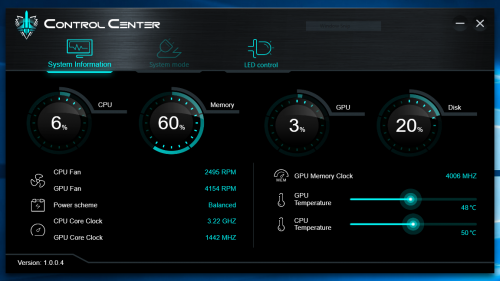
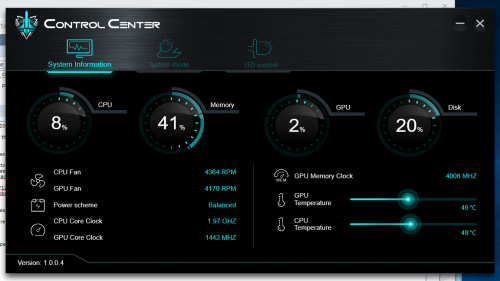
After pressing on FN+1, the fan speed when up as expected but when i press again, only the CPU fan speed when down and the GPU fan speed did not changed at all. The fan noise can be heard after rebooting as well, did not encounter this issues before

This is when the fan speed is at max speed.
» Click to show Spoiler - click again to hide... «


This is after i press again FN+1.
» Click to show Spoiler - click again to hide... «


This post has been edited by zoixc: Apr 17 2019, 12:29 AM
AZIM@ILLEGEAR
post Apr 17 2019, 11:34 AM

New Member
*
Junior Member
28 posts

Joined: Feb 2017
From: Team ILLEGEAR


QUOTE(zoixc @ Apr 16 2019, 07:22 PM)
Yes the issue is still there after press FN + 1, i can see cpu and gpu fan speed up but only the cpu fan slows down after pressing again.

No, the fan speed is normal after rebooting, but will have same issue after certain hour of usage.
*Edit*
After pressing on FN+1, the fan speed when up as expected but when i press again, only the CPU fan speed when down and the GPU fan speed did not changed at all. The fan noise can be heard after rebooting as well, did not encounter this issues before

This is when the fan speed is at max speed.
» Click to show Spoiler - click again to hide... «


This is after i press again FN+1.
» Click to show Spoiler - click again to hide... «

*
Hi zoixc, I've sent you a PM smile.gif
wingwp
post Apr 17 2019, 10:04 PM

On my way
****
Senior Member
639 posts

Joined: Jan 2003


Azim can my S5 use this control center ..?

QUOTE(zoixc @ Apr 16 2019, 06:21 PM)
After using the laptop for around 3 hours, the laptop fan seems to stuck at one speed even when the temperature is around 40++ something. This does not happen when the laptop first start up and the fan is quite loud and kinda annoying.

Anyone else having this problem ?

*Illegear Laguna Model

user posted image
*
AZIM@ILLEGEAR
post Apr 18 2019, 10:32 AM

New Member
*
Junior Member
28 posts

Joined: Feb 2017
From: Team ILLEGEAR


QUOTE(wingwp @ Apr 17 2019, 10:04 PM)
Azim can my S5 use this control center ..?
*
Hi wingwp, the pictured Control Center is exclusive for LAGUNA models only, hope clarify nod.gif same goes to S-Series & the Raven series, etc.
wingwp
post Apr 19 2019, 11:52 PM

On my way
****
Senior Member
639 posts

Joined: Jan 2003


whats the latest software/control center for S5? can pm ..

QUOTE(AZIM@ILLEGEAR @ Apr 18 2019, 10:32 AM)
Hi wingwp, the pictured Control Center is exclusive for LAGUNA models only, hope clarify  nod.gif same goes to S-Series & the Raven series, etc.
*
AZIM@ILLEGEAR
post Apr 20 2019, 06:09 PM

New Member
*
Junior Member
28 posts

Joined: Feb 2017
From: Team ILLEGEAR


QUOTE(wingwp @ Apr 19 2019, 11:52 PM)
whats the latest software/control center for S5? can pm ..
*
Hi wingwp, I've dropped you a PM smile.gif
nagash99
post Apr 22 2019, 04:39 PM

New Member
*
Newbie
5 posts

Joined: Jul 2006
Hi, is Illegear considering refreshing your desktop/laptop line with the Ryzen 3rd Generation processors when they are released?
STEVE@ILLEGEAR
post Apr 22 2019, 06:29 PM

New Member
*
Newbie
2 posts

Joined: Apr 2018
From: Team ILLEGEAR


QUOTE(nagash99 @ Apr 22 2019, 04:39 PM)
Hi, is Illegear considering refreshing your desktop/laptop line with the Ryzen 3rd Generation processors when they are released?
*
Hi nagash99 Yes we will consider smile.gif
pluginbaby
post Apr 23 2019, 04:35 PM

Look at all my stars!!
*******
Senior Member
2,661 posts

Joined: Apr 2007


Looks like intel 9th gen (i7-9750) and GTX1660Ti are available for order on Illegear website (Prodigy and Rogue). Onyx (non lite) loses rtx2060 option.

This post has been edited by pluginbaby: Apr 23 2019, 04:36 PM
TSPrince J
post Apr 23 2019, 05:25 PM

Regular
******
Senior Member
1,272 posts

Joined: May 2010
From: Team ILLEGEAR


QUOTE(pluginbaby @ Apr 23 2019, 04:35 PM)
Looks like intel 9th gen (i7-9750) and GTX1660Ti are available for order on Illegear website (Prodigy and Rogue). Onyx (non lite) loses rtx2060 option.
*
ONYX RTX2060 have been sold out and pending with a lot of back orders, therefore we temporary disable them on our webstore until there is a clear ETA. We plan to re-enable them end of this week.

64 Pages « < 61 62 63 64 >Top
Topic ClosedOptions
 

Change to:
| Lo-Fi Version
0.0302sec    0.35    6 queries    GZIP Disabled
Time is now: 9th December 2025 - 07:48 AM