Welcome Guest ( Log In | Register )

Outline · [ Standard ] · Linear+

 Cheap Asus Wifi Router Alternative, Huawei WS880 & Others

views
     
alucard89
post Apr 28 2017, 03:45 PM

Look at all my stars!!
*******
Senior Member
4,454 posts

Joined: Apr 2006
QUOTE(blacktubi @ Apr 28 2017, 02:17 PM)
USB tethering is hit and miss, not all phones utilise the same protocol. It is hard to troubleshoot as well.
*
My current setup is :
Primary Wan = B310 modem (with digi 4g) connected to WAN port
Secondary Wan = Z2 phone tethered via USB as Android Phone in the setting <--- Not connected

So I tried again by switching the WAN
Primary WAN = Z2 phone tethered via USB (setup as USB modem) <-- Connected, I can see the ip range at 192.168.42.xx
Secondary Wan = B310 modem (with digi 4g) connected to WAN port <-- Failed to connect, couldn't get WAN ip even after I setup static ip address

Could this be an issue with secondary wan unable to connect?

This post has been edited by alucard89: Apr 28 2017, 03:46 PM
alucard89
post Apr 29 2017, 05:17 PM

Look at all my stars!!
*******
Senior Member
4,454 posts

Joined: Apr 2006
I just read that dual wan doesn't actually combine the speed but rather just fallback to whichever wan still online

Anyone here successfully use the dual wan feature to combine speed?
alucard89
post May 1 2017, 07:40 PM

Look at all my stars!!
*******
Senior Member
4,454 posts

Joined: Apr 2006
QUOTE(raynman @ Apr 29 2017, 06:23 PM)
Well, you guessed wrong.

The WS880 can act as a load balancer by combining the bandwidth of both WANs.

user posted image
*
Have you succesfully combined speed with both wan? streamyx/unifi + 4g?

alucard89
post Jul 29 2017, 09:08 AM

Look at all my stars!!
*******
Senior Member
4,454 posts

Joined: Apr 2006
Guys, just wanna confirm something
I have Huawei e3722 modem, I don't see any specs listing it as ipv6
Can I still setup ipv6 on the xwrt with a modem like huawei e3722 that doesn't have ipv6?
alucard89
post Sep 27 2017, 06:25 PM

Look at all my stars!!
*******
Senior Member
4,454 posts

Joined: Apr 2006
Anyone that's on tomato firmware
How stable is it now?
Can you use vpn when router is setup as wireless repeater with tomato?
On xwrt, vpn is disabled when router is set as wireless repeater

This post has been edited by alucard89: Sep 27 2017, 06:26 PM
alucard89
post Sep 28 2017, 12:17 AM

Look at all my stars!!
*******
Senior Member
4,454 posts

Joined: Apr 2006
QUOTE(muncheno @ Sep 27 2017, 10:34 PM)
Dun think any wrt or dwrt out there can have repeater and vpn together by default.
*
My tplink router with ddwrt can use vpn with repeater function. Which why I'm curious how tomato handles it
alucard89
post Nov 16 2020, 06:50 PM

Look at all my stars!!
*******
Senior Member
4,454 posts

Joined: Apr 2006
QUOTE(muncheno @ Jul 21 2020, 09:35 AM)
For those who is running XWRT-VORTEX 380.70

Here is another alternative from Koolshare_Merlin
https://firmware.koolshare.cn/Koolshare_Mer...0/Huawei/WS880/

I didn't try it yet, as my 2 WS880 routers are now in my parents house, away from me.
More or less they are the same 380.70, however Koolshare has more tweak to the features and much more easier to manage entware.
*
Hi, how's the method for upgrading?
Is it just simply uploading the firmware?
alucard89
post Nov 29 2020, 01:39 PM

Look at all my stars!!
*******
Senior Member
4,454 posts

Joined: Apr 2006
Anyone still has the WS880 CFE file on from 1st page?
The mega link already expired
Need to install on my extra ws880 that i finally unbox after all these years 😅
alucard89
post Nov 29 2020, 10:39 PM

Look at all my stars!!
*******
Senior Member
4,454 posts

Joined: Apr 2006
QUOTE(muncheno @ Nov 29 2020, 02:03 PM)
Thanks, need some help after reaching CFE page, after I upload the xrt firmware, it was sending request then i got connection time out after a few minutes (not 24mb uploaded).
After I restart normally, i see internet led blinking only (no wifi name or anything).
Doesn't seem like it completed the firmware upgrade or did I just bricked mine?
alucard89
post Nov 30 2020, 12:10 AM

Look at all my stars!!
*******
Senior Member
4,454 posts

Joined: Apr 2006
QUOTE(muncheno @ Nov 29 2020, 11:17 PM)
Did you using CFE editor to edit your bin file correctly and flash the router with the edited bin file before upload to merlin firmware?

If you have fail to upload, did you try or manage to access the CFE mode with the IP you set in the bin file?
*
Yeah, already done that for the bin file correctly and flashed it
Seems like I keep getting timeout when accessing CFE web page
Btw, I set my ip to static (192.168.1.2) to access it
alucard89
post Nov 30 2020, 01:12 AM

Look at all my stars!!
*******
Senior Member
4,454 posts

Joined: Apr 2006
QUOTE(muncheno @ Nov 30 2020, 12:37 AM)
Have tried other internet browser?  if i recall correctly Chrome is not very good with CFE.

If still can try flash older merlin version before goto latest.
*
After a few tries, finally succesfully uploaded firmware on chrome browser. Definitely got me worried there sweat.gif
Btw, how's Koolshare_Merlin working out for you so far? What are some extra features does it bring actually?

alucard89
post Dec 19 2020, 10:55 AM

Look at all my stars!!
*******
Senior Member
4,454 posts

Joined: Apr 2006
QUOTE(Gregar Forte @ Dec 11 2020, 12:50 AM)
Thanks boss for the reply. Will do that. Ill update here afterwards
*
May i know which tomato firmware version you flashed?
Doesn’t seem like it’s been updated in a while
alucard89
post Dec 27 2020, 12:39 AM

Look at all my stars!!
*******
Senior Member
4,454 posts

Joined: Apr 2006
QUOTE(Gregar Forte @ Dec 19 2020, 03:24 PM)
i used fresh tomato. didnt remember which version but definely newer than shibby one. tried it but really unstable. long time taken to connect pppoe then reverted back to xwrt
*
Hi, may i how you did it?
I tried uploading the freshtomato from xwrt but i just bricks the router. Had to go back to cfe method

So i’ve been stuck almost 1 hour trying to boot to cfe page. Had no issues last time, but this time repeatedly pressing power + reset button 15-20 sec just doesn’t bring that page anymore.
Any ideas guys?

This post has been edited by alucard89: Dec 27 2020, 01:16 AM
alucard89
post Dec 27 2020, 11:02 PM

Look at all my stars!!
*******
Senior Member
4,454 posts

Joined: Apr 2006
QUOTE(Gregar Forte @ Dec 27 2020, 04:15 PM)
I just flashed it from XWRT directly. Working fine however with slow WAN reconnect and have to reset WAN connection upon BW Limiter, I went back to XWRT lol
*
Had to reset nvram then i was able to access cfe properly
Btw, on freshtomato, how to setup as wireless repeater?
Basically like this

4g usb modem —> freshtomato ws880

On wxrt there’s a repeater option for that, which makes it easy to setup.

I also noticed on xwrt, if i try to set 4g modem as WAN
I get really slow download speed (0.5mbps) but high upload speed 🤔


alucard89
post Dec 29 2020, 06:43 PM

Look at all my stars!!
*******
Senior Member
4,454 posts

Joined: Apr 2006
QUOTE(Gregar Forte @ Dec 28 2020, 11:05 AM)
Still not working for me it seems
The guide seems to be for 2 routers running on tomato

Looks like the usb modem (oem) was at fault
Even on freshtomato and xwrt i was still getting 0.3-0.5mbps download speed. Oddly enough connect directly the usb modem’s hotspot i was getting normal download speed.
Switched to huawei e8372 wingle modem (setup as wan on xwrt) and everything is smooth sailing.
Might need to reconsider getting oem modem after this

This post has been edited by alucard89: Dec 29 2020, 06:43 PM
alucard89
post Mar 18 2021, 06:43 PM

Look at all my stars!!
*******
Senior Member
4,454 posts

Joined: Apr 2006
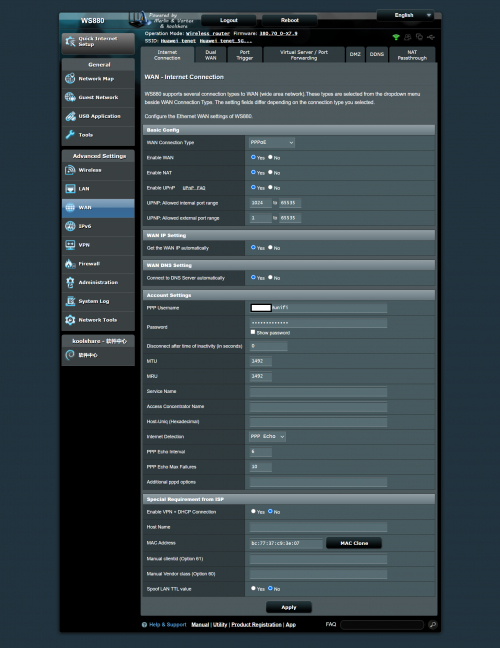
Hi guys, how do you configure pppoe settings to connect unifi?
I already key in username (@unifi) and password but it’s still unsuccessful to connect

This post has been edited by alucard89: Mar 18 2021, 06:43 PM
alucard89
post Mar 19 2021, 12:08 AM

Look at all my stars!!
*******
Senior Member
4,454 posts

Joined: Apr 2006
QUOTE(Gregar Forte @ Mar 18 2021, 08:32 PM)
Already check for Unifi Home Profile?
*
I flashed mine with xwrt Merlin 380.70
Is unifi home profile still there in the settings?

user posted image

This post has been edited by alucard89: Mar 19 2021, 12:37 AM
alucard89
post Mar 19 2021, 11:29 PM

Look at all my stars!!
*******
Senior Member
4,454 posts

Joined: Apr 2006
QUOTE(muncheno @ Mar 19 2021, 06:21 AM)
You need set vlan tagging settings for unifi also. This is located in LAN - > IPTV.
Choose Unifi profile or manually set it.
» Click to show Spoiler - click again to hide... «

*
Thanks, gonna try this out
alucard89
post Mar 19 2021, 11:32 PM

Look at all my stars!!
*******
Senior Member
4,454 posts

Joined: Apr 2006
QUOTE(Gregar Forte @ Mar 19 2021, 11:31 AM)
Yeah this settings. Thank you bro. Havent used WS880 for a while since it hanged with 500GB usage daily.
*
How do you even reach that daily use 😅


Change to:
| Lo-Fi Version
0.0679sec    0.37    7 queries    GZIP Disabled
Time is now: 6th December 2025 - 07:38 PM