

Anione can help me on my phone capacity?
I am using 32gb,but show total of around 24.5gb & onli less den 18gb available...
Izit normal to be so less?
Huawei Mate 8 forum discussion V2, The truly premium flagship?
Huawei Mate 8 forum discussion V2, The truly premium flagship?
|
|
 Oct 24 2016, 02:52 PM Oct 24 2016, 02:52 PM
|
 
Senior Member
1,874 posts Joined: Dec 2005 From: Malacca   
|
Anione can help me on my phone capacity?
I am using 32gb,but show total of around 24.5gb & onli less den 18gb available... Izit normal to be so less? |
|
|
|
|
|
Oct 24 2016, 03:05 PM
|

Senior Member
5,284 posts Joined: Nov 2011
|
QUOTE(plain_white @ Oct 24 2016, 02:40 PM) I'm using B321 now. It's EMUI 4.1. No need for root. Just download the firmware and use the dload method can tell me how to flash it without root.n eed install twrp recovery ?follow this one ? This post has been edited by samsungXP: Oct 24 2016, 03:21 PM Attached thumbnail(s) 
|
|
|
Oct 24 2016, 03:20 PM
|
 
Elite
27,801 posts Joined: Jun 2007 From: Johor
|
QUOTE(samsungXP @ Oct 24 2016, 03:05 PM) can tell me how to flash it without root.n eed install twrp recovery ? Download firmware. Extract zip to get dload folderCopy this folder to either internal memory or ext sdcard Switch off phone. Press simultaneously both VOL n power buttons. Once you see bootup release power n release both VOL buttons once you see EMUI splash screen Firmware will be flashed. Your phone will reboot twice Whole process will take about 2 mins No need root to do this as you are flashing official firmware through phone stock recovery |
|
|
Oct 24 2016, 03:22 PM
|
|
Senior Member
5,284 posts Joined: Nov 2011
|
QUOTE(benny888 @ Oct 24 2016, 03:20 PM) Download firmware. Extract zip to get dload folder tq.can dl using phone ?Copy this folder to either internal memory or ext sdcard Switch off phone. Press simultaneously both VOL n power buttons. Once you see bootup release power n release both VOL buttons once you see EMUI splash screen Firmware will be flashed. Your phone will reboot twice Whole process will take about 2 mins No need root to do this as you are flashing official firmware through phone stock recovery This post has been edited by samsungXP: Oct 24 2016, 03:22 PM |
|
|
Oct 24 2016, 03:30 PM
|
|
Senior Member
5,284 posts Joined: Nov 2011
|
QUOTE(benny888 @ Oct 24 2016, 03:20 PM) Download firmware. Extract zip to get dload folder i cant create dload folder at root coz it mention system files read only.Copy this folder to either internal memory or ext sdcard Switch off phone. Press simultaneously both VOL n power buttons. Once you see bootup release power n release both VOL buttons once you see EMUI splash screen Firmware will be flashed. Your phone will reboot twice Whole process will take about 2 mins No need root to do this as you are flashing official firmware through phone stock recovery This post has been edited by samsungXP: Oct 24 2016, 03:49 PM |
|
|
Oct 24 2016, 03:34 PM
|
|
Senior Member
5,284 posts Joined: Nov 2011
|
QUOTE(plain_white @ Oct 24 2016, 02:40 PM) I'm using B321 now. It's EMUI 4.1. No need for root. Just download the firmware and use the dload method delThis post has been edited by samsungXP: Oct 24 2016, 03:37 PM |
|
|
|
|
|
Oct 24 2016, 04:30 PM
|
|
Elite
27,801 posts Joined: Jun 2007 From: Johor
|
QUOTE(samsungXP @ Oct 24 2016, 03:22 PM) tq.can dl using phone ? Yes n why not??QUOTE(samsungXP @ Oct 24 2016, 03:30 PM) i cant create dload folder at root coz it mention system files read only. Just copy to any location in internal memory will do. I would suggest copy to ext sdcard s better optionWhy waste the space as after extract takes about 2.5gb Is good to keep copy in ext sdcard in case of need to flash back in case of any emergency |
|
|
Oct 24 2016, 05:42 PM
|

Senior Member
1,095 posts Joined: Jun 2005 From: KL
|
QUOTE(arslow @ Oct 24 2016, 09:41 AM) Mate 9 pro....looking pretty awesome...especially since Kirin 960 is supposedly pretty darn awesome! Estimate Rm5k plus.. can challenge iphone liow |
|
|
Oct 24 2016, 06:19 PM
|
|
Junior Member
177 posts Joined: Jun 2009
|
QUOTE(Str33tBoY @ Oct 24 2016, 02:52 PM) Anione can help me on my phone capacity? Normally it will be less as system files take up ard 8-10gb spaceI am using 32gb,but show total of around 24.5gb & onli less den 18gb available... Izit normal to be so less? |
|
|
Oct 24 2016, 06:28 PM
|
|
Senior Member
5,284 posts Joined: Nov 2011
|
QUOTE(benny888 @ Oct 24 2016, 04:30 PM) Yes n why not?? currently no ext sd.so i can copy to storage also since root system files read only.how the battery on b321.after dl the firmwares and unzipped wat files we get ? juz copy all the files ? ok i ord watch the video how to flash..tqJust copy to any location in internal memory will do. I would suggest copy to ext sdcard s better option Why waste the space as after extract takes about 2.5gb Is good to keep copy in ext sdcard in case of need to flash back in case of any emergency This post has been edited by samsungXP: Oct 24 2016, 06:38 PM |
|
|
Oct 24 2016, 06:29 PM
|
|
Senior Member
5,284 posts Joined: Nov 2011
|
QUOTE(piglover @ Oct 24 2016, 05:42 PM) Estimate Rm5k plus.. can challenge iphone liow china phone wont more than rm3k |
|
|
Oct 24 2016, 06:39 PM
|
|
Elite
27,801 posts Joined: Jun 2007 From: Johor
|
QUOTE(samsungXP @ Oct 24 2016, 06:28 PM) currently no ext sd.so i can copy to storage also since root system files read only.how the battery on b321.after dl the firmwares and unzipped wat files we get ? juz copy all the files ? After unzip you will get to see a folder named dload. Inside it is the update.app firmware fileJust copy over the whole dload folder I had no issues with battery since b163. I don't see any significant differences upgrading all the versions from b170 till b320 n b321. My SOT has been consistently at 10+ hours |
|
|
Oct 24 2016, 07:15 PM
|
|
Senior Member
1,874 posts Joined: Dec 2005 From: Malacca
|
QUOTE(simonkc @ Oct 24 2016, 06:19 PM) Normally it will be less as system files take up ard 8-10gb space wow so much ar?btw... d 24gb available is after minus d system files? coz i dun remember i have much files in my phone already left 18gb... |
|
|
|
|
|
Oct 24 2016, 09:02 PM
|
|
Senior Member
5,284 posts Joined: Nov 2011
|
QUOTE(benny888 @ Oct 24 2016, 06:39 PM) After unzip you will get to see a folder named dload. Inside it is the update.app firmware file so b321 dun have any special features ?Just copy over the whole dload folder I had no issues with battery since b163. I don't see any significant differences upgrading all the versions from b170 till b320 n b321. My SOT has been consistently at 10+ hours |
|
|
Oct 25 2016, 06:43 AM
|
|
Senior Member
5,284 posts Joined: Nov 2011
|
i press volume up + power button but it not going to recovery mode but show emui installer
|
|
|
Oct 25 2016, 06:57 AM
|
|
Elite
27,801 posts Joined: Jun 2007 From: Johor
|
QUOTE(samsungXP @ Oct 25 2016, 06:43 AM) i press volume up + power button but it not going to recovery mode but show emui installer Did you see the 3 options - reboot, factory reset, wipe cache? That is emui stock recovery. You CANNOT install any firmware directly through it. Use the dload method and the emui installer will auto detect n update firmware |
|
|
Oct 25 2016, 11:36 AM
|
|
Senior Member
5,284 posts Joined: Nov 2011
|
QUOTE(benny888 @ Oct 25 2016, 06:57 AM) Did you see the 3 options - reboot, factory reset, wipe cache? That is emui stock recovery. You CANNOT install any firmware directly through it. Use the dload method and the emui installer will auto detect n update firmware i ord install the firmwares.but now i wan go to recovery mode.volume up + power cant get into recovery mode.only go to installer modeThis post has been edited by samsungXP: Oct 25 2016, 11:37 AM |
|
|
Oct 25 2016, 11:52 AM
|
|
Elite
27,801 posts Joined: Jun 2007 From: Johor
|
QUOTE(samsungXP @ Oct 25 2016, 11:36 AM) i ord install the firmwares.but now i wan go to recovery mode.volume up + power cant get into recovery mode.only go to installer mode As said that is stock recovery already.Root and install twrp if you wish to have a proper recovery mode. However you must flash back stock recovery before you can install any official firmware |
|
|
Oct 25 2016, 01:06 PM
Show posts by this member only | IPv6 | Post
#2699
|
|
Senior Member
5,284 posts Joined: Nov 2011
|
QUOTE(benny888 @ Oct 25 2016, 11:52 AM) As said that is stock recovery already. no wat i mean is power + volume up i cant go to stock recovery.it will come out emui installer package screen.i wan to wipe cache.i mean hard reset.it is the same button to press if we want to install firmwares? below is wat i meanRoot and install twrp if you wish to have a proper recovery mode. However you must flash back stock recovery before you can install any official firmware This post has been edited by samsungXP: Oct 25 2016, 01:46 PM Attached thumbnail(s) 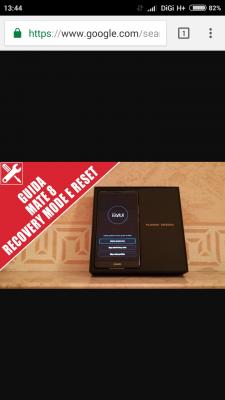
|
|
|
Oct 25 2016, 02:16 PM
|
|
Elite
27,801 posts Joined: Jun 2007 From: Johor
|
QUOTE(samsungXP @ Oct 25 2016, 01:06 PM) no wat i mean is power + volume up i cant go to stock recovery.it will come out emui installer package screen.i wan to wipe cache.i mean hard reset.it is the same button to press if we want to install firmwares? below is wat i mean Yes, the photograph shows that is stock recovery . As said you CANNOT install any firmware from stock recovery. You need to use the dload method |
|
Topic ClosedOptions
|
| Change to: |  0.0339sec 0.0339sec
 0.39 0.39
 6 queries 6 queries
 GZIP Disabled GZIP Disabled
Time is now: 24th December 2025 - 01:47 PM |
 Quote
Quote