Outline ·
[ Standard ] ·
Linear+
Huawei Mate 8 forum discussion V2, The truly premium flagship?
|
simonkc
|
 Apr 19 2016, 06:59 PM Apr 19 2016, 06:59 PM
|
Getting Started


|
Did anyone having battery drain issue after update to b170 version? Need to know everyone experience here b4 i update it.
I am on version b103 now, the battery is quite good when i test it on aeroplane mode for few days. When i insert my sim card, the battery start to drain very fast & i only run on 3G connection.
Anyone facing the same issue?
|
|
|
|
|
|
simonkc
|
Apr 21 2016, 08:11 PM
|
Getting Started
|
QUOTE(latte36 @ Apr 21 2016, 04:06 PM) Hi latte36, How do you achieve that? I tried so hard only can get 5h++ your SOT mostly on surfing or video? Did you enable wifi & data all the time? This post has been edited by simonkc: Apr 21 2016, 08:21 PM |
|
|
|
|
|
simonkc
|
Apr 21 2016, 09:43 PM
|
Getting Started
|
QUOTE(benny888 @ Apr 21 2016, 09:02 PM) Mine easily 10-11 hours SOT on mainly internet stuffs with no gaming On mainly LTE I only surfing, whatsapp, Facebook and video less than 1 hour. With wifi & 3g smart switch. 40% of time is screen off. I suspect my battery having issue . Or 4G can save more battery? This post has been edited by simonkc: Apr 21 2016, 09:45 PM |
|
|
|
|
|
simonkc
|
Apr 22 2016, 01:31 PM
|
Getting Started
|
QUOTE(benny888 @ Apr 21 2016, 09:55 PM) Check your wakelocks first. Google if you don't understand what this is Weak 3g will drain battery Hi Uncle Benny, thanks for sharing, will try 4g to test my battery from now on. Btw, we need to root the phone before we can use the ? |
|
|
|
|
|
simonkc
|
Apr 22 2016, 01:36 PM
|
Getting Started
|
QUOTE(latte36 @ Apr 21 2016, 10:09 PM) 4g will drain more because most telcos dont have strong 4g coverage, except maybe maxis. Thus, forcing ur phone to constantly switch to 4g when there is coverage eats batteries. Personal experience on a s6. In setia alam, no 4g, 3g also pretty weak. Kept surfing and refresh webpages, in less than 4hrs my battery went from 90+% to 5% I can see in power usage, mobile network have a lot of red & yellow line, mean that the phone keep searching for network. I am using digi, I think their 4g coverage is better I think |
|
|
|
|
|
simonkc
|
Apr 22 2016, 01:37 PM
|
Getting Started
|
QUOTE(latte36 @ Apr 21 2016, 10:09 PM) 4g will drain more because most telcos dont have strong 4g coverage, except maybe maxis. Thus, forcing ur phone to constantly switch to 4g when there is coverage eats batteries. Personal experience on a s6. In setia alam, no 4g, 3g also pretty weak. Kept surfing and refresh webpages, in less than 4hrs my battery went from 90+% to 5% I can see in power usage, mobile network have a lot of red & yellow line, mean that the phone keep searching for network. I am using digi, I think their 4g coverage is better I think |
|
|
|
|
|
simonkc
|
Apr 24 2016, 09:39 PM
|
Getting Started
|
And so i used the stock charger. It is indeed capable of around 2.5 hours to full charge. No idea how Anandtech got 80% in an hour as i only get around 60%. The power delivery seems pretty spiky too but surprisingly close to 3A at the beginning.   [/quote] Joseph, which battery manager you using? |
|
|
|
|
|
simonkc
|
Apr 25 2016, 09:17 AM
|
Getting Started
|
QUOTE(daddoo @ Apr 24 2016, 04:56 PM) I can't even find this Dead Trigger 2 game from Google Play ..... Me too, "dead trigger" not shown in my play store. |
|
|
|
|
|
simonkc
|
May 5 2016, 10:22 PM
|
Getting Started
|
When using fingerprint unlock, lock screen did not show magazine wallpaper. Anyone have the same issue? I on ver b170
|
|
|
|
|
|
simonkc
|
May 6 2016, 10:33 PM
|
Getting Started
|
QUOTE(Joseph Hahn @ May 6 2016, 10:19 AM) Erm if use fingerprint unlock you won't see the lockscreen at all no? :confused: Or you chose a theme without magazine unlock? Only 2 theme have magazine, black and gold, tried both also not working |
|
|
|
|
|
simonkc
|
May 7 2016, 10:09 PM
|
Getting Started
|
I found that the wifi/mobile data switch reminder drain lot of battery when choose 'use mobile data' when wifi not available.
Wifi+ also not auto connect when wifi available
|
|
|
|
|
|
simonkc
|
May 9 2016, 05:41 PM
|
Getting Started
|
QUOTE(icemessenger @ May 9 2016, 03:14 PM) coverage should be considered good i think as u can see from the pic, the (4g) signal is 3 out of 4 bars  Try to restart the phone, I have the same problem. Battery drain drain 10% overnight without wifi or data on. Screen should consume most of the battery, I think this is EMUI bug |
|
|
|
|
|
simonkc
|
May 12 2016, 10:24 AM
|
Getting Started
|
QUOTE(benny888 @ May 9 2016, 06:25 PM) Is your wakelocks and not emui bug Doze should set in on Marshmallow with phone idle. Even with both wifi n 3g on . You should be looking at most 2-3% drain over 7-8 hours Uncle Benny, how you check the wakelock on mate 8? I tried using wakelock detector from play store unfortunately my unit is not root & need to connect to PC to use the apps. Tried to follow the instruction to configure in PC but no luck. |
|
|
|
|
|
simonkc
|
May 12 2016, 10:28 AM
|
Getting Started
|
QUOTE(sKy^pAna @ May 12 2016, 02:15 AM) achieved 7 hour sot today....with around 4 hours of youtubing...🎉🎉🎉😎😎😎 with 16% left.... I think can get 8 hours at least ... That number is really amazing with youtubing. For me, it used 5% of battery for 10 mins of FHD youtube on phone's speaker |
|
|
|
|
|
simonkc
|
May 18 2016, 12:29 PM
|
Getting Started
|
QUOTE(donavan1986 @ May 18 2016, 10:57 AM) I mean all my notification for facebook, whatsapp messages all i need to connect to wifi only they come in. when i use data, all seems to render inactive here. is there any setting i have done wrong? Did you enable data & background data for those apps you need notification? Phone Manager>traffic manager>networked apps |
|
|
|
|
|
simonkc
|
May 18 2016, 06:23 PM
|
Getting Started
|
QUOTE(psjjl @ May 17 2016, 08:02 AM) my mate remain unroot bro. so can't check wakelocks. i try to disable Drive and see how. Same like me, not root & can't check wakelocks. But after I disable "Android system webview" in apps setting, battery improved. Check your app> ignore optimization. |
|
|
|
|
|
simonkc
|
May 19 2016, 03:21 PM
|
Getting Started
|
QUOTE(bissa @ May 19 2016, 12:30 PM) Yes, it is weird I don't understand why it covers the sensors and camera and notification led. I didn't see in the market SP in local shops cover all that btw, there is included SP in the retail box already, but I didn't use it. That is the phone's gorilla screen? Try to take it off & your phone won't have screen anymore  |
|
|
|
|
|
simonkc
|
May 23 2016, 02:04 PM
|
Getting Started
|
QUOTE(freeman1314 @ May 21 2016, 01:07 PM) Battery drains faster too. Alot more faster. Yes, on B180, it is very obvious the battery percentage going down faster when surfing |
|
|
|
|
|
simonkc
|
May 23 2016, 08:22 PM
|
Getting Started
|
QUOTE(benny888 @ May 23 2016, 05:43 PM) No need to install any HW program When you plug in phone, drag down status bar and select files By default it is charging status Install the USB phone drivers is enough I found that copy files from PC to HW phone is a bit slow. |
|
|
|
|
|
simonkc
|
May 29 2016, 03:35 PM
|
Getting Started
|
everyone is excited with the DSLR smartphone now. Jump topic a bit 6h45m SOT in 52 hour, is this normal? Attached thumbnail(s)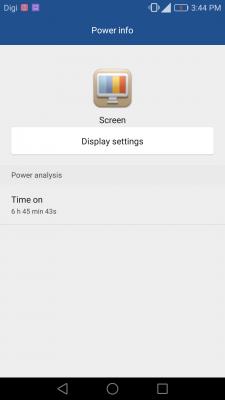
|
|
|
|
|



 Quote
Quote


 0.0595sec
 0.29
0.29
 7 queries
 GZIP Disabled