QUOTE(marlboro20s @ May 1 2008, 01:39 AM)
digswell,
erm...i'll try again tmr, i feel i have tried that b4 too..hmmmm
for the modem device, is there any other method than using windows update?
anyway, thanks for the help. will update on my status.
siuyi,
its not dat i missed it, i did browse alot of threads regarding these issues, even outside of lowyat.net,...
its just dat:-
1. if i use the .exe after dl, it won't install.
2. if i force install manually...i have no idea which hardware goes to which .inf/etc file to locate.
most of the threads just says dl 'here' or dl 'there'....

*sry,...vista is screwing me up. 1st timer on vista...making me blur case siah.
I hv no idea how did u install and update ur driver
tell u the true i dl 3 or 4 time the nvidia nforce driver from hp website..after finish dl tat the zip corrupt when unzip it
in my mind is blur blur ,edy wast my times bout 2 day seaching here and there....i use bitcomet to dl ...but fail again. at last i try dl with star downloader . i was happy to dl the right files with it and install correctly
actually u oso can use V3616AU mobo driver too
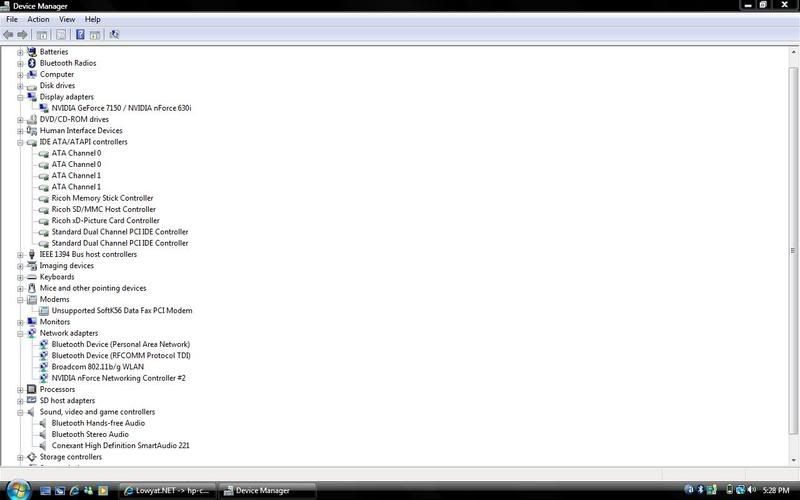
the NVIDIA nForce Chipset Driver inside come with SMbus , Lan driver and ide/sata driver
modem i use update software driver at device manager .
if u still cannot install the right driver u can direct MSN me ...check my profile to get my msn
Here show up my v3751au ss for device manger and gc
» Click to show Spoiler - click again to hide... «
This post has been edited by digswell: May 1 2008, 10:02 AM 

 Apr 30 2008, 01:01 PM


 Quote
Quote



 cant find my model which is presario c700(juz got it yesterday


 Thanks again...



 0.0235sec
 0.98
0.98
 6 queries
 GZIP Disabled