Welcome Guest ( Log In | Register )

Bump Topic Topic Closed RSS Feed

Outline · [ Standard ] · Linear+

 hp-compaq Presario V3000 series AMD & intel V2, Owners, Comments, Drivers, Support n Etc

views
     
digswell
post Apr 15 2008, 07:06 PM

Look at all my stars!!
*******
Senior Member
2,484 posts

Joined: Nov 2007
From: Nilai,N.S.D.K
Hello all bro , juz bought v3751au yesterday...problem seaching the gc , chipset and lan driver
same problem with bro detomaso
will try to download V3614AU chipset and graphic driver .

Edit: V3614AU chipset driver didnt work with V37514AU chipset ...get BSOD after restarting when finish install the driver
Still got other driver can use ?? help me plz icon_question.gif icon_question.gif

This post has been edited by digswell: Apr 15 2008, 07:54 PM
digswell
post Apr 15 2008, 08:08 PM

Look at all my stars!!
*******
Senior Member
2,484 posts

Joined: Nov 2007
From: Nilai,N.S.D.K
QUOTE(detomaso @ Apr 15 2008, 07:52 PM)
voila!.. im done.. the gc working!...  for chipset can be downloaded from nvidia.com and for lan?. .errr.. www.compaq.com have it..
btw, im wanted to ask one more thing .. can u all use 'fn' keypad, i mean the number... pressing 'fn' + (m,j,k,l,u,i,o,p,;,/..etc) shud appear the 'fn' key right?..

only 'fn' plus f-button(top row) only working.. to dim the lcd,printing,.....etc
*
Later let know bro ...coz cannot boot edy ..BSOD after install V3614AU chipset driver
if u fund any chipset driver can u ..might to let me know bro ok. notworthy.gif

Edit: V3614AU chipset driver didnt work with V37514AU chipset ...get BSOD after restarting when finish install the driver
Still got other driver can use ?? help me plz notworthy.gif notworthy.gif

This post has been edited by digswell: Apr 15 2008, 08:12 PM
digswell
post Apr 15 2008, 08:19 PM

Look at all my stars!!
*******
Senior Member
2,484 posts

Joined: Nov 2007
From: Nilai,N.S.D.K
QUOTE(BOTAK_WAI @ Apr 15 2008, 08:11 PM)
try nvidia website
nforce 6/7 driver
*
Downloading 169.25_forceware_winvista_32bit_english_whql (Motherboard GPU - Notebooks - 7 Series) now
but 1st nid to reinstall windows Vista again

This post has been edited by digswell: Apr 15 2008, 08:20 PM
digswell
post Apr 16 2008, 02:56 AM

Look at all my stars!!
*******
Senior Member
2,484 posts

Joined: Nov 2007
From: Nilai,N.S.D.K
QUOTE(bububang @ Apr 15 2008, 11:52 PM)
One thing im blur.. why need install forceware? If really duno how to search driver from HP website.. actually you can send an email to them and tell them your problem.. they will send u the link..
*
HP website no hv V3751 driver for chipset , lan and graphic . So hv to get try with other 3 part of driver for windows vista. any 1 who of u know where can i find those driver can plz give a link .


digswell
post Apr 21 2008, 07:59 PM

Look at all my stars!!
*******
Senior Member
2,484 posts

Joined: Nov 2007
From: Nilai,N.S.D.K
QUOTE(jediknight7sam @ Apr 21 2008, 06:07 PM)
what kinda patch? patch to enable us to set 800Mhz only, jump from 800Mhz to full speed and set at only full speed only? I've download some patch from AMD site but now my proc only can set 1.8Ghz only and jump around....canot set only 800Mhz..how rr?
normal for vista and XP about LAN...still need to wait Windows to figure out this problem...
Mobo burn maybe...lots of case happen liao....b4 ur problem come...have u check ur GPU heat b4?
*
Actually AMD turion proc support cool & queit.
cool & queit is a system will cool down the proc with lower vcore and proc speed .So the proc temp will no very high and juz a lil bit lost performance
the proc will speed up when u loading program and speed down when in idle
the vcore so work together
to enable CnQ for Vista is enable option balanced
and to enable for xp u nid to install 2 amd proc driver
1 is AMD Dual-Core Optimizer and other 1 is AMD Processor Driver Version 1.3.2.0053 for Windows XP
after install nid to restart and enable minimal power management at power schemes in power option

Download driver here

This post has been edited by digswell: Apr 21 2008, 08:03 PM
digswell
post Apr 22 2008, 08:47 AM

Look at all my stars!!
*******
Senior Member
2,484 posts

Joined: Nov 2007
From: Nilai,N.S.D.K
QUOTE(jediknight7sam @ Apr 21 2008, 09:30 PM)
bingo...now we see the problem...you should monitor ur GPU heat...that's the culprit...from what i heard from forumer here is...GPU too hot and burn off some components on the mobo that caused that...so u might wan to send back to service center for a new mobo...nothing to do with RAM nor HDD.
I understand ur point, infact, i do...

but my point here is...i want my proc to be able to set it to use 800Mhz only...now my proc is running like u said, power down when idle and power up when load more stuffs...im using xp by the way, and last time i cant set it to only 800mhz after i get my lappy back from service center,(duno what the engineer did to my lappy).....so now after i format, i cant set it anymore. so i suspect it's a software problem, not har5dware, coz hardware definitely support...

i already install that 1.3.2.0053 already still no effect...please help
*
only wan to run 800mhz only ?
then u can use CrystalCPUID ..load it when finish loading windows ..
u can set wat speed u wan mean....from multipier 4x to 9x or 10x depend wat proc u use
u can set the multipier at function AMD K6 / k7 / k8 / lx

download from here

after u create the shotcut ....u can put into startup folder .then windows will auto load for u

This post has been edited by digswell: Apr 22 2008, 08:49 AM
digswell
post Apr 23 2008, 07:43 AM

Look at all my stars!!
*******
Senior Member
2,484 posts

Joined: Nov 2007
From: Nilai,N.S.D.K
Any V3751au user here wan to find winxp driver can look for here

For Vista mobo driver like Lan , SM bus and the GC can use model V3614 mobo and gc driver
digswell
post Apr 29 2008, 08:07 PM

Look at all my stars!!
*******
Senior Member
2,484 posts

Joined: Nov 2007
From: Nilai,N.S.D.K
QUOTE(marlboro20s @ Apr 29 2008, 03:52 PM)
Hi All,

Just bought V3751AU.
tried playing it a little with WinXP, so far so good. No problem with installation or driver issues rclxm9.gif . (Only problem is the HP QuickLaunch, it works but it doesn't show any visual indicator on my screen when adjusting my volume  hmm.gif ) Even my wi-fi works perfectly.
Haven't test my webcam and microphone yet. (Hope it will go smoothly  blush.gif ).

Later I'm gonna go another step forward and try dual booting with Vista  brows.gif

If everything goes smoothly, I'll update.  tongue.gif

*A side note : wooooootttt~~~ i just love the feel and design
*
@bro marlboro20s
wat price u buy ?? i hear the price will increase when i bought tis V3751AU last 3 week.
digswell
post Apr 30 2008, 11:22 AM

Look at all my stars!!
*******
Senior Member
2,484 posts

Joined: Nov 2007
From: Nilai,N.S.D.K
QUOTE(sujend @ Apr 30 2008, 10:41 AM)
mine is also v3751au...dear malboro...how u find the drivers...and give me eh..i mean for xp!!
i got 1 year warranty..and paid 2199 oni!!
*
Wan to find winxp driver for V3751AU-->here

For Vista mobo driver like Lan , SM bus and the GC can use model V3614 mobo and gc driver

Driver for v3751au --->click here
For Mobo and GC------>Click here

This post has been edited by digswell: Apr 30 2008, 11:24 AM
digswell
post Apr 30 2008, 11:48 PM

Look at all my stars!!
*******
Senior Member
2,484 posts

Joined: Nov 2007
From: Nilai,N.S.D.K
QUOTE(marlboro20s @ Apr 30 2008, 09:49 PM)
Hi,

Ok..I've finally stuck.
WinXP success.
Vista.....few drivers are missing cry.gif
Found alot of threads here and there mentioning the same problems, but none with a real solution. rclxub.gif
1. Coprocessor
2. Ethernet Controller
3. SM Bus Controller
4. Modem Device on High Definition Audio Bus

Not sure which drivers goes to what....dunno how to choose between the hardware drivers when force installation.
Help?  icon_question.gif
*BTW, my dual OS works perfectly so far. No problems...yet.
*
Download V3614AU Vista mobo driver --->NVIDIA nForce Chipset Driver

Moderm Device use the mention Update Driver Software at Device Manager
Or use Windows Update

This post has been edited by digswell: Apr 30 2008, 11:49 PM
digswell
post May 1 2008, 09:44 AM

Look at all my stars!!
*******
Senior Member
2,484 posts

Joined: Nov 2007
From: Nilai,N.S.D.K
QUOTE(marlboro20s @ May 1 2008, 01:39 AM)
digswell,
erm...i'll try again tmr, i feel i have tried that b4 too..hmmmm
for the modem device, is there any other method than using windows update?

anyway, thanks for the help. will update on my status.
siuyi,
its not dat i missed it, i did browse alot of threads regarding these issues, even outside of lowyat.net,...
its just dat:-
1. if i use the .exe after dl, it won't install.
2. if i force install manually...i have no idea which hardware goes to which .inf/etc file to locate.

most of the threads just says dl 'here' or dl 'there'.... rclxub.gif

*sry,...vista is screwing me up. 1st timer on vista...making me blur case siah.
*
I hv no idea how did u install and update ur driver
tell u the true i dl 3 or 4 time the nvidia nforce driver from hp website..after finish dl tat the zip corrupt when unzip it
in my mind is blur blur ,edy wast my times bout 2 day seaching here and there....i use bitcomet to dl ...but fail again. at last i try dl with star downloader . i was happy to dl the right files with it and install correctly
actually u oso can use V3616AU mobo driver too
the NVIDIA nForce Chipset Driver inside come with SMbus , Lan driver and ide/sata driver

modem i use update software driver at device manager .
if u still cannot install the right driver u can direct MSN me ...check my profile to get my msn

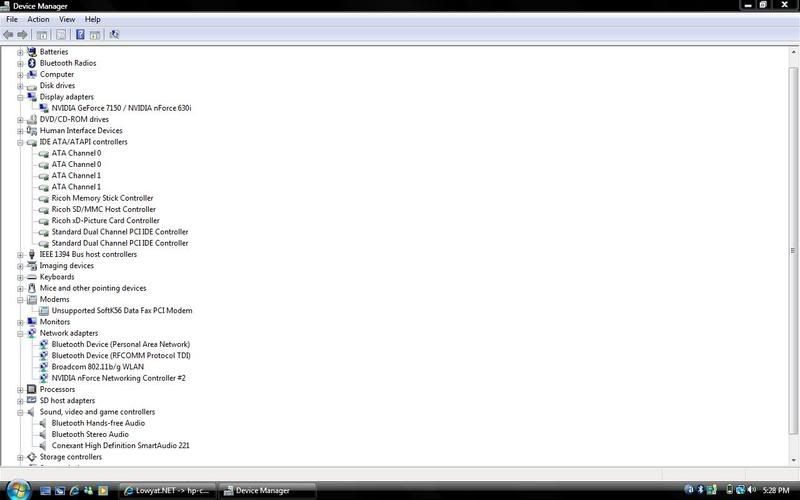
Here show up my v3751au ss for device manger and gc

» Click to show Spoiler - click again to hide... «


This post has been edited by digswell: May 1 2008, 10:02 AM
digswell
post May 1 2008, 07:53 PM

Look at all my stars!!
*******
Senior Member
2,484 posts

Joined: Nov 2007
From: Nilai,N.S.D.K
QUOTE(marlboro20s @ May 1 2008, 05:36 PM)
digswell,

here's a ss of mine.

» Click to show Spoiler - click again to hide... «


the VGA is the only thing different from yours.
the rest i've managed to installed it. thanks for the SMbus and bla bla drivers.

how about your modem device blabla? Where is it categorised after you installed it? mine i ended choosing 'microsoft unsupported softK56 data fax pci modem'...haha..at least it doesn't show the exclamation mark on it.  icon_idea.gif
*
The VGA is different....the importand thing is wether u can use the S-Video port and The VGA port or not
My dispaly properties do hv 2 display setting and the S-Video and the VGA port all work nicely
bout the moderm...is only use for fax thing using. i think is no very importand to u unless u wan to use

My another SS .....the moderm driver totally different from u

» Click to show Spoiler - click again to hide... «


This post has been edited by digswell: May 1 2008, 08:02 PM
digswell
post May 1 2008, 07:55 PM

Look at all my stars!!
*******
Senior Member
2,484 posts

Joined: Nov 2007
From: Nilai,N.S.D.K
Deleted..sorry double post

This post has been edited by digswell: May 1 2008, 07:59 PM
digswell
post May 2 2008, 09:31 AM

Look at all my stars!!
*******
Senior Member
2,484 posts

Joined: Nov 2007
From: Nilai,N.S.D.K
QUOTE(BOTAK_WAI @ May 2 2008, 12:54 AM)
can u teach me how to enable S-Video?thx
*
Using the S-Video-out jack
The 7-pin S-Video-out jack connects the computer to an optional S-Video device such as a television,
VCR, camcorder, overhead projector, or video capture card.
To transmit video signals through the S-Video-out jack, you need an S-Video cable, available from most
electronics retailers. If you are combining audio and video functions, such as playing a DVD movie on
your computer and displaying it on your television, you also need a standard audio cable, available from
most electronics retailers, to connect to the headphone jack.
The computer can support one S-Video device connected to the S-Video-out jack, while simultaneously
supporting an image on the computer display or on any other supported external display.

NOTE: The S-Video connection provides a higher quality image than a composite-video connection.

To connect a video device to the S-Video-out jack:
1. Plug one end of the S-Video cable into the S-Video-out jack on the computer.

NOTE: If the S-Video-out jack on the computer is not accessible because the computer is docked
in an optional docking device, connect the S-Video cable to the S-Video-out jack on the docking
device.

2. Plug the other end of the cable into the video device, as instructed in the user guide included with
the device.

3. Press the fn+f4 keys to switch the image between display devices connected to the computer.

This post has been edited by digswell: May 2 2008, 09:34 AM

digswell
post May 2 2008, 08:17 PM

Look at all my stars!!
*******
Senior Member
2,484 posts

Joined: Nov 2007
From: Nilai,N.S.D.K
QUOTE(BOTAK_WAI @ May 2 2008, 03:29 PM)
thank you very much.

but i don't understand this
NOTE: If the S-Video-out jack on the computer is not accessible because the computer is docked
in an optional docking device, connect the S-Video cable to the S-Video-out jack on the docking
device.

btw...must use the s-video cable that 7pin to 7pin?cant use 7pin to yellow(video rca?)
*
I use 7pin to 7pin it work ....havent try with 7pin to yellow(video rca) coz i no hv converter for it.
later will try it if i hv da converter
digswell
post May 3 2008, 08:32 PM

Look at all my stars!!
*******
Senior Member
2,484 posts

Joined: Nov 2007
From: Nilai,N.S.D.K
QUOTE(hyeap1 @ May 3 2008, 08:10 PM)
anyone can share their recovery cd?
*
wat model lappy and wat os u wan??
digswell
post May 4 2008, 12:16 PM

Look at all my stars!!
*******
Senior Member
2,484 posts

Joined: Nov 2007
From: Nilai,N.S.D.K
QUOTE(junstar @ May 4 2008, 11:18 AM)
i juz bought my presario v3751au and they didn't give me any driver and i've install xp..and there is no sound,and a lot of function is not working..anybody can help me on this?thanks
*
Go and see my post at #5761
digswell
post May 4 2008, 08:38 PM

Look at all my stars!!
*******
Senior Member
2,484 posts

Joined: Nov 2007
From: Nilai,N.S.D.K
QUOTE(SiuYi @ May 4 2008, 12:18 PM)
SHOfrE3zE
sleep mode?i suggest u to choose te option to "do nothing' when u close the lid.

junstar
lazy guy..read backwards.
*
haha bout 5800 post on tis thread doh.gif ...how to read all doh.gif
maybe hv to ask bro sokdotcom to edit and add current latest model driver at 1st post hmm.gif
digswell
post May 4 2008, 10:49 PM

Look at all my stars!!
*******
Senior Member
2,484 posts

Joined: Nov 2007
From: Nilai,N.S.D.K
QUOTE(SiuYi @ May 4 2008, 10:04 PM)
digswell
he can use the search bar below but who bothers much..it shud be a new V3,not update V2.but im not free to start it..digswell.propose u lar..V3 new TS.hiaks
*
Me !! laugh.gif I still new at tis thread . hmm.gif ...maybe other forumer
I think bro BOTAK_WAI is better choice
digswell
post May 7 2008, 09:45 AM

Look at all my stars!!
*******
Senior Member
2,484 posts

Joined: Nov 2007
From: Nilai,N.S.D.K
QUOTE(calvin_ng @ May 7 2008, 09:34 AM)
been using v3222AU (AMD) no issue so far
just upgraded to 1.5GB ram... and installed Vista....

funny my idle processor running at 50% to 80% everytime....
on Vista never happen on XP......

like vista........ any ideas guys
*
u wrong....it will idle to below 5 % when u finish load windows bout 3 or 5 minutes.......disable those offline thing at control panel option ...

2 Pages  1 2 >Top
Topic ClosedOptions
 

Change to:
| Lo-Fi Version
0.1201sec    0.61    7 queries    GZIP Disabled
Time is now: 19th December 2025 - 03:53 PM