Welcome Guest ( Log In | Register )

84 Pages « < 41 42 43 44 45 > » Bottom

Outline · [ Standard ] · Linear+

 Huawei Honor 7 Official Thread v2, still very unfair for other phone!

views
     
ideaplus
post Sep 7 2016, 08:23 AM

Enthusiast
*****
Junior Member
919 posts

Joined: Nov 2014
QUOTE(fiezwan @ Sep 6 2016, 02:26 PM)
So far, this is the best rom ever (marshmallow) for me. with EMUI 4.1 + best kernel from digigoon + multi screen works perfect with any application + call recorder + camera + and so many more features.
Give it a try.
*
How about fast charging? Working fine?

Probably take my wife H7 and test, since her warranty is until Oct/16
fiezwan
post Sep 7 2016, 09:30 AM

Getting Started
**
Junior Member
217 posts

Joined: Oct 2007


QUOTE(ideaplus @ Sep 7 2016, 08:23 AM)
How about fast charging? Working fine?

Probably take my wife H7 and test, since her warranty is until Oct/16
*
Fast charging working well too.
Slow battery drain.
Thanks for the digigoon kernel.
Right now, even if i'm on another rom or stock rom, i will still flash this kernel. no words to describe it. laugh.gif
asrulz
post Sep 7 2016, 09:32 AM

Casual
***
Junior Member
475 posts

Joined: Jan 2003
From: Klang


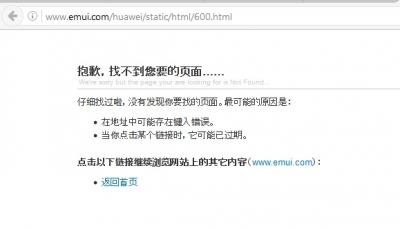
I cant get the bootloader unlock code from emui.huawei.com ..the page is not found (for unlock code) ..

This post has been edited by asrulz: Sep 7 2016, 09:33 AM
fiezwan
post Sep 7 2016, 10:01 AM

Getting Started
**
Junior Member
217 posts

Joined: Oct 2007


QUOTE(asrulz @ Sep 7 2016, 09:32 AM)
I cant get the bootloader unlock code from emui.huawei.com ..the page is not found (for unlock code) ..
*
Not sure if you had refer to this link before (guide to unlock your bootloader)
https://www.gizdev.com/guide-to-unlock-boot...huawei-honor-7/
asrulz
post Sep 7 2016, 10:32 AM

Casual
***
Junior Member
475 posts

Joined: Jan 2003
From: Klang


QUOTE(fiezwan @ Sep 7 2016, 10:01 AM)
Not sure if you had refer to this link before (guide to unlock your bootloader)
https://www.gizdev.com/guide-to-unlock-boot...huawei-honor-7/
*
The problem is when I go to Huawei Unlock Page ..it return with this page (as in the image).


Attached thumbnail(s)
Attached Image
asrulz
post Sep 7 2016, 10:37 AM

Casual
***
Junior Member
475 posts

Joined: Jan 2003
From: Klang


Anybody has try to install these EMUI 4.1 apps in current EMUI 4.0 ?

https://www.gizdev.com/download-huawei-emui...id-6-0-devices/
fiezwan
post Sep 7 2016, 10:57 AM

Getting Started
**
Junior Member
217 posts

Joined: Oct 2007


QUOTE(asrulz @ Sep 7 2016, 10:32 AM)
The problem is when I go to Huawei Unlock Page ..it return with this page (as in the image).
*
Have you tried different browser? Or are you in office with behind a proxy / firewall settings?
Mine work just fine.


Attached thumbnail(s)
Attached Image
Dyson Jin
post Sep 7 2016, 01:23 PM

Enthusiast
*****
Senior Member
960 posts

Joined: Mar 2013


updated to latest b340 using OTA and factory reset done

Pros
-Smooth
-Camera improved a bit
-More user friendly
-Wifi better than b130
-Android M Doze is working as expected..awake in the morning..only 1% of battery gone.

Cons
-Charging became much slower 20% to 100% took me 2hour while on b130,took me 1hour 45minits.
-Battery manager is confusing,have to press hardware under consumption level to view my SOT.Prefer b130 where i can straightforward see how much is my battery stat and SOT.
-Fingerprint and double touch to awake is much slower due to the animation.
-Whatapps notification bug..To fix,
Put performance power plan and reboot. Remember to lock whatapps under protected apps and it works!!

Other than that..it good to use...

This post has been edited by Dyson Jin: Sep 7 2016, 11:00 PM
ideaplus
post Sep 7 2016, 01:44 PM

Enthusiast
*****
Junior Member
919 posts

Joined: Nov 2014
QUOTE(fiezwan @ Sep 7 2016, 09:30 AM)
Fast charging working well too.
Slow battery drain.
Thanks for the digigoon kernel.
Right now, even if i'm on another rom or stock rom, i will still flash this kernel. no words to describe it.  laugh.gif
*
I have quite long time didn't flash phone anymore. May i check the steps with you?

1. Get the unlock code from Huawei
2. Install TWRP
3. Root the phone
4. Flash the rom from 1.0 > 1.1 > 1.1b
5. OTA to 2.0

Btw, where to enter the unlock code? confused.gif
s30ckf
post Sep 7 2016, 03:14 PM

Regular
******
Senior Member
1,093 posts

Joined: Jan 2003
QUOTE(Dyson Jin @ Sep 7 2016, 01:23 PM)
updated to latest b340 using OTA and factory reset done

Pros
-Smooth
-Camera improved a bit
-More user friendly
-Wifi better than b130
-Android M Doze is working as expected..awake in the morning..only 1% of battery gone.

Cons
-Charging became much slower 20% to 100% took me 2hour while on b130,took me 1hour 45minits.
-Battery manager is confusing,have to press hardware under consumption level to view my SOT.Prefer b130 where i can straightforward see how much is my battery stat and SOT.
-Fingerprint and double touch to awake is much slower due to the animation.

Other than that..it good to use...
*


How about WhatsApp notification?
fiezwan
post Sep 7 2016, 03:28 PM

Getting Started
**
Junior Member
217 posts

Joined: Oct 2007


QUOTE(ideaplus @ Sep 7 2016, 01:44 PM)
I have quite long time didn't flash phone anymore. May i check the steps with you?

1. Get the unlock code from Huawei
2. Install TWRP
3. Root the phone
4. Flash the rom from 1.0 > 1.1 > 1.1b
5. OTA to 2.0

Btw, where to enter the unlock code? confused.gif
*
all your steps is correct.
flash the original rom first. let it boot up + configure your gmail acc etc. when that part done, proceed to 1.1 - let it boot up. When it's done, proceed to 1.1b.
to get the OTA 2.0, you need to launch OTA Updater. Then let it will prompt for your action to proceed with the 2.0 version.

* unlock code? That will be generated by Huawei website. when you entered all your serial number + IMEI = then you will get the code from them. I would advise you to write it down or get a print screen of that code (just incase..)
The lock code will be needed when you use Multi-Tool to root it

Good luck!

This post has been edited by fiezwan: Sep 7 2016, 03:54 PM

Dyson Jin
post Sep 7 2016, 10:40 PM

Enthusiast
*****
Senior Member
960 posts

Joined: Mar 2013


QUOTE(s30ckf @ Sep 7 2016, 03:14 PM)
How about WhatsApp notification?
*
no notification..no led light blinking..no sound..
i lock whatapps on recent apps,i on priority display,allow notification,, protected apps andwhatapps notifications on.
still no notification.. sad.gif

---Update---

switch to performance power plan and reboot phone..
it works!! Remember to lock whatapps under protected apps..
Thanks to 1 of user here for teaching the way..


This post has been edited by Dyson Jin: Sep 7 2016, 10:58 PM
jen1017
post Sep 7 2016, 11:28 PM

New Member
*
Junior Member
5 posts

Joined: May 2013


QUOTE(ngmunwai @ Sep 4 2016, 08:16 PM)
U using celcom? Before i update alrdy realised the problem
*
No. Im digi user. Need to restart the phone to get 4g. But after 1 or 2 hours. No more 4 g again. Having this problem only after the recent update.
s30ckf
post Sep 8 2016, 01:08 AM

Regular
******
Senior Member
1,093 posts

Joined: Jan 2003
QUOTE(Dyson Jin @ Sep 7 2016, 10:40 PM)
no notification..no led light blinking..no sound..
i lock whatapps on recent apps,i on priority display,allow notification,, protected apps andwhatapps notifications on.
still no notification.. sad.gif

---Update---

switch to performance power plan and reboot phone..
it works!! Remember to lock whatapps under protected apps..
Thanks to 1 of user here for teaching the way..
*
After reboot it will back to normal, but the bug will come again for certain user, I am one of them... do notify here if your bug is reoccur...
swgiant
post Sep 8 2016, 09:14 AM

Extravagance RUINS Your Life !!!
******
Senior Member
1,414 posts

Joined: Jan 2003
From: 47300


QUOTE(fiezwan @ Sep 7 2016, 03:28 PM)
all your steps is correct.
flash the original rom first. let it boot up + configure your gmail acc etc. when that part done, proceed to 1.1 - let it boot up. When it's done, proceed to 1.1b.
to get the OTA 2.0, you need to launch OTA Updater. Then let it will prompt for your action to proceed with the 2.0 version.

* unlock code? That will be generated by Huawei website. when you entered all your serial number + IMEI = then you will get the code from them. I would advise you to write it down or get a print screen of that code (just incase..)
The lock code will be needed when you use Multi-Tool to root it

Good luck!
*
the captcha code image link keeps broken! can flash the custom rom from b340 ?
ideaplus
post Sep 8 2016, 09:44 AM

Enthusiast
*****
Junior Member
919 posts

Joined: Nov 2014
QUOTE(fiezwan @ Sep 7 2016, 03:28 PM)
all your steps is correct.
flash the original rom first. let it boot up + configure your gmail acc etc. when that part done, proceed to 1.1 - let it boot up. When it's done, proceed to 1.1b.
to get the OTA 2.0, you need to launch OTA Updater. Then let it will prompt for your action to proceed with the 2.0 version.

* unlock code? That will be generated by Huawei website. when you entered all your serial number + IMEI = then you will get the code from them. I would advise you to write it down or get a print screen of that code (just incase..)
The lock code will be needed when you use Multi-Tool to root it

Good luck!
*
Hi bro, do you have the link of TWRP 3.0.2?
mytaffeta
post Sep 8 2016, 11:42 AM

Regular
******
Senior Member
1,326 posts

Joined: Dec 2010


so anyone manage to fix the wassap issue?
fiezwan
post Sep 8 2016, 05:46 PM

Getting Started
**
Junior Member
217 posts

Joined: Oct 2007


QUOTE(ideaplus @ Sep 8 2016, 09:44 AM)
Hi bro, do you have the link of TWRP 3.0.2?
*
Hi. Sorry. No, I do not have it because I use SRK Tools - to install the TWRP n flash it over. It's a build-in (downloaded) from the tool to your phone.

Maybe this link would help you to point to the direct source
http://forum.xda-developers.com/honor-7/de...-t3366622/page9
EugeneLai
post Sep 8 2016, 08:03 PM

New Member
*
Junior Member
47 posts

Joined: Nov 2014
Last week the WhatsApp notification no problem. This week problem again mad.gif bangwall.gif vmad.gif

Apparently my friend Samsung S2 also facing WhatsApp problem. Need to launch only message come in. A7 no problem. I thought is WhatsApp server but this week bug me again ranting.gif
fkinmeng
post Sep 8 2016, 10:43 PM

Look at all my stars!!
*******
Senior Member
6,373 posts

Joined: May 2007
QUOTE(EugeneLai @ Sep 8 2016, 08:03 PM)
Last week the WhatsApp notification no problem. This week problem again  mad.gif  bangwall.gif  vmad.gif

Apparently my friend Samsung S2 also facing WhatsApp problem. Need to launch only message come in. A7 no problem. I thought is WhatsApp server but this week bug me again  ranting.gif
*
old samsung phones memang got whatsapp notification issue.

anyway, try to notice when the whatsapp bug happen on your honor 7, im starting to trace a pattern. for mine, it's when i mute my phone and later turn on the ringtone again. there are other times as well, but still tracing the pattern.

84 Pages « < 41 42 43 44 45 > » Top
 

Change to:
| Lo-Fi Version
0.0274sec    0.90    6 queries    GZIP Disabled
Time is now: 15th December 2025 - 08:48 AM