Welcome Guest ( Log In | Register )

27 Pages « < 15 16 17 18 19 > » Bottom

Outline · [ Standard ] · Linear+

 Hisense TVs, Discussion & opinion

views
     
alvinddm
post Sep 7 2020, 07:32 PM

Casual
***
Junior Member
443 posts

Joined: Apr 2008


QUOTE(Silfer @ Sep 6 2020, 10:42 PM)
want to ask, those that bought 65", what is your viewing distance?
I know those online recommended viewing distance, but want to know real life scenario how does it pan out.
*
About 10ft.
Another point to consider is the viewing angle.
It's best to be seated and looking straight to the center of the TV. Try not to place the TV too high or too low.
andrekua2
post Sep 10 2020, 08:14 PM

10k Club
********
All Stars
13,476 posts

Joined: Jan 2012


QUOTE(alvinddm @ Sep 4 2020, 08:09 PM)
Got myself the 65A7400F. Noticed artifacts during dark scenes. Not sure if it's codec compression issue or input signal issue. Still trying to find out root cause.
*
Bro,

I just saw a hdtvtest video and found something interesting. Apparently those artifacts can be eliminated. I did a test and found that it helps.

Just goto motion and select custom. You can try and set yout preferred blur reduction setting but leave judder reduction to 0 or 1. Personally I feel 1 is still ok, can still see very minimal artifact occasionally but a 0 setting would totally eliminate the artifact.

Personally I think I would accept the slight ghosting over artifacts. I can leave it at 1 if I wanted since it was minimal but improve the fluidity (reduce ghosting).

Update:

Opps, you mentioned dark scene... But I didnt test dark scene. I only tested sports anime and natural effect like hair blown by wind. Could have no effect on your case.

This post has been edited by andrekua2: Sep 10 2020, 08:17 PM
alvinddm
post Sep 10 2020, 10:14 PM

Casual
***
Junior Member
443 posts

Joined: Apr 2008


QUOTE(andrekua2 @ Sep 10 2020, 08:14 PM)
Bro,

I just saw a hdtvtest video and found something interesting. Apparently those artifacts can be eliminated. I did a test and found that it helps.

Just goto motion and select custom. You can try and set yout preferred blur reduction setting but leave judder reduction to 0 or 1. Personally I feel 1 is still ok, can still see very minimal artifact occasionally but a 0 setting would totally eliminate the artifact.

Personally I think I would accept the slight ghosting over artifacts. I can leave it at 1 if I wanted since it was minimal but improve the fluidity (reduce ghosting).

Update:

Opps, you mentioned dark scene... But I didnt test dark scene. I only tested sports anime and natural effect like hair blown by wind. Could have no effect on your case.
*
Thanks for your feedback. Will still try and see if it helps.
On another note, will there be any system updates for this hisense atv? Has older models received any updates?
Silfer
post Sep 15 2020, 12:45 AM

Regular
******
Senior Member
1,053 posts

Joined: Oct 2010
From: meow meow city / selangor
My 657400F arrived. Will try in depth soon.
alvinddm
post Sep 15 2020, 06:48 PM

Casual
***
Junior Member
443 posts

Joined: Apr 2008


Enjoy your new TV.
Good timing, tomorrow holiday can test kaw kaw.

Btw, I've raised a service request regarding my case and a hisense tech called and showed me a video of similar problem on another brand TV. Apparently, it's a common issue due to astro broadcasting. Too much compression since their launch of 4k.
stasio
post Sep 17 2020, 04:20 PM

10k Club
********
All Stars
18,504 posts

Joined: Oct 2007
From: P.Jaya
Seems models price go up on Lazada/Shopee .

Warranty period also changed.....

Retail: 3 Years General Warranty
Online Purchase: 2 Years General Warranty

Silfer
post Sep 17 2020, 08:46 PM

Regular
******
Senior Member
1,053 posts

Joined: Oct 2010
From: meow meow city / selangor
QUOTE(stasio @ Sep 17 2020, 04:20 PM)
Seems models price go up on Lazada/Shopee .

Warranty period also changed.....

    Retail: 3 Years General Warranty
    Online Purchase: 2 Years General Warranty
*
Wow.. it's true..
andrekua2
post Sep 18 2020, 08:29 AM

10k Club
********
All Stars
13,476 posts

Joined: Jan 2012


QUOTE(stasio @ Sep 17 2020, 04:20 PM)
Seems models price go up on Lazada/Shopee .

Warranty period also changed.....

    Retail: 3 Years General Warranty
    Online Purchase: 2 Years General Warranty
*
I wonder how they will differentiate it. I don't even know if mine is 2 or 3 years then. When I bought it, onking website showed 3 years.

If I goto hisense warranty registration page, it has a page that stated all av product is 2 years. Weird.
sw1314
post Sep 20 2020, 05:08 PM

Casual
***
Junior Member
312 posts

Joined: Aug 2012
Hi all,any news for h8g?
sw1314
post Sep 25 2020, 12:16 AM

Casual
***
Junior Member
312 posts

Joined: Aug 2012
QUOTE(Silfer @ Sep 15 2020, 12:45 AM)
My 657400F arrived. Will try in depth soon.
*
how your tv ya? great?
Silfer
post Sep 25 2020, 08:16 AM

Regular
******
Senior Member
1,053 posts

Joined: Oct 2010
From: meow meow city / selangor
QUOTE(sw1314 @ Sep 25 2020, 12:16 AM)
how your tv ya? great?
*
So far so good. No complains so far. Android tv is smooth. Used kodi also ok. I think the internal speaker is ok for normal usage, definitely can be better once pair up with bookshelf or sound bar. No chance to try dts virtual x. Netflix can support Dolby vision on this tv. Color accuracy no comment cause I don't know how to calibrate.
stasio
post Sep 25 2020, 12:16 PM

10k Club
********
All Stars
18,504 posts

Joined: Oct 2007
From: P.Jaya
QUOTE(Silfer @ Sep 25 2020, 08:16 AM)
So far so good. No complains so far. Android tv is smooth. Used kodi also ok. I think the internal speaker is ok for normal usage, definitely can be better once pair up with bookshelf or sound bar. No chance to try dts virtual x. Netflix can support Dolby vision on this tv. Color accuracy no comment cause I don't know how to calibrate.
*
When is HDR content let say in YouTube, got any info on screen that is Dolby Vision, HDR10 or HLG ?
Or must go in setting about pic info ?

This post has been edited by stasio: Sep 25 2020, 12:16 PM
Silfer
post Sep 25 2020, 12:55 PM

Regular
******
Senior Member
1,053 posts

Joined: Oct 2010
From: meow meow city / selangor
QUOTE(stasio @ Sep 25 2020, 12:16 PM)
When is HDR content let say in YouTube, got any info on screen that is Dolby Vision, HDR10 or HLG ?
Or must go in setting about pic info ?
*
Can send link for youtube hdr content? So I can try it out and let you know tonight.
Usually I go to the nerd info or something. Got show bt2020 though.
stasio
post Sep 25 2020, 02:55 PM

10k Club
********
All Stars
18,504 posts

Joined: Oct 2007
From: P.Jaya
QUOTE(Silfer @ Sep 25 2020, 12:55 PM)
Can send link for youtube hdr content? So I can try it out and let you know tonight.
Usually I go to the nerd info or something. Got show bt2020 though.
*
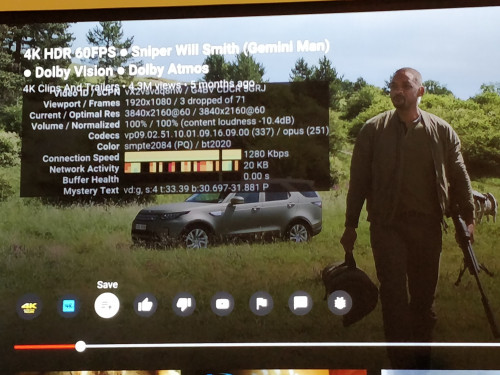
Dolby Vision
https://www.youtube.com/watch?v=vX2vsvdq8nw

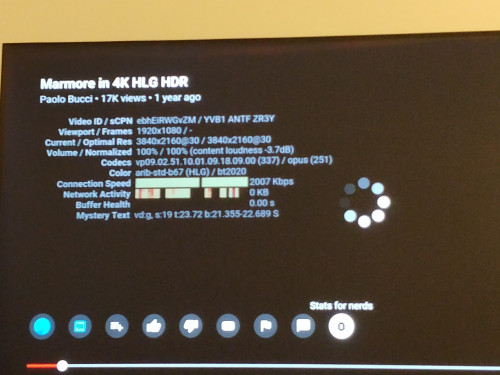
HLG
https://www.youtube.com/watch?v=ebhEiRWGvZM

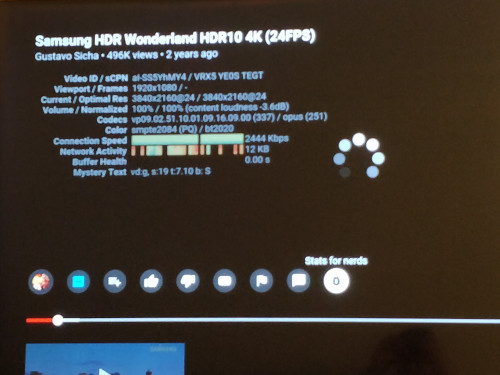
HDR10
https://www.youtube.com/watch?v=aI-SS5YhMY4

So in YT nerd is VP9.02....smpte2084 (PQ) / bt2020 ?

This post has been edited by stasio: Oct 6 2020, 05:01 AM
Silfer
post Sep 25 2020, 11:34 PM

Regular
******
Senior Member
1,053 posts

Joined: Oct 2010
From: meow meow city / selangor
QUOTE(stasio @ Sep 25 2020, 02:55 PM)
user posted image
user posted image
user posted image

Looks like all can support.
Scissorshand
post Sep 25 2020, 11:55 PM

Regular
******
Senior Member
1,691 posts

Joined: Nov 2008
QUOTE(Silfer @ Sep 25 2020, 08:16 AM)
So far so good. No complains so far. Android tv is smooth. Used kodi also ok. I think the internal speaker is ok for normal usage, definitely can be better once pair up with bookshelf or sound bar. No chance to try dts virtual x. Netflix can support Dolby vision on this tv. Color accuracy no comment cause I don't know how to calibrate.
*
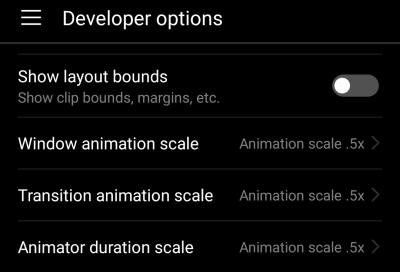
In developer setting you may try adjust to see if its more fluid and responsive

I do this on all my atv boxes


Attached thumbnail(s)
Attached Image
stasio
post Sep 26 2020, 12:25 AM

10k Club
********
All Stars
18,504 posts

Joined: Oct 2007
From: P.Jaya
QUOTE(Silfer @ Sep 25 2020, 11:34 PM)
Looks like all can support.
*
Very good.... thumbsup.gif

Except nerd in YT and Netflix title,
any info on screen that you watching in HDR (as Sony and Philips) or must press display button on remote or check in picture mode setting ?
I mean how you know the TV has detected the HDR content ,any icon on TV screen ?

Something like this:

Attached Image

user posted image

https://klgadgetguy.com/2020/09/07/hisense-...-5-reasons-buy/

This post has been edited by stasio: Sep 26 2020, 09:26 AM
Silfer
post Sep 26 2020, 08:39 AM

Regular
******
Senior Member
1,053 posts

Joined: Oct 2010
From: meow meow city / selangor
QUOTE(Scissorshand @ Sep 25 2020, 11:55 PM)
In developer setting you may try adjust to see if its more fluid and responsive

I do this on all my atv boxes
*
ooh.. similar to phone. will try tonight.

QUOTE(stasio @ Sep 26 2020, 12:25 AM)
Very good.... thumbsup.gif 

Except nerd in YT and Netflix title,
any info on screen that you watching in HDR (as Sony and Philips) or must press display button on remote or check in picture mode setting ?
I mean how you know the TV has detected the HDR content ,any icon on TV screen ?

Something like this:

Attached Image

user posted image
*
hmm.gif the only other channel im watching now is digital TV1, TV2, etc.. i think tv1 and 2 got show dolby audio on top right corner when watching there..
got any particular app then u want to see? cause i primarily watch YT and Netflix only. disney plus and amazon prime will try one day.
stasio
post Sep 26 2020, 11:09 AM

10k Club
********
All Stars
18,504 posts

Joined: Oct 2007
From: P.Jaya
QUOTE(Silfer @ Sep 26 2020, 08:39 AM)
hmm.gif the only other channel im watching now is digital TV1, TV2, etc.. i think tv1 and 2 got show dolby audio on top right corner when watching there..
got any particular app then u want to see? cause i primarily watch YT and Netflix only. disney plus and amazon prime will try one day.
*
As dolby audio show on top right screen corner,
did any HDR icon apear on top right corner when content is HDR (as pic above) ?

Edit:
If I am not mistaken in Android Setting / Accessibility ,I saw (on YouTube) column to enable this function.

This post has been edited by stasio: Sep 26 2020, 01:22 PM
Silfer
post Sep 26 2020, 01:44 PM

Regular
******
Senior Member
1,053 posts

Joined: Oct 2010
From: meow meow city / selangor
QUOTE(stasio @ Sep 26 2020, 11:09 AM)
As dolby audio show on top right screen corner,
did any HDR icon apear on top right corner when content is HDR (as pic above) ?

Edit:
If I am not mistaken in Android Setting / Accessibility ,I saw (on YouTube) column to enable this function.
*
Dolby vision logo got appear in netflix. Youtube I din see. Maybe need enable the function first. Let you know tonight.

27 Pages « < 15 16 17 18 19 > » Top
 

Change to:
| Lo-Fi Version
0.0215sec    0.70    6 queries    GZIP Disabled
Time is now: 9th December 2025 - 03:55 PM