Welcome Guest ( Log In | Register )

159 Pages « < 22 23 24 25 26 > » Bottom

Outline · [ Standard ] · Linear+

 Microsoft Windows 10 (V.2)

views
     
XeactorZ
post Aug 2 2016, 11:13 PM

♥ PandaDog ♥
*********
All Stars
31,608 posts

Joined: Aug 2010
QUOTE(horns @ Aug 2 2016, 11:04 PM)
Yeah but it's fine i already got esds that i need. However I forgot to put ei.cfg to lemme choose w10 pro just now so i ended up installing w10 home (automatically activated with key embedded in bios) the good news is that everything went very well smile.gif
Ok sorry.

1. Ramdisk is a ram-based virtual drive created with software, like softperfect ramdisk. You install the software and create a ramdisk based on your needs, then move your web browser cache folders to it.

2. 'win+r' means pressing windows key and r key at the same time. It will bring up the run dialogue.
*
oo, enjoy your anniversary update biggrin.gif
waiting 1am right now laugh.gif
horns
post Aug 3 2016, 12:39 AM

\m/
*******
Senior Member
3,038 posts

Joined: Nov 2009
QUOTE(XeactorZ @ Aug 2 2016, 11:13 PM)
oo, enjoy your anniversary update biggrin.gif
waiting 1am right now laugh.gif
*
It's very close now so you will have yours very soon smile.gif

a clean install will do; it will be automatically activated when the pc is online. Tbh w10 is getting solid after build 1511 (at least in my case)
XeactorZ
post Aug 3 2016, 12:43 AM

♥ PandaDog ♥
*********
All Stars
31,608 posts

Joined: Aug 2010
QUOTE(horns @ Aug 3 2016, 12:39 AM)
It's very close now so you will have yours very soon smile.gif

a clean install will do; it will be automatically activated when the pc is online. Tbh w10 is getting solid after build 1511 (at least in my case)
*
roughly 18 minutes
with my download speed, I think within 1 hour can finished download
and yes, I going to clean install straight away laugh.gif
horns
post Aug 3 2016, 12:50 AM

\m/
*******
Senior Member
3,038 posts

Joined: Nov 2009
QUOTE(XeactorZ @ Aug 3 2016, 12:43 AM)
roughly 18 minutes
with my download speed, I think within 1 hour can finished download
and yes, I going to clean install straight away laugh.gif
*
Sweet lol! Now i'm doing a clean install on my main rig. I have run build 14393 for some time on this one but with vm. It's time smile.gif
XeactorZ
post Aug 3 2016, 12:52 AM

♥ PandaDog ♥
*********
All Stars
31,608 posts

Joined: Aug 2010
QUOTE(horns @ Aug 3 2016, 12:50 AM)
Sweet lol! Now i'm doing a clean install on my main rig. I have run build 14393 for some time on this one but with vm. It's time smile.gif
*
but the media creation tool still showing 10586 build
waiting waiting, 8 minutes more
btw where you download the ISO ? using ESD and convert in ISO file ?
XeactorZ
post Aug 3 2016, 01:05 AM

♥ PandaDog ♥
*********
All Stars
31,608 posts

Joined: Aug 2010
*edit, after try to install then download again laugh.gif

This post has been edited by XeactorZ: Aug 3 2016, 01:08 AM
horns
post Aug 3 2016, 01:37 AM

\m/
*******
Senior Member
3,038 posts

Joined: Nov 2009
QUOTE(XeactorZ @ Aug 3 2016, 12:52 AM)
but the media creation tool still showing 10586 build
waiting waiting, 8 minutes more
btw where you download the ISO ? using ESD and convert in ISO file ?
*
I made it myself. The steps are simple:
1. Download and extract decrypt-release (http://rg-adguard.net/dl/decrypt/decrypt-release.7z);
2. Download esd (http://pastebin.com/raw/eiXxArq4); choose en-us clientcombinedsl (which contains pro, home, home single language and education editions in one esd);
3. Run administrative command prompt and navigate to decrypt-release folder;
4. Run update_keys.cmd to update cryptokey db; then copy the downloaded esd to the folder and run decrypt-decryptesd.cmd;
5. Choose 1 to make iso with install.wim (this one can do slipstreams with cu) and wait for it;
6. Format a usb stick with fat32 and extract the iso contents into the usb stick directly.

That's it hehe
XeactorZ
post Aug 3 2016, 01:44 AM

♥ PandaDog ♥
*********
All Stars
31,608 posts

Joined: Aug 2010
QUOTE(horns @ Aug 3 2016, 01:37 AM)
I made it myself. The steps are simple:
1. Download and extract decrypt-release (http://rg-adguard.net/dl/decrypt/decrypt-release.7z);
2. Download esd (http://pastebin.com/raw/eiXxArq4); choose en-us clientcombinedsl (which contains pro, home, home single language and education editions in one esd);
3. Run administrative command prompt and navigate to decrypt-release folder;
4. Run update_keys.cmd to update cryptokey db; then copy the downloaded esd to the folder and run decrypt-decryptesd.cmd;
5. Choose 1 to make iso with install.wim (this one can do slipstreams with cu) and wait for it;
6. Format a usb stick with fat32 and extract the iso contents into the usb stick directly.

That's it hehe
*
seems confusing laugh.gif
anyway I use CMD to force stop downloading via windows update
since I going to clean install + update for my desktop as well, so now downloading via media creation tool
speed quite fast, now already 54% laugh.gif
TSstasio
post Aug 3 2016, 02:06 AM

10k Club
********
All Stars
18,504 posts

Joined: Oct 2007
From: P.Jaya
Official ISO Win10_1607:

https://www.microsoft.com/en-us/software-do...d/windows10ISO/
horns
post Aug 3 2016, 02:06 AM

\m/
*******
Senior Member
3,038 posts

Joined: Nov 2009
QUOTE(XeactorZ @ Aug 3 2016, 01:44 AM)
seems confusing laugh.gif
anyway I use CMD to force stop downloading via windows update
since I going to clean install + update for my desktop as well, so now downloading via media creation tool
speed quite fast, now already 54% laugh.gif
*
nah it's simple if you go through the steps many times lol that's how i tested insider builds with only esd.

just in case people are looking for mct;

https://www.microsoft.com/en-us/software-download/windows10

horns
post Aug 3 2016, 02:11 AM

\m/
*******
Senior Member
3,038 posts

Joined: Nov 2009
QUOTE(stasio @ Aug 3 2016, 02:06 AM)
nice! downloading these also biggrin.gif
XeactorZ
post Aug 3 2016, 02:14 AM

♥ PandaDog ♥
*********
All Stars
31,608 posts

Joined: Aug 2010
QUOTE(horns @ Aug 3 2016, 02:06 AM)
nah it's simple if you go through the steps many times lol that's how i tested insider builds with only esd.

just in case people are looking for mct;

https://www.microsoft.com/en-us/software-download/windows10
*
ya, practice makes perfect
finished downloaded, making bootable usb using rufus biggrin.gif
horns
post Aug 3 2016, 02:18 AM

\m/
*******
Senior Member
3,038 posts

Joined: Nov 2009
QUOTE(XeactorZ @ Aug 3 2016, 02:14 AM)
ya, practice makes perfect
finished downloaded, making bootable usb using rufus biggrin.gif
*
nice biggrin.gif

actually you don't really need rufus if your pc has uefi support. all you need to create a bootable usb stick with w10 iso is to format the stick with fat32 and extract the contents of iso directly into it with 7zip.
TSstasio
post Aug 3 2016, 02:54 AM

10k Club
********
All Stars
18,504 posts

Joined: Oct 2007
From: P.Jaya
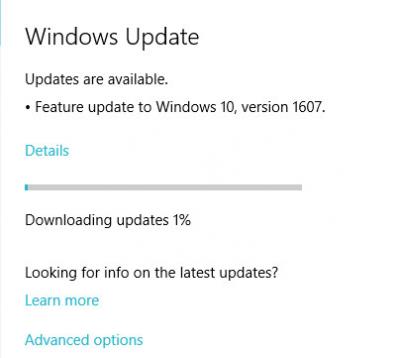
Windows update also working....

Attached Image
XeactorZ
post Aug 3 2016, 03:51 AM

♥ PandaDog ♥
*********
All Stars
31,608 posts

Joined: Aug 2010
QUOTE(horns @ Aug 3 2016, 02:18 AM)
nice biggrin.gif

actually you don't really need rufus if your pc has uefi support. all you need to create a bootable usb stick with w10 iso is to format the stick with fat32 and extract the contents of iso directly into it with 7zip.
*
really no idea laugh.gif
already get used to rufus haha

btw it took around 20 minutes to finished setup, power of ssd whistling.gif
horns
post Aug 3 2016, 09:26 AM

\m/
*******
Senior Member
3,038 posts

Joined: Nov 2009
QUOTE(stasio @ Aug 3 2016, 02:54 AM)
Windows update also working....

Attached Image
*
Haha nice man smile.gif

QUOTE(XeactorZ @ Aug 3 2016, 03:51 AM)
really no idea laugh.gif
already get used to rufus haha

btw it took around 20 minutes to finished setup, power of ssd whistling.gif
*
It's fine just to share with you an alternative smile.gif

Yes ssd with usb stick connected to usb3.x port makes clean installs fast haha; that's why it's important to have ssd as boot drive. (Value ssd is also ok) It takes a lot more of time doing the same with hdd.

edit: finished installing w10 pro 1607 on my laptop. a tip: to show os edition selection menu, you can add ei.cfg with the following contents in the 'sources' folder in your bootable w10 installation usb stick created with mct or isos downloaded from the links above.

CODE

[Channel]
Retail


the above is handy especially for laptops with key embedded in bios, and you wanna use editions that are different from stock os.

This post has been edited by horns: Aug 3 2016, 12:00 PM
XeactorZ
post Aug 3 2016, 02:16 PM

♥ PandaDog ♥
*********
All Stars
31,608 posts

Joined: Aug 2010
QUOTE(horns @ Aug 3 2016, 09:26 AM)
Haha nice man smile.gif
It's fine just to share with you an alternative smile.gif

Yes ssd with usb stick connected to usb3.x port makes clean installs fast haha; that's why it's important to have ssd as boot drive. (Value ssd is also ok) It takes a lot more of time doing the same with hdd.

edit: finished installing w10 pro 1607 on my laptop. a tip: to show os edition selection menu, you can add ei.cfg with the following contents in the 'sources' folder in your bootable w10 installation usb stick created with mct or isos downloaded from the links above.

CODE

[Channel]
Retail


the above is handy especially for laptops with key embedded in bios, and you wanna use editions that are different from stock os.
*
Oo, I just know this time 1 ISO can use to install home, pro, single language & education laugh.gif
Btw did you feel any laggy? Sometime I open .exe file to install software, I already press YES, but didn't pop out, so I restart windows explorer and open again it works rclxub.gif
horns
post Aug 3 2016, 03:00 PM

\m/
*******
Senior Member
3,038 posts

Joined: Nov 2009
QUOTE(XeactorZ @ Aug 3 2016, 02:16 PM)
Oo, I just know this time 1 ISO can use to install home, pro, single language & education laugh.gif
Btw did you feel any laggy? Sometime I open .exe file to install software, I already press YES, but didn't pop out, so I restart windows explorer and open again it works rclxub.gif
*
Yes i first thought it's the normal multi-edition iso (pro, home only) too

Yes i had some lags after first booted into desktop. The laggy part was when i didn't install drivers. (But it's not what you described; just not smooth when i navigated desktop) After drivers were installed, no more issues. (Didn't pay attention which one that stopped the lag)
SUSg104
post Aug 3 2016, 03:18 PM

On my way
****
Senior Member
657 posts

Joined: Mar 2016
still haven't receive any updates yet. doh.gif
XeactorZ
post Aug 3 2016, 03:27 PM

♥ PandaDog ♥
*********
All Stars
31,608 posts

Joined: Aug 2010
QUOTE(horns @ Aug 3 2016, 03:00 PM)
Yes i first thought it's the normal multi-edition iso (pro, home only) too

Yes i had some lags after first booted into desktop. The laggy part was when i didn't install drivers. (But it's not what you described; just not smooth when i navigated desktop) After drivers were installed, no more issues. (Didn't pay attention which one that stopped the lag)
*
No idea is it due to I downloading windows update
I already install intel & nvidia graphic driver, later try again smile.gif

159 Pages « < 22 23 24 25 26 > » Top
 

Change to:
| Lo-Fi Version
0.0284sec    0.75    6 queries    GZIP Disabled
Time is now: 12th December 2025 - 10:11 PM