Outline ·
[ Standard ] ·
Linear+
Microsoft Windows 10 (V.2)
|
XeactorZ
|
 Jun 18 2021, 12:34 AM Jun 18 2021, 12:34 AM
|

|
QUOTE(Andrewtst @ Jun 17 2021, 11:49 PM) I just install the Leak Windows 11 in VMware. I like it.  Start Menu  Widget  Multiple Desktop & Recent Apps (my photos is erase in this screenshot)  Misc Apps & Search (email is erase in this screenshot)  Multiple Way to Resize Apps  No More Smaller Taskbar & Ability to add Others Apps in Pen  Windows 11 in Dark Mode  lol continue wait for official release I believe Microsoft will follow Apple allow user to free upgrade to 11 |
|
|
|
|
|
Andrewtst
|
Jun 18 2021, 12:36 AM
|
|
|
QUOTE(XeactorZ @ Jun 18 2021, 12:34 AM) lol continue wait for official release I believe Microsoft will follow Apple allow user to free upgrade to 11 I hope in final release update is free and I wished it can be release by this year. Currently none Genuine key is working for this leak version. I need to activate it using KMS tools. Haha! |
|
|
|
|
|
xxboxx
|
Jun 18 2021, 01:02 AM
|
|
|
QUOTE(Andrewtst @ Jun 17 2021, 11:49 PM) I just install the Leak Windows 11 in VMware. I like it. » Click to show Spoiler - click again to hide... « Start Menu Widget Multiple Desktop & Recent Apps (my photos is erase in this screenshot) Misc Apps & Search (email is erase in this screenshot) Multiple Way to Resize Apps No More Smaller Taskbar & Ability to add Others Apps in Pen Windows 11 in Dark Mode Nice. I just saw video from LTT, it seems to be for virtual machine instead of direct install. How do you feel the Start button keep changing place depending on how many programs running? If it was fixed in middle I think it would be better?  |
|
|
|
|
|
Andrewtst
|
Jun 18 2021, 01:09 AM
|
|
|
QUOTE(xxboxx @ Jun 18 2021, 01:02 AM) Nice. I just saw video from LTT, it seems to be for virtual machine instead of direct install. How do you feel the Start button keep changing place depending on how many programs running? If it was fixed in middle I think it would be better? Ya, the easier way now was install at Virtual Machine. I read can install at actual but more step need to do, anyway this is Beta and it not going to install as actual for me. Haha! I think the Start Menu should be on center, this will prevent it keep changing place when added more apps, anyway you still got option put back to Left side and this can prevent it keep changing place. I actually quite like the Start Menu at Center, look nice but at beginning you will always want to move your mouse to left as we already get use to left for so long time already. Haha! This post has been edited by Andrewtst: Jun 18 2021, 01:18 AM |
|
|
|
|
|
xxboxx
|
Jun 18 2021, 01:19 AM
|
|
|
QUOTE(Andrewtst @ Jun 18 2021, 01:09 AM) Ya, the easier way now was install at Virtual Machine. I read can install at actual but more step need to do, anyway this is Beta and it not going to install as actual for me. Haha! The Start Menu is not floating around, you can only set at Center or back to classic way on Left. I actually quite like the Start Menu at Center, look nice but at beginning you will always want to move your mouse to left as we already get use to left for so long time already. Haha! When at center it still will move place right when open many programs? I guess still better than at most left, have to travel far if use ultra wide monitor. The pinned on Start looks limited, can't pin much programs. I got like 40 programs pinned on my Start.  I like Win 10 Start where it can drag to expand so that can show more pinned programs. My Start almost reach middle of screen. |
|
|
|
|
|
XeactorZ
|
Jun 18 2021, 01:29 AM
|
|
|
QUOTE(Andrewtst @ Jun 18 2021, 12:36 AM) I hope in final release update is free and I wished it can be release by this year. Currently none Genuine key is working for this leak version. I need to activate it using KMS tools. Haha! Hopefully by Q3 or 4  Lol why need to activate as you run it on VM? |
|
|
|
|
|
Andrewtst
|
Jun 18 2021, 01:29 AM
|
|
|
QUOTE(xxboxx @ Jun 18 2021, 01:19 AM) When at center it still will move place right when open many programs? I guess still better than at most left, have to travel far if use ultra wide monitor. The pinned on Start looks limited, can't pin much programs. I got like 40 programs pinned on my Start. I like Win 10 Start where it can drag to expand so that can show more pinned programs. My Start almost reach middle of screen. Ya the Start Menu is now simplified, you can pin a lot but then you need to continue scroll down. Also cannot make folder to expand apps inside like you said, I hope this get implement in Final. This post has been edited by Andrewtst: Jun 18 2021, 01:32 AM |
|
|
|
|
|
Andrewtst
|
Jun 18 2021, 01:36 AM
|
|
|
QUOTE(XeactorZ @ Jun 18 2021, 01:29 AM) Hopefully by Q3 or 4 Lol why need to activate as you run it on VM? Without activation, cannot customize, for example change wallpaper and change to dark mode. I want to see how it looks on Dark Mode. Haha! |
|
|
|
|
|
Andrewtst
|
Jun 18 2021, 10:56 AM
|
|
|
Windows 11 Wallpaper really nice! Using it now on my Windows 10 PC also. Haha!  |
|
|
|
|
|
XeactorZ
|
Jun 18 2021, 02:42 PM
|
|
|
QUOTE(Andrewtst @ Jun 18 2021, 01:36 AM) Without activation, cannot customize, for example change wallpaper and change to dark mode. I want to see how it looks on Dark Mode. Haha! No wonder Next week stay tune for the announcement |
|
|
|
|
|
Andrewtst
|
Jun 18 2021, 04:14 PM
|
|
|
QUOTE(XeactorZ @ Jun 18 2021, 02:42 PM) No wonder Next week stay tune for the announcement Haha! Yaya, wished can seen more new design. |
|
|
|
|
|
TSstasio
|
Jun 19 2021, 07:48 AM
|
|
|
|
|
|
|
|
|
Andrewtst
|
Jun 20 2021, 11:15 AM
|
|
|
Bored with Windows 11 Wallpaper. Today be animation. 😂 The PC  The Laptop  This post has been edited by Andrewtst: Jun 20 2021, 12:42 PM This post has been edited by Andrewtst: Jun 20 2021, 12:42 PM |
|
|
|
|
|
PJng
|
Jun 20 2021, 02:25 PM
|
|
|
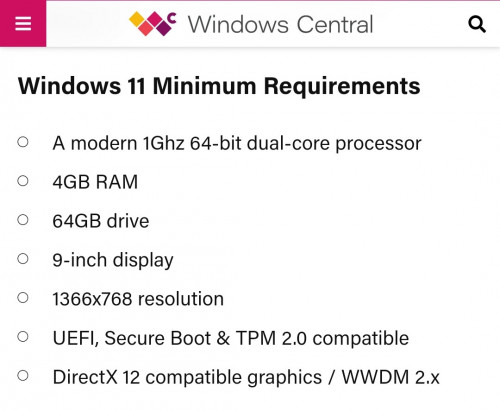
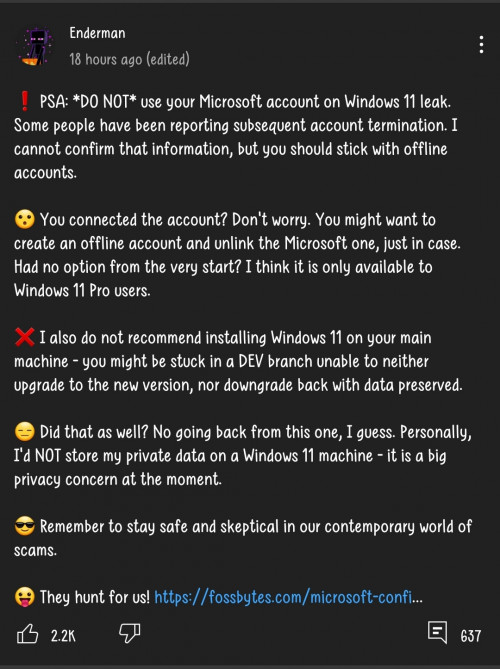 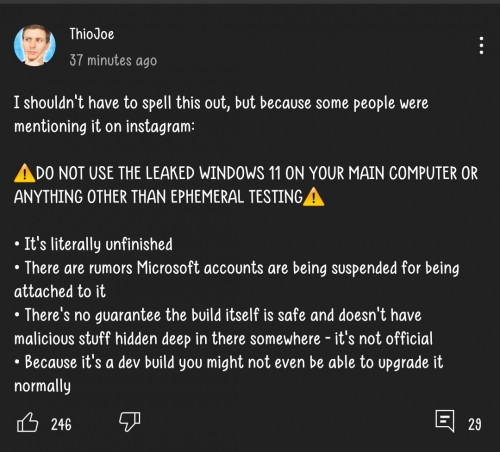 Is it a risk? I don found any site mention it Btw my pc cannot use windows 11 if required UEFI and TPM 2.0, year 2012 pc still BIOS |
|
|
|
|
|
KCY3701
|
Jun 21 2021, 08:41 PM
|
|
|
QUOTE(PJng @ Jun 20 2021, 02:25 PM) Is it a risk? I don found any site mention it Btw my pc cannot use windows 11 if required UEFI and TPM 2.0, year 2012 pc still BIOS Some say it's just fear-mongering and there's no such ban. Some say they got banned because they are logged in using non-Windows insider accounts. Some even say it's because they installed a modified ISO. Currently, I have Windows 11 Pro installed on my laptop, upgraded using ISO from Windows 10 Pro. No ban whatsoever. It activates automatically for me. If anyone is looking for an ISO on the internet, make sure the MD5 matches the one below: 179BFE07F7050093EE595DDD85A30201 |
|
|
|
|
|
PJng
|
Jun 24 2021, 11:46 PM
|
|
|
|
|
|
|
|
|
VeeJay
|
Jun 25 2021, 01:21 AM
|
|
|
Reposting here as well...for the record Good read here...check it out https://www.republicworld.com/technology-ne...tion-error.html
QUOTE This PC can't run Windows 11 error - What to do?
As stated earlier, the error might occur due to two reasons. Firstly, the Secure Boot feature in the BIOS setting might be disabled, leading to the error. Secondly, the TPM 2.0 shall be enabled, which is one of the Windows 11 minimum requirement. Both these errors might occur when a user is trying to mount and run the Windows 11 iso. However, there is a possible fix for both the errors. Follow the steps given below to fix 'this PC can't run Windows 11 error.'
The PC must support TPM 2.0
Check Whether TPM is enabled
Press 'Windows + R' and launch the run command
In the dialogue box that opens, type 'tpm.msc' and click on OK
A window titled 'TPM Management on Local Computer' would open
Check whether the TPM is enabled under the 'Status' section
If the message shows 'The TPM is ready for use', it is enabled and one does not need to follow the given steps
If not enabled follow the steps given below
Restart and open 'Startup Menu' through F1, F2, F10, F11, DEL or other required key
Go to the 'Security Tab'
Go to 'TPM device'
On the list available, select 'Available'
Save and restart the PC
The PC must support Secure Boot
Once the TPM is available, follow the given steps
Restart the PC and enter the 'Start Menu'
Enter 'Bios Setup'
In the menu, select 'Advanced Tab'
After that, select 'Boot Options'
Under the menu, a lot of boot options would be available
Locate 'Secure Boot' and enable it
Click on save and exit
Boot the system and enter 'Start Menu' again
Manually select the drive which has Windows 11 download in 'Boot Device Option'
Instal Windows 11 manually from the Windows 11 iso
|
|
|
|
|
|
Andrewtst
|
Jun 25 2021, 01:11 PM
|
|
|
Ya, Microsoft really make TPM 2.0 is minimum requirement! My PC only show support after I enable fTPM at Bios!!! Off course if current hack still working and that hack only work from installing from ISO image with one file from Windows 10 ISO to prevent check of TPM. PC Health Check for Windows 11 requirement - https://mspoweruser.com/microsoft-windows-p...k-windows-11-2/ https://www.microsoft.com/en-us/windows/win...ows_app_omc_win https://www.microsoft.com/en-us/windows/win...ows_app_omc_win Check your PC Windows Security is another option to know TPM 2.0 is support or not.  |
|
|
|
|
|
tenchi0205
|
Jun 25 2021, 02:46 PM
|
|
|
QUOTE(Andrewtst @ Jun 25 2021, 01:11 PM) Ya, Microsoft really make TPM 2.0 is minimum requirement! My PC only show support after I enable fTPM at Bios!!! Off course if current hack still working and that hack only work from installing from ISO image with one file from Windows 10 ISO to prevent check of TPM. PC Health Check for Windows 11 requirement - https://mspoweruser.com/microsoft-windows-p...k-windows-11-2/https://www.microsoft.com/en-us/windows/win...ows_app_omc_winCheck your PC Windows Security is another option to know TPM 2.0 is support or not. 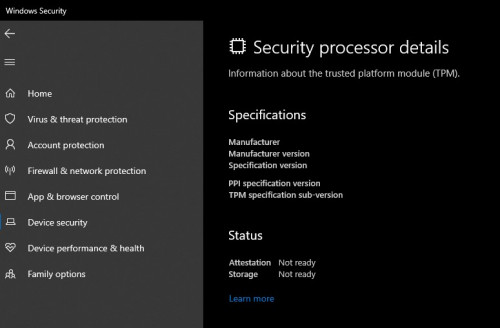 So I can said bye bye to windows 11 |
|
|
|
|
|
Andrewtst
|
Jun 25 2021, 04:13 PM
|
|
|
QUOTE(tenchi0205 @ Jun 25 2021, 02:46 PM) So I can said bye bye to windows 11 If your Bios don't have option to turn on fTPM or TPM, then probably the only way was using hack method to install. https://winaero.com/how-to-install-windows-...ithout-tpm-2-0/ |
|
|
|
|



 Quote
Quote






 0.0286sec
 0.46
0.46
 6 queries
 GZIP Disabled