QUOTE(Cosef @ Feb 7 2007, 05:38 AM)
The max speed I tried is not the cfosspeed problem, its the program that makes the connection speed reach to the max. 

Can't get what you mean 
►► Speed Up Your Internet, Extreme testing on pg25
|
|
 Feb 7 2007, 12:24 PM Feb 7 2007, 12:24 PM
|
 
Senior Member
9,257 posts Joined: Aug 2005 From: Not so sure myself Status: 1+3+3=7   
|
QUOTE(Cosef @ Feb 7 2007, 05:38 AM) The max speed I tried is not the cfosspeed problem, its the program that makes the connection speed reach to the max. Can't get what you mean |
|
|
|
|
|
Feb 7 2007, 02:43 PM
|

Senior Member
2,293 posts Joined: Feb 2006 From: Sarawak 
|
The pakage maximum speed that it can achieve.
Before I using cfosspeed, it can't do that. After I use it, i able to reach the max speed untill it gets lagg. Sry for my language problem.... |
|
|
Feb 7 2007, 02:53 PM
|

Junior Member
441 posts Joined: May 2006 From: Selangor
|
Whoa ! This is so cool! lol Where can i buy it ? LOL
|
|
|
Feb 7 2007, 06:42 PM
|

Junior Member
216 posts Joined: Feb 2006
|
There is not much improve on my line,
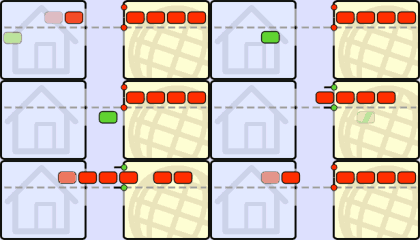
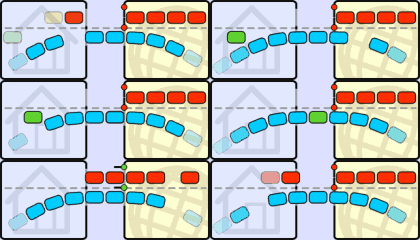
Download Speed before install cFosPeed [ MAX ]  Speed after install cFosPeed [ MAX ]  Upload Speed before install cFosPeed [ MAX ]  Speed after install cFosPeed [ MAX ]  |
|
|
Feb 7 2007, 09:11 PM
|

Senior Member
2,823 posts Joined: Jun 2006 From: West Malaysia
|
QUOTE(monky91 @ Feb 7 2007, 06:42 PM) There is not much improve on my line, This is not what cFosSpeed is for Download » Click to show Spoiler - click again to hide... « » Click to show Spoiler - click again to hide... «  Try reading my post & cosef's post on page 25, you'll get a better picture... |
|
|
Feb 7 2007, 09:57 PM
|
|
Junior Member
216 posts Joined: Feb 2006
|
QUOTE(J-Slade @ Feb 7 2007, 09:11 PM) This is not what cFosSpeed is for I know optimizing, but my mozilla firefox didn't have much improvement on the webpage, I am using fasterfox, donou whether got crash between them. Try reading my post & cosef's post on page 25, you'll get a better picture... But really, not much different, just that when TM start to block p2p download, my html download start to be fast. After installed CFOS, not much change either. |
|
|
|
|
|
Feb 8 2007, 03:13 AM
|

Junior Member
40 posts Joined: Nov 2006
|
after iinstall.
do i need to do any setting?.. |
|
|
Feb 8 2007, 12:55 PM
|

Junior Member
164 posts Joined: Jan 2003
|
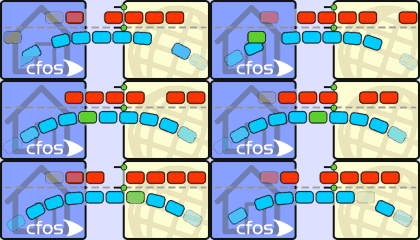
QUOTE(monky91 @ Feb 7 2007, 09:57 PM) I know optimizing, but my mozilla firefox didn't have much improvement on the webpage, I am using fasterfox, donou whether got crash between them. Well, still lots of people don't understand what cFosSpeed for.But really, not much different, just that when TM start to block p2p download, my html download start to be fast. After installed CFOS, not much change either. It's a "packets priotizier" program which means it set the the pririoty to your network traffic according to your requirement (which is already preset in the software but you can tweak it). Lots of people encountered slow or even timeout on Web browsing, Email receiving, online gaming whenever they are using P2P. Because P2P traffic had almost fully utilized their line. cFosSpeed is to set your 'important' packets to 'cut queue' so that you will get Web browsing, Online game...etc smoother. Check out the picture in http://www.cfos.de/traffic_shaping/traffic_shaping_e.htm » Click to show Spoiler - click again to hide... « Added on February 8, 2007, 1:03 pm QUOTE(omega5475 @ Feb 5 2007, 07:00 PM) cFosSpeed only works if it measures our connection by sending pings right? Then what if ICMP packets are blocked by ISP? My suggestion is to set the ping destination host in your cfosspeed.ini in the program folder. I have configured the correct rules for my router and software firewalls. Set it to the nearest hop (next after your modem/router), take your picture as example, set it to 219.93.218.177 will be fine. find the line in cfosspeed.ini which consist of "ping_dest", if don't have, put it under the param section, as ping_dest=219.93.218.177 This post has been edited by YiQi: Feb 8 2007, 01:05 PM |
|
|
Feb 8 2007, 03:29 PM
|

Senior Member
652 posts Joined: Jan 2005
|
hi J-Slade,
what did you do after you found your network connections items are missing while 'testing out" this software last time? |
|
|
Feb 8 2007, 04:16 PM
|
|
Junior Member
216 posts Joined: Feb 2006
|
QUOTE(YiQi @ Feb 8 2007, 12:55 PM) Well, still lots of people don't understand what cFosSpeed for. No, you say it will auto optimize, but I din't fell any changes at all. After I clik the "Callibrate Line" , it get even worse. I didn't use p2p program a week ago. Weird eh?It's a "packets priotizier" program which means it set the the pririoty to your network traffic according to your requirement (which is already preset in the software but you can tweak it). Lots of people encountered slow or even timeout on Web browsing, Email receiving, online gaming whenever they are using P2P. Because P2P traffic had almost fully utilized their line. cFosSpeed is to set your 'important' packets to 'cut queue' so that you will get Web browsing, Online game...etc smoother. Check out the picture in http://www.cfos.de/traffic_shaping/traffic_shaping_e.htm » Click to show Spoiler - click again to hide... « Added on February 8, 2007, 1:03 pm My suggestion is to set the ping destination host in your cfosspeed.ini in the program folder. Set it to the nearest hop (next after your modem/router), take your picture as example, set it to 219.93.218.177 will be fine. find the line in cfosspeed.ini which consist of "ping_dest", if don't have, put it under the param section, as ping_dest=219.93.218.177 Whats the problem, I donou whats the Callibrate thing... |
|
|
Feb 8 2007, 09:46 PM
|

Junior Member
228 posts Joined: Nov 2006 From: Sarawak
|
Another newbie here, jus wanna say that after installing cfos and let it run for a week, my line speed has decreased lol. usually testing at the tmnut speedometer will give 870++kbs but after installing cfos i get 650++kbs =X. Oh well, still more to learn about this software
|
|
|
Feb 8 2007, 11:17 PM
|

Senior Member
778 posts Joined: Jan 2003 From: Polysiloxanes Boulevard
|
CFosSpeed is not about getting the max connection speed for your programs, it's about getting you and your friends on a network all comfortable using the Internet.
|
|
|
Feb 9 2007, 07:20 AM
|

Senior Member
1,801 posts Joined: Sep 2006 From: Shibuya, Japan 
|
My registered version only work on reduce the online games latency and other function is totally unusable.It reduce my internet speed and p2p speed.
This post has been edited by WingKalimdor: Feb 9 2007, 07:21 AM Attached image(s)  |
|
|
|
|
|
Feb 9 2007, 02:34 PM
|
|
Senior Member
9,257 posts Joined: Aug 2005 From: Not so sure myself Status: 1+3+3=7
|
QUOTE(WingKalimdor @ Feb 9 2007, 07:20 AM) My registered version only work on reduce the online games latency and other function is totally unusable.It reduce my internet speed and p2p speed. I tried both trial and registered version, it works fine for me.How come your internet speed been reduced? Wrong settings? |
|
|
Feb 9 2007, 02:40 PM
|

Senior Member
1,429 posts Joined: Sep 2006 From: Trance MUsic
|
oh my,my speed cut down after use it!!!
|
|
|
Feb 9 2007, 02:43 PM
|
|
Senior Member
9,257 posts Joined: Aug 2005 From: Not so sure myself Status: 1+3+3=7
|
Is it because of the aftermath effect by the damaged undersea cable??
 |
|
|
Feb 9 2007, 03:48 PM
|
|
Senior Member
1,801 posts Joined: Sep 2006 From: Shibuya, Japan
|
QUOTE(eXPeri3nc3 @ Feb 9 2007, 02:43 PM) Is it because of the aftermath effect by the damaged undersea cable?? Actually when undersea cable damage my internet speed is pretty good and each video file that I download only need around 20minutes and now each file need around 2 hour. |
|
|
Feb 9 2007, 05:26 PM
|
|
Senior Member
2,293 posts Joined: Feb 2006 From: Sarawak
|
QUOTE(WingKalimdor @ Feb 9 2007, 07:20 AM) My registered version only work on reduce the online games latency and other function is totally unusable.It reduce my internet speed and p2p speed. Favour pingtime gets more stable for ping time like prevent ping spike which suddenly turns high that lags you. Indeed the bandwidth was reduced.I always choose favour ping time when theres no extreme downloading while gaming, and favour bandwidth when I surfing web and left the computer downloading stuffs. This post has been edited by Cosef: Feb 10 2007, 09:43 AM |
|
|
Feb 9 2007, 07:59 PM
|
|
Senior Member
9,257 posts Joined: Aug 2005 From: Not so sure myself Status: 1+3+3=7
|
QUOTE(Cosef @ Feb 9 2007, 05:26 PM) Favour pingtime gets more stable for ping time like prevent ping spike which suddenly turns high that lags you. Indeed the bandwidth was reduced. What the duck? I always choose favour ping time when theres no extreme downloading while gaming, and favour ping time when I surfing web and left the computer downloading stuffs.  What are you trying to say, is it favour bandwidth for downloading? |
|
|
Feb 9 2007, 09:40 PM
|
|
Senior Member
1,801 posts Joined: Sep 2006 From: Shibuya, Japan
|
QUOTE(Cosef @ Feb 9 2007, 05:26 PM) Favour pingtime gets more stable for ping time like prevent ping spike which suddenly turns high that lags you. Indeed the bandwidth was reduced. Favour??? I always choose favour ping time when theres no extreme downloading while gaming, and favour ping time when I surfing web and left the computer downloading stuffs. What I know is the latency issues in browsering the web still didn't change even I have set the TCP. This post has been edited by WingKalimdor: Feb 9 2007, 09:43 PM |
| Change to: |  0.0320sec 0.0320sec
 0.66 0.66
 6 queries 6 queries
 GZIP Disabled GZIP Disabled
Time is now: 11th December 2025 - 12:13 PM |
 Quote
Quote