Well, still lots of people don't understand what cFosSpeed for.
It's a "packets priotizier" program which means it set the the pririoty to your network traffic according to your requirement (which is already preset in the software but you can tweak it).
Lots of people encountered slow or even timeout on Web browsing, Email receiving, online gaming whenever they are using P2P. Because P2P traffic had almost fully utilized their line. cFosSpeed is to set your 'important' packets to 'cut queue' so that you will get Web browsing, Online game...etc smoother.
Check out the picture in
http://www.cfos.de/traffic_shaping/traffic_shaping_e.htm» Click to show Spoiler - click again to hide... «
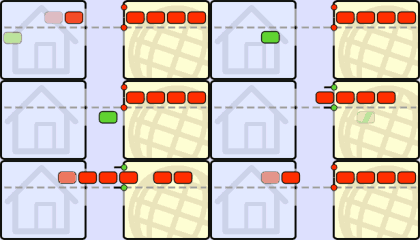 Normal data transfer:
Data reception needs to be confirmed (ACKnowledgment packets) before new data can be sent.
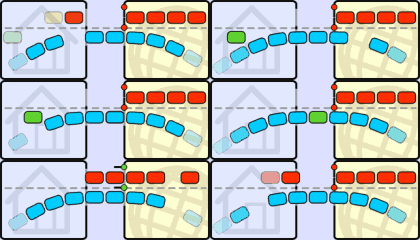 No Traffic Shaping:
ACK packets are stalled and delayed by a simultaneous upload. As a result, the download is slowed down as well.
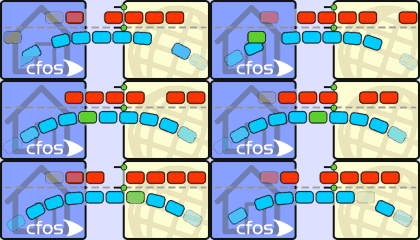 cFos Traffic Shaping:
ACK packets are prioritized in the upstream, allowing the download to continue at maximum speed.
Added on February 8, 2007, 1:03 pmMy suggestion is to set the ping destination host in your cfosspeed.ini in the program folder.
Set it to the nearest hop (next after your modem/router), take your picture as example, set it to 219.93.218.177 will be fine.
find the line in
cfosspeed.ini which consist of "ping_dest", if don't have, put it under the
param section, as
ping_dest=219.93.218.177No, you say it will auto optimize, but I din't fell any changes at all. After I clik the "Callibrate Line" , it get even worse. I didn't use p2p program a week ago. Weird eh?
Whats the problem, I donou whats the Callibrate thing...


 Feb 5 2007, 11:08 PM


 Quote
Quote


 0.0170sec
 0.58
0.58
 7 queries
 GZIP Disabled