

Later I will try connect to my tv box, if ok, meaning that something wrong with the STB box.
Thanks.
Unifi Connect UniFi HyppTV Set Top Box Through WiFi
Unifi Connect UniFi HyppTV Set Top Box Through WiFi
|
|
 Oct 28 2017, 02:40 PM Oct 28 2017, 02:40 PM
Show posts by this member only | IPv6 | Post
#181
|
 
Junior Member
137 posts Joined: Oct 2008  
|
Later I will try connect to my tv box, if ok, meaning that something wrong with the STB box.
Thanks. |
|
|
|
|
|
Oct 29 2017, 02:21 PM
|

All Stars
11,458 posts Joined: Oct 2007 From: KL
|
QUOTE(zenoon2008 @ Oct 28 2017, 02:40 PM) Later I will try connect to my tv box, if ok, meaning that something wrong with the STB box. You've tried the STB direct to the router and it works, right? Then it should be working just fine. You also tried your PC to the wall jack and it works also correct? Then the wall jacks are fine too. And if your PC works, the android TV box should work also. So it's something else that's wrong.Thanks.  |
|
|
Nov 3 2017, 12:11 AM
|

Junior Member
16 posts Joined: Jul 2009
|
Can i use my old hypptv setup box for streamyx? Currently subscribe unifi lite.
|
|
|
Nov 3 2017, 07:23 AM
|

Senior Member
3,076 posts Joined: Jan 2008
|
QUOTE(satayz88 @ Nov 3 2017, 12:11 AM) Can i use my old hypptv setup box for streamyx? Currently subscribe unifi lite. Your Unifi Lite comes with HyppTv or HyppTv Everywhere?If comes HyppTv Everywhere then cannot use . |
|
|
Nov 7 2017, 06:26 PM
Show posts by this member only | IPv6 | Post
#185
|
|
Junior Member
197 posts Joined: Jan 2007
|
I just upgrade my unifi lite to unifi advance..tm staff tell me there is 2 model for the hypptv box.one is with wifi,one is without wifi,is it true?he say depend on my luck which model I will getting.
|
|
|
Nov 8 2017, 04:16 PM
|
|
Junior Member
33 posts Joined: Oct 2017
|
QUOTE(soonwai @ Jan 16 2016, 04:11 PM) The TM router can be replaced with another UniFi compatible router, no problem. Got many to choose from, Mikrotik, DLink, TPLink, Linksys, Cisco, Asus or any router that supports VLAN. Hi All,Add-on also can but no point. Waste electricity only. I have a Mikrotik RB952Ui, tried many settings with wifi AP but my STB (Huawei EC6108V8) always cannot connect. Once I set the Wifi AP to VLAN 600, it will say error connecting or stuck at obtaining IP stage. Once I set it to VLAN 500, no problem with connection. Has anyone successfully using RouterOS to allow STB to connect via wifi? I looked at the instruction on the first post, but couldn't find port binding for Mikrotik ROS. Thanks! |
|
|
|
|
|
Nov 9 2017, 09:39 AM
Show posts by this member only | IPv6 | Post
#187
|
|
Junior Member
197 posts Joined: Jan 2007
|
QUOTE(hlchoo @ Nov 8 2017, 04:16 PM) Hi All, I try and also get the same error as yours..mine keeping ask me reenter password even i hv enter the correct passwordI have a Mikrotik RB952Ui, tried many settings with wifi AP but my STB (Huawei EC6108V8) always cannot connect. Once I set the Wifi AP to VLAN 600, it will say error connecting or stuck at obtaining IP stage. Once I set it to VLAN 500, no problem with connection. Has anyone successfully using RouterOS to allow STB to connect via wifi? I looked at the instruction on the first post, but couldn't find port binding for Mikrotik ROS. Thanks! |
|
|
Nov 9 2017, 10:50 PM
|
|
Junior Member
33 posts Joined: Oct 2017
|
QUOTE(shen1716 @ Nov 9 2017, 09:39 AM) I try and also get the same error as yours..mine keeping ask me reenter password even i hv enter the correct password I read in forum that Mikrotik router should work. Hopefully some sifus here will help us out! |
|
|
Nov 10 2017, 02:36 AM
|
|
All Stars
11,458 posts Joined: Oct 2007 From: KL
|
QUOTE(hlchoo @ Nov 8 2017, 04:16 PM) Hi All, hlchooI have a Mikrotik RB952Ui, tried many settings with wifi AP but my STB (Huawei EC6108V8) always cannot connect. Once I set the Wifi AP to VLAN 600, it will say error connecting or stuck at obtaining IP stage. Once I set it to VLAN 500, no problem with connection. Has anyone successfully using RouterOS to allow STB to connect via wifi? I looked at the instruction on the first post, but couldn't find port binding for Mikrotik ROS. Thanks! Hi, can you post in the Mikrotik thread along with your /export? I haven't tried this myself but it should work. This post has been edited by soonwai: Nov 10 2017, 09:25 AM |
|
|
Nov 10 2017, 06:46 AM
|
|
Junior Member
197 posts Joined: Jan 2007
|
I am using dlink dir 850l. I am setting vlan 600 for hypptv for ssid unifi_iptv. But when i want to connect to the ssid,it always return error with wrong password although i hv key in the correct password. Any idea? Attached thumbnail(s) 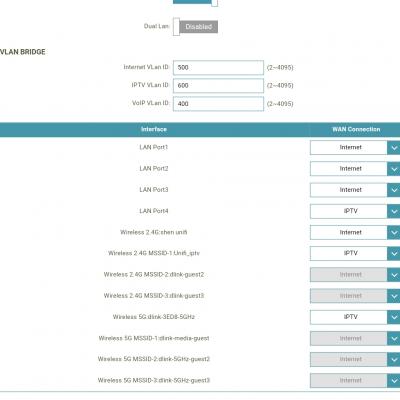
|
|
|
Nov 10 2017, 08:54 AM
|
|
All Stars
11,458 posts Joined: Oct 2007 From: KL
|
QUOTE(shen1716 @ Nov 10 2017, 06:46 AM) I am using dlink dir 850l. I am setting vlan 600 for hypptv for ssid unifi_iptv. But when i want to connect to the ssid,it always return error with wrong password although i hv key in the correct password. Any idea? Due to some technical reasons, this doesn't work on the DIR-850L. |
|
|
Nov 10 2017, 09:13 AM
|
|
Junior Member
197 posts Joined: Jan 2007
|
QUOTE(soonwai @ Nov 10 2017, 08:54 AM) Due to some technical reasons, this doesn't work on the DIR-850L. Now I set the ssid security as open.seems like can connect already.will test it when my hypptv is arrive next week. |
|
|
Nov 10 2017, 09:25 AM
|
|
All Stars
11,458 posts Joined: Oct 2007 From: KL
|
QUOTE(shen1716 @ Nov 10 2017, 09:13 AM) Now I set the ssid security as open.seems like can connect already.will test it when my hypptv is arrive next week. Please update us. Would be useful to know if it works. |
|
|
|
|
|
Nov 10 2017, 02:36 PM
|
|
Junior Member
33 posts Joined: Oct 2017
|
QUOTE(soonwai @ Nov 10 2017, 02:36 AM) hlchoo Hi thanks for reply. Somehow today I managed to get it to connect to the VAP by simply defining it as VLAN ID 600, with and without security. In the past it was never able to obtain IP address. So now I could actually connect via wifi. However, the problem is the speed is soooo slow... I can see VLAN600 data coming in at 8Mbps, but the wireless transmission only 800+kbps! Video keeps lagging and mostly can't see anything! Any way to speed this up? Thanks.Hi, can you post in the Mikrotik thread along with your /export? I haven't tried this myself but it should work. Some of the code related to the setup is below: /interface vlan add interface=ether1-gateway name=vlan500 vlan-id=500 add interface=ether1-gateway name=vlan600 vlan-id=600 /interface wireless add disabled=no keepalive-frames=disabled l2mtu=1598 mac-address=\ 00:00:00:00:00:00master-interface=wlan1 multicast-buffering=disabled name=\ wlan3 security-profile=profile1 ssid=hypptv wds-cost-range=0 \ wds-default-cost=0 wps-mode=disabled /interface bridge port add bridge=bridge comment=defconf interface=ether2-master add bridge=bridge comment=defconf interface=wlan1 add bridge=bridge comment=defconf interface=wlan2 add bridge=bridge-iptv interface=ether5 add bridge=bridge-iptv interface=vlan600 add bridge=bridge-iptv interface=wlan3 This post has been edited by hlchoo: Nov 10 2017, 02:37 PM |
|
|
Nov 10 2017, 03:04 PM
|
|
All Stars
11,458 posts Joined: Oct 2007 From: KL
|
QUOTE(hlchoo @ Nov 10 2017, 02:36 PM) Hi thanks for reply. Somehow today I managed to get it to connect to the VAP by simply defining it as VLAN ID 600, with and without security. In the past it was never able to obtain IP address. So now I could actually connect via wifi. However, the problem is the speed is soooo slow... I can see VLAN600 data coming in at 8Mbps, but the wireless transmission only 800+kbps! Video keeps lagging and mostly can't see anything! Any way to speed this up? Thanks. Try setting multicast-helper=fuil for wlan1 and see if that helps.... Also keep in mind that any 2.4Ghz activity will interfere with the HyppTV stream since wlan1 & wlan3 are on the same channel. If the above works, try watching something and doing a Speedtest on your phone at the same time, the HyppTV will probably start lagging. This post has been edited by soonwai: Nov 11 2017, 08:35 AM |
|
|
Nov 10 2017, 07:01 PM
|
|
Junior Member
33 posts Joined: Oct 2017
|
QUOTE(soonwai @ Nov 10 2017, 03:04 PM) Try setting multicast-helper=fuil for wlan1 and see if that helps. It worked!! Thank you so much @soonwai!! Mostly smooth now even when doing a Speedtest. Speedtest showing 30Mbps (I’m on unifi30) even though hypptv is running. I actually tried the same router setting before this but didn’t work. What I did was upgrading my STB yesterday to a newer version and it worked today. Perhaps was some settings issue previously?Also keep in mind that any 2.4Ghz activity will interfere with the HyppTV stream since wlan1 & lan 3 are on the same channel. If the above works, try watching something and doing a Speedtest on your phone at the same time, the HyppTV will probably start lagging. |
|
|
Nov 11 2017, 10:18 AM
|
|
Junior Member
145 posts Joined: Nov 2013
|
Any solution to connect through wifi for the Hyyptv Stb? My router is Tp link Archer c1200 given by TM. Powerline is too expensive for me...
|
|
|
Nov 12 2017, 06:00 PM
|
|
All Stars
11,458 posts Joined: Oct 2007 From: KL
|
QUOTE(hlchoo @ Nov 10 2017, 07:01 PM) It worked!! Thank you so much @soonwai!! Mostly smooth now even when doing a Speedtest. Speedtest showing 30Mbps (I’m on unifi30) even though hypptv is running. I actually tried the same router setting before this but didn’t work. What I did was upgrading my STB yesterday to a newer version and it worked today. Perhaps was some settings issue previously? That's awesome. No problem. Not sure if the newer STB has anything to do with it but possible I guess. I haven't actually tried something like this. The closest is 2 Mikrotiks as a wds bridge. One connected to the router and one to the old HyppTV STB, the one without wifi built-in. I had to set multicast-helper=full also for this to work smoothly. |
|
|
Nov 12 2017, 06:18 PM
|

Senior Member
1,709 posts Joined: Jan 2003 From: Kedah Khap Khoun Khap (4K)
|
anybody experienced the problem to keyin Wifi password to alphabet mode?
i am in Settings to turn on the WLAN. so i chose my Wifi and tried to enter my password but the remote can only key in NUMBERS. i tried to pressed the # TEXT button but i can only keyin NUMBERS. I even called TM 100 to explain but they can't and said that this is the first case happened. tried to reboot my Hypptv but still cannot. I don't want to change my Wifi password to NUMBERS only to solve this problem because that is not the best solution. pls help out thanks. |
|
|
Nov 12 2017, 09:42 PM
|

Senior Member
817 posts Joined: Feb 2010
|
I got my new 30mb unifi today. They gave me a tplink AC1200.
My setup is 3 connection points from a router at my study room downstair to living room and master room upstair, connected through power line adapter. Before unifi, i use streamyx for internet and iptv, they worked well where i connected any on the lan port to my study room powerline. But today with new streamyx, when connected using port4 (vlan IPTV) to powerline adpater, iptv worked but the internet. If I connected other ports to the power line, internet worked but IPTV not working. I was looking at ac1200 functions and i couldnt find any vlan bridging. One way to solve this is to use a switch but I reckon it is redundant and waste of electricity. Supposedly the router could be configured to achieve this. Perhaps I just noob, out of idea how to solve it. Anyone could shed any light? Thank in advance. |
| Change to: |  0.0287sec 0.0287sec
 0.40 0.40
 6 queries 6 queries
 GZIP Disabled GZIP Disabled
Time is now: 8th December 2025 - 02:10 PM |
 Quote
Quote