Outline ·
[ Standard ] ·
Linear+
Ultrawide monitor fan's club, Ultrawide master race
|
richard912
|
 Feb 28 2017, 04:59 PM Feb 28 2017, 04:59 PM
|

|
QUOTE(youngy @ Feb 28 2017, 04:56 PM) I found one. Don't wanna disclose the place.  Not sure if they updated their site or not. To avoid disappointment, best to give them a call and reserve a unit for pick up this weekend |
|
|
|
|
|
richard912
|
Feb 28 2017, 08:10 PM
|
|
|
QUOTE(youngy @ Feb 28 2017, 05:07 PM) Damn... Don't say til like that! Making me wanna grab it fast fast yo!!! Regret coming in here already. LOL  Resistance is futile....you'll just be kept awake at night thinking about the X34A until you finally get one.  |
|
|
|
|
|
richard912
|
Feb 28 2017, 11:14 PM
|
|
|
QUOTE(youngy @ Feb 28 2017, 10:43 PM) I'll watch at least one review of X34 before I go to bed. Kena poison already. Haiz... Hard decision. LOL and more review. Nite nite |
|
|
|
|
|
richard912
|
Mar 3 2017, 09:15 PM
|
|
|
QUOTE(edmund_yung @ Mar 3 2017, 09:07 PM) I got a X34 from Harvey Norman recently, they gave an acer headset for free... just to poison you more. The free headset is an ongoing "promo". I got it too back in the day. It's actually a SteelSeries Siberia 200 |
|
|
|
|
|
richard912
|
Mar 21 2017, 09:17 AM
|
|
|
QUOTE(Someonesim @ Mar 21 2017, 09:07 AM) I believe there's Asus, of coz also Asus-pricing Quite sad as LG have one of the largest range of ultrawide monitor. Sadly, LG models are mostly (if not all) are Freesync though. Same with Samsung  |
|
|
|
|
|
richard912
|
Mar 30 2017, 10:16 AM
|
|
|
QUOTE(hahantu @ Mar 29 2017, 09:30 PM) I'll give it a try, havent update the driver since december  it's a long shot but might as well update my driver.  edit: tried with latest driver, no luck. Not really a big deal as this monitor exceed my expectations so far. Maybe one day I'll try with amd gpu Nvidia GPU with Freesync monitor, you will unlikely be able to avoid the issues at >60Hz. You may have read online about isolated cases where users had success in running similar setups at 75Hz but alas, there are tons of users reporting otherwise too. Best option for you is to either change to a G-sync monitor or change GPU to AMD to enjoy tear-free >60Hz |
|
|
|
|
|
richard912
|
Apr 3 2017, 11:40 AM
|
|
|
QUOTE(youngy @ Apr 3 2017, 10:27 AM) I've decided to purchased X34A yesterday, gaming really look nice in Ultrawide. Need to play with settings again. Used to maxed out all of the the settings during 1080p gaming. Do you guys enable Vsync in nvidia control panel and disable it in game setting? Tried some CS:GO with it and I can say I miss 144hz. Other single player games still okay. In CS:GO, I opt for the 2560x1440 resolution instead of 3440x1440. Menus are all over the place in 3440x1440 resolution and I can live with side panel in CS:GO. Only thing I'm missing is 144hz and FPS above 80. LOL I have the vsync setting disabled in-game but have my G-sync on in NVidia control panel. Once you game in 3440x1440, nothing less will suffice. To enable you to have ultra settings in-game, a GTX-1080 is recommended but this will be game dependent. You will need to play with the in-game settings to achieve the optimal to your liking. If you can afford it, go for the GTX1080ti. |
|
|
|
|
|
richard912
|
Apr 9 2017, 01:37 PM
|
|
|
QUOTE(youngy @ Apr 9 2017, 01:19 PM) 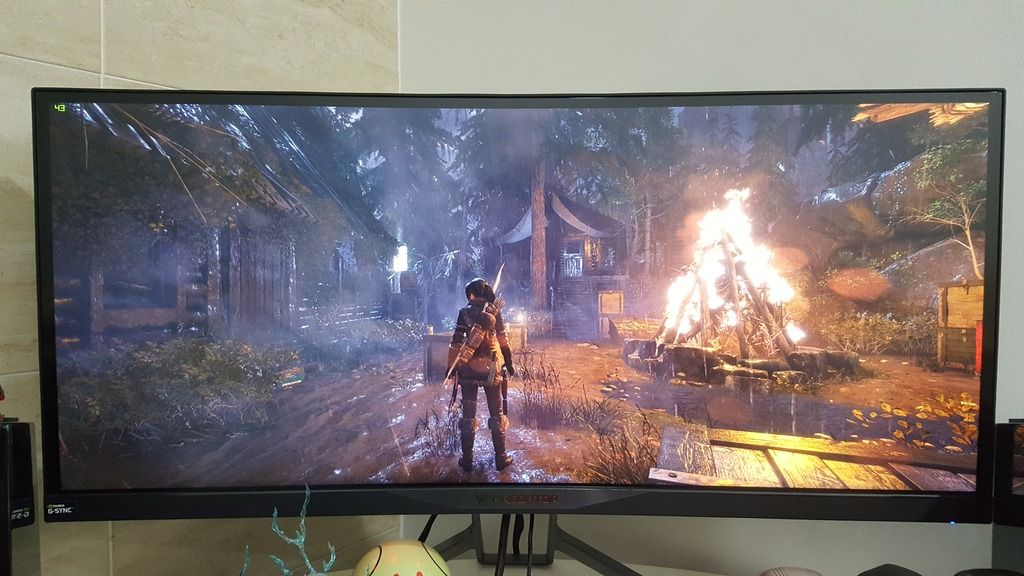 As promise. LOL Nice!  Next "project", to increase FPS from 43.... 1080ti or Titan Xp |
|
|
|
|
|
richard912
|
Apr 19 2017, 02:19 PM
|
|
|
QUOTE(scyter @ Apr 19 2017, 11:55 AM) hey guys, im about to buy x34a acer, is it one of the best monitor for ultrawide? cuz right now having tearing issue with old monitor using 1080. i have read some of the forum stating that x34a has quite of problem regarding to pixel and lower refresh rate. Can you guys enlighten me on this uneasy feelling whether i should go for x34a or other brand. thanks Your only other option with similar specs is Asus PG348Q, which costs significantly more |
|
|
|
|
|
richard912
|
Apr 19 2017, 02:43 PM
|
|
|
QUOTE(soul_fly9900 @ Apr 19 2017, 02:32 PM) At the cost of roughly around another 2k if not mistaken. To be exact, based on RRP: Asus PG348Q - RM6269 Acer X34A - RM4699 |
|
|
|
|
|
richard912
|
Apr 26 2017, 08:58 PM
|
|
|
QUOTE(Someonesim @ Apr 26 2017, 02:35 PM) Initially said Q2 2017 but some source said delayed indefinitely. Just get X34A as long you're getting the revision version 'A'. X34A solved some old issue ( no swivel stand, bad QC ) but some issue remain ( bad OSD menu ) The "bad OSD menu" issue is not really an issue unless you're the type who likes to fiddle with the settings constantly QUOTE(angel-girl @ Apr 26 2017, 03:01 PM) revision A fixed the bleed issue as well? QUOTE(gabriel.l @ Apr 26 2017, 03:31 PM) Mine got little bit if the room is dark and monitor is displaying black color output. I won't exactly say it is BLB but it is more of a case of IP glow, typical of IPS panels |
|
|
|
|
|
richard912
|
May 2 2017, 08:54 AM
|
|
|
QUOTE(angel-girl @ May 2 2017, 08:41 AM) By the way. I got my x34A already. [attachmentid=8778908] Brightness 50 Is this consider bad? Mine is set at 39 currently. You may want to look at this as a guide EDIT : Forgot to mention, it looks okay. This post has been edited by richard912: May 2 2017, 09:02 AM |
|
|
|
|
|
richard912
|
May 2 2017, 11:20 AM
|
|
|
QUOTE(Someonesim @ May 2 2017, 10:20 AM) Unless you game or use your computer in really dark room, light bleed was not obvious enough. Check again in your usual environment and setup. Looks more like IPG glow than bleed |
|
|
|
|
|
richard912
|
May 2 2017, 02:50 PM
|
|
|
QUOTE(angel-girl @ May 2 2017, 02:47 PM) in bright room with black background also can see the bleed. lol Aiyok....then best to return. |
|
|
|
|
|
richard912
|
May 2 2017, 03:18 PM
|
|
|
QUOTE(angel-girl @ May 2 2017, 02:52 PM) hows the warranty works? as long as got bleed then can exchange? Suggest you communicate with the shop you made your purchase with. |
|
|
|
|
|
richard912
|
May 3 2017, 08:00 AM
|
|
|
QUOTE(angel-girl @ May 2 2017, 11:11 PM) haha now i also dono its blb or glow. but it stays there even i change the viewing angle. but only top left most annoying, others should be glow. this one max brightness [attachmentid=8780434] this one 40 [attachmentid=8780433] If it's any consolation, mine has it too. As mentioned previously, my brightness level is set at 39. My peasant eyes don't notice it but this is also due to the fact that I never work/game in the dark. |
|
|
|
|
|
richard912
|
May 3 2017, 04:23 PM
|
|
|
QUOTE(angel-girl @ May 3 2017, 12:22 PM) forgot to mention, have you guys try to push the panel side with the bleed/glow? i tried pressing the panel firmly and the bleed/glow gone,i let go and its blee/glow again haha. Scared to "push". Nanti bocor how??? |
|
|
|
|
|
richard912
|
May 3 2017, 05:13 PM
|
|
|
QUOTE(angel-girl @ May 3 2017, 04:40 PM) not to push hard la haha.just firmly press the side panel, u will see the difference. Hahaha, I know la. Anyway, mine is really within my tolerance rate so, happy with it as it is. |
|
|
|
|
|
richard912
|
May 18 2017, 09:43 PM
|
|
|
QUOTE(mdzaboy @ May 18 2017, 09:22 PM) The despatch guy came to my house yesterday and collect my monitor. And also they loan me a monitor (not the same monitor that i use right now, hehe). And this afternoon they called me and told me problem with the LED panel which is i'm not sure the entire panel itself or the board panel. Tomorrow they will update me again. Good to know Acer's customer service is good |
|
|
|
|
|
richard912
|
May 31 2017, 08:08 AM
|
|
|
QUOTE(emy_xvidia @ May 30 2017, 08:43 PM) OMG it's happening! http://wccftech.com/asus-announces-rog-swi...te-hdr-support/Curved? Check. Quantum Dot? Check. HDR? Check. 200Hz Refresh Rate? Check. ULTRAWIDE? Check!!  now let's guess how much will this be? Being ASUS, it will cost an arm and a leg in MY for sure |
|
|
|
|



 Quote
Quote

 0.1334sec
 0.75
0.75
 7 queries
 GZIP Disabled