Welcome Guest ( Log In | Register )

4 Pages  1 2 3 > » Bottom

Outline · [ Standard ] · Linear+

 Lenovo K3 Note | Official Thread, AKA A7000+ in Malaysia

views
     
uan
post Jul 6 2015, 10:38 AM

On my way
****
Senior Member
571 posts

Joined: Oct 2005


greetings people. i bought this item at lazada and receive the item on last friday. priced at RM 579 and use the lazada RM 75 coupon code discount GETAPP75 (now the phone price already increase to 600+. the lazada link). quite a bargain i think. mine is white, with yellow-ish coating.

i believe mine was from china, with china charger pin and documentation.

things to highlight:
1. the 'factory' rom i suspect it was modified with numbers of malware, thus need to flash other rom
2. official vibe ui rom is also crap. i use google now launcher, and can't use most of the widget (settings force close error). same also with other launcher.
3. tried limeonchelo novamod, but not quite happy with it. now using aosp
4. 1st sim is 2g/3g/4g capable. 2nd sim only 2g
5. still monitoring on the battery performance

more at wiki page here:
https://www.reddit.com/r/lenovok3note/wiki/index

peace

uan
post Jul 6 2015, 01:18 PM

On my way
****
Senior Member
571 posts

Joined: Oct 2005


QUOTE(sitescope @ Jul 6 2015, 11:29 AM)
this is bcoz u put card in both sim. put only 4g sim in 2nd slot & u'll get 4g in sim2 like here...
*
Aha. Nice to know that. Thanks. On the sim slot it only labeled the second slot as "2G"

Battery discharging relatively fast. I just switch to 3G on data and let see how the difference.
uan
post Jul 9 2015, 02:32 AM

On my way
****
Senior Member
571 posts

Joined: Oct 2005


download VIBEUI_V2.5_1524_5.955.1_ST_K50-T5_WCA8.zip only to find that the scatter file is invalid. wtf...

corrupted zip file? but i can extract all file without problem.
uan
post Jul 11 2015, 01:53 PM

On my way
****
Senior Member
571 posts

Joined: Oct 2005


I've done flashing the indian rom. There is update prompt after intial setup. Now downloading.

Attached Image
uan
post Jul 11 2015, 03:01 PM

On my way
****
Senior Member
571 posts

Joined: Oct 2005


Update:
After the 17Mb update, unable to root. I'll try to flash again without the update and root.

ROM seems to be snappier. i like it.
- no bloatware, except for lenovo shareit, cloneit & syncit
- google app is everywhere. even the default calendar is google's and default music player is play music
- camera is v4.1
- no chinese character found anywhere.

@whitemouse @mulut99 use sp flash tool to flash. flash at own risk.
uan
post Jul 11 2015, 04:04 PM

On my way
****
Senior Member
571 posts

Joined: Oct 2005


Update:
Skip the initial update promt, still unable to root device. I will try once a root method for ROW rom established

@mulut99
you can follow instruction at first page

@whitemouse
follow the preparation guide here: http://forum.xda-developers.com/android/de...3-note-t3102997 to ensure all drivers are in place.


uan
post Jul 11 2015, 04:28 PM

On my way
****
Senior Member
571 posts

Joined: Oct 2005


QUOTE(sitescope @ Jul 11 2015, 04:05 PM)
Got hotspot icon in notification center ?
They should put hotspot icon rather than wide touch/cast screen
*
no hotspot. got ceramic speaker some more blink.gif
Attached Image

QUOTE(sitescope @ Jul 11 2015, 04:05 PM)
1st pg is for flash via cwm/twrp only... No ft...
*
first page. flash using SPFTool:
+++ List of Flashing Steps +++
Steps to install Official ROM
https://drive.google.com/open?id=18tHSju-0O...dmixjvZ46DZspk8

ah. and dont forget to do the ####682# change region thing. i can't see what is really does but i think it handle the +60 prefix

This post has been edited by uan: Jul 11 2015, 04:42 PM
uan
post Jul 12 2015, 06:30 AM

On my way
****
Senior Member
571 posts

Joined: Oct 2005


QUOTE(mulut99 @ Jul 12 2015, 01:17 AM)
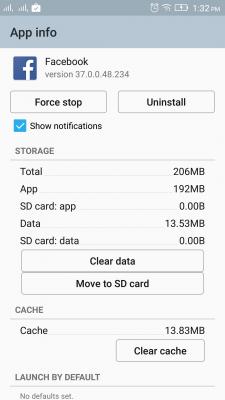
This india rom got transfer apps to externalSD feature?
*
No such option. Only have default write disk in storage setting.
Attached Image

This post has been edited by uan: Jul 12 2015, 06:31 AM
uan
post Jul 12 2015, 01:34 PM

On my way
****
Senior Member
571 posts

Joined: Oct 2005


@mulut99

Yeah. You are right. Option to move to sd appear after choosing sd card. thumbup.gif

Attached Image
uan
post Jul 12 2015, 05:41 PM

On my way
****
Senior Member
571 posts

Joined: Oct 2005


finally K50 a40 ROOTED!

instruction here: http://akilli.be/forum/konu-k3-note-root-m...ery-imei-repair
-use chrome and translate to english

twrp file here: https://userscloud.com/j2d8swzh18h9
- use SPFTool and use the attached scattered file. it will automatic load the recovery file
- once complete (green circle with tick), plug out cable from phone, DIRECTLY ENTER RECOVERY (vol up + vol down + power)
- flash supersu .zip
- reboot to system

DONE!
uan
post Jul 12 2015, 08:13 PM

On my way
****
Senior Member
571 posts

Joined: Oct 2005


I think with the spftool method it would nearly impossible to brick the phone, since the flash machanism starts with the phone switched off.

Unlike samsung, moto, or lg where you need to enter download mode first to do the flash.

This post has been edited by uan: Jul 12 2015, 08:14 PM
uan
post Jul 12 2015, 10:54 PM

On my way
****
Senior Member
571 posts

Joined: Oct 2005


it is the same procedure as sitescope mention before. here are the steps in brief:

PART A - preparation
1. install & verify all the required drivers. can refer here
2. get the rom & extract the .7z file. download the rom here
3. get spftool and extract the zip file. download spftool here
4. optional - backup app via titanium backup and/or do a backup in recovery. save to external sd card

PART B - flashing
1. open spftool. go to option > download > da dl all with checksum > check all the 2 boxes (i have no idea what is this)
2. click scatter loading > select MT6752_Android_scatter.txt from \K50a40_S112_150610_ROW\target_bin\
3. click download
4. switch off phone. remove sim & sd card
5. connect phone to pc. spftool will start flashing
6. flashing successful when the green circle pops up
7. disconnect phone. switch on the phone and complete the initial set up & update

if you have no intention to root, enjoy the new rom!

PART C - rooting
1. get twrp recovery and extract the .rar file. download here
2. get supersu .zip file, save to phone. download here
3. open spftool. click scatter loading > select MT6752_Android_scatter.txt from \K3_Note_TWRP\
4. click download
5. switch off phone. remove sim & sd card
6. connect phone to pc. spftool will start flashing
7. flashing successful when the green circle pops up
8. disconnect phone. DO NOT POWER ON. enter recovery (vol up + vol down + power)
9. install supersu .zip file
10. reboot system and verify supersu app is properly installed

PART D - restore
1. if you are still reading, i don't think you understand why you need root...
2. install titanium backup and ehem*lucky patcher*ehem and you know the drill, or perhaps you might want to restore data from recovery

so that's it. let me know if i miss anything

This post has been edited by uan: Jul 12 2015, 11:00 PM
uan
post Jul 13 2015, 12:29 AM

On my way
****
Senior Member
571 posts

Joined: Oct 2005


nice to know it works for you. oh did you do the ####682# code (change region)? the phone will restart with welcome screen default to bm. i'm not sure how this impact the phone.
uan
post Jul 13 2015, 11:28 PM

On my way
****
Senior Member
571 posts

Joined: Oct 2005


QUOTE(mulut99 @ Jul 13 2015, 08:53 PM)
- Cannot run waze........hope they fix it asap. Using Here map, no issue.
Bro. Waze for 64 bit already fixed on v3.9.5.0.

uan
post Jul 13 2015, 11:49 PM

On my way
****
Senior Member
571 posts

Joined: Oct 2005


QUOTE(mulut99 @ Jul 13 2015, 11:39 PM)
For China rom, yes. No issue with waze 3.9.5.0
For India rom, it will auto close when launch waze. Same lastest version.
I try reinstall it and see.
*
Mine works fine. Did you restore from titanium backup? Just do the clear data and rerun waze. I normally encounter this when restore waze from TB.
uan
post Jul 14 2015, 01:40 PM

On my way
****
Senior Member
571 posts

Joined: Oct 2005


QUOTE(sitescope @ Jul 14 2015, 09:30 AM)
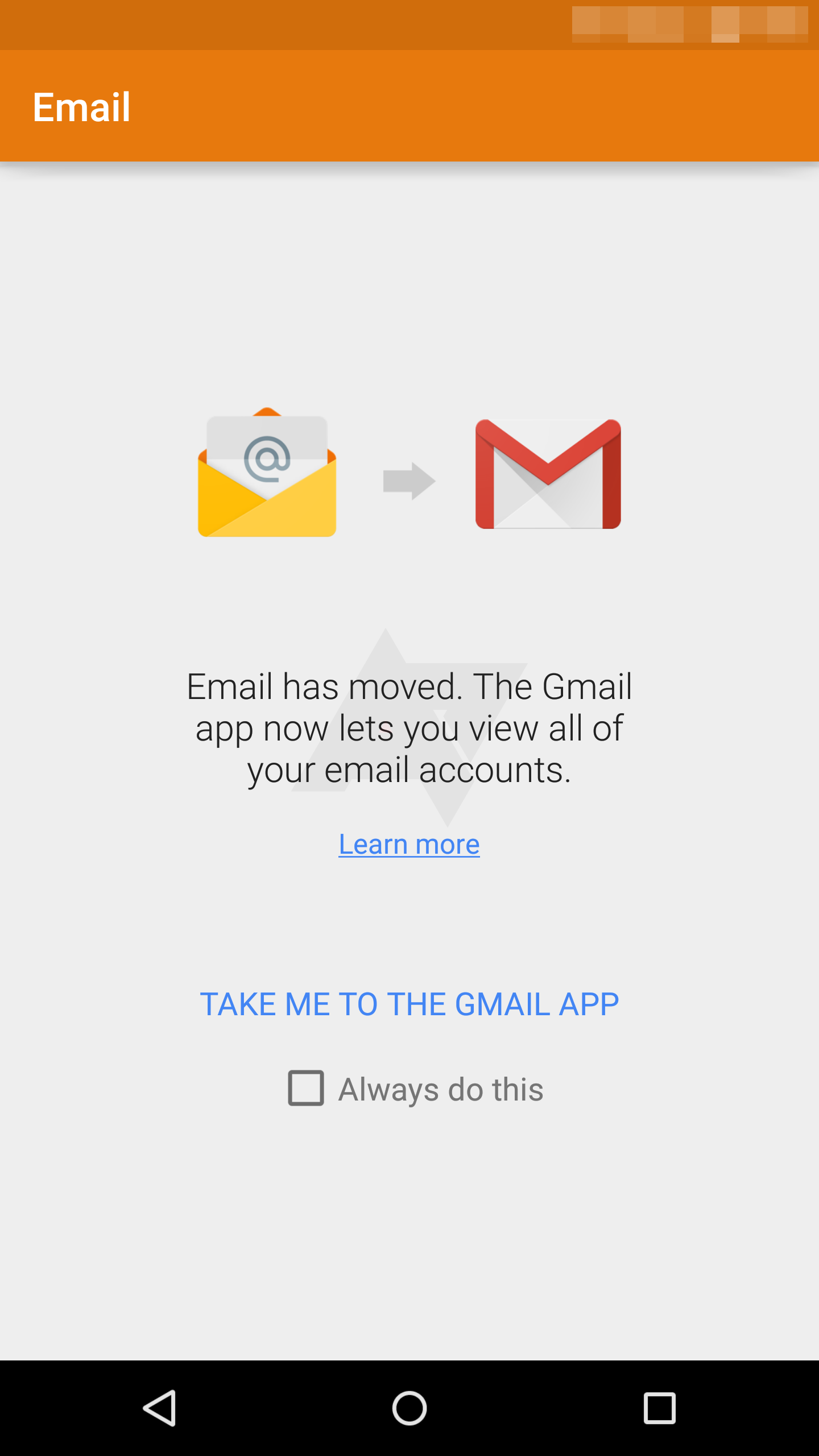
Found 3 bugs in india rom
- exchange email is point to gmail
- got malay ringtone in english language
- unable to rename name for no that save frm wasap
*
- exchange email is point to gmail

gmail already support echange since nov 2014. and if you install native google email client, it will ask you to use gmail.

since the default app for indian rom is gapps, that why the default mail client opens gmail
» Click to show Spoiler - click again to hide... «

- got malay ringtone in english language

which one? haha this is feature, not bug tongue.gif

- unable to rename name for no that save frm wasap

yeah. the whatsapp details can't be rename

This post has been edited by uan: Jul 14 2015, 01:41 PM
uan
post Jul 15 2015, 01:25 AM

On my way
****
Senior Member
571 posts

Joined: Oct 2005


Gatal tangan install xposed. Everything works fine as expected. Hope amplify will bring some good to the battery.

And if u on xposed, I highly recommend "SpotifySkip" by Thunder07. No more shuffle and can select any song to play!

*Note that my spotify shuffle is disabled cool.gif
(no, i am not a premium user)

» Click to show Spoiler - click again to hide... «

uan
post Jul 20 2015, 11:26 AM

On my way
****
Senior Member
571 posts

Joined: Oct 2005


Nice to see more k3n user. Share your problem, the community sure will help. But please read/google first prior asking. You will be good.
uan
post Jul 20 2015, 09:15 PM

On my way
****
Senior Member
571 posts

Joined: Oct 2005


Dont skip this part:
1. open spftool. go to option > download > da dl all with checksum > check all the 2 boxes
uan
post Jul 21 2015, 08:41 PM

On my way
****
Senior Member
571 posts

Joined: Oct 2005


downloading s117. slow connection.

already uninstall xposed framework, unroot and reflash stock recovery.

tunggu...


4 Pages  1 2 3 > » Top
 

Change to:
| Lo-Fi Version
0.0534sec    0.42    7 queries    GZIP Disabled
Time is now: 1st December 2025 - 10:47 PM