

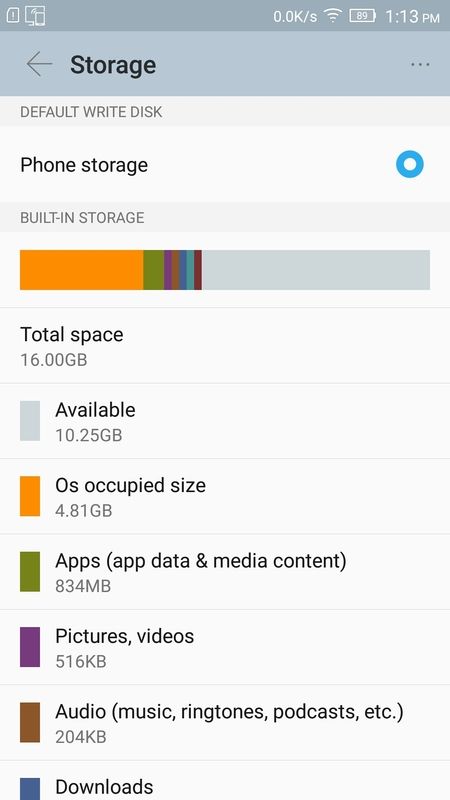
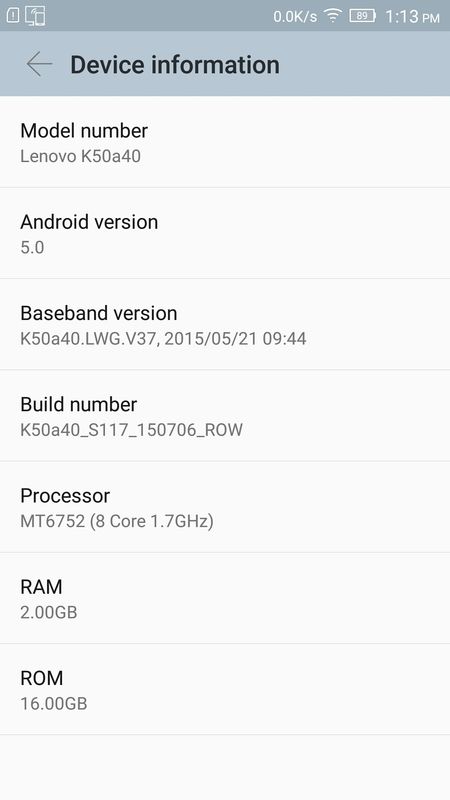
How much internal storage space should have after update to S117 firmware? Is it normal only 10.25GB left?
This post has been edited by cvg: Aug 9 2015, 01:28 PM
Lenovo K3 Note | Official Thread, AKA A7000+ in Malaysia
|
|
 Aug 9 2015, 01:26 PM Aug 9 2015, 01:26 PM
Return to original view | Post
#1
|
 
Junior Member
296 posts Joined: Jan 2014 
|
Hi All,
How much internal storage space should have after update to S117 firmware? Is it normal only 10.25GB left? This post has been edited by cvg: Aug 9 2015, 01:28 PM |
|
|
|
|
|
Aug 9 2015, 02:00 PM
Return to original view | Post
#2
|
|
Junior Member
296 posts Joined: Jan 2014
|
QUOTE(kirokiroshin @ Aug 9 2015, 12:31 PM) oh man, you're the hero! it works! flash complete and is booting now! thank you so much~ Bro, mind to share your windows version and SP Flash Tool version used, for the benefit of other forumer. Thanks! lenovousbdriver 1.0.13 can't work but this 1.0.14 works! thanks also to sifus who were trying to help! thanks again sifu-sifu sekalian!  |
|
|
Aug 9 2015, 06:45 PM
Return to original view | Post
#3
|
|
Junior Member
296 posts Joined: Jan 2014
|
QUOTE(kirokiroshin @ Aug 9 2015, 02:12 PM) oh, ok. i'm using windows 8.1, lenovousbdriver 1.0.14, spflash tool v5.1504. Did you uninstall the 1.0.13 first then install 1.0.14, or just install 1.0.14 on top of 1.0.13? Thank you bro!the steps are exactly in the tutorial, but the driver is newer, bcoz the old one won't work on my laptop. |
|
|
Aug 9 2015, 10:50 PM
Return to original view | Post
#4
|
|
Junior Member
296 posts Joined: Jan 2014
|
QUOTE(kirokiroshin @ Aug 9 2015, 10:29 PM) i installed 1.0.14 on top of 1.0.13. i didn't not uninstall 1.0.13 first. but i restarted my laptop after 1.0.14 installed. Thanks bro, your input is definately valueable  |
|
|
Aug 11 2015, 12:24 AM
Return to original view | Post
#5
|
|
Junior Member
296 posts Joined: Jan 2014
|
QUOTE(kirokiroshin @ Aug 10 2015, 12:05 AM) no problem, bro. glad that i can be of any help! If you would like to update from S114 to S117, you may download file from here:http://phonedl.ota.lenovomm.com/dls/v6/K50...06_ROW_WCDE.zip Copy file to phone storage, rename file -> update.zip Then press vol up+vol down+power together to boot into recovery, choose language and then install update.zip. After phone reboot, key in ####682#, select MY马来西亚 to customized firmware locale. To check firmware locale key in ####5993#    This post has been edited by cvg: Aug 11 2015, 01:33 AM |
|
|
Aug 11 2015, 07:47 AM
Return to original view | Post
#6
|
|
Junior Member
296 posts Joined: Jan 2014
|
You may want to consider perform a factory reset to recover 400+MB phone storage after setting firmware locale (by clearing the locale easy image cache in the system)
Before 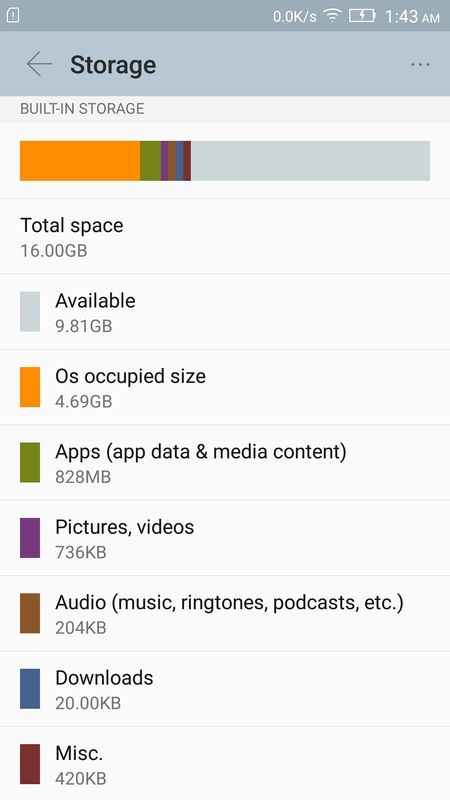 After |
|
|
|
|
|
Aug 11 2015, 08:44 AM
Return to original view | Post
#7
|
|
Junior Member
296 posts Joined: Jan 2014
|
QUOTE(hteekay @ Aug 11 2015, 07:52 AM) I seriously implore those who haven't update to S117 to wait for the official update from Lenovo India. There's a reason why they pull it off the update system. Now I'm having problem with the WiFi and charging. I have to shut the phone down and pull out the battery whenever the Wi-Fi decided not to work. Even *#*# technique to "fix" the problem doesn't work. Please do a factory reset, most probably that will solve the problem.I have no WiFi and charging issue at all. |
|
|
Aug 12 2015, 10:12 PM
Return to original view | Post
#8
|
|
Junior Member
296 posts Joined: Jan 2014
|
QUOTE(uan @ Aug 9 2015, 10:03 PM) Lol... MInd to share HOW to go to the screenshot page - battery ? Thanks![attachmentid=4718052] This post has been edited by cvg: Aug 12 2015, 10:13 PM |
|
|
Aug 13 2015, 05:36 PM
Return to original view | Post
#9
|
|
Junior Member
296 posts Joined: Jan 2014
|
QUOTE(uan @ Aug 13 2015, 09:21 AM) vibeui and row rom don't have the shortcut to this battery usage screen. use this app instead: Battery Usage Shortcut TQ you  |
|
|
Aug 15 2015, 10:26 PM
Return to original view | Post
#10
|
|
Junior Member
296 posts Joined: Jan 2014
|
QUOTE(kirokiroshin @ Aug 15 2015, 08:17 PM) i flashed my rom to s117 successfully, but when i wanted to change the system locale, i got an error saying the ota patch is not correct. if you have perform factory reset before, then the 280MB easyimage.zip in the /dafa partition is gone.any idea what went wrong? Solution is to reflash S112, OTA TO S114, then flash the S114 -S117 update zip. Another way is to root the phone, then use root explorer to put easyimage.zip back into /data partition. |
|
|
Aug 16 2015, 11:23 AM
Return to original view | Post
#11
|
|
Junior Member
296 posts Joined: Jan 2014
|
QUOTE(kirokiroshin @ Aug 16 2015, 09:58 AM) owh, that is a very long process. there is basically no difference between locale right? apart from some extra apps. Not much different. Locale setting is to customize apps appear on home screen and input method keyboard. |
|
|
Aug 16 2015, 11:35 AM
Return to original view | Post
#12
|
|
Junior Member
296 posts Joined: Jan 2014
|
Antutu Score for ROW S117 and China Stable 1529 firmware. You can see the a bigger different is in Storage I/O speed.
S117 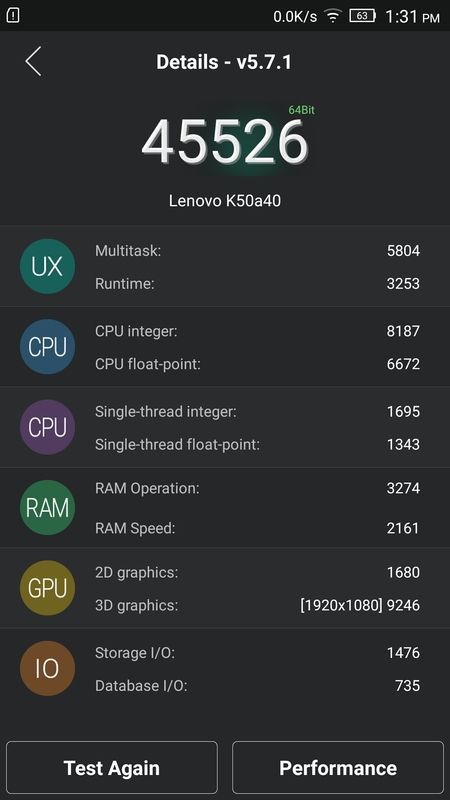 1529  This post has been edited by cvg: Aug 16 2015, 11:37 AM |
|
|
Aug 20 2015, 06:32 PM
Return to original view | Post
#13
|
|
Junior Member
296 posts Joined: Jan 2014
|
S114 to S121 OTA package: http://phonedl.ota.lenovomm.com/ ... 150813_ROW_WC76.zip
md5:32b370185723c5856f65f33f75567b08 Size: 332MB S117 to S121 OTA package: http://phonedl.ota.lenovomm.com/ ... 150813_ROW_WC0C.zip md5: 305594552c5f602301b9b3c9cb2813b0 Size: 85.7MB Rename file to update.zip , copy to internal storage then flash with Lenovo Recovery  |
|
|
|
|
|
Aug 22 2015, 08:25 AM
Return to original view | Post
#14
|
|
Junior Member
296 posts Joined: Jan 2014
|
--deleted--
This post has been edited by cvg: Aug 22 2015, 08:32 AM |
|
|
Aug 22 2015, 08:31 AM
Return to original view | Post
#15
|
|
Junior Member
296 posts Joined: Jan 2014
|
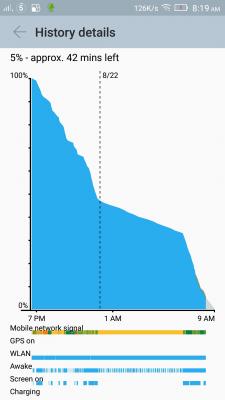
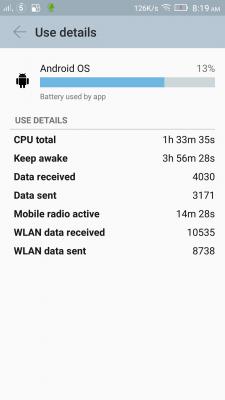
On S121, battery discharge graph. Android OS wakeup a lot. No problem for one day use per charge.


|
|
|
Aug 24 2015, 05:27 PM
Return to original view | Post
#16
|
|
Junior Member
296 posts Joined: Jan 2014
|
QUOTE(Zaffar @ Aug 24 2015, 04:36 PM) Hi 工厂模式 - Factory ModeCan someone translate this for me? Tia 传感器校准 - Transducer Calibration 自动测试 - Automatic Test 单项测试 - Single Item Test 测试报告 - Test Report 调试测试项 - Debug Test Item 清除eMMC - Clear eMMC 版本信息 - Version Info 重启手机 - Reboot |
|
|
Sep 12 2015, 09:59 AM
Return to original view | Post
#17
|
|
Junior Member
296 posts Joined: Jan 2014
|
QUOTE(ameri @ Sep 11 2015, 07:11 PM) So I've bought this phone just now. Thanks for sharing. Mind to share also the 1st & 2nd page of the original Home Screen? For those who still wondering about the A7000Plus spec, here you go: » Click to show Spoiler - click again to hide... « Can you key in ####5993# on the keypad and see what it show? Thanks in advance ! This post has been edited by cvg: Sep 12 2015, 10:01 AM |
|
|
Sep 12 2015, 07:04 PM
Return to original view | Post
#18
|
|
Junior Member
296 posts Joined: Jan 2014
|
QUOTE(ameri @ Sep 12 2015, 04:57 PM) I can't share the original 1st and 2nd page as I have rearrange it. But the first page homescreen is the same as the picture on the box. Nothing private, just to show the firmware version like below:I don't know if the info shown after pressing ####5993# private or not? Noob Android user here   This is my 2nd page, is it same as your when out of the box?  |
|
|
Sep 13 2015, 11:09 AM
Return to original view | Post
#19
|
|
Junior Member
296 posts Joined: Jan 2014
|
QUOTE(ygzdwdza @ Sep 12 2015, 10:47 PM) anyone know how to change the functions of the 3 home buttons? Functions of the 3 virtual buttons can be change if your phone has root access.Download mtk-tpd.kl and copy to /system/usr/keylayout with root explorer (rename original mtk-tpd.kl first) , change permission to rw-r--r-- , restart phone mtk-tpd.kl : http://www.mediafire.com/download/pvupbpqxae4h7e6/mtk-tpd.kl 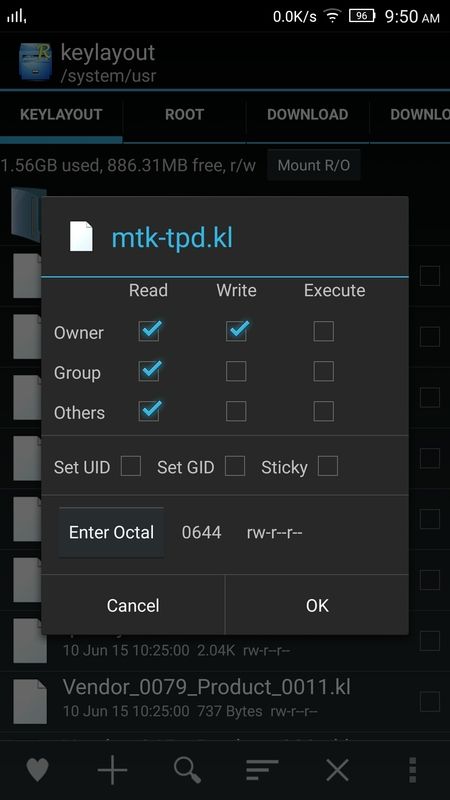 |
|
|
Sep 20 2015, 04:41 PM
Return to original view | Post
#20
|
|
Junior Member
296 posts Joined: Jan 2014
|
QUOTE(ygzdwdza @ Sep 19 2015, 11:53 AM) Sorry, can you teach me how to change the functions of the 3 virtual buttons for my own favourite? Install Root Explorer, long press mtk-tpd.kl to open file in text editor, edit file according to your requirement then save. |
| Change to: |  0.0552sec 0.0552sec
 0.25 0.25
 7 queries 7 queries
 GZIP Disabled GZIP Disabled
Time is now: 2nd December 2025 - 07:50 AM |
 Quote
Quote


