Welcome Guest ( Log In | Register )

Bump Topic Topic Closed RSS Feed
123 Pages « < 69 70 71 72 73 > » Bottom

Outline · [ Standard ] · Linear+

 Samsung Galaxy Note 4 Official Thread V8, Lollipop rolling out in Malaysia ....

views
     
aquilaTE
post May 25 2015, 06:45 PM

Casual
***
Junior Member
481 posts

Joined: Mar 2007


QUOTE(smokey @ May 25 2015, 06:29 PM)
any1 use their Note 4 long enough without screen protector?
feel like tearing off the tempered glass as the swiping doesn't feel smooth
*
I've been using without SP from day one. I have a tiny micron scratch that is not noticeable unless you turn off and start hunting for it...

smokey
post May 25 2015, 06:56 PM

Infinity speed
*******
Senior Member
3,506 posts

Joined: Jan 2003
From: Lumpur
QUOTE(aquilaTE @ May 25 2015, 06:45 PM)
I've been using without SP from day one. I have a tiny micron scratch that is not noticeable unless you turn off and start hunting for it...
*
great

will remove the SP then biggrin.gif
nncchh1990
post May 25 2015, 07:01 PM

Getting Started
**
Junior Member
162 posts

Joined: Feb 2010
look like the update was fixed the waze bug issue.
surefire v LED
post May 25 2015, 07:26 PM

Never Say Never But Say Never 2 Proton
*******
Senior Member
4,349 posts

Joined: Sep 2005
you guys face this issue - if mute my N4 and put on vibrate the notification ringer will still set to zero eventhough you put the N4 on ring mode.
Try to put on vibrate for about 30 minutes or so.
icelight7
post May 25 2015, 07:35 PM

Getting Started
**
Junior Member
129 posts

Joined: Apr 2012
Maxis app suck lot of battery..
Force stop also useless.. uninstall easier hehhe...
user posted image


This post has been edited by icelight7: May 25 2015, 07:36 PM
arrowhead7372
post May 25 2015, 08:14 PM

Noob
******
Senior Member
1,917 posts

Joined: Mar 2008


QUOTE(smokey @ May 25 2015, 06:31 PM)
is it website based or app based?
*
App based

QUOTE(liondoncefreak @ May 25 2015, 06:41 PM)
Try opening it again? The first thing I did after updating was to check if Waze had been fixed. And I still got the white boxes.

Then someone mentioned that it was fixed on his. Tried opening mine again and now it seems fine lol.
*
Oh it worked! Thanks.
arrowhead7372
post May 25 2015, 08:16 PM

Noob
******
Senior Member
1,917 posts

Joined: Mar 2008


QUOTE(surefire v LED @ May 25 2015, 07:26 PM)
you guys face this issue - if mute my N4 and put on vibrate the notification ringer will still set to zero eventhough you put the N4 on ring mode.
Try to put on vibrate for about 30 minutes or so.
*
Dont really get what you are trying to explain laugh.gif
surefire v LED
post May 25 2015, 08:19 PM

Never Say Never But Say Never 2 Proton
*******
Senior Member
4,349 posts

Joined: Sep 2005
QUOTE(arrowhead7372 @ May 25 2015, 08:16 PM)
Dont really get what you are trying to explain laugh.gif
*
My notification ringer volume won't go back up eventhough i already switch from vibrate mode to normal mode.
smokey
post May 25 2015, 08:26 PM

Infinity speed
*******
Senior Member
3,506 posts

Joined: Jan 2003
From: Lumpur
QUOTE(arrowhead7372 @ May 25 2015, 08:14 PM)
App based
Oh it worked! Thanks.
*
May I know the app name?
bitcomet79
post May 25 2015, 08:28 PM

Casual
***
Junior Member
356 posts

Joined: Nov 2013
If I had rooted my note 4 n want to update my phone , is there any method other than below

http://howto.highonandroid.com/samsung-tut...msung-firmware/

Pls help....tia
akping_1
post May 25 2015, 08:33 PM

On my way
****
Junior Member
629 posts

Joined: Nov 2011
wat i notice is after i change my motherboard from SC, after conduct the factory reset the 1st prompt out language is in Thai, will it be the reason that i failed to update OTA?
sharp56
post May 25 2015, 09:04 PM

Casual
***
Junior Member
332 posts

Joined: Nov 2008
For N4 rooted phones, how to update latest firmware?
guy73
post May 25 2015, 09:19 PM

Getting Started
**
Junior Member
226 posts

Joined: Jan 2003
From: puchong.com.my


Just got new ROM updated on OTA

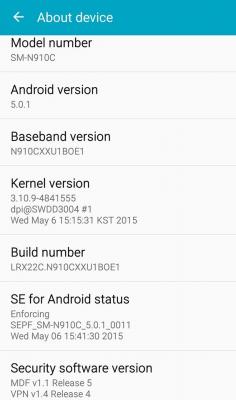
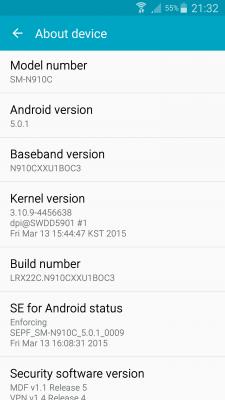
Attached Image


akping_1
post May 25 2015, 09:35 PM

On my way
****
Junior Member
629 posts

Joined: Nov 2011
Any 1 can show their phone info before conduct update? Mine as below


Attached thumbnail(s)
Attached Image
TSXeactorZ
post May 25 2015, 09:59 PM

♥ PandaDog ♥
*********
All Stars
31,609 posts

Joined: Aug 2010
QUOTE(nncchh1990 @ May 25 2015, 12:39 AM)
My SOT result
*
my maximum nearly 6 hours only sad.gif

QUOTE(liondoncefreak @ May 25 2015, 04:40 PM)
This is after the latest update, if anyone is curious.

And I've checked, Waze is still not fixed.
*
oh no need to download the firmware and root again sad.gif

QUOTE(bitcomet79 @ May 25 2015, 06:00 PM)
Mine is rooted....can I juz update tru KIES?
Sifu, pls inform step by step to update....tq
*
nope, flash through odin then root again laugh.gif

QUOTE(sharp56 @ May 25 2015, 09:04 PM)
For N4 rooted phones, how to update latest firmware?
*
refer above
Charlton
post May 25 2015, 10:48 PM

Casual
***
Junior Member
316 posts

Joined: Jan 2003
Anyone has mirror link to the latest lollipop firmware?
Sammobile is too slow
andyting
post May 25 2015, 11:32 PM

Casual
***
Junior Member
324 posts

Joined: Sep 2009
Search on the net and it seems that this firmware improves the battery life.. Will fully charged my phone tonight and monitor it. And waze is fixed in this latest update~
arrowhead7372
post May 25 2015, 11:42 PM

Noob
******
Senior Member
1,917 posts

Joined: Mar 2008


QUOTE(surefire v LED @ May 25 2015, 08:19 PM)
My notification ringer volume won't go back up eventhough i already switch from vibrate mode to normal mode.
*
Oh. Mine has no such problems. Quite weird...
benny888
post May 25 2015, 11:48 PM

Gadget Freak
Group Icon
Elite
27,801 posts

Joined: Jun 2007
From: Johor


For those rooted phones, you will not be able to update firmware OTA
There are several ways to overcome this

If ONLY rooted without any custom recovery ( CWM or TWRP) installed

- USE app supersu PRO to unroot. Launch app and at its settings, untick enable supersuser . Scroll down and tap Fully unroot. Restart phone

If rooted and with Custom recovery installed

Extract fully down the stock firmware tar file till you see recovery.img. There will be other several img files too. Use app FLASHIFY to flash this stock recovery.img file. Restart phone and you will get stock recovery installed. Unroot phone as described earlier on
Or you can use Odin in PC to just flash this recovery.img file ( compress it back to tar format) . You need to compress the img file back to tar format first. I always prefer use app flashify without need to use PC

If you had any CUSTOM rom installed, best is to use Odin in PC to flash the stock firmware in tar format. This will auto unroot and restore stock recovery and stock rom to your phone. However this will possibly erase all your phone's data. I cannot really remember whether this will happen but it won't erase any data if your rom is official rom. Downgrading your firmware will erase data. Upgrading or flashing similar version will not

This post has been edited by benny888: May 25 2015, 11:54 PM
TSXeactorZ
post May 26 2015, 12:05 AM

♥ PandaDog ♥
*********
All Stars
31,609 posts

Joined: Aug 2010
QUOTE(Charlton @ May 25 2015, 10:48 PM)
Anyone has mirror link to the latest lollipop firmware?
Sammobile is too slow
*
why I go sammobile website didn't saw the latest firmware can download ??

QUOTE(benny888 @ May 25 2015, 11:48 PM)
For those rooted phones, you will not be able to update firmware OTA
There are several ways to overcome this

If ONLY rooted without any custom recovery ( CWM or TWRP) installed

- USE app supersu PRO to unroot. Launch app and at its settings, untick enable supersuser . Scroll down and tap Fully unroot. Restart phone

If rooted and with Custom recovery installed

Extract fully down the stock firmware tar file till you see recovery.img. There will be other several img files too. Use app FLASHIFY to flash this stock recovery.img file. Restart phone and you will get stock recovery installed. Unroot phone as described earlier on
Or you can use Odin in PC to just flash this recovery.img file ( compress it back to tar format) . You need to compress the img file back to tar format first. I always prefer use app flashify without need to use PC

If you had any CUSTOM  rom installed, best is to use Odin in PC to flash the stock firmware in tar format. This will auto unroot and restore stock recovery and stock rom to your phone. However this will possibly erase all your phone's data. I cannot really remember whether this will happen but it won't erase any data if your rom is official rom. Downgrading your firmware will erase data. Upgrading or flashing similar version will not
*
I am the one who root with twrp (custom) recovery installed
for me the easiest step is flash using pc in odin > root > twrp laugh.gif

123 Pages « < 69 70 71 72 73 > » Top
Topic ClosedOptions
 

Change to:
| Lo-Fi Version
0.0291sec    0.14    6 queries    GZIP Disabled
Time is now: 14th December 2025 - 07:45 PM