Outline ·
[ Standard ] ·
Linear+
Samsung Galaxy Note 4 Official Thread V8, Lollipop rolling out in Malaysia ....
|
sharp56
|
 May 17 2015, 03:27 PM May 17 2015, 03:27 PM
|

|
Followed all the steps for rooting Note 4 (N910C - lollipop 5.0.1) correctly but message at Odin 3.0.7 stucked at "Getting PIT for mapping". The phone stuck at downloading mode (green android figure) and I had to pull out the battery to reboot the phone. Tried re-downloading the program at XDA developers website and re-do all the steps several times but result all the same - stuck at "Getting PIT for mapping".
What could be the problem and solution?
|
|
|
|
|
|
sharp56
|
May 17 2015, 07:48 PM
|
|
|
benny888,
I didn't select PIT. I just opened up the odin3.07 exe and tap on the PDA button and select the "CF-Auto-Root-trelte-treltexx-smn910c.tar.md5" file and then start button. I don't know what is the problem.
|
|
|
|
|
|
sharp56
|
May 18 2015, 02:04 PM
|
|
|
QUOTE(asdasd @ May 17 2015, 08:25 PM) maybe you can try getting the latest ODIN version 3.10 and run odin as administrator Ya, I did that and managed to root my Note4 this morning. Thanks everybody for the help. |
|
|
|
|
|
sharp56
|
May 20 2015, 02:41 PM
|
|
|
After rooting my Note 4, I messed around installing some 3rd party apps into system and also moving some system apps. Somehow, it soft bricked my phone and I was stucked at bootup at Samsung logo. It didn't respond to wiping cache and all data using Vol up, Home and Power keys.
Sent my rooted phone to Samsung SC and in half an hour got back a smoother and more battery saving phone installed with Lollipop 5.0.1 free of charge without any questions asked. I think they were too busy to check the knox counter or bother about the knox counter. Since knox already tripped, I re-root my phone as soon as I got back home.
I rooted my phone because mainly I wanted to install Greenify, Titanium Backup and Cerberus into the system rom. I usually switch my GPS to off and in case I lose or misplace my phone I want Cerberus to switch my phone's GPS to on, remotely, to find my phone. Already tested this GPS functions off/on correctly on my rooted phone. With Greenify my phone runs cooler and battery life extends to slightly more than a day with minimal normal usage.
I was pleased that the phone runs better this time around when clean/rooted and with the things I want.
This post has been edited by sharp56: May 20 2015, 03:15 PM
|
|
|
|
|
|
sharp56
|
May 20 2015, 05:19 PM
|
|
|
QUOTE(benny888 @ May 20 2015, 04:48 PM) sharp 56 - messing with system apps ( deleting n moving) do it only if you are more knowledgeable You can always use Odin in PC to flash back any stock rom incase your phone is soft broken I used Greenify Pro to greenify everything that is listed except whatsapp. Don't worry core system apps will never allow it to be greenify I used Titanium to freeze all Knox stuffs n several other useless ( so deemed by me) Samsung app n utilities too Ya...I went through the school of hard knocks while messing around with the system apps but emerged more knowledgeable after that. As I see it there is no harm in rooting the phone and experimenting on it to gain knowledge and enhance the functionality of the phone like - better battery life, better GPS functionality, smoother and quicker phone, removing bloatware, better utilization of certain apps, etc. If one messed it up totally and beyond one's comprehension of how to put it back to its original state, just go to the SC to put it back nice and clean for you. If under warranty, it's free and just half an hour waiting. Even, if they say your warranty is nullified - what the heck, just pay RM30 (roughly the price of a handphone cover) for the service charge of putting it back nice and clean for you. If you had to pay for it (assuming hardware is no problem), RM 30 is well worth the experience, knowledge and satisfaction you gain from your rooted phone - that's my personal opinion. Thanks benny888 for the guidance. This post has been edited by sharp56: May 20 2015, 05:49 PM |
|
|
|
|
|
sharp56
|
May 25 2015, 09:04 PM
|
|
|
For N4 rooted phones, how to update latest firmware?
|
|
|
|
|
|
sharp56
|
May 26 2015, 02:18 PM
|
|
|
I tried to OTA new firmware by unrooting my N4 using SuperSU Pro but was unable to OTA.
My N4 was unrooted successfully (checked with titanium) but the Settings/About phone/Status /device status still show "custom" in spite of the unroot. My previous root was without custom recovery. I read somewhere the device status can't change from custom to official may be due to the knox being tripped.
Anyone here unroot using SuperSU Pro but can OTA new firmware?
This post has been edited by sharp56: May 26 2015, 02:25 PM
|
|
|
|
|
|
sharp56
|
May 27 2015, 03:21 PM
|
|
|
QUOTE(XeactorZ @ May 26 2015, 05:25 PM) Just wait for Malaysia BOE1 ROM then download from sammobile website and flash it then root
That what I going to do so, lazy to backup > factory reset > downgrade back to Malaysia BOC3 > check OTA =.= Flashing with Malaysia BOE1 Rom is the quickest way to unroot N4 back to OTA, right? I was unable to OTA with SuperSU Pro unroot method. Is the BOE1 out yet and where to download? And thanks to benny888, too, for all the useful information on N4 This post has been edited by sharp56: May 27 2015, 03:24 PM |
|
|
|
|
|
sharp56
|
May 27 2015, 07:55 PM
|
|
|
QUOTE(XeactorZ @ May 27 2015, 04:56 PM) ya but right now Malaysia release Malaysia BOE1 ROM if I really want to update to BOE1 Malaysia ROM, I need backup > flash BOC3 Malaysia ROM > factory reset > OTA > root > restore  The N4(Exynos) XME (Malaysia) version of BOE1 firmware (date : 6 May, 2015) is available at samsung-updates.com here: http://samsung-updates.com/device/?id=SM-N910CDownload is faster than sammobile This post has been edited by sharp56: May 27 2015, 07:57 PM |
|
|
|
|
|
sharp56
|
May 29 2015, 03:23 PM
|
|
|
Those who have unrooted their N4 to BOE1, able to OTA the latest today's update? I checked my device software update and it says that it is already the latest. I'm planning to root my phone again after the latest OTA update. I think OTA should be functional now since my device status = official (changed from custom when I unrooted with superSU previously) It's a good thing after flashing my N4 (BOC1) to BOE1, all my previous apps remains intact and there's no need to factory reset or clear cache although I have prepared the titanium backup just in case. Now confirmed that Waze is fully functional. Those who wants to unroot their N4 can get the XME (Malaysian version) BOE1 (Exynos) here: http://forum.xda-developers.com/note-4/gen...ltiple-t3028939or http://samsung-updates.com/device/?id=SM-N910CSammobile is a little behind in their firmware updates. If you have not yet flash your N4 to BOE1, better you wait a few more days for the Malaysian version of the BOE2 which I think will include today's latest update. This post has been edited by sharp56: May 29 2015, 03:59 PM |
|
|
|
|
|
sharp56
|
Jun 1 2015, 11:17 PM
|
|
|
QUOTE(OwlsHeart @ Jun 1 2015, 11:00 PM)  out of curiosity i tested the new firmware (BOE3 Poland) on Antutu and this is the first time i scored 50k+ on note 4 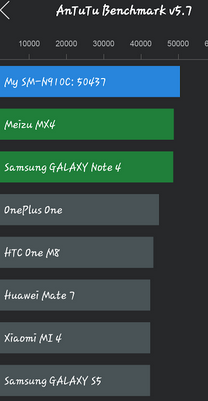 on previous BOE1 BOC5,i only managed to score over 43k+. Any other major improvements? |
|
|
|
|
|
sharp56
|
Jun 20 2015, 11:12 PM
|
|
|
My N4 charger just went kaput today. Unfortunately it is 6 months and 22 days. I went to the samsung SC to claim replacement and the SC said my charger is out of guarantee. I know for a fact that the 1st batch of N4 charger has a lot of problem. Is there any way I can claim warranty replacement?
|
|
|
|
|



 Quote
Quote

 0.0230sec
 0.39
0.39
 7 queries
 GZIP Disabled