

QUOTE(alucard89 @ Feb 24 2023, 11:23 AM)
Smart Home, Let's discuss
Smart Home, Let's discuss
|
|
 Feb 24 2023, 11:46 AM Feb 24 2023, 11:46 AM
Return to original view | Post
#21
|
 
Junior Member
229 posts Joined: Sep 2009 
|
Yup similar to that, but the one you linked is a wifi model. The zigbee one looks the same, smartrul brand. No, i tried to look for a usb C outlet one, but doesnt seem to be available yet. I tried in Aliexpress, Taobao and even expo.tuya. Nothing released yet.
QUOTE(alucard89 @ Feb 24 2023, 11:23 AM) |
|
|
|
|
|
Feb 28 2023, 09:09 AM
Return to original view | Post
#22
|
|
Junior Member
229 posts Joined: Sep 2009
|
actually you can. I did ask for a quotation before (some need a min quantity), but then i gave up, cos i wanted my item quick, and i think they’re prolly gonna ship slow.. and tracking could be an issue
QUOTE(alucard89 @ Feb 26 2023, 02:27 PM) Can buy from expo.tuya? Looks similar to alibaba ordering  |
|
|
Mar 3 2023, 09:34 AM
Return to original view | Post
#23
|
|
Junior Member
229 posts Joined: Sep 2009
|
It depends on what they quote you. I didnt get that far into the quotation because i was in urgent need of the device, so ended up on taobao.com / shopee
QUOTE(alucard89 @ Feb 28 2023, 05:28 PM) How’s the shipping fee there? If alibaba i usually just have them ship to china warehouse to consolidate |
|
|
Mar 8 2023, 01:59 PM
Return to original view | IPv6 | Post
#24
|
|
Junior Member
229 posts Joined: Sep 2009
|
Question 1 :-
I have the Daikin airconditioners that have wifi built in. The type that uses the Daikin Go app. The app brings the aircon units to Google Home and alexa. Does anyone know how to bring them into Homekit? I have tried so many Homebridge plugins.. but non of them work for the wifi adapter that we have here in malaysia. The ones that are overseas, the wifi adapter name starts with B, and ours here starts with A, specifically the AWM61A01. And since i dont have (and dont intend to use) home assistant due to no extra raspberry Pi available (and also HA spooks me, haha), what other methods or plugins can i use to bring these Daikin units into Homekit? Question 2:- I have a Vivos Alarm system. Comes with the alarm panel, network interface module to use the vivos app remotely and the several sensors and siren connected via cables. Does anyone know if this alarm system can be linked to Google Home or Homekit? This brand vivos is a malaysian brand... their app is pretty barebones. Would be nice to be able to integrate into either google home or homekit for automations. My Homekit setup is pretty complete.. Aqara (natively), Sony TV (natively), Do Home (natively) , Sonoff + Ewelink (via homebridge), Tuya (via homebridge), xiaomi (via homebridge) , imou + Dahua (via homebridge), samsung (via homebridge). All thats left is my Daikin Aircons... and my Vivos alarm system. Any idea guys? |
|
|
Mar 8 2023, 02:40 PM
Return to original view | IPv6 | Post
#25
|
|
Junior Member
229 posts Joined: Sep 2009
|
QUOTE(Max @ Mar 8 2023, 02:20 PM) even with HA, our local Daikin AC cant be integrated into it. nobody creating integration for it, or maybe difficult or daikin doenst release the wifi encryption (something like that) Yeah i think i read something along the lines of this last year, when i was in the search for a solution. I was even considering HA, but in the end i came upon the HA forums, and no one managed to do it. I think its cos Daikin wants to lock users in with their subscription plan, which i have now, for free until 2026. |
|
|
Mar 8 2023, 02:42 PM
Return to original view | IPv6 | Post
#26
|
|
Junior Member
229 posts Joined: Sep 2009
|
QUOTE(alucard89 @ Mar 8 2023, 02:29 PM) 1. seems like nobody's making an integration for the cheaper wifi adapter yeah.. no one locally has done it yet..  and the overseas adapter way too expensive and the overseas adapter way too expensiveYou can use something like this, flash with esphome or tasmota then use the homebridge plugin This guy hooked up the esp to the ir receiver of the ac, so if someone was using physical remote you'd still get the current status of the ac There's also iot dongle compatible for midea and others, but don't see daikin in the list https://community.home-assistant.io/t/midea...acturers/320784 2. Maybe you can check out konnected if supports your alarm system Thats pretty cool that even though IR, it can still have the current status of the AC. but i think i may not have time to tinker.. life being a big part of it. Oh well.. Yeah i did stumble upon konnected, but it seems like there are two options, basically either replace the actual panel, or add a panel onto the existing panel. Ill look into it further.. thanks! |
|
|
|
|
|
Mar 24 2023, 02:10 PM
Return to original view | IPv6 | Post
#27
|
|
Junior Member
229 posts Joined: Sep 2009
|
QUOTE(alucard89 @ Mar 21 2023, 08:08 PM) Anyone got the aqara fp2? FP2 seems interesting. Saw lots of reddit threads on this. Pity its wired to a wall socket. I’m considering to get a mmwave sensor much like the FP1 and FP2, but from tuya, cos i saw one thats ceiling mountable, would look much neater, like a downlight. Not sure on the performance of it though. Pretty affordable at around RM160-ish without shipping. Saw some feedback/comments on taobao but no one’s mentioning about fan detection |
|
|
Mar 24 2023, 02:11 PM
Return to original view | IPv6 | Post
#28
|
|
Junior Member
229 posts Joined: Sep 2009
|
QUOTE(lucaswjk @ Mar 21 2023, 10:23 AM) most tech company in China prepared to be sanction by US. Hope not! I’ve got lots of Tuya devices in my Tuya app (and Apple Home) now.. would be a major pain to reset and add them to Smartlifelike huawei n tiktok. not surprised if they break the app for international users |
|
|
Mar 24 2023, 02:14 PM
Return to original view | IPv6 | Post
#29
|
|
Junior Member
229 posts Joined: Sep 2009
|
QUOTE(alucard89 @ Mar 14 2023, 11:11 AM) The zigbee E1 (no neutral) don’t need capacitors The E1’s are great. I’m using both the D1’s and the E1’s (both neutral and non-neutral). I particularly prefer the E1’s (even though they are cheaper) cos they have a small lip at the bottom, good looking design. Both offer good clicky response and have a matte finish. It’s usually the wifi type that requires it No neutral version generally doesn’t act as zigbee repeaters compared to neutral one (there was an exception for a specific tuya switch posted a few pages back) Yup, no issues with the non-neutrals (dont require a capacitor). They don’t cause any flicker on all circuits that i have them wired to (LED downlights, pendants, etc). |
|
|
Mar 24 2023, 02:16 PM
Return to original view | IPv6 | Post
#30
|
|
Junior Member
229 posts Joined: Sep 2009
|
QUOTE(alucard89 @ Mar 13 2023, 11:43 PM) Presently no, at least until tuya add thread/matter support (probably another year or so) Pardon me ya.. do you guys have a wiring diagram and also a photo of the contactor that you (and Max) mentioned? Im curious to see how it works and looks like. ThanksFor the 20a Use any aqara switch + contactor -> ac/water heater Like Max does |
|
|
Mar 27 2023, 10:30 AM
Return to original view | Post
#31
|
|
Junior Member
229 posts Joined: Sep 2009
|
QUOTE(alucard89 @ Mar 24 2023, 05:38 PM) Should be similar to how this guy installed the contactor for his smart switch, just that you hide in the ceiling or somewhere else Thanks for the reply! Never thought of using a contactor at a residential environment, mostly related that to industrial. But good to keep this in mind. However it's kina cheaper to just go for a zigbee boiler 20/30a double pole if you add up the cost and also no hassle on concealing the contactor. Thanks !https://lesterchan.net/blog/2016/07/14/usin...e-water-heater/ |
|
|
Mar 27 2023, 10:31 AM
Return to original view | Post
#32
|
|
Junior Member
229 posts Joined: Sep 2009
|
QUOTE(alucard89 @ Mar 24 2023, 05:36 PM) Using the no neutral hack posted earlier, i'm able to tap into existing live/neutral cable for the light bulbs to power those devices that require cable. True, fans would be an issue , since these mmwave sensors can supposedly even detect breathingThis way, I can hide those devices in the ceiling. Still doubtful to use mmwave sensors in rooms with fans though, unless you cover it with some aluminium foil |
|
|
Apr 1 2023, 01:43 PM
Return to original view | Post
#33
|
|
Junior Member
229 posts Joined: Sep 2009
|
Quick question.. I’m planning to not buy the Zigbee smart wall embedded sockets for fear that my box may be too congested or any fitment issues. Therefore looking at getting those zigbee smart wall plugs instead.
Question: Are all Tuya branded zigbee wall plugs zigbee extenders? I.e. they extend the mesh network of the zigbee network? |
|
|
|
|
|
Apr 1 2023, 03:09 PM
Return to original view | Post
#34
|
|
Junior Member
229 posts Joined: Sep 2009
|
QUOTE(alucard89 @ Apr 1 2023, 02:21 PM) If it's powered (not battery) then it's zigbee repeaters (bulbs, plugs etc) So basically if it has live & neutral right ? Cos my non neutral light switches aren't repeaters Ok I'll snag a couple of them to improve the mesh network to my further switches which keep dropping off |
|
|
Apr 5 2023, 08:39 AM
Return to original view | Post
#35
|
|
Junior Member
229 posts Joined: Sep 2009
|
Hey bro, just want to ask u, before your sockets fried, did they function as ZigBee extenders/repeaters?
QUOTE(Oltromen Ripot @ Feb 21 2023, 09:33 AM) unacceptable response. Do not buy MOES UK Zigbee wall socket without putting thought into it. https://shp.ee/4hrx7y6 MOES UK Wifi wall socket works fine. but its MOES UK Zigbee wall socket does not. reason being,the Zigbee wall socket cannot tolerate voltage above 250V. which according to Energy Commission, Malaysian supply can go as high as 253V tolerance. vendor customer is to reduce Voltage from mains to make the socket functional. 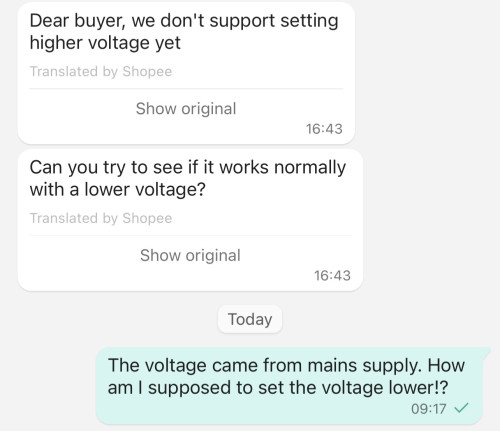 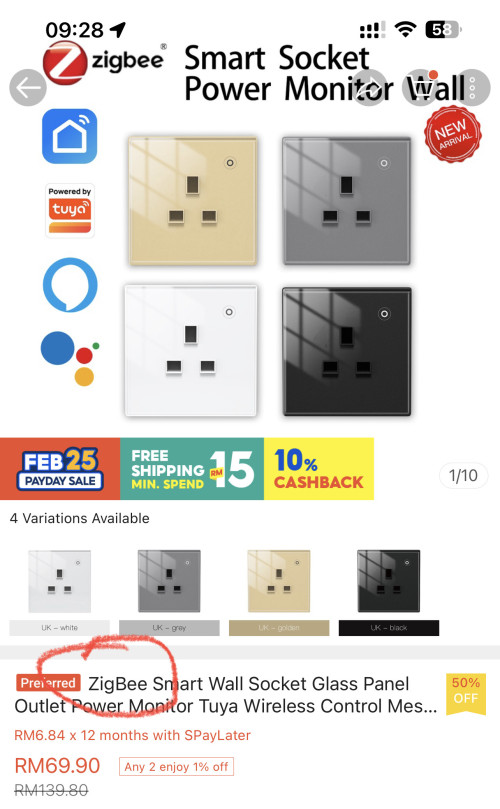 |
|
|
Apr 6 2023, 12:20 AM
Return to original view | IPv6 | Post
#36
|
|
Junior Member
229 posts Joined: Sep 2009
|
Bummer I'll just use the ZigBee smart plugs instead QUOTE(Oltromen Ripot @ Apr 5 2023, 09:30 AM) Sorry. The fried ones are WiFi version. Anyway, the Zigbee version, I put them behind AVR and UPS that can step down to lower end of 200V-250V range as workaround. But I wouldn't be buying more of them anymore. As for their usage as extender, I cannot verify the feature. But their connection have been very, very stable. Home 1. Separate network powered by Huawei B618 as backbone, specifically to control switches behind the other Homes and itself. Hub, no usb extender. All the 9 * wall sockets and 12 * plug socket. Very stable, not reliable (as in, less than 5 of them can turn off on their own for no reason and never came back if no manual intervention. So I set schedule to turn ALL of them on every 30mins.) Home 2. Sprinkler. Rides on Home 1 network as well. Hub, no usb extender. Zigbee tap controller to avoid overfill if water-leak sensor inside tank is triggered. 1 wall socket to control water-pump timer. Very reliable, very stable. Why not straight spray from tap instead of using tank? Because we want to make sure there is stored water for at least 1 cycle if pump is ON during mains interruption. And, we can put fertilizer inside tank. Home 3. General home and Fibre services. Hub, 1 USB extender to reach far rear. Home alarm (i use one of those tuya "tablet"-like from Shopee, like it because it have remote control to hang with keychain), wall switches, wall sockets, (sun)light sensor (to limit auto lights ON/OFF at porch and in hallway only when it's dark outdoor), aircond, heater, water leak sensor (because the tap inside wall that controls water supply to sink itself can silently leak if i opened it too much, had that twice and it ruined the cabinet door being soaked for whole week, not to mention excessive moisture in home from mini flood). Also the heat-based motion sensor (previously used for alarm, now to switch lights on only when there is humans present). I think it performed unreliably at the far rear, but improved after I put USB repeater in the middle to Hub. my Wifi-based devices at far rear will have notice inside SmartLife app about signal degradation, so I assumed the Zigbee ones also have issue, thus the USB repeater. Oh, the Wifi degradation, I attempt to solve with 4-node mesh scattered around WITH dhcp lifetime of 4hrs only (apparently the devices somehow gets new IP at random time, so if set for too long, the pool will run out and I will have lots of offline Wifi devices that never recovered until power reset at mains. I use Zigbee USB extender. Why? I can plug in behind any of mesh nodes, which I have 8 altogether scattered around (4 for home automation, 4 for laptops, mobiles, etc.) Since, again, I cannot verify wall zigbees usage as extenders. And. USB repeater is free to switch Hub to repeat, but Zigbee wall swiches supposedly repeats only the Hub it is registered to; wall sucks if I need it to repeat for Home A when it is registered to Home C. Imagine "missing" your kitchen socket in Home A because you had to have it repeat Home C. Nobody woild miss a missing USB extender if you move it to another Home. |
|
|
Apr 11 2023, 05:26 PM
Return to original view | IPv6 | Post
#37
|
|
Junior Member
229 posts Joined: Sep 2009
|
Hi sifus,
First and foremost pardon the noob question that I have here. I have an alarm panel, that has 2 output terminals, 12V DC each, to indicate arm and disarm status. Means when armed, it has 12V DC voltage. When disarmed then no voltage. I'm trying to figure out, how to use this output into my smart home app ( could be anything, apple home, tuya, Ewelink etc etc) As far as I'm concerned there are no smart switches that can use a DC voltage as an input signal (not input supply) or even a dry contact as an input , it can only control dry contact outputs. Any ideas? For example if I connect an ewelink smart switch ( the Autogate type that accepts 7-32V DC as an input supply) then the switch would only be powered when the alarm is armed and offline (no power) when the alarm is off. And even if it's armed and powered, the status of the switch in the app is non relevant. Any ideas sifus?? |
|
|
Apr 11 2023, 06:31 PM
Return to original view | IPv6 | Post
#38
|
|
Junior Member
229 posts Joined: Sep 2009
|
Hey there, No only one terminal has voltage. The other one is ground. I did think of lux through a light..but if the environment is bright then it kinda is not going to be very reliable. Still thinking of how to get over this.. QUOTE(Oltromen Ripot @ Apr 11 2023, 06:01 PM) 2 separate output terminals? Means if armed then 1 terminal have constant power? Brief power? And when disarmed, another 1 terminal have constant power? Brief power? Sort of like, you can put green bulb, red bulb as status indicator? I don't know if there is any tuya device that can outright rake in 12V as input signal. But i can think of using bulb for each of the 2 output terminal, then use 2 separate tuya light sensors to capture LUX value of the bulb. I assume the output terminals are mutually exclusive. such that if light sensor A read a sudden brightness, then can assume output terminal A has light up. The same goes for light sensor B reading a sudden brightness coming from output terminal B. |
|
|
Apr 12 2023, 01:27 PM
Return to original view | Post
#39
|
|
Junior Member
229 posts Joined: Sep 2009
|
I think i pretty much got my solution, after a lengthy discussion with my friend The 12V + and 12V - outputs from the alarm panel, will feed into a 12VDC relay, which then i will output to a Normally open and COM pair of cables. Then i will solder these to a reed sensor on a zigbee door sensor, which will then give me a closed door for when the alarm is armed, and open door when alarm is open. Then all i need to do is create an automation in homekit, which says that when that certain door is closed, then arm the aqara security , which will then show me a symbol of alarm being armed. In essence, when the main wired alarm is armed, then the aqara alarm is also armed (pretty convenient). Now i just gotta buy the items to get this into motion. Also, the alarm panel has a remote in.. which means that you can actually wire up a traditional RF receiver from autogate to the alarm panel. However, since i’m goin the smart route, i will be getting a zigbee module with RF built in. That way, i can arm and disarm using Tuya/Homekit/Google Home/Alexa and also use RF remote 433Mhz to arm the alarm. In a nutshell, 1. Tuya/Homekit/Google Home/Alexa and also use RF remote 433Mhz to arm the alarm. 2. Alarm Panel will output 12V DC+ to relay, which will activate door reed sensor, and arm aqara alarm - to show dumb alarm is armed. All will be present in Homekit, in theory. now just gotta get these items and try it out. Thanks! This post has been edited by epicure: Apr 12 2023, 02:13 PM wailing81 liked this post
|
|
|
Apr 12 2023, 03:44 PM
Return to original view | Post
#40
|
|
Junior Member
229 posts Joined: Sep 2009
|
QUOTE(celciuz @ Apr 12 2023, 03:07 PM) Which alarm panel is this btw? Im using a very dumb alarm panel, vivos. I have the IOT module, but sometimes the app doesnt load. so this hardware mod hopefully will be more responsive. fingers crossedI'm using Paradox and been trying to see how I'm able to arm/disarm via HomeKit. I have the Insite Gold subscription but.. its pretty slow and crap. |
| Change to: |  0.3734sec 0.3734sec
 0.43 0.43
 7 queries 7 queries
 GZIP Disabled GZIP Disabled
Time is now: 20th December 2025 - 01:54 AM |
 Quote
Quote