Outline ·
[ Standard ] ·
Linear+
Acer Aspire V Nitro Thread, Designed to rev up your life
|
ylums
|
 Oct 6 2015, 02:38 PM Oct 6 2015, 02:38 PM
|
New Member


|
Just sent my unit to service centre. Shut down suddenly then would never power on again although plugged in. 7months old 744n @@ Promised can get back within 3 working days. So fast huh.
|
|
|
|
|
|
ylums
|
Oct 6 2015, 02:42 PM
|
New Member
|
QUOTE(TWH1993 @ Sep 24 2015, 08:52 PM) Hi, I am current using vn7-591g-744n. After upgrade to windows 10, when i want to reset the factory setting it pop up said that the recovery files are missing and do not have the button of downgrade back to windows 8.1.  Now I am finding the recovery files for my laptop. Anyone can copy the recovery file for me (i think it will work) or have another suggestion?  Last time I accidentally format the recovery partition, so i ask highpoint in facebook he say can install back but i never send mine. So im not sure. What i do is download windows 8 iso and install and download back all the drivers. Dun worry about the product key as it will automatically detected. U can also backup your product key, ask google 😃 |
|
|
|
|
|
voncrane
|
Oct 6 2015, 09:31 PM
|
|
|
QUOTE(TWH1993 @ Sep 24 2015, 08:52 PM) Hi, I am current using vn7-591g-744n. After upgrade to windows 10, when i want to reset the factory setting it pop up said that the recovery files are missing and do not have the button of downgrade back to windows 8.1. Now I am finding the recovery files for my laptop. Anyone can copy the recovery file for me (i think it will work) or have another suggestion? QUOTE(ylums @ Oct 6 2015, 02:42 PM) Last time I accidentally format the recovery partition, so i ask highpoint in facebook he say can install back but i never send mine. So im not sure. What i do is download windows 8 iso and install and download back all the drivers. Dun worry about the product key as it will automatically detected. U can also backup your product key, ask google 😃 This^^ ... Also, i believe the OEM product keys are backed up and crosschecked with Microsoft's servers. I got tired of a bloated system, downloaded windows 10 ISO and did a completely fresh install. Windows was activated automatically, no fuss. This post has been edited by voncrane: Oct 6 2015, 09:32 PM |
|
|
|
|
|
aloy88
|
Oct 12 2015, 12:00 PM
|
Getting Started
|
i got some minor problem after installing W10, my wifi need to manually connect instead of auto connect. any suggestion ?
prior to installation, my old w8 can just auto connect even tho i shut down my laptop, however i need to manually log on everytime.
|
|
|
|
|
|
piglover
|
Oct 14 2015, 08:05 PM
|
|
|
Hi Guys!
Nice to have this discussion group..
My VN7-591G-78A2K coming very soon..
|
|
|
|
|
|
voncrane
|
Oct 14 2015, 09:20 PM
|
|
|
QUOTE(aloy88 @ Oct 12 2015, 12:00 PM) i got some minor problem after installing W10, my wifi need to manually connect instead of auto connect. any suggestion ? prior to installation, my old w8 can just auto connect even tho i shut down my laptop, however i need to manually log on everytime. Are you using default windows drivers or specifically from Acer's website? No auto-connect issues here... I'm using drivers from Acer's website. |
|
|
|
|
|
aloy88
|
Oct 15 2015, 12:08 PM
|
Getting Started
|
QUOTE(voncrane @ Oct 14 2015, 09:20 PM) Are you using default windows drivers or specifically from Acer's website? No auto-connect issues here... I'm using drivers from Acer's website. i didnt install anything also. should be standard driver from windows... maybe i go try install from their acer website |
|
|
|
|
|
arslow
|
Oct 15 2015, 11:06 PM
|
|
|
The v13 and v15 have launched in SG few days back, ender when will we see the Nitro Skylake in Malaysia  |
|
|
|
|
|
Dutchlady
|
Oct 19 2015, 02:20 PM
|
New Member
|
Hi guys. Am currently making decision between v nitro vn7 519g 78 skg and asus g551. Which one is better? Thanks
|
|
|
|
|
|
skaiz
|
Oct 28 2015, 11:20 PM
|
New Member
|
i have not been able to download windows update recently.
anyone got the same error (0x80240442) ?
my model is VN7-591G-744N and upgraded to windows 10 months ago.
|
|
|
|
|
|
voncrane
|
Oct 29 2015, 12:09 AM
|
|
|
QUOTE(skaiz @ Oct 28 2015, 11:20 PM) i have not been able to download windows update recently. anyone got the same error (0x80240442) ? my model is VN7-591G-744N and upgraded to windows 10 months ago. Hmmm.... Same model here and upon checking, I've also got a bunch of updates awaiting download and not downloading... No ideas why.. PC still functions normally though... |
|
|
|
|
|
skaiz
|
Oct 29 2015, 09:35 AM
|
New Member
|
QUOTE(voncrane @ Oct 29 2015, 12:09 AM) Hmmm.... Same model here and upon checking, I've also got a bunch of updates awaiting download and not downloading... No ideas why.. PC still functions normally though... maybe it is related, my laptop actually suffered from crashing while playing some games, ie, video rendering error, windows kernel error, etc is it software or hardware issue? time to send back for warranty? |
|
|
|
|
|
voncrane
|
Oct 29 2015, 10:30 AM
|
|
|
QUOTE(skaiz @ Oct 29 2015, 09:35 AM) maybe it is related, my laptop actually suffered from crashing while playing some games, ie, video rendering error, windows kernel error, etc is it software or hardware issue? time to send back for warranty? I believe its a software issue as most people on different hardware are reporting the same error. There's the trick on Windows TenForums to perform a Windows 10 upgrade while still running Windows 10. Try that and reply back here if it works for you.. |
|
|
|
|
|
skaiz
|
Nov 2 2015, 11:00 AM
|
New Member
|
QUOTE(voncrane @ Oct 29 2015, 10:30 AM) I believe its a software issue as most people on different hardware are reporting the same error. There's the trick on Windows TenForums to perform a Windows 10 upgrade while still running Windows 10. Try that and reply back here if it works for you.. Did a Win 10 upgrade on a Win 10. Still cant download windows update. But i read somewhere, a dude has the same problem and he can download window updates after using a LAN cable instead of wifi. However, for me, the windows update can only be done after using unifi wifi rather than maxis fibre wifi. Very weird. Subsequently for experiment purpose, i clean install window 10 again, this time removing everything and windows updates can be downloaded using maxis fibre wifi. The laptop feels much better now but i noted an issue in Task Manager. I noted disk utilisation is fluctuating from 0% to 100% then to 0% even without opening any apps. Anyone got this problem? |
|
|
|
|
|
voncrane
|
Nov 2 2015, 04:40 PM
|
|
|
QUOTE(skaiz @ Nov 2 2015, 11:00 AM) Did a Win 10 upgrade on a Win 10. Still cant download windows update. But i read somewhere, a dude has the same problem and he can download window updates after using a LAN cable instead of wifi. However, for me, the windows update can only be done after using unifi wifi rather than maxis fibre wifi. Very weird. Subsequently for experiment purpose, i clean install window 10 again, this time removing everything and windows updates can be downloaded using maxis fibre wifi. The laptop feels much better now but i noted an issue in Task Manager. I noted disk utilisation is fluctuating from 0% to 100% then to 0% even without opening any apps. Anyone got this problem? Hey... sorry you had to go through the hassle of re-installation. Here's how I solved mine. *Download and run Windows Update Troubleshooter. *Let it do its thing and after its fixed the issues. *Restart the PC, then launch Windows update. *Give it a couple of minutes depending on internet speed, updates will then resume downloading and installation. |
|
|
|
|
|
skaiz
|
Nov 2 2015, 05:11 PM
|
New Member
|
QUOTE(voncrane @ Nov 2 2015, 04:40 PM) Hey... sorry you had to go through the hassle of re-installation. Here's how I solved mine. *Download and run Windows Update Troubleshooter. *Let it do its thing and after its fixed the issues. *Restart the PC, then launch Windows update. *Give it a couple of minutes depending on internet speed, updates will then resume downloading and installation. dun worry...i sorted with the windows update ady. but do u experienced disk utilisation fluctuating up to 100% and down? |
|
|
|
|
|
voncrane
|
Nov 2 2015, 06:02 PM
|
|
|
QUOTE(skaiz @ Nov 2 2015, 05:11 PM) dun worry...i sorted with the windows update ady. but do u experienced disk utilisation fluctuating up to 100% and down? Nope... looks pretty normal to me... 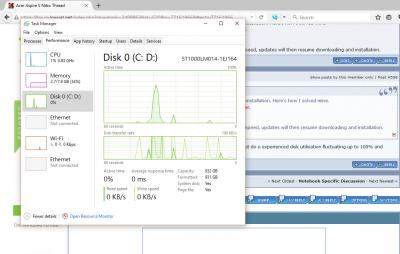
|
|
|
|
|
|
freddy manson
|
Nov 3 2015, 09:55 AM
|
|
|
QUOTE(zenquix @ Oct 4 2015, 04:16 PM) i have bene trying to transfer the OS installation from the standard drive but have used 2 tools in the market but still cannot work I used AOMEI Partition Manager Pro.. After succesfully clone the OS drive i took out the HDD and let the SSD boot then i insert the HDD after a successfully boot from the SSD |
|
|
|
|
|
bullshyt
|
Nov 8 2015, 12:31 AM
|
Getting Started
|
guys anyone can suggest me seller/place to purchase this laptop? saw cheapest in lyn around 3.6k
|
|
|
|
|
|
lopiop
|
Nov 8 2015, 06:26 PM
|
|
|
for those who got display driver crash, dont use the nvidia driver provided by acer, im using 355.82 and suffered no problems, just download from the nvidia website
|
|
|
|
|



 Quote
Quote







 0.0344sec
 0.43
0.43
 6 queries
 GZIP Disabled