

30Mbps dipinggirkan, kesian me.
The Official Maxis FTTH Thread | v5, Maxis Home Fibre Internet, from RM89
The Official Maxis FTTH Thread | v5, Maxis Home Fibre Internet, from RM89
|
|
 Oct 26 2023, 09:28 AM Oct 26 2023, 09:28 AM
Return to original view | Post
#41
|
 
Senior Member
1,716 posts Joined: May 2006 From: JDT  
|
30Mbps dipinggirkan, kesian me.
|
|
|
|
|
|
Oct 27 2023, 02:29 PM
Return to original view | Post
#42
|
|
Senior Member
1,716 posts Joined: May 2006 From: JDT
|
QUOTE(azizul1975 @ Oct 27 2023, 02:26 PM) the only way for existing customer of 30Mbps to get 100Mbps/RM89 is to pretend you want to switch to unifi. but first you need to get the TR number from Unifi agent and then give to Maxis center tell them you want to switch to unifi. few days later sure maxis agent will call you to counter offer to match Unifi offer. siap offer nak bagi 2 months free lagi.... But 2 years contract kan? |
|
|
Oct 27 2023, 04:31 PM
Return to original view | Post
#43
|
|
Senior Member
1,716 posts Joined: May 2006 From: JDT
|
Even RM79 for 30Mbps I would stay also, but looks like not the case. vez liked this post
|
|
|
Oct 29 2023, 07:39 PM
Return to original view | Post
#44
|
|
Senior Member
1,716 posts Joined: May 2006 From: JDT
|
QUOTE(fruitie @ Oct 29 2023, 05:51 PM) Not really. I never had any capped speed with Maxis Fibre and using TM UniFi infra, not a single day since the installation day in last year's March. Wait you are on Maxis but didn't get symmetrical speed?It is always more than 300Mbps for me and I'm on 300Mbps plan.  I searched for both FAQ and T&C for Home Fibre, I can't find sentence or table that mention upload/download speed for the fibre plan. Did I missed anything? |
|
|
Oct 31 2023, 07:48 PM
Return to original view | Post
#45
|
|
Senior Member
1,716 posts Joined: May 2006 From: JDT
|
QUOTE(Oltromen Ripot @ Oct 31 2023, 06:08 PM) Had to change by ownself. If you use their supplied router, they will change it for you. sadlyfalways liked this post
|
|
|
Nov 21 2023, 11:15 AM
Return to original view | IPv6 | Post
#46
|
|
Senior Member
1,716 posts Joined: May 2006 From: JDT
|
30Mbps crying in dark corner.
Meanwhile this notification just popped up.  |
|
|
|
|
|
Nov 21 2023, 12:30 PM
Return to original view | Post
#47
|
|
Senior Member
1,716 posts Joined: May 2006 From: JDT
|
They are not auto upgrading eligible users like TM, looks like they want to minimise damage as much as possible.
|
|
|
Nov 21 2023, 12:43 PM
Return to original view | Post
#48
|
|
Senior Member
1,716 posts Joined: May 2006 From: JDT
|
QUOTE(busbos @ Nov 21 2023, 12:41 PM) probably because they're giving options to users. say like those that dont want to upgrade can choose to stay with current speed with reduced monthly payment Reduced monthly payment with existing plan is welcome, are they doing it? |
|
|
Nov 22 2023, 05:04 PM
Return to original view | Post
#49
|
|
Senior Member
1,716 posts Joined: May 2006 From: JDT
|
QUOTE(jstnlw2 @ Nov 22 2023, 05:00 PM) my upgrade done liou, quite fast, 300 > 500mbps. weird i get duplicate sms, hope it doesn't cause any billing issues. What is your upload/download speed before the free upgrade?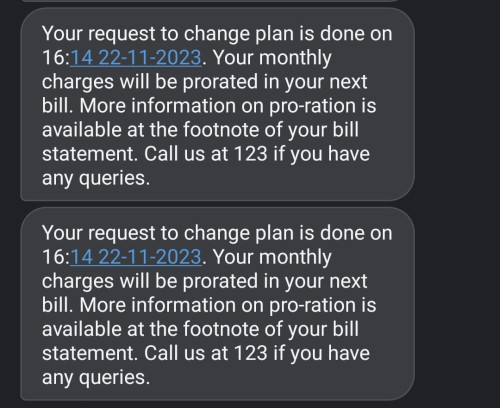 speed was wonky at first, then give it a fresh reboot and it meets the speed. gonna monitor for a few days. 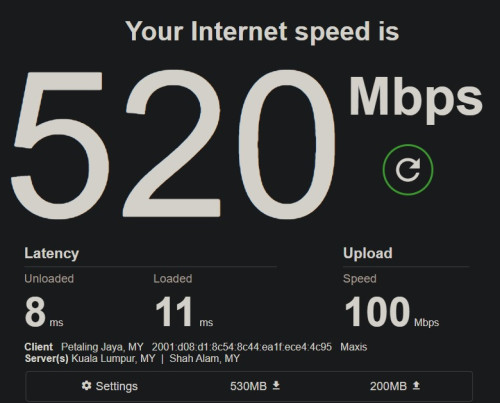 |
|
|
Dec 26 2024, 05:05 PM
Return to original view | Post
#50
|
|
Senior Member
1,716 posts Joined: May 2006 From: JDT
|
QUOTE(sadlyfalways @ Dec 26 2024, 09:59 AM) can anyone using public ip on maxis do a pingplotter to 8.8.8.8 and show me the results? right now i am using nextdns on asus gateway, deco as ap and unifi modem in my network. got so many hops in my pingplotter but ping is low. just wondering why haha  |
|
|
Mar 3 2025, 06:55 PM
Return to original view | Post
#51
|
|
Senior Member
1,716 posts Joined: May 2006 From: JDT
|
QUOTE(xjoshualaw29 @ Mar 1 2025, 12:08 PM) Hi No issue here, public IP, now on 121.121.X.XIs anyone on the public IP 202.75.155.X range on maxis home fiber? I am using public IP but then this IP subnet range seems to be just having issues trying to access Hong Leong Bank. Other banks are just fine. It is just Hong Leong Bank. It has reoccured after I managed to just change back to the 58.XX.XX.XX IP subnet range. Screenshots are below for reference if anyone has the same issue. 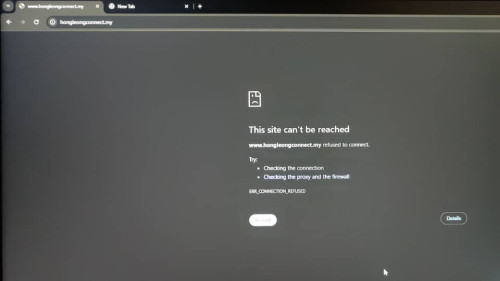 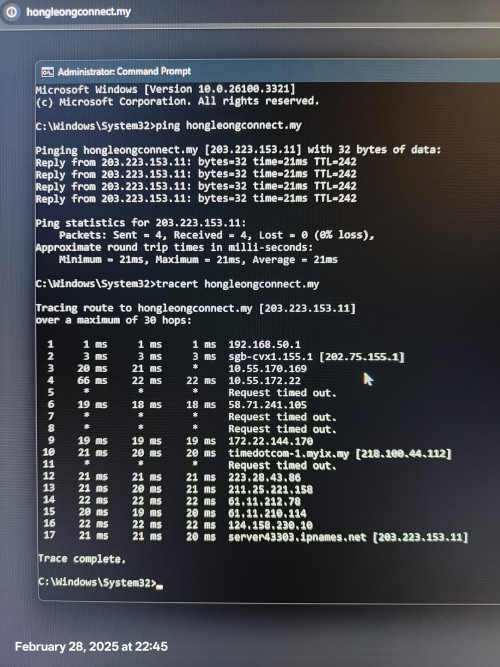 Ping results is fine but then IP subnet got blocked. I did a MCMC report before on this but all they do is just put me back on the 58.XX.XX.XX subnet to fix the issue. They did not fix the 202.75.155.X range by talking with HLB on this. Maybe you try click online banking from https://www.hlb.com.my/ It will redirect you to https://s.hongleongconnect.my/rib/app/fo/login?icp=hlb-en-all-header-txt-connectweb 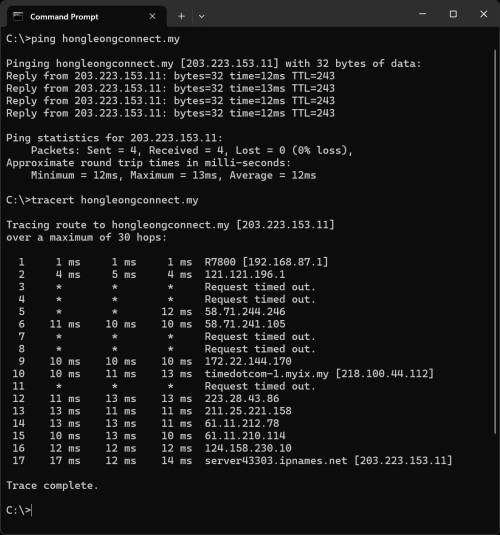 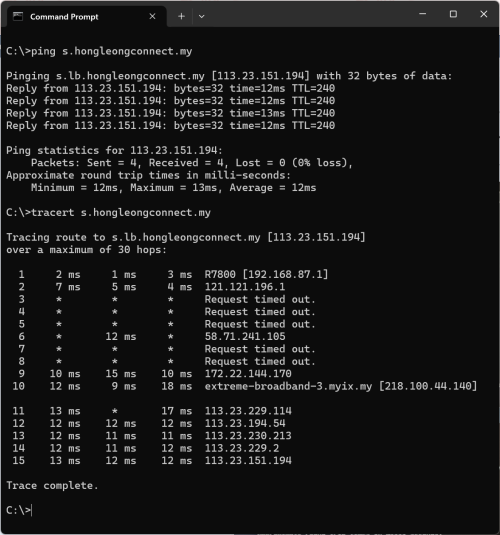 |
|
|
Mar 5 2025, 06:52 PM
Return to original view | Post
#52
|
|
Senior Member
1,716 posts Joined: May 2006 From: JDT
|
QUOTE(xjoshualaw29 @ Mar 5 2025, 06:11 PM) Update 05/03: I am using my own router, my router shows my subnet is 255.255.255.255, VLAN ID is 621.Maxis said that could not resolve and then asked me to follow up with Hong Leong Bank on this and they also said they did not block my IP subnet...  Ended up asking Maxis to fix it remotely when i put back my router and then they managed to change my IP subnet... once completed, i swapped back my Asus router. yet still gotten the issue only reoccur on my Asus router. Had to change the VLAN profile to Maxis-Fiber in ISP profile of my router then back to the 58.71.205.XX range... So I'm now wondering is Maxis purposely doing this to make ppl use their Maxis router... If I use custom VLAN profile which is Maxis Internet VLAN 621 only. The issue reoccurs. But if i use their profile, the issue disappears... Guess something new or just wondering apa issue with it...  |
|
|
May 1 2025, 03:43 PM
Return to original view | Post
#53
|
|
Senior Member
1,716 posts Joined: May 2006 From: JDT
|
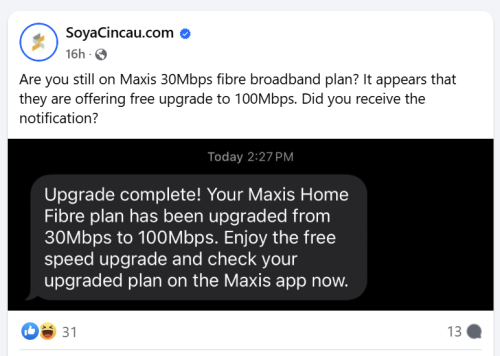
Anyone on 30Mbps got this notification?
 This post has been edited by alexander3133: May 1 2025, 03:43 PM |
|
|
Jun 10 2025, 08:38 PM
Return to original view | Post
#54
|
|
Senior Member
1,716 posts Joined: May 2006 From: JDT
|
Thanks Maxis #MaxisFibre #Dinocorn  jusbella liked this post
|
|
|
Jul 11 2025, 08:53 PM
Return to original view | Post
#55
|
|
Senior Member
1,716 posts Joined: May 2006 From: JDT
|
QUOTE(fruitie @ Jul 11 2025, 08:02 PM) It is using UniFi infra but have been on Maxis since day 1, didn't change ISP from UniFi or anything. Probably the TM technician did it since day 1. I am also with Maxis since day 1 on TM infra, also uses LAN2.How to login to the BTU?  |
| Change to: |  0.0304sec 0.0304sec
 0.55 0.55
 7 queries 7 queries
 GZIP Disabled GZIP Disabled
Time is now: 3rd December 2025 - 01:40 PM |
 Quote
Quote