Outline ·
[ Standard ] ·
Linear+
The Official Maxis FTTH Thread | v5, Maxis Home Fibre Internet, from RM89
|
QuantumEdge
|
 Oct 18 2024, 03:39 PM Oct 18 2024, 03:39 PM
|

|
QUOTE(YoungMan @ Oct 18 2024, 03:29 PM) I can confirm that no way you can get permanent waiver for public IP. At most get 8 months free. If the aim is cheapest monthly subs, Unifi is the way. After 2 years can even apply SWU plan. Yep, btw I tried to change my postpaid 79 to hotlink 45 They said I need to follow SOP, transfer to hotlink prepaid for a month before they allow me to change again And then they transfer my call to Maxis's marketing department RM20 rebate for 3 years, no contract So RM59 for 300GB of data for my phone, I'm keeping this  Still waiting for the call from their fiber department |
|
|
|
|
|
QuantumEdge
|
Oct 24 2024, 11:35 PM
|
|
|
Some updates of my experience of transferring from Maxis to Unifi
Unifi offered me 6+2 months free bill if I change to them
Since Maxis refused to give me any meaningful promotion package to recontract, I decided to change ISP
Submitted my transfer request on 17/10, had to contact M's CS via twitter and provide them the transfer ID
Because my postpaid plan was linked to the fibre account, they need to unbind them
Requested to change my postpaid 79 to hotlink 45, they told me I need to use a month of prepaid before they allow me to switch to postpaid. I said no problem, then their retention team told me they will give me RM20 rebate on my RM79 postpaid for 3 years without any contract, so I'm keeping that number with Maxis till the rebate is over
Didnt receive and call back from their fibre department
----------------------------------------------------------------------------
22/10
Agent told me transfer request was rejected
Contacted Maxis again, they told me I need to clear the balance before they will let me go
Paid the bill for this month+another month in advance, submitted request again
Maxis called back in the afternoon, they said they are willing to counter Unifi's offer with the same 8 months bill rebate
Still, they said it is impossible to give me free access to public IP since it is an add-on service...
Ended up saying no to Maxis, but I did told the CS rep I'm happy with their service for the past 3 years, just not the price
Checked with CS rep, no need to return any of the equipments if you are out of contract
In the evening, Unifi send me the installation info for confirmation
----------------------------------------------------------------------------
24/10
Unifi 500Mbps installed, they give me a skyworth 2 in 1 box lol
However, you can use back the old ONU if you want to, plug and play
So far encountered pictures on twitter not loading (again, typicall of unifi)
Fixed it by using Controld DNS
Bye guys, see you all in 24 months lol
For me, the total saving will be:
RM149 x 8 Months= RM1192
No more public IP subscription required: Another RM10 per month saving till I terminate/TM starts charging fees for it
This post has been edited by QuantumEdge: Oct 25 2024, 09:11 AM
|
|
|
|
|
|
QuantumEdge
|
Oct 26 2024, 08:00 AM
|
|
|
QUOTE(YoungMan @ Oct 25 2024, 02:35 PM) A good lesson to learn is, when doing transfer always clear your bill. Back when I did my transferfrom Unifi to Digi Fibre, TM ask for 1 month advance payment. Any balance will be refunded later. Enjoy your Unifi, and meanwhile your Maxis Fibre will still run for a few days to 2 weeks. Should you decide to do a side by side comparison just plug back the Maxis router into lan2 of the modem. Thanks Maxis already potong myy service today, too late to try But I'm seeing more and more SSID changing from @Unifi to @Maxis in my area, that's quite alarming... |
|
|
|
|
|
QuantumEdge
|
Oct 26 2024, 02:56 PM
|
|
|
QUOTE(YoungMan @ Oct 26 2024, 10:07 AM) Haha, so efficient. Last time my Unifi took 2 weeks to terminate. My Digi fibre also took around 10 days. Nothing to worry, people nowadays are more open to choose their providers. Unlike those days marketting will convince you the other provider service sucks. Still waiting for Maxis to refund my advance payment lol QUOTE(blacktubi @ Oct 26 2024, 11:43 AM) You mean you old modem given during your Maxis Fiber era works seamlessly with Unifi without changing any settings on the modem? That's quite interesting Yes, I even cross checked the OLT credentials Same password, different serial Tried the same password on 3 different ONU (Huawei,ZTE,Nokia), all worked without the need to change the serial. I managed to get the VOIP service working on all 3 ONU as well. *My maxis was on TM infra This post has been edited by QuantumEdge: Oct 26 2024, 03:13 PM |
|
|
|
|
|
QuantumEdge
|
Oct 27 2024, 01:34 PM
|
|
|
QUOTE(YoungMan @ Oct 26 2024, 07:30 PM) I hope you have fill up their Maxis Refund Request form. You can google for it. 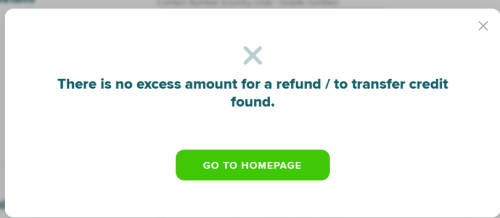 Welp, need to kacau their CS again 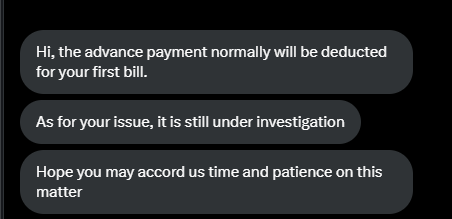 This post has been edited by QuantumEdge: Oct 27 2024, 01:48 PM This post has been edited by QuantumEdge: Oct 27 2024, 01:48 PM |
|
|
|
|
|
QuantumEdge
|
Nov 27 2024, 10:51 AM
|
|
|
Maxis fibre and data service big kaboom?
|
|
|
|
|
|
QuantumEdge
|
Dec 8 2024, 05:00 PM
|
|
|
QUOTE(kart @ Dec 7 2024, 06:42 PM) What is the best brand of WiFi 6 certified router and Modem (Optical Network Terminal (“ONT”) or Broadband Termination Unit (“BTU”)), given by Maxis? Or, does Maxis provide only 1 brand of router, ONT or BTU? Thank you. I subscribed to Maxis 300Mbps 2+ years ago, they gave me Kaon AR2140+ZTE f620 ONU I've seen my friends getting Tplink routers (AX20 I think, or the newer AX53) ONU wise, ZTE F620, Huawei HG8240H5 (In my opionion this is the best), 1GBPS and beyond you might be getting Skyworth Anyway, ONU really doesnt matter much Router I agree with Blacktubi, buy your own and swap the provided router out Remember to grab the PPPOE credentials from your installer This post has been edited by QuantumEdge: Dec 8 2024, 05:01 PM |
|
|
|
|
|
QuantumEdge
|
Jan 31 2025, 09:57 AM
|
|
|
QUOTE(kart @ Jan 31 2025, 09:00 AM) Previously, I used TMnet Streamyx internet service (under copper wire infrastructure). In the event of heavy rain with thunder, I would detach the RJ-11 telephone cable between ADSL Router and the wall socket, to prevent the ADSL Router getting struck by lightning. At present, I am using my Maxis Home Fibre subscription (under TM fibre infrastructure). Do I need to detach the optical fibre from ZTE ONT during heavy rain with thunder, in order to prevent TP-Link router and ZTE ONT getting struck by lightning? Thank you for your information.  Fibre cable doesnt conduct electricity, it is made out of glass And the stainless steel cord inside is not connected to your ONT, it is there to give structural strength So dont worry, you can keep it plugged in |
|
|
|
|
|
QuantumEdge
|
Aug 13 2025, 12:11 PM
|
|
|
Any Maxis user here using Controld DNS? Are you able to be assigned to DNS hosted in Singapore? How's the ping? On Unifi I keeps getting routed to Japan, ping consistently 100ms+  |
|
|
|
|
|
QuantumEdge
|
Aug 20 2025, 07:05 PM
|
|
|
QUOTE(Raymond T. @ Aug 20 2025, 06:52 PM) Just transfer to maxis fiber today. How to know if I’m on Public or Private IP ? Current IP 113.211.213.XXX 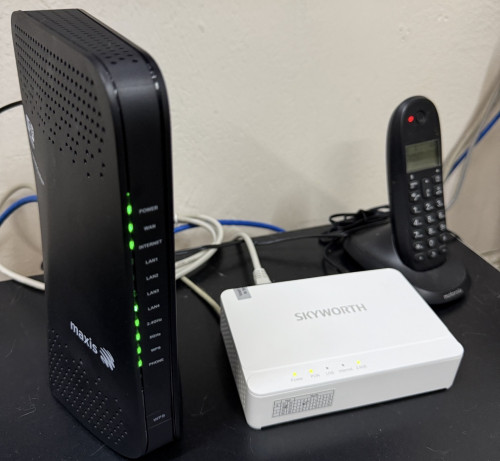 Definitely private, maxis public IP is RM10 per month extra |
|
|
|
|
|
QuantumEdge
|
Aug 27 2025, 05:53 PM
|
|
|
Maxis users, have you encountered any slowdowns recently? Especially during the night?
|
|
|
|
|
|
QuantumEdge
|
Aug 27 2025, 11:40 PM
|
|
|
QUOTE(dev/numb @ Aug 27 2025, 09:32 PM) So far so good, but maybe I’m not the best person to ask since my main browsing devices are connected to a VPN server (server in KL, I’m in JB) via router full-time. Sometimes latency might go up a bit at night compared to day time, but still comfortably around 20ms. Occasionally might drop a few packets, but doesn’t affect anything I do. Not a gamer so cannot comment on gaming latency. Also disabled IPv6 (to prevent VPN leaks) so cannot comment on that either. So not Unifi level of bad then? Geez, U is not usable in the night recently |
|
|
|
|
|
QuantumEdge
|
Aug 28 2025, 05:29 PM
|
|
|
QUOTE(fruitie @ Aug 28 2025, 10:54 AM) Is it? I think location based kot. I’m now living at my sister’s house in Seremban and her house is equipped with UniFi 500Mbps, it is good. Full speed all the time. It is really bad, basically everynight from 7PM onwards the internet is basically unusable And my traffic was gettting routed to random COUNTRIES instead of the closest servers Such things never happened during my 2 years with Maxis Cloudflare speedtest PL and latency is over the rooft, plus only getting 10% of my subscribed speed as bonus QUOTE(dev/numb @ Aug 28 2025, 12:31 PM) For my needs, no contest. Maxis ain’t perfect but at the very least it seems like their network engineers went to school. My only regret was not switching sooner. All the blood I vomited from TM’s nightly international peering nonsense, I will never be able to claim back. Yes, Maxis is not the top ISP in my mine but they are the most average one for sure I had to cancelled my online tuitions because it was bad enough I couldnt open online materials  |
|
|
|
|
|
QuantumEdge
|
Aug 30 2025, 05:54 PM
|
|
|
QUOTE(fruitie @ Aug 28 2025, 05:34 PM) OMG, that's really bad. As I'm in a Global role, so my daily online meetings via MS Teams only start at 8pm which is the peak time, but never once I face any issue and sometimes I even have to turn on my camera during the calls. Because of the horrible routing, I considered taking Allo (either directly or Maxis under their infra) as my backup fibre plan while I serve Unifi's contract for another 18 months. My area is covered by both Allo and Unifi's infra, after checking with Allo's CS they told me it is impossible for customer to have both Unifi and Allo service in the same premise despite they are on different infra. |
|
|
|
|
|
QuantumEdge
|
Aug 30 2025, 07:11 PM
|
|
|
QUOTE(fruitie @ Aug 30 2025, 06:30 PM) Why don’t you try 5G broadband as backup? If I can get a fibre connection, I would still try to go with it consider it is only RM49 a month for 100Mbps symmetric Still, worse case scenario I would give 5G a shot |
|
|
|
|
|
QuantumEdge
|
Sep 23 2025, 11:55 AM
|
|
|
QUOTE(KenYoung @ Sep 23 2025, 09:43 AM) Was scrolling my fb and they kept shooting me ads for this Bcoz somehow the algorithm caught onto me shopping around for home fiber renewal and saw this 1 agent saying Maxis now can do renewal and they giving a good deal? 100 mbps 2 years @ 89 /m@ 6 months free 3 years @ 89/m@ free 50' Samsung tv Free replacement router 6, if ours is old 1... And they throw in some vouchers to buy electronics.. (later go enquire further) Agent charging RM100 service fee for 100mbps B4 they start processing.. (will be refunded if maxis don't call) (300 and up they charge 150 rm) Looks legit with office (and thousands of good review on fb) nearby my place so maybe later I go walk In see see.. Any1 done this B4? I've never heard of any processing fees when renewing contract Safest way is to call Maxis's marketing team |
|
|
|
|
|
QuantumEdge
|
Sep 23 2025, 12:39 PM
|
|
|
QUOTE(fruitie @ Sep 23 2025, 11:56 AM) Yes, there is no processing fees but just to submit for retention purposes. Pandai this agent do this kind of things.  Earn double dy From what I've heard, they earned the same commission as the price of your subscribed plan from ISP And then still wanna take a bite from you  |
|
|
|
|
|
QuantumEdge
|
Sep 24 2025, 11:09 AM
|
|
|
QUOTE(kwss @ Sep 23 2025, 05:48 PM) I believe no one reply you with the ping time yet. Both IPv4 and IPv6 via Equinix SG Thanks man, the issue seems to be on Unifi only Good to know, bad to go through  |
|
|
|
|
|
QuantumEdge
|
Sep 24 2025, 11:10 AM
|
|
|
QUOTE(kwss @ Sep 23 2025, 05:48 PM) I believe no one reply you with the ping time yet. Both IPv4 and IPv6 via Equinix SG Thanks man, the issue seems to be on Unifi only Good to know, bad to go through |
|
|
|
|



 Quote
Quote

 0.0320sec
 0.73
0.73
 7 queries
 GZIP Disabled