

QUOTE(Micky78 @ Aug 23 2024, 11:38 PM)
today is my first day of moving from unifi to maxis (500mbps plan), was given a kaon router and a new ZTE box.. felt the wifi signal is weaker compare to unifi time..

Kaon is pure e waste, buy your own routerThe Official Maxis FTTH Thread | v5, Maxis Home Fibre Internet, from RM89
|
|
 Aug 24 2024, 05:42 PM Aug 24 2024, 05:42 PM
Return to original view | IPv6 | Post
#161
|
 
Senior Member
1,601 posts Joined: Jan 2016  
|
QUOTE(Micky78 @ Aug 23 2024, 11:38 PM) today is my first day of moving from unifi to maxis (500mbps plan), was given a kaon router and a new ZTE box.. felt the wifi signal is weaker compare to unifi time.. Kaon is pure e waste, buy your own router |
|
|
|
|
|
Sep 2 2024, 09:50 PM
Return to original view | IPv6 | Post
#162
|
|
Senior Member
1,601 posts Joined: Jan 2016
|
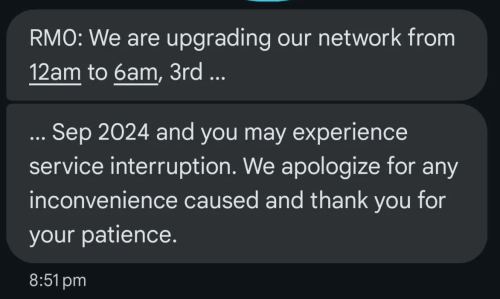 Limited to Johor area? |
|
|
Sep 2 2024, 09:53 PM
Return to original view | IPv6 | Post
#163
|
|
Senior Member
1,601 posts Joined: Jan 2016
|
QUOTE(Oltromen Ripot @ Sep 2 2024, 09:52 PM) SMS? no notification for SPU. Yep, received for Batu Pahat and Kulai |
|
|
Sep 2 2024, 10:37 PM
Return to original view | IPv6 | Post
#164
|
|
Senior Member
1,601 posts Joined: Jan 2016
|
QUOTE(Oltromen Ripot @ Sep 2 2024, 09:54 PM) are you on HSBB or Maxisnet? Unifi infra |
|
|
Sep 4 2024, 09:51 PM
Return to original view | IPv6 | Post
#165
|
|
Senior Member
1,601 posts Joined: Jan 2016
|
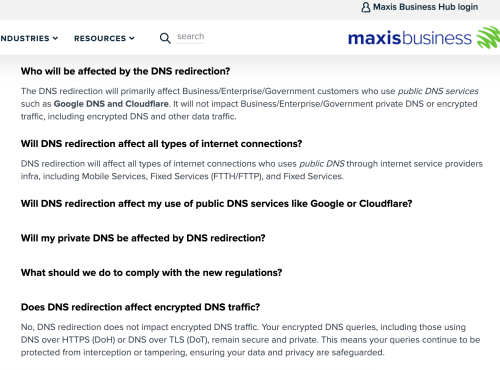 https://www.business.maxis.com.my/en/faq/da...ns-redirection/ This post has been edited by QuantumEdge: Sep 4 2024, 09:52 PM PRSXFENG liked this post
|
|
|
Sep 5 2024, 11:10 AM
Return to original view | Post
#166
|
|
Senior Member
1,601 posts Joined: Jan 2016
|
QUOTE(OKLY @ Sep 4 2024, 11:47 PM) I wonder if this applies for Maxis Home users as well? If yes, I will request a port in this week. For me at least, both TIME and Maxis's DNS redirection can be bypassed using DoT/DoH The only ISP that's playing around with blocking is Unifi But I think you better monitor for a while before porting out PRSXFENG liked this post
|
|
|
|
|
|
Sep 5 2024, 03:43 PM
Return to original view | IPv6 | Post
#167
|
|
Senior Member
1,601 posts Joined: Jan 2016
|
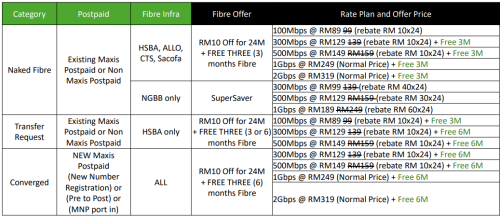 Oh yeah, my friend sent me this They are still pushing Unifi to Maxis promo Anyone interested boleh pm tepi  However, from what I've seen earlier today... some Maxis users are complaning about Maxis blocking DoT DoH so no idea what will happen down the road |
|
|
Sep 5 2024, 05:42 PM
Return to original view | IPv6 | Post
#168
|
|
Senior Member
1,601 posts Joined: Jan 2016
|
QUOTE(OKLY @ Sep 5 2024, 05:38 PM) Promo can get from Maxis Centre also? Nope, dealer only |
|
|
Sep 19 2024, 07:41 AM
Return to original view | Post
#169
|
|
Senior Member
1,601 posts Joined: Jan 2016
|
QUOTE(alucard89 @ Sep 18 2024, 09:32 PM) Hi, so I noticed it's slow at nightime for the past week. No issue here, Johor areaAnyone having the same problem? |
|
|
Sep 29 2024, 01:08 PM
Return to original view | IPv6 | Post
#170
|
|
Senior Member
1,601 posts Joined: Jan 2016
|
QUOTE(Created On 21/1/2021 @ Sep 26 2024, 09:12 AM) 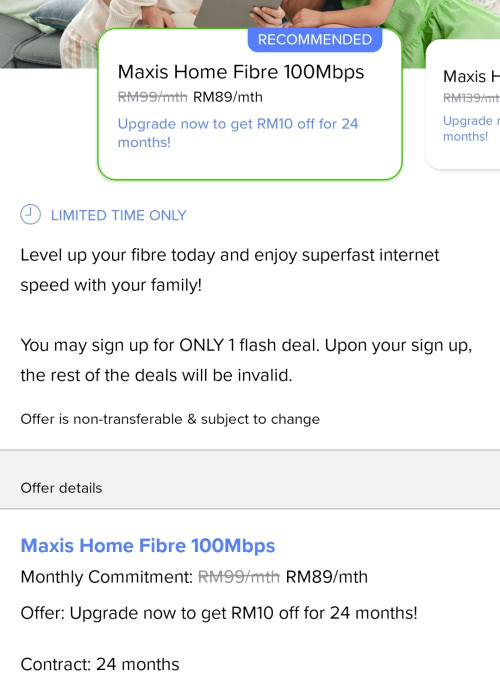 Maxis finally offers 100Mbps for RM89, but the catch is your contract renew for 24-month. So far still pushing that "special promo 1GBPS for RM249" RM249 1Gbps aint even a promo, just the price for typical 1GBPS plan |
|
|
Oct 7 2024, 01:38 PM
Return to original view | IPv6 | Post
#171
|
|
Senior Member
1,601 posts Joined: Jan 2016
|
Found something interesting, someone posted KAON AR2140's proposal online
https://www.scribd.com/document/661239708/T...v-2-261120-pptx According to the document, spec are as following: Main Chipsets BCM6750+BCM43684 NAND 256MB RAM 512MB Wifi 2.4Ghz 2*2, 5Ghz 4*4 OS based on OpenWRT Turns out this thing uses the same tri core processor as Asus AX82u, Tplink AX6000 While using the same 5Ghz chipsets as Asus AX86u, AX88u Anyone actually using this router 24/7? |
|
|
Oct 8 2024, 12:55 PM
Return to original view | IPv6 | Post
#172
|
|
Senior Member
1,601 posts Joined: Jan 2016
|
QUOTE(dev/numb @ Oct 7 2024, 06:49 PM) Must confess I didn’t really explore the Kaon for very long. May have been able to perform better if I played with the channels and other settings, but “out-of-the-box” it was pretty bad and the far lower spec Asus AX59u I replaced it with managed better performance/coverage with the 5Ghz band. Alas, I kind of semi-bricked the Kaon by playing with some of the DHCP toggles and promptly lost interest, did a factory reset, and put it in the box it came with.   Might be a case of decent hardware (although RAM is low for that level of chipset) being hamstrung by whatever dodgy software overlay Maxis/Kaon put on top of OpenWRT, typical of many ISP issued routers.  QUOTE(blacktubi @ Oct 7 2024, 08:03 PM) The 5GHz is definitely not 4*4 so I think the document is either an earlier revision or it's = not the Maxis customized model 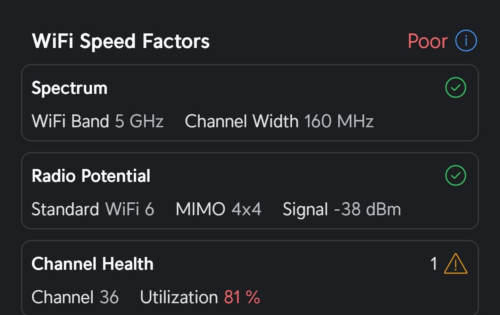 Interesting, according to wifiman it is 4*4 160mhz And it worked with TIME |
|
|
Oct 8 2024, 03:26 PM
Return to original view | IPv6 | Post
#173
|
|
Senior Member
1,601 posts Joined: Jan 2016
|
QUOTE(khainiz94 @ Oct 8 2024, 03:02 PM) I use the router for almost 18 months, and I can tell you the router is good vs all the other shit quality router that the telco gives. I couldnt test the peformance over walls, how was your experience ping and coverage wise?But reliability is so so. Both of mine kaput within 18 months. 😆😆😆 Dont worry, moving out from this unit in 6 months  |
|
|
|
|
|
Oct 9 2024, 03:09 PM
Return to original view | IPv6 | Post
#174
|
|
Senior Member
1,601 posts Joined: Jan 2016
|
QUOTE(khainiz94 @ Oct 9 2024, 12:22 PM) And this result is after I change my router to ASUS TUF AX6000. I tried the router a bit yesterday, the speed is actually really goodSignal is a bit better, but Asus Dual Band Smart Connect failed me since day one, I dunno what happen. They keep stuck on 2.4 GHz, so I have to split the band to make sure the device connected not stuck at 2.4 GHz. AND the speed sucks a bit in my room vs my old Kaon. I am just lazy to tinker around, so I just let it be and use as normal. 😆😆😆 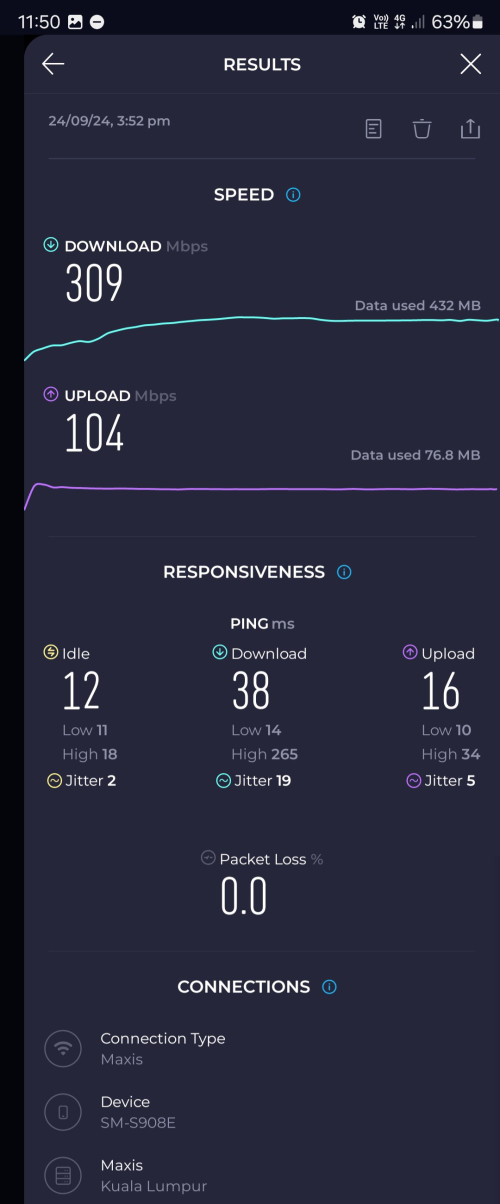 Not sure about signal strength as I cant simply enter other people's room Previously I was using Asus AX68u, using smart connect as well For my newer devices (Tab S9, S23U, AX200) they will switch to 5Ghz once they are avaliable However, Apple devices will stick to 2.4 despite I enabled band steering Even after changing to AX86U, same issue persisted |
|
|
Oct 9 2024, 08:53 PM
Return to original view | Post
#175
|
|
Senior Member
1,601 posts Joined: Jan 2016
|
QUOTE(khainiz94 @ Oct 9 2024, 07:01 PM) That is why I felt funny because all people keep bashing the Kaon router but it is good overall for an ISP router based on my experience for 18 months. I always install the newest merlin wrt, still...so far only iPhone 14,15,16 are having weird tendency to use 2.4 instead of 5In my house, no Apple devices. It affects all of my devices that support 5 GHz. It seems like band steering issue. Dunno why. But recently, after my switch to CelcomDigi, I factory reset my TUF AX6000, setup back everything with Digi Fibre credential, band steering problem all gone. And my slow speed issue in my room also gone. I dunno what happen. 😆😆😆 Maybe firmware fault when I first bought the router? Speed in the same room as usual. This time from my Tab S9+ QUOTE(fruitie @ Oct 9 2024, 07:09 PM) I have no issue with Asus router, it always prioritizes 5GHz even for my Apple devices. It's really odd, no such issue in my landed house but in my condo...it happens a lot |
|
|
Oct 9 2024, 09:06 PM
Return to original view | Post
#176
|
|
Senior Member
1,601 posts Joined: Jan 2016
|
QUOTE(fruitie @ Oct 9 2024, 08:56 PM) I'm also living in a condo. The only time it will connect to 2.4GHz is when I just restart the router, once I disconnect the WiFi then reconnect it again and it will be on 5GHz. Yes, and it's usually apple or mid tier android devices |
|
|
Oct 17 2024, 09:11 AM
Return to original view | IPv6 | Post
#177
|
|
Senior Member
1,601 posts Joined: Jan 2016
|
Registered to transfer from Maxis to Unifi, still waiting for Maxis's phone call
Unifi agent offering 6+2 months free subscription  And I dont need to pay an extra RM10 monthly for public IP Total saving: RM149*8 Months: RM1192 (excluding SST) Plus, every month afterwards I save RM10 So basically another RM10*12 Months: RM120 till the day I switch again Next step I'm going to move my RM79 Maxis postpaid to Hotlink, since no more one prime unlimited everything Bye bye Maxis This post has been edited by QuantumEdge: Oct 17 2024, 09:16 AM |
|
|
Oct 17 2024, 02:24 PM
Return to original view | IPv6 | Post
#178
|
|
Senior Member
1,601 posts Joined: Jan 2016
|
QUOTE(YoungMan @ Oct 17 2024, 09:42 AM) 👍 save wherever possible. I assume it is 500mbps? as below that no public IP. Yep, 500Mbps cause I need public IP for my VPN (Gonna thanks TIME for their bad routing to China)QUOTE(fruitie @ Oct 17 2024, 10:49 AM) For Maxis, have to call them, at least based on my experience. Agent told me not needed, they will call Cause last time his client called CS, request transferation However, later CS called and claims they never receive such request |
|
|
Oct 17 2024, 09:25 PM
Return to original view | IPv6 | Post
#179
|
|
Senior Member
1,601 posts Joined: Jan 2016
|
QUOTE(fruitie @ Oct 17 2024, 02:49 PM) During my time, I waited for a few days and it is like 2 more days UniFi will come and do the necessary but still no call from Maxis. Called Maxis to "check" my transfer and passed to another team to offer me.  QUOTE(YoungMan @ Oct 17 2024, 04:03 PM) If you need the offer, then yes call them. For his case, I think he do not need any offer from Maxis, thus will just let Maxis to approve. Contacted them via twitter this afternoon, they've unlink my postpaid from the fibre planSo just need to wait for their CS to call again to confirm my request To be honest, unless they can provide me 8 months rebate plus permenant waver on extra charge of public IP It will still be bye bye ------------update on 22/10-------------- Transfer request rejected, need to clear the balance even when the bill is not out yet Resubmitted transfer request again 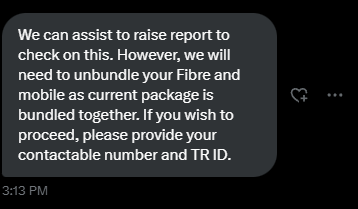 This post has been edited by QuantumEdge: Oct 22 2024, 07:46 AM |
|
|
Oct 18 2024, 08:22 AM
Return to original view | IPv6 | Post
#180
|
|
Senior Member
1,601 posts Joined: Jan 2016
|
QUOTE(dev/numb @ Oct 17 2024, 10:25 PM) Just as I switch to Maxis from Unifi via your contact, you’re going the opposite direction. Just go for the cheaper ones lah, that guy didnt even send me my commission Me now making sad pikachu face.   |
| Change to: |  0.2409sec 0.2409sec
 1.39 1.39
 7 queries 7 queries
 GZIP Disabled GZIP Disabled
Time is now: 18th December 2025 - 02:33 PM |
 Quote
Quote