Welcome Guest ( Log In | Register )

15 Pages « < 5 6 7 8 9 > » Bottom

Outline · [ Standard ] · Linear+

 The Official Maxis FTTH Thread | v5, Maxis Home Fibre Internet, from RM89

views
     
sitescope
post Oct 26 2018, 05:02 PM

Look at all my stars!!
*******
Senior Member
4,494 posts

Joined: Oct 2013
QUOTE(misspinky @ Oct 26 2018, 02:52 PM)
i can see its much different and much better, but i'm into voip one..my main purpose to change their default tplink voip hardware that everyone got same problem.
*
Oh ok

QUOTE(daz @ Oct 26 2018, 03:12 PM)
For the upgrade from 10Mbps to 30Mbps, do they need to change the router?
*
Yes coz they renew ur contract for another 2yrs
sitescope
post Nov 9 2018, 01:25 PM

Look at all my stars!!
*******
Senior Member
4,494 posts

Joined: Oct 2013
QUOTE(numbertwo @ Nov 9 2018, 01:01 PM)
All,
which router is the most sensible upgrade to the Archer C5v that Maxis is giving us ?. Im using the 100Mbps package.

[attachmentid=10099743]
*
QUOTE(aeiou228 @ Nov 9 2018, 01:23 PM)
Archer C5v keep dc from time to time.
When it dc, I need to on/off WiFi on my mobile devices in order to reconnect to the internet. Such pain !
*
Chg to bajet router such as tenda ac18
sitescope
post Nov 9 2018, 05:48 PM

Look at all my stars!!
*******
Senior Member
4,494 posts

Joined: Oct 2013
QUOTE(numbertwo @ Nov 9 2018, 05:34 PM)
is it a plug n play for Maxis Fiber?  Does it affect the public IP setting ? 
tks
*
PnP
No affect
sitescope
post Nov 13 2018, 07:54 AM

Look at all my stars!!
*******
Senior Member
4,494 posts

Joined: Oct 2013
QUOTE(supervai @ Nov 13 2018, 12:31 AM)
Anyone changed or added router to current Maxis router?
*
I did before
Maxis router for voip
Tplink for wifi
sitescope
post Nov 13 2018, 07:55 AM

Look at all my stars!!
*******
Senior Member
4,494 posts

Joined: Oct 2013
QUOTE(soulmad @ Nov 13 2018, 12:36 AM)
current maxis router archer v1200 sux to max
when more connection it just kaput
anyone have solution?
*
QUOTE(soulmad @ Nov 13 2018, 12:38 AM)
same here
can we all form a groupu and boycott maxis for giving lousy router
*
QUOTE(soulmad @ Nov 13 2018, 12:39 AM)
is the router problem la
dun know how to router the traffic

more connection more kaput

boy cott maxis
*
Thought unifi tplink 1200 also lousy
Solution buy tenda ac18

This post has been edited by sitescope: Nov 13 2018, 07:55 AM
sitescope
post Nov 13 2018, 02:13 PM

Look at all my stars!!
*******
Senior Member
4,494 posts

Joined: Oct 2013
QUOTE(nickcct @ Nov 13 2018, 08:56 AM)
My plan just recently upgraded to 30mbps, however the speedtest only reach 20mbps, so I expect they will call me to change the modem?
*
30mb no need chg modem
Even old 4-5yrs router also sapot
sitescope
post Nov 13 2018, 02:14 PM

Look at all my stars!!
*******
Senior Member
4,494 posts

Joined: Oct 2013
QUOTE(supervai @ Nov 13 2018, 02:06 PM)
Can ask further? So means Maxis router control DHCP and voip right?

Or did your TP Link control DHCP and Wi-Fi?

I am not sure If this will work and if all sifu can advice. If I get another router as main router, connect to current Maxis router lan port for voip only, will it work? Maxis router will get IP from main router.
*
Maxis ctrl voip
Tplink ctrl dhcp n wifi
sitescope
post Nov 14 2018, 12:50 PM

Look at all my stars!!
*******
Senior Member
4,494 posts

Joined: Oct 2013
QUOTE(dkcheong1127 @ Nov 14 2018, 11:05 AM)
dem...my maxis installer did the same, bcoz i can connect to my neighbor wifi to test his speed, he using unifi 30mbps , average was always > 30mbps, but upload as we knew is 15mbps...when i show that to maxis installer, then he say because they are leasing on unifi backbone therefore blah blah blah...so mine is always around 28.5 saje...but upload can hit 30mbps la...
*
Kenot be
Mine use wifi 4 bar je use nbook can hit 30mbps
Sometime 32mbps
sitescope
post Nov 16 2018, 05:40 PM

Look at all my stars!!
*******
Senior Member
4,494 posts

Joined: Oct 2013
QUOTE(plague @ Nov 16 2018, 03:12 PM)
I just subscribe to the service, less than a month ago. Already got a router upgrade?
*
No upg if ur current router is c5v
sitescope
post Nov 24 2018, 08:07 PM

Look at all my stars!!
*******
Senior Member
4,494 posts

Joined: Oct 2013
QUOTE(westlife @ Nov 24 2018, 04:22 PM)
Actually I first sign up the rm179 30Mbps plan 2 years back, in between they upgrade to 50Mbps then offer me rm10 to upgrade to 100Mbps with ultimate pack for unifi tv and STD20 600mins free calls and eventually will be upgraded to 800Mbps after turbo upgrade. But before the turbo upgrade, I had decided to switch to the current rm129 100Mbps plan to save rm60 monthly since I totally never watch the unifi tv at all and I am the only one to use the broadband at home.

Good thing is that the rm129 100Mbps comes with STD20 which I have usage of it since I do not have any plan activated on my Hotlink but just the 365 validity so it is useful for me to make any local calls such as to call banks etc.

However, still a bit regret not to take the 30Mbps rm89 + rm10 unlimited fixed line and mobile calls though for maxis. Since I can really save to the max that I can.

Seriously from 30Mbps to 50Mbps to now 100Mbps. I can say most of the time I do not utilise the speed. So 30Mbps is more than enough. Of course if can get full speed, direct http download the 100Mbps vs 30Mbps sure got difference but prob is my laptop is on 24x7 so 30Mbps is more than enough even it is slower by a bit but given the speed even big files that more than GB can download within minutes so no significant difference.

Even the torrent download nowadays due to lack of seeds and peers, I can hardy get more than 3MB/s for all the downloads at the same time too.

So really feel underuse. Some more downgrade plan to 100Mbps for unifi no new equipment given, while I switch to 30Mbps rm89 + rm10 unlimited calls I can get one free wifi router and dect phone. Really a bit regret but no choice need to stuck for 2 more years then maybe switch to a better deal at that time again.

But if choose between unifi 100Mbps at rm129 now vs maxis broadband 100Mbps rm129 I will choose unifi though since the download and upload speeds are all the same, plus other add-ons also comparable. Personally have no prob with unifi ever since I use it. Never try maxis broadband before though but the rm89 30Mbps is really value for money.
*
Me downgrade to 30mbps too but reason i choose maxis coz of upload speed
sitescope
post Nov 26 2018, 11:30 PM

Look at all my stars!!
*******
Senior Member
4,494 posts

Joined: Oct 2013
QUOTE(fiqqyz @ Nov 26 2018, 10:47 AM)
Any recommendations of router model/brand?
*
Tenda ac18
sitescope
post Nov 28 2018, 08:30 AM

Look at all my stars!!
*******
Senior Member
4,494 posts

Joined: Oct 2013
QUOTE(pizzaboyj @ Nov 27 2018, 02:05 PM)
just saw this on tplink malaysia site:
https://www.tp-link.com/my/download/Archer-...v.html#Firmware
anyone tried yet? though I don't have a clue on how to actually apply this upgrade though
CODE

Archer_VR1200vv1_1.0.0_0.8.0_up_boot(181024)_2018-10-24_16.21.45
Published Date: 2018-11-24 Language: English File Size: 12.83 MB
The firmware release note as below:
1. To forbid register process when there is alphabet letter (A-Z, a-z) in VoIP account, except “+” sign and numbers
2. Optimise the performance and fix some critical bugs
3. Fix the issue when VR1200v get invalid IP address without PPPoE account
4. To allow configuration of SPI firewall

*
Think this 1 kenot flash to maxis c5v
But anyone dare to try ?
🤭🤭
sitescope
post Dec 1 2018, 12:25 AM

Look at all my stars!!
*******
Senior Member
4,494 posts

Joined: Oct 2013
QUOTE(imalmighty @ Dec 1 2018, 12:24 AM)
Vlan tagging support is a MUST. Most people who chose to buy routers from china buy ASUS cause Asus have local firmwares instead of brands like mercury or tenda, their out of the box firmwares are china local ones which do not support vlan tagging
*
Tenda can flash merlin firmware
No isu
sitescope
post Dec 2 2018, 12:37 PM

Look at all my stars!!
*******
Senior Member
4,494 posts

Joined: Oct 2013
QUOTE(imalmighty @ Dec 1 2018, 10:08 PM)
Does TM issue tplink archer c5? Haha how does it look like? As far as im concerned, TM used to issue c1200 instead? May i have photo? How does it look like?
*
Correct
Unifi give itu bulat router
sitescope
post Dec 2 2018, 12:41 PM

Look at all my stars!!
*******
Senior Member
4,494 posts

Joined: Oct 2013
QUOTE(westlife @ Dec 1 2018, 08:45 PM)
I think maybe the fact that you are not using the stock router made a difference?

becos normal case, I dun find there is a need to change the router. Most stock router is actually good. If one needs a better coverage, home plug, mesh wifi maybe a better bet.
*
I use tplink rm70 router load with openwrt
Put a fan at bottom n no restart for 6mths
Fuhhh thousand better than c5v

I dun use 5g coz my speed 30mbps only
And 5g coverage short

sitescope
post Dec 22 2018, 12:38 AM

Look at all my stars!!
*******
Senior Member
4,494 posts

Joined: Oct 2013
QUOTE(hk99mobile @ Dec 21 2018, 05:15 PM)
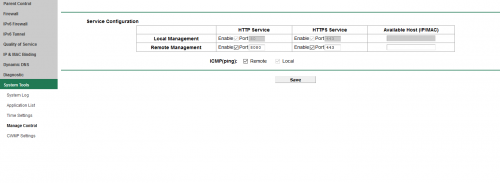
maxis just change  Archer C5v all work fine portforward etc except Remote Management, i tick enable and save and can login remotely from anywhere but once reboot the Archer C5v the tick enable box in remote management return to default untick, i login as administrator and serial number, i think Maxis does not allowed this setting on their custom firmware,anyone know how to solve? i need remote management smile.gif)

user posted image
*
How to set torrent portfwd in c5v ?
sitescope
post Dec 31 2018, 10:36 AM

Look at all my stars!!
*******
Senior Member
4,494 posts

Joined: Oct 2013
QUOTE(mztang52 @ Dec 30 2018, 11:46 AM)
Guys, there is some people I know in a group has gathered together (Maxis users) to buy a Netgear router. Of course, the price would be cheaper and as you know netgear is obviously way more better than the original Maxis router dry.gif  doh.gif  If anyone wants to order one also, please DM me asap, because we need to order also. Currently already have gathered 8 people. As you all know Maxis router is erhem *cough* hmm.gif No business here but just want to gather more people so that everyone can get a cheaper price for each unit. Everyone gets benefits also. Let me know asap yaaa
*
Cheaper than tenda ac18 ?
sitescope
post Jan 3 2019, 07:13 PM

Look at all my stars!!
*******
Senior Member
4,494 posts

Joined: Oct 2013
QUOTE(peri peri @ Jan 3 2019, 03:44 PM)
wow, meaning 3 devices running. hmmmm, not sure on the electricity consumption
*
Not much compare 3 airconds
😝😝
sitescope
post Jan 18 2019, 01:19 PM

Look at all my stars!!
*******
Senior Member
4,494 posts

Joined: Oct 2013
QUOTE(jamejam @ Jan 17 2019, 12:19 PM)
Hi, Just my personal sharing, i subscribed Maxis Fiber Home, last Oct18 when they started introduce the cheaper subscription compare to Unifi. However after used for one month+, the fiber was cut off, called and make complain to Maxis HL at 16Nov18, they came by 30Nov18, after check say is due to TM backhaul broken and need to wait for next appointment together with TM Tech, since then i follow up with Maxis every 1-2 days thru their HL, Tweeter, Chat, so then next appointment at 07Dec18, then they come again but diff. Maxis person but without TM Tech, then waited whole day, the Maxis Tech return and said will have make next appointment again due to TM Tech EL, since then i followed again HL, Tweeter, Chat, but no date given for next appointment, given reason like our Level 2 tgh check la, escalated to TM tggu reply. I told them i had make complaint to MCMC and still not reply from them till 22Dec18, someone from Maxis HL call me said appointment is 08Jan19, so totally my internet is down for almost 1.5 months.
My next door neighbor is using Unifi, his internet just down 2 weeks ago and TM already come to attend the fault within 3 days after complaint, the same issue like min, during TM repairing the fiber i ask along when will my be repair after 1.5 months waited, TM ppl said they didn't received the order from Maxis so they can't do it. Finally 3rd appointment 07Jan19 Maxis and TM Tech come, they check and confirm is backhaul fiber broken (off coz la, same issue with my next door), luckily this time, TM come next day repaired and all back to normal.
After you all read my experience shared, my 2 cents is
1. Check you area who is the fiber backhaul provider, most area is under Unifi for resident, some condo got few and some area like Puchong Wawasan is under Maxis
2. Go subscribe with the backhaul provider even their package maybe more expensive then other, becoz if is internet down you need fast to attend problem
3. Area backhaul not provide by Maxis, e.g. is unifi, the ONU/T is provide by TM, Maxis only take care the router, otherwise is all repair by TM
4. How to know backhaul is by whom, can check thru their website,  if both Unifi and Maxis exist then is Unifi, if only Maxis then is Maxis. In M'sia usually TM Unifi is the one will laid the backhaul fiber first compare to other, but now a day like in JB, Time Fiber also expending at unifi area
For Unifi Fiber https://unifi.com.my/unifi-en/ijoin/check-coverage.page.
For Maxis Fiber https://www.maxis.com.my/en/personal/intern...r-coverage.html
For Time Fiber https://www.time.com.my/personal/broadband/fibre-broadband

Hope it helps all FYI
*
Facing this too 3yrs ago n maxis gave me broadband modem + 2 simkad with data pakej

But my prob solved in 10 days
I got 10 days rebate in bill + boradband modem for free
sitescope
post Jan 26 2019, 08:39 PM

Look at all my stars!!
*******
Senior Member
4,494 posts

Joined: Oct 2013
QUOTE(AhBoy~~ @ Jan 26 2019, 07:13 PM)
If you are using iPhone the effect is even worst. Yes, 5G is unusable at all, I wonder why do they even include it when the technician advise me not to use it; "Boss 5Ghz jangan pakai, problem byk".

My family have Note9, Mi Note, iPhone 7+ and iPhone XR, iPhones connection keep dropping as soon as moving different room where the router place...  doh.gif
*
If my family use all that type of hp, for sure i'll not use tplink maxis
Go buy asus-88u coz money not an isu

This post has been edited by sitescope: Jan 26 2019, 08:40 PM

15 Pages « < 5 6 7 8 9 > » Top
 

Change to:
| Lo-Fi Version
0.1946sec    0.85    7 queries    GZIP Disabled
Time is now: 16th December 2025 - 05:12 AM