Welcome Guest ( Log In | Register )

5 Pages  1 2 3 > » Bottom

Outline · [ Standard ] · Linear+

 Sony XPERIA™ Z Ultra | Official Thread V9, Experience The Definition of A Phablet.

views
     
4lt4ir
post May 14 2015, 06:07 PM

{--} 7
******
Senior Member
1,397 posts

Joined: Sep 2006
Guys, my XZU is still on 4.4.4. I've checked the Update Center many times but still no new update to Android 5.0. Is it out yet for the XZU or not?

Also, I've lost the little plastic cover to the charging port..know where can get replacement? I've asked at shops in Lowyat they said don't have that spare part sad.gif

Oh yeah, and I just replaced my XZU's cracked screen last week...RM580 with free tempered glass sad.gif(
4lt4ir
post May 14 2015, 09:53 PM

{--} 7
******
Senior Member
1,397 posts

Joined: Sep 2006
QUOTE(Jay Chua CC @ May 14 2015, 08:24 PM)
I have replaced the usb flap for my ex ZU for only rm38.
*
Cool! May I know where u did it? Does it come in different colors? My XZU is purple.


QUOTE(Flying knight @ May 14 2015, 08:29 PM)
my ZU is an AP set ady received lollipop update last month smile.gif
*
Mine is an AP set too, but as of today still no update to 5.0 sad.gif Wonder why?
4lt4ir
post May 14 2015, 11:55 PM

{--} 7
******
Senior Member
1,397 posts

Joined: Sep 2006
QUOTE(benny888 @ May 14 2015, 09:59 PM)
Just connect your phone to PC and launch Sony Companion and immediately you will get latest lollipop update.
*
Awesome, thanks for the info! So you mean the Lollipop update can't be done wirelessly OTA?
4lt4ir
post May 15 2015, 12:23 AM

{--} 7
******
Senior Member
1,397 posts

Joined: Sep 2006
QUOTE(benny888 @ May 14 2015, 09:59 PM)
Just connect your phone to PC and launch Sony Companion and immediately you will get latest lollipop update.
*
Strange...

I just connected my XZU via USB to my Macbook, ran Sony Bridge for Mac & it detected my phone ok like it always does. But it says that my phone software is UP TO DATE!?

What's going on?

Am I the only person stuck with KitKat on their XZU?
4lt4ir
post May 15 2015, 09:36 AM

{--} 7
******
Senior Member
1,397 posts

Joined: Sep 2006
QUOTE(benny888 @ May 15 2015, 06:05 AM)
Don't use Mac. Try with Windows PC n use Sony Companion.
*
ok will try this soon at the office
4lt4ir
post May 15 2015, 11:52 AM

{--} 7
******
Senior Member
1,397 posts

Joined: Sep 2006
QUOTE(Jay Chua CC @ May 15 2015, 10:19 AM)
A sony dealer shop. Bettervfor you to go to sony sc if you are within the kl area
*
Ok, thanks! I heard they're also available on ebay.
4lt4ir
post May 15 2015, 11:55 AM

{--} 7
******
Senior Member
1,397 posts

Joined: Sep 2006
QUOTE(benny888 @ May 15 2015, 06:05 AM)
Don't use Mac. Try with Windows PC n use Sony Companion.
*
Tried this on my WIndows 7 PC and still PC Companion says I have the latest firmware.

Upon further investigation it seems that my phone's CDA is Hong Kong CDA. Checked Xperifirm and indeed the latest firmware version available for HK CDA is still KitKat.

Downloading Malaysian CDA with 14.5.A.0.242/R2D now via XperiFirm, will flash it to my XZU once done.

Anything I missed or should be doing?
4lt4ir
post May 15 2015, 01:05 PM

{--} 7
******
Senior Member
1,397 posts

Joined: Sep 2006
QUOTE(hightechgadgets8 @ May 15 2015, 01:01 PM)
just make sure your unit is LTE unit and not the 3G one
*
Ok, thanks. I've been able to use LTE all along so am pretty sure mine is the LTE version.
4lt4ir
post May 15 2015, 03:48 PM

{--} 7
******
Senior Member
1,397 posts

Joined: Sep 2006
QUOTE(raymondtong94 @ May 15 2015, 02:52 PM)
Yeah, as long you download C6833, other than that is C6802, which is 3G version.
*
QUOTE(hightechgadgets8 @ May 15 2015, 02:54 PM)
inb4 3G version usually slower to get update. that's why i assume yours is 3G
*
+1, thanks guys!
4lt4ir
post May 15 2015, 04:36 PM

{--} 7
******
Senior Member
1,397 posts

Joined: Sep 2006
Oh no...help me...

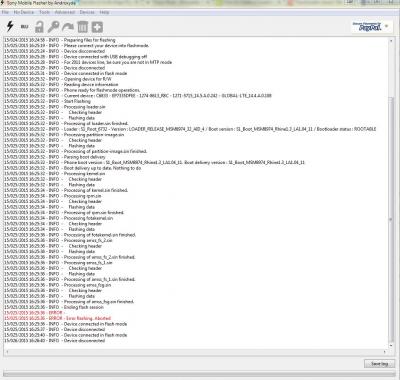
Refer to attached screenshot from Flashtool. Flashing got error in the beginning at first but then restarted the phone all ok but still 4.4.4. I think I must've let go of the vol - button too soon.

Then did the flashing for 2nd time, pressed the vol - button firmly then got error about halfway through the flash process.

Now my XZU is in a neverending boot loop. The splash screen with "SONY" and "XPERIA" at the bottom appears and then disappears over and over again (before this it the splash screen only shows "SONY" no "XPERIA". Have to press the reset button or power + vol up button until 3 vibrations to off the phone.

Tried a 3rd time and same results. Error happened about halfway.

USB debugging is on and other sources is on.

What should I do now? What went wrong? Is my phone bricked?

HELP guys!

This post has been edited by dani_irwan: May 15 2015, 04:37 PM


Attached thumbnail(s)
Attached Image
4lt4ir
post May 15 2015, 04:49 PM

{--} 7
******
Senior Member
1,397 posts

Joined: Sep 2006
QUOTE(raymondtong94 @ May 15 2015, 04:40 PM)
Try flash again by repeating the same process. Never let go Volume - button too fast until there is process on your screen. Also, use original cable as possible, and try switch USB ports.
*
Thanks for your reply. I am using the original XZU USB cable, connected to a USB 3.0 port on my PC. Tried using another USB 3.0 port just now, and held down the vol - button really long time, still got error and my XZU is still stuck in indefinite boot loop sad.gif

Any other thing I can do?

In FLashtool, should DATA and CACHE be ticked or unticked?
4lt4ir
post May 15 2015, 05:33 PM

{--} 7
******
Senior Member
1,397 posts

Joined: Sep 2006
I've tried a USB 2.0 port, still no luck sad.gif

Maybe I'll try flashing another .ftf. Which one should I download from XperiFirm? Is it ok to use other countries' CDA?
4lt4ir
post May 16 2015, 12:47 AM

{--} 7
******
Senior Member
1,397 posts

Joined: Sep 2006
Ok, so tonight I tried flashing my XZU with the other Msian CDA, and used a different Windows 7 PC this time too. But still no luck, same error occurs and XZU is still stuck in bootloop sad.gif

Currently downloading MENA LATIN CDA via XperiFirm. 14.5.A.0.242 too but R1D. Will try flashing that.

Haven't downloaded Singpore one as it's the same version as the Malaysian one (R2D).

I've tried ticking & unticking wipe DATA, tried excluding SYSTEM in Flashtool..but still same error.

Getting frustrated sad.gif
4lt4ir
post May 16 2015, 01:17 AM

{--} 7
******
Senior Member
1,397 posts

Joined: Sep 2006
MENA Latin CDA didn't work sad.gif Same error, flashing doesn't complete...no matter what I do.

Downloading the HK CDA Kitkat which was originally on my XZU to see if I can restore it back...

WHAT AM I DOING WRONG?!

Sigh...
4lt4ir
post May 16 2015, 09:39 AM

{--} 7
******
Senior Member
1,397 posts

Joined: Sep 2006
one thing i noticed is that flashtool error will happen when its flashing the baseband files. happened with all 4 cda I've tried
4lt4ir
post May 16 2015, 11:56 PM

{--} 7
******
Senior Member
1,397 posts

Joined: Sep 2006
QUOTE(darth5zaft @ May 16 2015, 09:42 AM)
did u have sony pc companion as well as ADB install in the PC u are using? i also find USB 2.0, windows 7, checking off MTP mode and original cable are needed in flashing operation.

might want to try the repair option on sony pc companion. i solve a bootloop once with it.
*
The 1st PC already had the latest version of Sony PC Companion. 2nd PC did not so I had to download & install it. 2nd PC also didn't have the drivers for it so I had to install drivers from Flashtool DRIVERS directory.

I don't know what ADB is, although am pretty sure I came across it while reading through the forums. Sorry, am a total noob at this. Care to explain what ADB is bro?

MTP mode is checked/unchecked on the phone right? I am not 100% sure, but before my phone went into bootloop, I think it had the MTP mode on, not mass storage mode.

I've thought about using Sony PC Companion to repair the phone, there's an option for it I think..but now since the phone is in an eternal bootloop I can't since Sony PC Companion doesn't even recognize the phone when I plug it into the PC sad.gif

Thanks for the ideas though bro.


QUOTE(benny888 @ May 16 2015, 09:52 AM)
Why even bother with CDA ??? Not necessary. You can flash any country ftf file - suggest use Europe or Spore
Why even want to flash baseband files ?
I can do for you FOC. You just need pay courier charges back to you
*
Thanks very much for the offer of doing it for me, Benny. I'll try by myself for a bit more first, if I still can't then I'll PM you.

Not sure what you mean about not needing the CDA though. What I'm doing is I'm downloading the CDA for different countries/regions via XperiFirm, then I'm bundling each one into an FTF file using Flashtool's 'BUNDLE' option. Then I try and flash the FTF onto the phone.

I've already tried generic Singapore earlier today, didn't work. Am now downloading Singtel SG CDA then try again. Also will download Nordic & Baltic CDA's after this.

QUOTE(raymondtong94 @ May 16 2015, 12:33 PM)
If you are KL region, let me do for you.
up to you if you wanna treat me a cup of Starbucks or else.
*
Hi Raymond, thanks for the offer of help, much appreciated. Yup no problem with a Starbucks treat smile.gif I'm in Bangi so quite near to you if you're in Semenyih that is. See how it goes today & tomorrow, if still cannot I'll PM you.


4lt4ir
post May 18 2015, 12:53 AM

{--} 7
******
Senior Member
1,397 posts

Joined: Sep 2006
QUOTE(benny888 @ May 17 2015, 05:38 AM)
Just use flashtool ( not the Xperia version)  n don't bother with any CDA.
Switch phone off. Connect it to PC by pressing vol down button when you are prompted. Allow the flashtool to run the install firmware first. BE Patient n wait for it to be run n initially will appear to be stuck
Watch the progress on PC screen n you will be prompted to disconnect n restart phone.

Actually is very simple n straightforward to flash
Don't complicate it using any Xperia program n CDA stuffs
Make sure you had USB debugging selected before switching off phone

Flashtool:
http://forum.xda-developers.com/showthread.php?t=920746
*
Benny, I'm not using any Sony software in my attempts to flash/repair my phone. Just XperiFirm & Flashtool. I followed the guide here exactly:

http://www.xperiablog.net/2015/03/17/guide...-and-flashtool/

Is there something wrong with that guide?


QUOTE(darth5zaft @ May 17 2015, 07:41 AM)
i think ADB is one of those software meant for developing. installing the driver together with flashtool will install necessary files for flashtool to work. then installing pc companion would install necessary thing to recognise the device

anyway i once repair bootloop on my xperia s after fail flashing using something similar to this guide.

http://forum.xda-developers.com/showthread.php?t=1504809
*
Thanks for the link, will check it out.
4lt4ir
post May 19 2015, 12:32 AM

{--} 7
******
Senior Member
1,397 posts

Joined: Sep 2006
QUOTE(raymondtong94 @ May 18 2015, 09:50 AM)
somehow in the link, it uses flashtool by Androxyde, not the official Sony flashtool.
*
Yup, it's Flashtool by Androxyde.

Anyone know how to manually restore notes from the Sony 'notes' application?


4lt4ir
post May 20 2015, 02:20 PM

{--} 7
******
Senior Member
1,397 posts

Joined: Sep 2006
2nd value of C6833 is around what now?
4lt4ir
post May 20 2015, 02:27 PM

{--} 7
******
Senior Member
1,397 posts

Joined: Sep 2006
QUOTE(hightechgadgets8 @ May 20 2015, 02:25 PM)
i see a lot of ppl selling 750-800
*
Thanks icon_rolleyes.gif

5 Pages  1 2 3 > » Top
 

Change to:
| Lo-Fi Version
0.0211sec    0.38    7 queries    GZIP Disabled
Time is now: 12th December 2025 - 07:49 PM