

Thank you @visualfoley for your feedback! =D
[FAQ] PC auto restart/Blue Screen (BSOD), All questions go here please.
[FAQ] PC auto restart/Blue Screen (BSOD), All questions go here please.
|
|
 Aug 21 2012, 09:00 AM Aug 21 2012, 09:00 AM
|
 
Senior Member
843 posts Joined: Apr 2008 
|
Thank you @visualfoley for your feedback! =D
|
|
|
|
|
|
Aug 21 2012, 06:30 PM
|

Junior Member
215 posts Joined: Oct 2004 From: BUTTERWORTH / PENANG 
|
You're welcome
 |
|
|
Aug 22 2012, 10:40 PM
|

Senior Member
565 posts Joined: Jul 2007
|
now after i updated my bios on asus motherboard, something seems not right. I cannot use my mouse very well. sometimes i cant right click on certain window. but using the keyboard is not a problem. im using wireless microsoft mouse and keyboard. can anyone help?
btw, my dwm.exe crash before.. but just once.. |
|
|
Aug 22 2012, 11:39 PM
|

Junior Member
27 posts Joined: Jan 2011 From: Semenyih
|
Hye sifu. Can u help me with my BSOD problem ? Using Lenovo Y480.
Problem signature: Problem Event Name: BlueScreen OS Version: 6.1.7601.2.1.0.256.48 Locale ID: 1033 Additional information about the problem: BCCode: 3b BCP1: 00000000C0000005 BCP2: FFFFF80002F69FEE BCP3: FFFFF88009BDDCB0 BCP4: 0000000000000000 OS Version: 6_1_7601 Service Pack: 1_0 Product: 256_1 Files that help describe the problem: C:\Windows\Minidump\082212-6770-01.dmp C:\Users\TODxTatsuya\AppData\Local\Temp\WER-8486-0.sysdata.xml Read our privacy statement online: http://go.microsoft.com/fwlink/?linkid=104288&clcid=0x0409 If the online privacy statement is not available, please read our privacy statement offline: C:\Windows\system32\en-US\erofflps.txt |
|
|
Aug 27 2012, 01:19 AM
|

Senior Member
743 posts Joined: Jun 2008 From: Penang 
|
Hi all..bad day for me..it happened today a lot randomly
082712-10639-01.dmp 8/27/2012 12:37:49 AM KMODE_EXCEPTION_NOT_HANDLED 0x0000001e ffffffff`c0000005 fffff800`034e3149 00000000`00000000 ffffffff`ffffffff ntoskrnl.exe ntoskrnl.exe+7cd40 NT Kernel & System Microsoft® Windows® Operating System Microsoft Corporation 6.1.7601.21831 (win7sp1_ldr.111003-1503) x64 n toskrnl.exe+7cd40 C:\Windows\Minidump\082712-10639-01.dmp 4 15 7601 290,912 i dont know what is the problem =( how to fix this? what is the problem? already google and too many answer-.- my pv spec is in my signature.. This post has been edited by udin901: Aug 27 2012, 01:30 AM |
|
|
Sep 7 2012, 04:26 PM
|

Junior Member
451 posts Joined: Jan 2006
|
 i've format my hdd and install winxp...during installation process, suddenly got bsod saying the above...i've did memtest which gives no error, and my proc thermal margin is at +48c and mobo temp is at +41c which i think is normal. mobo is intel DG41WV proc is intel core2 duo 3.06GHz ram is 2gb ddr3 everything on-board can anyone help me out? |
|
|
|
|
|
Sep 7 2012, 06:42 PM
|

Junior Member
271 posts Joined: Jul 2010 From: "Kualalala Lumpur" Mizznina, Colby O' Donis
|
QUOTE(azam_halim @ Sep 7 2012, 04:26 PM) i've format my hdd and install winxp...during installation process, suddenly got bsod saying the above...i've did memtest which gives no error, and my proc thermal margin is at +48c and mobo temp is at +41c which i think is normal. mobo is intel DG41WV proc is intel core2 duo 3.06GHz ram is 2gb ddr3 everything on-board can anyone help me out?  2. Maybe try to install windows with only 1 RAM attached (in case if you have 2 or more) . 3. Revert back BIOS settings to default 4. lastly it might be a buggy hardware. you can just unplug your LAN card, your gpu, your audio card etc to see whether your computer can start properly This post has been edited by farizluqman: Sep 7 2012, 06:43 PM |
|
|
Sep 8 2012, 10:46 AM
|
|
Junior Member
451 posts Joined: Jan 2006
|
QUOTE(farizluqman @ Sep 7 2012, 06:42 PM) 1. If you have overclocked your device, underclock it back well...2. Maybe try to install windows with only 1 RAM attached (in case if you have 2 or more) . 3. Revert back BIOS settings to default 4. lastly it might be a buggy hardware. you can just unplug your LAN card, your gpu, your audio card etc to see whether your computer can start properly 1. i didnt overclocked it..i even use the minimal setting in bios 2. only one stick of ram...which has pass the memtest 3. as stated in 1 4. everything is on board..lan, video, sound..on board.. Added on September 8, 2012, 10:47 amhow to 'disable bios memory option'? This post has been edited by azam_halim: Sep 8 2012, 10:47 AM |
|
|
Sep 8 2012, 10:51 AM
|
|
Junior Member
215 posts Joined: Oct 2004 From: BUTTERWORTH / PENANG
|
QUOTE(azam_halim @ Sep 8 2012, 10:46 AM) well... make sure u have slipstream the SATA AHCI DRIVER into windows xp cd before install windows xp1. i didnt overclocked it..i even use the minimal setting in bios 2. only one stick of ram...which has pass the memtest 3. as stated in 1 4. everything is on board..lan, video, sound..on board.. Added on September 8, 2012, 10:47 amhow to 'disable bios memory option'? |
|
|
Sep 9 2012, 04:31 PM
|
|
Junior Member
451 posts Joined: Jan 2006
|
QUOTE(yeakyau @ Sep 8 2012, 10:51 AM) make sure u have slipstream the SATA AHCI DRIVER into windows xp cd before install windows xp How to slipstream when i have no os? Btw, i've installed xp in another pc with sata hdd prior to this with no problem at all..only this pc giving me hard time.. |
|
|
Sep 11 2012, 10:30 AM
|

All Stars
19,322 posts Joined: Jan 2003  
|
QUOTE(azam_halim @ Sep 9 2012, 04:31 PM) How to slipstream when i have no os? Btw, i've installed xp in another pc with sata hdd prior to this with no problem at all..only this pc giving me hard time.. try set ur bios hdd mode to ide instead of sata mode first , then only install windows xp to verify first. |
|
|
Sep 13 2012, 04:12 PM
|

Junior Member
74 posts Joined: Oct 2008 From: miao......
|
Hi guys..
i have this BSOD on my friend computer. Bad_Pool_Caller, on windows xp. i tried to repair the windonws xp it dint do any good. BSOD still happening with the same error code. i cant boot in safe mode too, it always bsod when it loads file mup.sys. i have attached the minidump along with this post, hoping that someone can give me solutions. thanks in advance and appreciate it so much This post has been edited by deogracias: Sep 13 2012, 04:33 PM Attached File(s)  minidum.zip ( 66.11k )
Number of downloads: 7
minidum.zip ( 66.11k )
Number of downloads: 7 |
|
|
Sep 15 2012, 02:00 PM
|

Junior Member
221 posts Joined: Feb 2011
|
Hi guys..
Need help here... My laptop frequently restart... And when on the laptop...This is the minidump file.. Attached File(s)
091512_14679_01.zip ( 19.36k )
Number of downloads: 10 |
|
|
|
|
|
Sep 17 2012, 10:11 PM
|

Junior Member
172 posts Joined: Aug 2008 From: Jasin, Melaka
|
my laptop having bsod today and i dont why it is happened.. i dont have any idea about it..
Attached File(s)
minidump.zip ( 58.36k )
Number of downloads: 12 |
|
|
Sep 19 2012, 03:46 PM
|

Junior Member
81 posts Joined: Aug 2007
|
hi guys,
please help to check the BSOD below, i don't know what is the issue. Use !analyze -v to get detailed debugging information. BugCheck 1A, {41284, fffff8a00285e001, 276f, fffff781c0000000} *** WARNING: Unable to verify timestamp for mssmbios.sys *** ERROR: Module load completed but symbols could not be loaded for mssmbios.sys ***** Kernel symbols are WRONG. Please fix symbols to do analysis. SYMBOL_STACK_INDEX: 0 SYMBOL_NAME: nt+7cc40 FOLLOWUP_NAME: MachineOwner IMAGE_NAME: ntoskrnl.exe BUCKET_ID: WRONG_SYMBOLS Followup: MachineOwner thanks. |
|
|
Sep 25 2012, 09:26 PM
|

Newbie
1 posts Joined: Mar 2012
|
QUOTE(leohammerd @ Sep 17 2012, 10:11 PM) my laptop having bsod today and i dont why it is happened.. i dont have any idea about it.. According to 091712-39312-01.dmp and 091712-59997-01.dmp= gdmuwm.sys got errorFile details of most used file with name "gdmuwm.sys" Product: Windows ® Win 7 DDK driver Company: GCT Semiconductor, Inc. Description: GCT GDM WiMAX Driver Version: 1.43.0.0 MD5: F428DC66C365D1D3C4A893E9E1B72C70 SHA1: F6EB6FC0DB2781F60AAEFB99EE65CD85F36AD928 SHA256: D86B21F97C4510C9CA3CC8DE16F7AE78C72B7DE866516588D495E08F8C99ABCB Size: 92160 Directory: %SYSDIR%\DRIVERS\gdmuwm.sys Operating System: Windows XP Discovered: Aug 24 2011 Occurence: Low oc0 Maybe you need to download RevoUninstaller or other similar uninstaller helper to clean remove and reinstall your WiMax dongle driver. (Or update the driver at Device Manager by manually.) Added on September 25, 2012, 10:20 pm QUOTE(kakisemut @ Sep 15 2012, 02:00 PM) Hi guys.. Below information may help for you,Need help here... My laptop frequently restart... And when on the laptop...This is the minidump file.. hal.dll (Hardware Abstraction Layer) error This problem may cause by "Hal.dll" file corrupted or missing.Other than that,you will have problem with HAL in the case when you transfer operating system from one computer to another computer that has quite different HAL. (Different Mainboard,Processor,HDD and others may cause this issues) Refer to below page for more info. http://www.kellys-korner-xp.com/xp_haldll_missing.htm Under "HAL.DLL is Missing - Updated by MVP Alex Nichol" method 2 is mostly use by me to solve this issue. Other step may help for me is to run "Sysprep" (a utility tools in Windows CD) and then run "NewSID" to reset system ID and detect hardware but don't reset and re-register windows license. Due to it is was unable boot up into windows so only can run this step via MSDOS environment. This post has been edited by milenio1928: Sep 25 2012, 10:20 PM |
|
|
Sep 27 2012, 09:23 PM
|

Junior Member
371 posts Joined: Oct 2008
|
3 types of BSODs take turn to ruin my life, please help me. Sent to ASUS for repair but they just formatted the laptop for me and the BSODs are still persistent.
1st one: Microsoft ® Windows Debugger Version 6.2.9200.16384 AMD64 Copyright © Microsoft Corporation. All rights reserved. Loading Dump File [C:\Windows\Minidump\092712-26754-01.dmp] Mini Kernel Dump File: Only registers and stack trace are available Symbol search path is: SRV*c:\websymbols*http://msdl.microsoft.com/download/symbols Executable search path is: Windows 7 Kernel Version 7600 MP (4 procs) Free x64 Product: WinNt, suite: TerminalServer SingleUserTS Personal Built by: 7600.16617.amd64fre.win7_gdr.100618-1621 Machine Name: Kernel base = 0xfffff800`02e63000 PsLoadedModuleList = 0xfffff800`030a0e50 Debug session time: Thu Sep 27 20:07:49.481 2012 (UTC + 8:00) System Uptime: 0 days 0:06:12.026 Loading Kernel Symbols ............................................................... ................................................................ ................................. Loading User Symbols Loading unloaded module list ............. ******************************************************************************* * * * Bugcheck Analysis * * * ******************************************************************************* Use !analyze -v to get detailed debugging information. BugCheck A, {48, 2, 1, fffff80002f85b1f} Probably caused by : memory_corruption ( nt!MiIdentifyPfn+26f ) Followup: MachineOwner --------- 0: kd> !analyze -v ******************************************************************************* * * * Bugcheck Analysis * * * ******************************************************************************* IRQL_NOT_LESS_OR_EQUAL (a) An attempt was made to access a pageable (or completely invalid) address at an interrupt request level (IRQL) that is too high. This is usually caused by drivers using improper addresses. If a kernel debugger is available get the stack backtrace. Arguments: Arg1: 0000000000000048, memory referenced Arg2: 0000000000000002, IRQL Arg3: 0000000000000001, bitfield : bit 0 : value 0 = read operation, 1 = write operation bit 3 : value 0 = not an execute operation, 1 = execute operation (only on chips which support this level of status) Arg4: fffff80002f85b1f, address which referenced memory Debugging Details: ------------------ WRITE_ADDRESS: GetPointerFromAddress: unable to read from fffff8000310b0e0 GetUlongFromAddress: unable to read from fffff8000310b198 0000000000000048 Nonpaged pool CURRENT_IRQL: 2 FAULTING_IP: nt!MiIdentifyPfn+26f fffff800`02f85b1f f0410fba6e481f lock bts dword ptr [r14+48h],1Fh CUSTOMER_CRASH_COUNT: 1 DEFAULT_BUCKET_ID: WIN7_DRIVER_FAULT BUGCHECK_STR: 0xA PROCESS_NAME: svchost.exe TRAP_FRAME: fffff8800af154b0 -- (.trap 0xfffff8800af154b0) NOTE: The trap frame does not contain all registers. Some register values may be zeroed or incorrect. rax=0000000000000001 rbx=0000000000000000 rcx=0200000000000020 rdx=000000000004fb24 rsi=0000000000000000 rdi=0000000000000000 rip=fffff80002f85b1f rsp=fffff8800af15640 rbp=fffffa8009ee4b90 r8=000000000004f4e5 r9=0000000000000001 r10=0000000000000042 r11=0000058000000000 r12=0000000000000000 r13=0000000000000000 r14=0000000000000000 r15=0000000000000000 iopl=0 nv up ei pl nz ac po nc nt!MiIdentifyPfn+0x26f: fffff800`02f85b1f f0410fba6e481f lock bts dword ptr [r14+48h],1Fh ds:00000000`00000048=???????? Resetting default scope LAST_CONTROL_TRANSFER: from fffff80002ed2ca9 to fffff80002ed3740 STACK_TEXT: fffff880`0af15368 fffff800`02ed2ca9 : 00000000`0000000a 00000000`00000048 00000000`00000002 00000000`00000001 : nt!KeBugCheckEx fffff880`0af15370 fffff800`02ed1920 : 00000000`42506650 02000000`00015b18 00000000`00000000 00000000`00000000 : nt!KiBugCheckDispatch+0x69 fffff880`0af154b0 fffff800`02f85b1f : 00000000`00000000 02000000`00019493 00000000`000018c0 fffff800`0319a35b : nt!KiPageFault+0x260 fffff880`0af15640 fffff800`02f867cb : 00000000`00000000 00000000`00000020 fffffa80`043927f0 fffffa80`04392000 : nt!MiIdentifyPfn+0x26f fffff880`0af156e0 fffff800`032e5595 : fffffa80`04392000 fffff880`0af15c60 fffff880`0af157b8 00000000`00000000 : nt!MmQueryPfnList+0xbb fffff880`0af15720 fffff800`0322a8b8 : 00000000`00000006 00000000`00000000 fffffa80`04392000 fffff800`02e63001 : nt!PfpPfnPrioRequest+0x115 fffff880`0af15770 fffff800`031d13c3 : 00000000`00000000 fffff800`02e63000 fffffa80`040103a0 fffff880`0af15801 : nt! ?? ::NNGAKEGL::`string'+0x472ad fffff880`0af15800 fffff800`031d21e5 : 00000000`02e5b648 00000000`0004fe80 00000000`02e5b6a0 00000000`076666c8 : nt!ExpQuerySystemInformation+0x11c2 fffff880`0af15ba0 fffff800`02ed2993 : 00000000`00000000 00000000`03a37c60 fffffa80`04a91601 00000000`03e4e700 : nt!NtQuerySystemInformation+0x4d fffff880`0af15be0 00000000`777800ba : 00000000`00000000 00000000`00000000 00000000`00000000 00000000`00000000 : nt!KiSystemServiceCopyEnd+0x13 00000000`02e5b5a8 00000000`00000000 : 00000000`00000000 00000000`00000000 00000000`00000000 00000000`00000000 : 0x777800ba STACK_COMMAND: kb FOLLOWUP_IP: nt!MiIdentifyPfn+26f fffff800`02f85b1f f0410fba6e481f lock bts dword ptr [r14+48h],1Fh SYMBOL_STACK_INDEX: 3 SYMBOL_NAME: nt!MiIdentifyPfn+26f FOLLOWUP_NAME: MachineOwner MODULE_NAME: nt DEBUG_FLR_IMAGE_TIMESTAMP: 4c1c44a9 IMAGE_NAME: memory_corruption FAILURE_BUCKET_ID: X64_0xA_nt!MiIdentifyPfn+26f BUCKET_ID: X64_0xA_nt!MiIdentifyPfn+26f Followup: MachineOwner --------- 0: kd> !analyze -v ******************************************************************************* * * * Bugcheck Analysis * * * ******************************************************************************* IRQL_NOT_LESS_OR_EQUAL (a) An attempt was made to access a pageable (or completely invalid) address at an interrupt request level (IRQL) that is too high. This is usually caused by drivers using improper addresses. If a kernel debugger is available get the stack backtrace. Arguments: Arg1: 0000000000000048, memory referenced Arg2: 0000000000000002, IRQL Arg3: 0000000000000001, bitfield : bit 0 : value 0 = read operation, 1 = write operation bit 3 : value 0 = not an execute operation, 1 = execute operation (only on chips which support this level of status) Arg4: fffff80002f85b1f, address which referenced memory Debugging Details: ------------------ WRITE_ADDRESS: 0000000000000048 Nonpaged pool CURRENT_IRQL: 2 FAULTING_IP: nt!MiIdentifyPfn+26f fffff800`02f85b1f f0410fba6e481f lock bts dword ptr [r14+48h],1Fh CUSTOMER_CRASH_COUNT: 1 DEFAULT_BUCKET_ID: WIN7_DRIVER_FAULT BUGCHECK_STR: 0xA PROCESS_NAME: svchost.exe TRAP_FRAME: fffff8800af154b0 -- (.trap 0xfffff8800af154b0) NOTE: The trap frame does not contain all registers. Some register values may be zeroed or incorrect. rax=0000000000000001 rbx=0000000000000000 rcx=0200000000000020 rdx=000000000004fb24 rsi=0000000000000000 rdi=0000000000000000 rip=fffff80002f85b1f rsp=fffff8800af15640 rbp=fffffa8009ee4b90 r8=000000000004f4e5 r9=0000000000000001 r10=0000000000000042 r11=0000058000000000 r12=0000000000000000 r13=0000000000000000 r14=0000000000000000 r15=0000000000000000 iopl=0 nv up ei pl nz ac po nc nt!MiIdentifyPfn+0x26f: fffff800`02f85b1f f0410fba6e481f lock bts dword ptr [r14+48h],1Fh ds:00000000`00000048=???????? Resetting default scope LAST_CONTROL_TRANSFER: from fffff80002ed2ca9 to fffff80002ed3740 STACK_TEXT: fffff880`0af15368 fffff800`02ed2ca9 : 00000000`0000000a 00000000`00000048 00000000`00000002 00000000`00000001 : nt!KeBugCheckEx fffff880`0af15370 fffff800`02ed1920 : 00000000`42506650 02000000`00015b18 00000000`00000000 00000000`00000000 : nt!KiBugCheckDispatch+0x69 fffff880`0af154b0 fffff800`02f85b1f : 00000000`00000000 02000000`00019493 00000000`000018c0 fffff800`0319a35b : nt!KiPageFault+0x260 fffff880`0af15640 fffff800`02f867cb : 00000000`00000000 00000000`00000020 fffffa80`043927f0 fffffa80`04392000 : nt!MiIdentifyPfn+0x26f fffff880`0af156e0 fffff800`032e5595 : fffffa80`04392000 fffff880`0af15c60 fffff880`0af157b8 00000000`00000000 : nt!MmQueryPfnList+0xbb fffff880`0af15720 fffff800`0322a8b8 : 00000000`00000006 00000000`00000000 fffffa80`04392000 fffff800`02e63001 : nt!PfpPfnPrioRequest+0x115 fffff880`0af15770 fffff800`031d13c3 : 00000000`00000000 fffff800`02e63000 fffffa80`040103a0 fffff880`0af15801 : nt! ?? ::NNGAKEGL::`string'+0x472ad fffff880`0af15800 fffff800`031d21e5 : 00000000`02e5b648 00000000`0004fe80 00000000`02e5b6a0 00000000`076666c8 : nt!ExpQuerySystemInformation+0x11c2 fffff880`0af15ba0 fffff800`02ed2993 : 00000000`00000000 00000000`03a37c60 fffffa80`04a91601 00000000`03e4e700 : nt!NtQuerySystemInformation+0x4d fffff880`0af15be0 00000000`777800ba : 00000000`00000000 00000000`00000000 00000000`00000000 00000000`00000000 : nt!KiSystemServiceCopyEnd+0x13 00000000`02e5b5a8 00000000`00000000 : 00000000`00000000 00000000`00000000 00000000`00000000 00000000`00000000 : 0x777800ba STACK_COMMAND: kb FOLLOWUP_IP: nt!MiIdentifyPfn+26f fffff800`02f85b1f f0410fba6e481f lock bts dword ptr [r14+48h],1Fh SYMBOL_STACK_INDEX: 3 SYMBOL_NAME: nt!MiIdentifyPfn+26f FOLLOWUP_NAME: MachineOwner MODULE_NAME: nt DEBUG_FLR_IMAGE_TIMESTAMP: 4c1c44a9 IMAGE_NAME: memory_corruption FAILURE_BUCKET_ID: X64_0xA_nt!MiIdentifyPfn+26f BUCKET_ID: X64_0xA_nt!MiIdentifyPfn+26f Followup: MachineOwner --------- 2nd one: Microsoft ® Windows Debugger Version 6.2.9200.16384 AMD64 Copyright © Microsoft Corporation. All rights reserved. Loading Dump File [C:\Windows\Minidump\092712-30669-01.dmp] Mini Kernel Dump File: Only registers and stack trace are available Symbol search path is: SRV*c:\websymbols*http://msdl.microsoft.com/download/symbols Executable search path is: Windows 7 Kernel Version 7600 MP (4 procs) Free x64 Product: WinNt, suite: TerminalServer SingleUserTS Personal Built by: 7600.16617.amd64fre.win7_gdr.100618-1621 Machine Name: Kernel base = 0xfffff800`02e5b000 PsLoadedModuleList = 0xfffff800`03098e50 Debug session time: Thu Sep 27 17:18:31.660 2012 (UTC + 8:00) System Uptime: 0 days 0:43:15.206 Loading Kernel Symbols ............................................................... ................................................................ ................................ Loading User Symbols Loading unloaded module list ............... ******************************************************************************* * * * Bugcheck Analysis * * * ******************************************************************************* Use !analyze -v to get detailed debugging information. BugCheck 4E, {99, 240ed, 2, baec} Probably caused by : memory_corruption ( nt!MiBadShareCount+4c ) Followup: MachineOwner --------- 2: kd> !analyze -v ******************************************************************************* * * * Bugcheck Analysis * * * ******************************************************************************* PFN_LIST_CORRUPT (4e) Typically caused by drivers passing bad memory descriptor lists (ie: calling MmUnlockPages twice with the same list, etc). If a kernel debugger is available get the stack trace. Arguments: Arg1: 0000000000000099, A PTE or PFN is corrupt Arg2: 00000000000240ed, page frame number Arg3: 0000000000000002, current page state Arg4: 000000000000baec, 0 Debugging Details: ------------------ BUGCHECK_STR: 0x4E_99 CUSTOMER_CRASH_COUNT: 1 DEFAULT_BUCKET_ID: WIN7_DRIVER_FAULT PROCESS_NAME: System CURRENT_IRQL: 2 LAST_CONTROL_TRANSFER: from fffff80002f5b38c to fffff80002ecb740 STACK_TEXT: fffff880`037166b8 fffff800`02f5b38c : 00000000`0000004e 00000000`00000099 00000000`000240ed 00000000`00000002 : nt!KeBugCheckEx fffff880`037166c0 fffff800`02e7b51d : fffffa80`00bf2b00 00000000`00000001 00000000`0003fb90 fffff800`02ed99fd : nt!MiBadShareCount+0x4c fffff880`03716700 fffff800`02edf59e : fffff800`03057e00 fffff880`03716950 00000000`00000000 00000000`0000000b : nt! ?? ::FNODOBFM::`string'+0x20403 fffff880`037168f0 fffff800`02f4da5e : fffff800`03057e00 fffff880`00000001 00000000`00000001 fffff880`03716b70 : nt!MiAgeWorkingSet+0x47e fffff880`03716aa0 fffff800`02edfee2 : 00000000`00000a25 00000000`00000000 fffffa80`00000000 00000000`00000007 : nt! ?? ::FNODOBFM::`string'+0x496d6 fffff880`03716b40 fffff800`02ee0173 : 00000000`00000008 fffff880`03716bd0 00000000`00000001 fffffa80`00000000 : nt!MmWorkingSetManager+0x6e fffff880`03716b90 fffff800`0316fc06 : fffffa80`03fec9e0 00000000`00000080 fffffa80`03fbb380 00000000`00000001 : nt!KeBalanceSetManager+0x1c3 fffff880`03716d00 fffff800`02ea9c26 : fffff880`009e8180 fffffa80`03fec9e0 fffff880`009f2fc0 fffff880`10170bcc : nt!PspSystemThreadStartup+0x5a fffff880`03716d40 00000000`00000000 : fffff880`03717000 fffff880`03711000 fffff880`037166d0 00000000`00000000 : nt!KiStartSystemThread+0x16 STACK_COMMAND: kb FOLLOWUP_IP: nt!MiBadShareCount+4c fffff800`02f5b38c cc int 3 SYMBOL_STACK_INDEX: 1 SYMBOL_NAME: nt!MiBadShareCount+4c FOLLOWUP_NAME: MachineOwner MODULE_NAME: nt DEBUG_FLR_IMAGE_TIMESTAMP: 4c1c44a9 IMAGE_NAME: memory_corruption FAILURE_BUCKET_ID: X64_0x4E_99_nt!MiBadShareCount+4c BUCKET_ID: X64_0x4E_99_nt!MiBadShareCount+4c Followup: MachineOwner --------- 3rd one: There's 1 more called memory management or something like that, but no minidump file for now, because these 3 take turn to happen, i need to wait til it happens again to get the minidump. Please help, anyone   This post has been edited by TendouSouji: Sep 27 2012, 09:25 PM |
|
|
Sep 29 2012, 07:13 PM
|

Junior Member
44 posts Joined: Jul 2008 From: Desa Setapak
|
I have 0x00000001E BSOD after i plug in my printers...
who can help me see what problem? I try very long time still cant get any clue... while im printing will BSOD... i try b4 when i plug-in the printer USB... direct come out BSOD... it bcoz of USB 3.0? ... haiz... hope tat have sifu today can help me out~ Attached File(s)
Desktop.zip ( 127.01k )
Number of downloads: 6 |
|
|
Sep 30 2012, 12:38 AM
|

Junior Member
63 posts Joined: Jan 2012
|
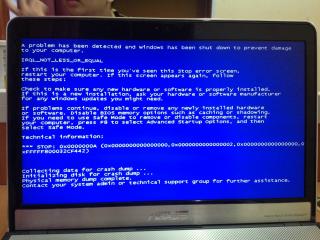
I'm facing this prob v my laptop. Win7 home edition. Blue screen and restart. Any sifu can help on this issue? Many thanks. |
|
|
Oct 2 2012, 12:15 AM
|

Junior Member
73 posts Joined: Oct 2008 From: Kuala Lumpur
|
Hi, i have some problem here.. My pc was running fine, and after i plugged in my iphone to charge at usb, it comes out blue screen, not enuf memory sumtin, u know like when yer ram rosak.. So i tried to switch places for my ram, n try to switch it on again, right at the windows startup, it crashes again.. So i tried another soluion, by changing another ram juz to check, but the pc is on, but it stays black screen.. Can anyone help pls..
|
| Change to: |  0.0329sec 0.0329sec
 0.58 0.58
 6 queries 6 queries
 GZIP Disabled GZIP Disabled
Time is now: 5th December 2025 - 07:49 PM |
 Quote
Quote