Welcome Guest ( Log In | Register )

9 Pages « < 6 7 8 9 >Bottom

Outline · [ Standard ] · Linear+

 [FAQ] PC auto restart/Blue Screen (BSOD), All questions go here please.

views
     
francischuahcw
post Dec 10 2008, 10:58 PM

Retired. Do Not Disturb
*******
Senior Member
2,152 posts

Joined: Feb 2006
Well,
we can compare it. You have no problem on Vista but you have problem on XP. That is obvious that it is not a hardware problem.

Do you just installed kaspersky recently? Your problem started on the 7th of December

Furthermore, 0X50 pointing to a bad driver or a bad service name. Either you have recently installed a bad driver which is not compatible, or else it should be your OS corrupted. NTOSKRNL.exe handles driver. Did you modificate any of the driver recently?

Add: You could be having a bad partition on XP drive too. Possible for you to run CHKDSK/r from Recovery Console?

This post has been edited by francischuahcw: Dec 10 2008, 11:00 PM
francischuahcw
post Dec 10 2008, 11:17 PM

Retired. Do Not Disturb
*******
Senior Member
2,152 posts

Joined: Feb 2006
Well,
You can have a suspect on that. But what is shown from your minidump file are errors on:
  • klif.sys
  • speedfan.sys
  • ntoskrnl.sys

You have speedfan installed?
http://www.processlibrary.com/directory/files/ntoskrnl
http://www.liutilities.com/products/wintas...brary/ntoskrnl/
http://www.computerhope.com/issues/ch000646.htm
http://www.techspot.com/vb/all/windows/t-7...toskrnlexe.html
http://www.computing.net/answers/windows-2...rror/55840.html
francischuahcw
post Dec 10 2008, 11:40 PM

Retired. Do Not Disturb
*******
Senior Member
2,152 posts

Joined: Feb 2006
In that case, you need another system to produce a XP3 cd.
You can use NLite to slipstream sp2 to sp3 and burn into cd then try to install again.
You have SP3 imaging file?
Then try download Nlite and produce an unattended installation cd.

Download Nlite from below link
http://www.nliteos.com/

We can only know whether your BSOD issue is solved after you repair your system or you run CHKDSK.
Have you check the bad sector?

This post has been edited by francischuahcw: Dec 10 2008, 11:41 PM
francischuahcw
post Dec 11 2008, 12:05 AM

Retired. Do Not Disturb
*******
Senior Member
2,152 posts

Joined: Feb 2006
You are welcome. Your case is a tough one.
smile.gif I am glad to help but i will be sorry if anything worst happens to your system.
Apologize again.
francischuahcw
post Dec 11 2008, 12:19 AM

Retired. Do Not Disturb
*******
Senior Member
2,152 posts

Joined: Feb 2006
Haha,
i would suggest you to send to service center better.
I am not an expert.
Further, you not worry your laptop wont be back to you?
Haha.
francischuahcw
post Dec 11 2008, 12:41 AM

Retired. Do Not Disturb
*******
Senior Member
2,152 posts

Joined: Feb 2006
Just go for a trial and error.
Else, you have to ask them to unplug your HDD and backup for you. So that your warranty wont void.
francischuahcw
post Dec 11 2008, 12:49 AM

Retired. Do Not Disturb
*******
Senior Member
2,152 posts

Joined: Feb 2006
Ok.Wait for your reply tomorrow. Its late. Time for bed
francischuahcw
post Dec 15 2008, 08:28 PM

Retired. Do Not Disturb
*******
Senior Member
2,152 posts

Joined: Feb 2006
QUOTE(cyew86 @ Dec 13 2008, 02:30 AM)
seems like my new rig is not stable, just updated the drivers to Catalyst 8.12 and got BSOD during/after game doh.gif got the minidump file with me, should i upload here?
*
Go to My Computer and locate C:\Windows\Minidump or C:\Minidump. Once you have the minidump folder, please zipped the whole folder and upload it here (using add attachement function) or other web hosting page mentioned below. Please provide the link to download your file.


Added on December 15, 2008, 8:46 pm
QUOTE(db07mufan @ Dec 13 2008, 02:49 AM)
dear francischuahcw,

please solve my problem. Been getting BSODS on and off since i got my new computer, but it got to my nerves finally.

This is my dump file, please have a look!

http://www.yousendit.com/download/TTZtak95SWU5eFhIRGc9PQ

thanks!
*
QUOTE
BugCheck 10000050, {eb126b48, 1, bf80ed63, 2}


Could not read faulting driver name
*** WARNING: Unable to verify timestamp for hal.dll
*** ERROR: Module load completed but symbols could not be loaded for hal.dll


Probably caused by : memory_corruption

Followup: memory_corruption


I got your thread here
http://forum.lowyat.net/topic/760600

Is this pc still new? You have a faulty RAM or maybe a bad sector in your HDD which affect the file paging.
Do you run memtest86+ to test your memory or run CHKDSK scandisk for your HDD for bad sector?
If you have other minidump file, i would prefer you Zipped the whole folder here.

Thanks

This post has been edited by francischuahcw: Dec 15 2008, 08:46 PM
francischuahcw
post Dec 15 2008, 11:00 PM

Retired. Do Not Disturb
*******
Senior Member
2,152 posts

Joined: Feb 2006
QUOTE(cyew86 @ Dec 15 2008, 10:47 PM)
[attachmentid=717736]
my minidump files. no more BSOD after reverting to old display drivers though. but it would be utmost appreciated if the sifu here can find out the main cause notworthy.gif
*
Hi cyew86

As i can see that you are using Vista 64bit so do expect this problem happens often as Vista 64bit is aint that stable as far as i am concern.
Debugger show no problem with your graphic driver but it pointed to your RAM. Excessive paged pool usage causing unstability on the RAM.

1st debug
QUOTE
BugCheck A, {28, 2, 0, fffff8000209c4b0}


Probably caused by : memory_corruption ( nt!MiFindNodeOrParent+0 )

Followup: MachineOwner
This is a common bugcheck and clearly stating memory corruption on svchost.exe.


2nd debug
QUOTE
Use !analyze -v to get detailed debugging information.

BugCheck 3B, {c0000005, 0, fffffa60074ff180, 0}


Probably caused by : ntkrnlmp.exe ( nt!IopXxxControlFile+5da )

Followup: MachineOwner
---------


This error has been linked to excessive paged pool usage and may occur due to user-mode graphics drivers crossing over and passing bad data to the kernel code.


Can you run a memtest86+ on your RAM? If Vista64 bit giving you this trouble, i would suggest you try downgrade to 32bit to see if problem occurs. It could be driver conflict of VGA with Vista 64x


francischuahcw
post Dec 16 2008, 10:07 PM

Retired. Do Not Disturb
*******
Senior Member
2,152 posts

Joined: Feb 2006
QUOTE(cyew86 @ Dec 16 2008, 12:39 PM)
need to run memtest86+ for whole day if i have 4GB RAM? guess i will have to leave that until i finish my work doh.gif
but there is no more BSOD after i reverted back to Catalyst 8.11. previous troubleshooting linked to ASUS softwares which i have installed in my system. perhaps 1 day i should reformat my PC and choose not to install any ASUS stuff and see how it goes. thanks for the help


Added on December 16, 2008, 3:41 pmedit: i have ran memtest, no error found
so what's left to be done is uninstalling all the ASUS craps in my PC
*
Do you have ASUS ENHANCED DRIVER installed? if yes, please remove it from the system.

Thanks
francischuahcw
post Dec 17 2008, 12:16 AM

Retired. Do Not Disturb
*******
Senior Member
2,152 posts

Joined: Feb 2006
QUOTE(db07mufan @ Dec 16 2008, 10:03 PM)
some new dumpfiles today..
*
I observed the two minidump file you attached. One referred to bad pool caller and one referred to critical object termination
Both the bugcheck pointed to system thread handling. If you have check your RAM is cleared and your HDD is clean, i suspect now is your processor having compatibility problem with your Mobo. It could be the file caching problem by your processor.
But what i suggest you to do is run your system with only one ram at a time. See if this test will manage to let you found something strange such as a faulty RAM slot.


Added on December 17, 2008, 12:18 am
QUOTE(cyew86 @ Dec 16 2008, 11:40 PM)
not really enhanced driver, i have EPU 4-engine, ASUS SmartDoctor, and ASUS GamerOSD, as well as AI Suite, PC Probe etc
*
If would like to test your system by removing asus component, i have no comment. You can have a try on it and see how it goes.
smile.gif

This post has been edited by francischuahcw: Dec 17 2008, 12:18 AM
francischuahcw
post Dec 26 2008, 01:50 PM

Retired. Do Not Disturb
*******
Senior Member
2,152 posts

Joined: Feb 2006
QUOTE(arcule @ Dec 23 2008, 08:46 PM)
can anyone out there know to fix this problem?

i accidentally off my laptop when i using external harddisk

after when i open again

blue screen appear and i cant even go into window

any idea to fix the unmountable_boot_volume?

STOP:0x000000ED
*
Change your HDD cable.
Basically it is whether your HDD failure or HDD cable failure.
Run a scan disk to check your HDD for bad sector.
Use it from the Recovery Console and scan the HDD.
Else, it is high possibility that your HDD is damaged.

QUOTE(ben3003 @ Dec 21 2008, 08:50 AM)
Mine also getting BSOD once per day. Dont know what is the problem. Any sifu here plz help me check ya...[attachmentid=725629]
*
Your dump file shows that your system has been up for nearly 15 hours.
The blue screen should have caused by RAM after a long period of usage.
The system file that crashes is part of the Vista Driver.
It would be advisable if you monitor your temperature of your system if you wishes to have a long on time for your system.
Thanks

Please come back if it happens again.
Thanks

QUOTE(EasternBadge @ Dec 24 2008, 01:02 PM)
Hi, I have a problem here, cannot boot into windows. My PC  POST successfully but BSOD will show up at windows vista loading screen, then my PC restarts.

Previously I've overclocked my E7300 to 4Ghz with no problem, except that the temperature's too high for daily use. So, I restarted my PC and underclock it to 3.8 Ghz, then the above problem occurs. I've also set the BIOS settings to default, but it doesn't work. Help please  cry.gif

My specs are:
Core 2 Duo E7300
Biostar Tpower I45
Team Xtreem 800 Mhz DDR2 1GBx 2
MSI Geforce 8400GS

Sorry for my english  sweat.gif

Edit: The error code is 0x0000C1F5
*
Are you sure that it is the correct error code?
There is no such error code for Blue screen but it does have exception code.
Please kindly confirm the error code again or attached a screen shot here.
Other than this, try boot in safe mode and see if possible for you to enter safe mode.
Thanks

QUOTE(doom89757 @ Dec 25 2008, 03:32 PM)
Ok, I suddenly have a BSOD of all the sudden, I was on my FireFox & MSN, then suddenly the whole screen froze but my mouse cursor still can move, then wait for a while got blue screen

Here is the minidump file:-
[attachmentid=732192]
Hope u guys can help me solve out the problem, thanks
*
Hi,
It has been a few time that i remind you regarding your Razer/Lycosa Keyboard.
I am not sure why it happens but it seems like it has some conflict with your USB port as your USB port crashes with it.
Try to change to other USB port. Do you maximized the USB port usage for your system?

QUOTE
STACK_TEXT: 
bacd3b74 bac58859 89db0670 00000000 00000001 nt!KeReleaseSemaphore+0x3a
WARNING: Stack unwind information not available. Following frames may be wrong.
bacd3ba4 804f13e2 896bb7c0 01eb1b18 896bb878 Razerlow+0x859
bacd3bd4 b9a08ee5 89eb1b18 89304c18 8a38d028 nt!IopfCompleteRequest+0xa2
bacd3c3c b9a09b57 89062750 00000000 8a38d7d8 USBPORT!USBPORT_CompleteTransfer+0x373
bacd3c6c b9a0a754 026e6f44 8a38d0e0 8a38d0e0 USBPORT!USBPORT_DoneTransfer+0x137
bacd3ca4 b9a0bf6a 8a38d028 80545aac 8a38d230 USBPORT!USBPORT_FlushDoneTransferList+0x16c
bacd3cd0 b9a19fb0 8a38d028 80545aac 8a38d028 USBPORT!USBPORT_DpcWorker+0x224
bacd3d0c b9a1a128 8a38d028 00000001 8055b0a0 USBPORT!USBPORT_IsrDpcWorker+0x37e
bacd3d28 80544e5f 8a38d64c 6b755044 00000000 USBPORT!USBPORT_IsrDpc+0x166
bacd3d50 80544d44 00000000 0000000e 00000000 nt!KiRetireDpcList+0x61
bacd3d54 00000000 0000000e 00000000 00000000 nt!KiIdleLoop+0x28


QUOTE
BugCheck 1000008E, {c0000047, 804fcc24, bacd37b0, 0}

Probably caused by : Razerlow.sys ( Razerlow+859 )

Followup: MachineOwner
---------

francischuahcw
post Dec 27 2008, 08:44 AM

Retired. Do Not Disturb
*******
Senior Member
2,152 posts

Joined: Feb 2006
If i were you, i wil fix directly to mobo usb port. Fix in extension the major concern is lack of power which will lead to BSOD too
francischuahcw
post Jan 10 2009, 07:47 PM

Retired. Do Not Disturb
*******
Senior Member
2,152 posts

Joined: Feb 2006
QUOTE(cheerioet @ Jan 10 2009, 01:09 PM)
Woah...I really don't know what had happen to my notebook. It show da blue screen again...and now I am submitting another minidump for any sifu to guide. Thanks.

to TTHM, the web cam thing one, i think solve ord, now i dunno what is causing this.
*
011009-01
Bug Check 0XF4 - Critical Object Termination on csrss with C0000005 (C5)

011009-02
Bug Check 0XA - IRQL_NOT_LESS_OR_EQUAL

Both minidump analysis indicates problem with your RAM with an obvious bugcheck on 011009-02 showing memory corruption.
How much RAM are you using at this moment? Would suggest you do check your RAM for faulty.

As per mentioned by tthm before, it could be your file paging or even your RAM.
Those that handles thread is not running well causing crashes on the 1st dump on your system process.

Thanks

francischuahcw
post Jan 15 2009, 09:42 AM

Retired. Do Not Disturb
*******
Senior Member
2,152 posts

Joined: Feb 2006
QUOTE(Pinvader @ Jan 12 2009, 08:14 PM)
this is my 3rd time posting here regarding bsod of pc..i still cannot find the solution..plz help me sad.gif

[attachmentid=759345]
*
1st of all,
tthm has suggested below but i havent see any of your reply to him regarding his suggestion. Do you do as per informed?

QUOTE(tthm @ Dec 23 2008, 03:41 PM)
Sorry for the late reply.

Did you monitor your system temperature (e.g. CPU, north-bridge chipset and also graphic card)?

You may want to do a full memory test on your system for a few cycle to see if your system RAM fail over long running time. For the software, you may want to Windows Memory Diagnostic.
*
Please follow what tthm has suggested. You might be having a RAM problem and it needs to be changed.
Furthermore, as per inform by tthm, you do over use your system in a long period of time. If it is a laptop, beware that you are reducing the lifespan of the system without proper cooling system.

Thanks

francischuahcw
post Jan 15 2009, 09:48 AM

Retired. Do Not Disturb
*******
Senior Member
2,152 posts

Joined: Feb 2006
QUOTE(bartbarb @ Jan 11 2009, 08:25 AM)
Hey Guys, need some help here also.

Here's the scenario. Last time when i use my dvd-drive, it didn't occured any BSOD, but later on i think around after few months, it start showing me BSOD sometimes when i'm using my dvd-drive.
Then i thought is the hardware failure, since the dvd-drive is quite old & slow already, somemore is an IDE drive.
Then i change another new SATA dvd-drive, but still sometimes it still give me BSOD. I thought maybe is the power cable fault, then i switch another power cable, still the same. I can't find the root cause of this problem, please help  icon_question.gif
*
Here is what i have for you
QUOTE
DRIVER_IRQL_NOT_LESS_OR_EQUAL (d1)
An attempt was made to access a pageable (or completely invalid) address at an
interrupt request level (IRQL) that is too high.  This is usually
caused by drivers using improper addresses.
If kernel debugger is available get stack backtrace.
Arguments:
Arg1: 08910018, memory referenced
Arg2: 00000002, IRQL
Arg3: 00000001, value 0 = read operation, 1 = write operation
Arg4: 7c911713, address which referenced memory

Debugging Details:
------------------


CURRENT_IRQL:  2

FAULTING_IP:
+7c911713
7c911713 66894118        mov    word ptr [ecx+18h],ax

PROCESS_NAME:  explorer.exe

BUGCHECK_STR:  RAISED_IRQL_FAULT

CUSTOMER_CRASH_COUNT:  3

DEFAULT_BUCKET_ID:  [b]INTEL_CPU_MICROCODE_ZERO[cool.gif

SYMBOL_NAME:  INVALID_CONTEXT

FOLLOWUP_NAME:  MachineOwner

MODULE_NAME: Unknown_Module

IMAGE_NAME:  Unknown_Image

DEBUG_FLR_IMAGE_TIMESTAMP:  0

STACK_COMMAND:  kb

FAILURE_BUCKET_ID:  RAISED_IRQL_FAULT_explorer.exe_INVALID_CONTEXT

BUCKET_ID:  RAISED_IRQL_FAULT_explorer.exe_INVALID_CONTEXT

Followup: MachineOwner
---------
More to me it seems like you are having a processor problem. Your processor Cache might be the caused of your BSOD.
I would suggest you to check your RAM one by one, clearing up your file paging, if problem still persist, it would be your processor cache not able to capture process.
francischuahcw
post Mar 5 2009, 01:00 AM

Retired. Do Not Disturb
*******
Senior Member
2,152 posts

Joined: Feb 2006
QUOTE(Maddox27 @ Feb 27 2009, 01:45 PM)
Hi
yeah.. bsod prob.. i always got win32k prob and page fault prob. my pc hanged almost everytime i transfer a big size file, and played videos.. is it my ram?

nway, hope u can help..
*
Good day,
Try to reset your file paging.

Shifting Paging File
Move your paging file from C:\ to D:\

You can set it by right click at My Computer>Advance Tab>Performance Setting.
Under the Advance Tab in Performance Setting
Look for Virtual Memory then click Change
Then click on other drive and change the paging file to other drive.

Thanks
francischuahcw
post Mar 5 2009, 01:07 AM

Retired. Do Not Disturb
*******
Senior Member
2,152 posts

Joined: Feb 2006
QUOTE(Dickong @ Feb 28 2009, 06:28 AM)
Hi, my pc recently have intermittern bsod, this happen during boot up, need help from sifu, the bsod stated, STOP,c0000218, registry file failure, the registry cannot load the hive ( file ) or its log or alternate.  It is corrupt, absent or not writeable
*
You have missing registry file which results your window failed to operate correctly.
Try to use a Window CD and do a system repair to recover the damage and corrupted registry and it will be fine.

http://www.geekstogo.com/forum/How-to-repa...ws-XP-t138.html

Thanks


This post has been edited by francischuahcw: Mar 5 2009, 01:10 AM
francischuahcw
post Mar 5 2009, 01:09 AM

Retired. Do Not Disturb
*******
Senior Member
2,152 posts

Joined: Feb 2006
QUOTE(Luckz @ Mar 4 2009, 10:28 PM)
hi guys, i need help with my new m300 e435. i just bought it for 3 days and it comes wif free another Kingston 2GB RAM. in total now i have 4 GB RAM.

I was about to instal adobe flash and suddenly the blue screen appears n at the bottom, it says dumping physical memory.. Does it have to do wif the Kingston Memory? Coz the Original memory in my laptop is Samsung. i'm suspecting the kingston is not compatible..

Any Help??? N i just ran the memory diagnostic tool n it detected a hardware probs also..
*
Hi there
Please upload your minidump folder here and i will help you to debug and let you know the reason for BSOD.

Looking for minidump file

Go to My Computer and locate C:\Windows\Minidump or C:\Minidump. Once you have the minidump folder, please zipped the whole folder and upload it here (using add attachement function) or other web hosting page mentioned below. Please provide the link to download your file. No minidump file available!!!How??
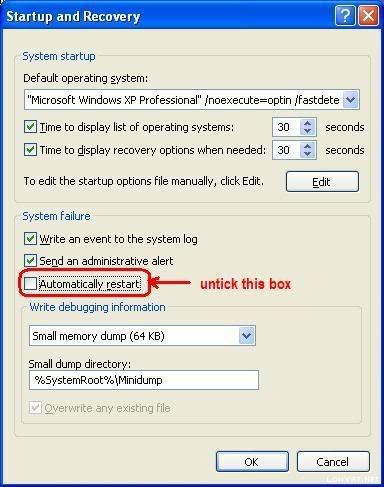
Do the following if you did not find your minidump file

(Window XP)
  • Right click at My Computer
  • Go to Properties
  • Look at Advanced tab then go for Startup and Recovery
  • Look at Settings and untick Automatic Restart
  • Make sure that write debugging information is Small Memory Dump (64kb)
(Window Vista)
  • Right click at My Computer
  • Go to Properties
  • Look at Advanced System Properties tab then go for Startup and Recovery
  • Look at Settings and untick Automatic Restart
  • Make sure that write debugging information is Small Memory Dump (64kb)
user posted image

The next time BSOD occurs, a minidump file will be created.

Further tutorial are available at http://forum.lowyat.net/topic/346230


This post has been edited by francischuahcw: Mar 5 2009, 01:20 AM
francischuahcw
post Mar 5 2009, 01:20 AM

Retired. Do Not Disturb
*******
Senior Member
2,152 posts

Joined: Feb 2006
QUOTE(doom89757 @ Mar 1 2009, 11:58 PM)
I suddenly got this BSOD , dunno wat happen, juz playing MSN only , suddenly whole screen freezes then BSOD
Here is my minidump:-
*
It has been numerous time that your issue is highlighted here.
The debug shows again conflict of driver to your Razer related hardware.

File name Lycosa.sys similar as previous BSOD issue that i have solved before.
Would suggest a full removal of current driver from the system and reinstall the driver

QUOTE
Bug Check 0X8E

Hardware incompatibility. Make sure that any new hardware installed is listed in the Microsoft Windows Marketplace Tested Products List.

Faulty device driver or system service. A faulty device driver or system service might be responsible for this error. Hardware issues, such as BIOS incompatibilities, memory conflicts, and IRQ conflicts can also generate this error.

9 Pages « < 6 7 8 9 >Top
 

Change to:
| Lo-Fi Version
0.1047sec    0.76    7 queries    GZIP Disabled
Time is now: 5th December 2025 - 06:26 AM