Welcome Guest ( Log In | Register )

4 Pages < 1 2 3 4 >Bottom

Outline · [ Standard ] · Linear+

 AMD K8 Family Overclocking (754/939/940/AM2/1207), General discussions and newbies' guide

views
     
alive88
post Jan 16 2008, 10:58 AM

Pata Pata Pon! Pon Pon Pata Pon!!
******
Senior Member
1,406 posts

Joined: Jun 2007


simple as this..
u r advise to lower ur divider, and push ur proc first.when u reach the limit, then only u will play wif the ram..i dnt know how mushkin value rams perform, but u may try by increasing the vdimm and play wif the timing..some value ram wont get OC high even u pump higher vcore..its becoz of the chip that they use.
just a bit curious here..u want to OC extremely or juz want increase the performance a bit?ram running at 337 is nothing..d perfrmance is barely noticeable...as u can see in my sig, ive used that rig before, and i can push it to 2.9, eventhough i think my proc is the worst brisby,coz i need 1.550vcore to do that...current G1 brisby can achieve 2.7~2.8 wif stock vcore..mybe urs can do better, or else,consider urself unlucky.
alive88
post Jan 25 2008, 03:02 AM

Pata Pata Pon! Pon Pon Pata Pon!!
******
Senior Member
1,406 posts

Joined: Jun 2007


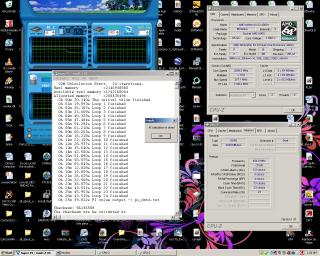
mybe u shud take a look at my gud old rig

my daily usage..confirm stable @2.73ghz blush.gif ,
and the highest oc,@2.9ghz sad.gif

look at my setting and vcore..this is done on stock heatsink tongue.gif


Attached thumbnail(s)
Attached Image Attached Image
alive88
post Jan 25 2008, 02:46 PM

Pata Pata Pon! Pon Pon Pata Pon!!
******
Senior Member
1,406 posts

Joined: Jun 2007


what u shud worry is not the idle, but the load..try orthos and see the differences...when u increase the clockspeed, the cpu will torture ur ram,thus u need to increase the vdimm as well.im short on vdimm coz my mobo only limit the vdimm at 2.2 only...this makes it hard when i run my ram at high speed..thats why i use vcore to cover the loss of the vdimm tongue.gif

This post has been edited by alive88: Jan 25 2008, 02:46 PM
alive88
post Feb 11 2008, 08:55 PM

Pata Pata Pon! Pon Pon Pata Pon!!
******
Senior Member
1,406 posts

Joined: Jun 2007


QUOTE(hermit23 @ Feb 5 2008, 12:41 AM)
Hi guys . . . really a noob in overclocking here, lots of things i google but still dont understand and cannot find, appreciate any help . . . im using a black edition
Questions:
a. Bus speed, can increase? how?
b. HT link = hyper transport?
c. DRAM frequency, whats that . . . higher better?
d. FSB:DRAM can explain wat izzit plz

Thanks for taking the trouble to read notworthy.gif
[attachmentid=394010]
*
answers:
a. bus speed or a.k.a cpu frequency can be chnge in bios..urs is BE rite?for non BE, we increase the bus speed to gain high GHZ..but u can just increase the multiplier.
b. yup..the higher the better..but some board cant go over 1000..
c. ur ram speed..in ur SS..it shows 387..means the speed is 774..the higher the better..rite now ur speed is ddr774..4 example,like 10th anny,can go up to ddr1200..this u must learn how to play with divider and timing...
d. FSB:DRAM ur cpu speed 3100:ur ram speed 387..that cpu/8 shows that ur cpu speed(3100) will be divided by 8,then u get 378 for the speed..

i dont really know how to explain..if u r really interested in OC, u will learn sooner
alive88
post Feb 11 2008, 11:36 PM

Pata Pata Pon! Pon Pon Pata Pon!!
******
Senior Member
1,406 posts

Joined: Jun 2007


got Q,just ask..but dont hope to be spoon feed nod.gif

This post has been edited by alive88: Feb 14 2008, 09:26 PM
alive88
post Feb 21 2008, 12:17 AM

Pata Pata Pon! Pon Pon Pata Pon!!
******
Senior Member
1,406 posts

Joined: Jun 2007


QUOTE(kho51 @ Feb 18 2008, 01:49 PM)
Hey, I face a problem when I OC through Bios is that I can only change my Vcore max to 1.25V, is there any idea to change it higher? I'm using Asus M2N-E SLI, AMD 64 x2 4000+, Thanks.
*
m2n-e can change..try to google around ur mobo manual
alive88
post Mar 4 2008, 06:50 PM

Pata Pata Pon! Pon Pon Pata Pon!!
******
Senior Member
1,406 posts

Joined: Jun 2007


QUOTE(melvintcs @ Mar 4 2008, 12:53 AM)
How to do OC...
im super duper noobie...T_T
wat stuff i nid? wat software i nid?
no hav any fan currently, juz hav cpu and psu fan...plan to add a cpu cooler this or next month..
using AMD 64 3200

im very noobie, hope can learn something from here
*
list out ur hardware..psot ur cpu-z ss..and summore,add ur hardware in ur signature,easy for us
alive88
post Mar 5 2008, 02:20 PM

Pata Pata Pon! Pon Pon Pata Pon!!
******
Senior Member
1,406 posts

Joined: Jun 2007


ggbyte s2?not that good for oc..what u can try now is lower the ht link to x3 and ram divider to 400.then increase ur fsb step by step..when u increase it,test the stabilty..what ram r u using?psu?later post ur cpu-z mem tab
alive88
post Mar 5 2008, 06:35 PM

Pata Pata Pon! Pon Pon Pata Pon!!
******
Senior Member
1,406 posts

Joined: Jun 2007


look at ur cpu-z screenie..


core speed=bus speed X cpu multiplier

bus speed=cpu frequency

ht link=bus speed/cpu frequency X ht link multiplier(1x,2x,3x,4x,5x,auto)

ram speed=corespeed divide by the ram divider


main thing in OC is the bus speed a.k.a ur cpu frequency
when u increase the bus speed, u will increase the ht link, and the ram speed.
for example..ur default bus speed is 200mhz and multiplier x10..
say if ur ram is value ram ddr2 533..n u use 533 divider(ddr=double data rate=means 533/2=266.5)=(in ur case,the ram only runs at ddr500)

now, ur pc spec is like this..refer to the above point

corespeed-2000(200 x 10)

bus speed-(200)

ht link-1000 (200 x 5(auto is always 5))

ram speed;
cpu is 2000MHz and the divider is 533
ram speed=ur ram is (250) 500 effective
2000/250 = 8 = ur ram divider is

**then ram speed is
2000/8 = 250mhz( every time u increase the bus speed, the ram speed will increase together..)

**(borrow likito calculation in am2 thread)thanks bro likito notworthy.gif

get it? if OC fail, check among these features..the ram problem can be solve in various way, etc, changing the ram divider and loosen the tming to make room for the proc
ht link can be boost up till 1xxx..but when OC, keep under 1000 to make sure it stable.but once stable, make 1+++(1600 is sweet) drool.gif

play safe wif vcore!vdimm!and beware of the temp! vmad.gif dont do any suicide attempt if ur not expert..(i dont coz im noob)hehe..but must be creative in tweaking!and lucky..haha biggrin.gif

thats all for now..mybe need to edit summore..sleepy rite now..anyone who find errors please help me to edit..
thanks notworthy.gif

EDITED=already edited according to ur spec icon_rolleyes.gif

need u to list down ur ram type, and psu smile.gif

This post has been edited by alive88: Mar 7 2008, 12:37 AM
alive88
post Mar 6 2008, 12:42 AM

Pata Pata Pon! Pon Pon Pata Pon!!
******
Senior Member
1,406 posts

Joined: Jun 2007


QUOTE(xixo_12 @ Mar 5 2008, 08:59 PM)
wah..can make guide..so loooooonnnnggggg whistling.gif
*
expert OCer detected.. tongue.gif


Added on March 6, 2008, 12:45 ammelvintcs..ur ram type?what value ram u use?chipset?

This post has been edited by alive88: Mar 6 2008, 12:45 AM
alive88
post Mar 6 2008, 03:21 PM

Pata Pata Pon! Pon Pon Pata Pon!!
******
Senior Member
1,406 posts

Joined: Jun 2007


ur vdimm?cant get above as if cant boot or bsod?are ur vcore too high?ur temp?maybe its one of the reason..post ur memset tab here..3.4vers..
and as xixo_12 said,timing set to CL-5 first
alive88
post Mar 6 2008, 05:30 PM

Pata Pata Pon! Pon Pon Pata Pon!!
******
Senior Member
1,406 posts

Joined: Jun 2007


bro..slow la..cian die
alive88
post Mar 7 2008, 12:29 AM

Pata Pata Pon! Pon Pon Pata Pon!!
******
Senior Member
1,406 posts

Joined: Jun 2007


max safe is 1.55,but not for 24/7.prefer 1.4 max for 24/7.u may refer to the table in am2 thread about the ram speed and multiplier.if ur htt is not touch, u dont need to touch the ram thingy

This post has been edited by alive88: Mar 7 2008, 12:38 AM
alive88
post Mar 7 2008, 07:04 PM

Pata Pata Pon! Pon Pon Pata Pon!!
******
Senior Member
1,406 posts

Joined: Jun 2007


vcore is too high for 24/7 usage..1.425 or mybe 1.45 for for 24/7.show the ss with 12hrs stable OC..why u dont play with multiplier only?
alive88
post Mar 8 2008, 08:04 AM

Pata Pata Pon! Pon Pon Pata Pon!!
******
Senior Member
1,406 posts

Joined: Jun 2007


dont trust ur temp..DTS spoilt..ur result is good..test stable yet??orthos or spi32m?
alive88
post Mar 8 2008, 12:00 PM

Pata Pata Pon! Pon Pon Pata Pon!!
******
Senior Member
1,406 posts

Joined: Jun 2007


brisbane core have DTS issue,which means that it cant read the temp well..so ,if u want to play safe,just dun exceed more than 1.5vcore(with good HSF) or not more than +0.05 from stock vcore if u on stock HSF..
alive88
post Mar 9 2008, 10:18 AM

Pata Pata Pon! Pon Pon Pata Pon!!
******
Senior Member
1,406 posts

Joined: Jun 2007


hmm..its good..have u tried stable or not?what ram r u using?u simply oc by increasing fsb and vcore or what?
alive88
post Mar 9 2008, 09:14 PM

Pata Pata Pon! Pon Pon Pata Pon!!
******
Senior Member
1,406 posts

Joined: Jun 2007


u need to download orthos or super pi,,suspect ur OC is not stable,coz the vcore are a bit low..or perhaps u got a gem..laugh.gif
alive88
post Mar 10 2008, 06:36 PM

Pata Pata Pon! Pon Pon Pata Pon!!
******
Senior Member
1,406 posts

Joined: Jun 2007


QUOTE(one3rd @ Mar 10 2008, 02:32 AM)
Do u guys think if i get Crucial RAM would improve my OC results...? hmm.gif  hmm.gif
Tot of getting some frm Shawty...Crucial Ballistix/Tracer...? thumbup.gif
*
sHaWty?hmm...gud luck then..
alive88
post Mar 30 2008, 11:37 PM

Pata Pata Pon! Pon Pon Pata Pon!!
******
Senior Member
1,406 posts

Joined: Jun 2007


do u want the latst mobo wif pci-e 2.0 or any mobo can?

here the very good OC mobo(old pci-e)(am2)
biostar ta690g

the new one.pci-e 2.0 (am2+)
biostar ta770(a bit clumsy)
dfi UT or DK 790FX..

4 Pages < 1 2 3 4 >Top
 

Change to:
| Lo-Fi Version
0.1894sec    0.14    7 queries    GZIP Disabled
Time is now: 9th December 2025 - 01:10 AM