

QUOTE(christ14 @ Mar 11 2015, 09:36 AM)
anyone tried cod aw?

Should be able to play on z5. Last time was good enough in lenovo y500 with gt760m. 
illegear z5 discussion thread, anything and everything about the beast
|
|
 Mar 11 2015, 10:13 AM Mar 11 2015, 10:13 AM
Return to original view | Post
#81
|
 
Junior Member
101 posts Joined: Dec 2014 
|
QUOTE(christ14 @ Mar 11 2015, 09:36 AM) anyone tried cod aw? Should be able to play on z5. Last time was good enough in lenovo y500 with gt760m. |
|
|
|
|
|
Mar 11 2015, 10:28 AM
Return to original view | Post
#82
|
|
Junior Member
101 posts Joined: Dec 2014
|
QUOTE(miong93 @ Mar 11 2015, 09:33 AM) Rogue is better optimized than Unity. Try play Unity then you will know the pain XD found some similar specs laptop gameplay that proves can play smooth.Did you try Watch Dogs ? Damn sad I need to lower my reso and settings to play it smoothly watch dogs gameplay on lenovo y50 gtx860m 4gbvram: https://www.youtube.com/watch?v=J1SrIO6AeuI assassins creed unity gameplay on lenovo y50 gtx860m 4gbvram: https://www.youtube.com/watch?v=_NTQVYgsVj8 |
|
|
Mar 12 2015, 11:03 PM
Return to original view | Post
#83
|
|
Junior Member
101 posts Joined: Dec 2014
|
QUOTE(FirstOne @ Mar 12 2015, 10:12 PM) Can this play H1Z1 full high setting? U can play in ultra graphics with full setting |
|
|
Mar 14 2015, 10:04 AM
Return to original view | Post
#84
|
|
Junior Member
101 posts Joined: Dec 2014
|
QUOTE(xarive @ Mar 14 2015, 09:31 AM) anyone tried shut down and close the lit (right before the keyboard backlight lights off?). Today got my BSOD again. The last thing I do was that I didn't wait until the light fades before I close the laptop (after pressed shut down). I think when you close the lid, your z5 goes to sleep mode while it is shutting down the windows. So I think the system not able to shut it down before it goes to sleep mode so when you power it on back it shows bsod error. |
|
|
Mar 18 2015, 08:59 PM
Return to original view | Post
#85
|
|
Junior Member
101 posts Joined: Dec 2014
|
Guys a good news for all genuine and non-genuine OS users, Microsoft just announced that they will be providing free windows 10 upgrade for genuine and non-genuine Operating Systems this coming Summer. So don't have to worry.
http://www.theverge.com/2015/3/18/8241023/...oftware-pirates http://www.technobuffalo.com/2015/03/18/ev...ows-10-upgrade/ |
|
|
Mar 19 2015, 08:58 PM
Return to original view | Post
#86
|
|
Junior Member
101 posts Joined: Dec 2014
|
QUOTE(Prince J @ Mar 19 2015, 06:09 PM) ILLEGEAR Z5 with GTX 960M and 970M pre-order are opened But the webpage is not having it yet... Then how to check the prices and differences? This post has been edited by MgrSagaaboyz: Mar 19 2015, 08:59 PM |
|
|
|
|
|
Mar 20 2015, 10:02 PM
Return to original view | Post
#87
|
|
Junior Member
101 posts Joined: Dec 2014
|
QUOTE(christ14 @ Mar 20 2015, 07:46 PM) yup thats what i thought I was also getting BSOD whenever getting to next stages when playing assassins creed unity.erm...i dont do ori games lol |
|
|
Mar 21 2015, 07:57 PM
Return to original view | Post
#88
|
|
Junior Member
101 posts Joined: Dec 2014
|
QUOTE(Prince J @ Mar 21 2015, 07:49 PM) xarive came to our office on Friday and told us that his laptop BSOD happens once to twice a week. To identify the root cause might need 2 to 3 weeks for such intermittent issue. That was why we didn't retain his laptop to double confirm the issue but to change parts right away. The screen exchange for FOC is really cool. Will come around to exchange my screen (red color spot/dead spot) if I encounter any big issue.There is also a small scratch (wear and tear) on his screen and ILLEGEAR helped to change a new one FOC. |
|
|
Mar 24 2015, 04:03 PM
Return to original view | Post
#89
|
|
Junior Member
101 posts Joined: Dec 2014
|
QUOTE(Adil@ILLEGEAR @ Mar 24 2015, 03:50 PM) try carrying the bag with both of your straps. anyway we thought the version two bag straps were improved. Just want to clear my doubts. Are we allowed to exchange version one backpack with version two if the version one is not used(still brand new). |
|
|
Mar 26 2015, 10:29 AM
Return to original view | Post
#90
|
|
Junior Member
101 posts Joined: Dec 2014
|
QUOTE(rexshadow @ Mar 26 2015, 06:45 AM) My z5 encounter plug in but not charging . solution? Thats not a problem, Z5 will stop charging if the battery level is above 85 or 90%. In this case z5 battery will not get damage from charging excessively. Since z5 battery cannot be plugged out, this is the best way to save the battery. So whenever you plugged in the power for a long time (like playing games or frget to unplug) , the battery will not get problem or damage in future. |
|
|
Mar 26 2015, 11:20 AM
Return to original view | Post
#91
|
|
Junior Member
101 posts Joined: Dec 2014
|
QUOTE(miong93 @ Mar 26 2015, 11:12 AM) You need to "hard" reset it. When you charged you laptop to 90 or above, switch off the power adapter and then unplug it. Wait for about 30 seconds or more then plug it in back and switch on the power adapter. In my case, I will not unplug the power adapter after switch off it. I will just switch off the power on adapter for about 30 second and then power on it back. Then there you go you will see it showing "plugged in but not charging).Now it will show not charging when it is 90% or above. The reason why it charge till 100% is most probably you're charging it from 90% or below, so it will straight away charge it to full. |
|
|
Mar 26 2015, 05:42 PM
Return to original view | Post
#92
|
|
Junior Member
101 posts Joined: Dec 2014
|
QUOTE(rexshadow @ Mar 26 2015, 04:46 PM) Is that so. But previously it will charge to 100% , even when battery under 20% or 90%.. Well if it done that for the better good, I will not mind it. Just asking. Well it will keep on charging till 100% if the battery is lower than 90%. But once reach above 90%, if you unplugged and plugged after 30 sec. Then you will see the system will shows plugged but not charging which means your laptop is not using the power from your battery anymore and its using power directly for plugged in connection. Well for other brands, if you plugged in the power to laptop for charge then it will still continue charge even it reach 100% (similar like mobile phone). |
|
|
Mar 31 2015, 05:40 PM
Return to original view | Post
#93
|
|
Junior Member
101 posts Joined: Dec 2014
|
The webpage for Z5 still not updated yet.
|
|
|
|
|
|
Apr 1 2015, 03:39 PM
Return to original view | Post
#94
|
|
Junior Member
101 posts Joined: Dec 2014
|
what is the price for motherboard with gtx970m and gtx960m for upgrading my gtx860m z5 motherboard. If can I trade in my Z5 gtx860m motherboard with gtx960m or 970m.
|
|
|
Apr 3 2015, 10:26 AM
Return to original view | Post
#95
|
|
Junior Member
101 posts Joined: Dec 2014
|
Illegear web server down
Attached thumbnail(s) 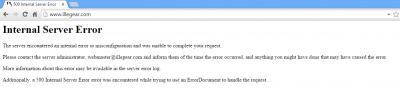
|
|
|
 Apr 9 2015, 08:05 PM Apr 9 2015, 08:05 PM
Return to original view | Post
#96
|
|
Junior Member
101 posts Joined: Dec 2014
|
guys check attachment first. Is that mean that we can play gta v in 30FPS on z5 gtx860m 4gb vram?
Attached thumbnail(s) 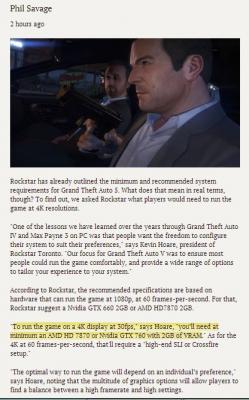
|
|
|
Apr 14 2015, 01:31 PM
Return to original view | Post
#97
|
|
Junior Member
101 posts Joined: Dec 2014
|
QUOTE(christ14 @ Apr 14 2015, 09:45 AM) i think its mah eyes or the cam quality cant so detail Ya I got what you mean. In fact im also having the same tiny tiles on the lid as you. I think its the build quality. And yes its so nasty with finger prints.you see the cover got design one "tiles" like the chess board tiles ba  |
|
|
Apr 23 2015, 04:27 PM
Return to original view | Post
#98
|
|
Junior Member
101 posts Joined: Dec 2014
|
guess what?? im playing gta v on high settings. Pretty beautiful higher than 30fps.
|
|
|
Apr 23 2015, 06:16 PM
Return to original view | Post
#99
|
|
Junior Member
101 posts Joined: Dec 2014
|
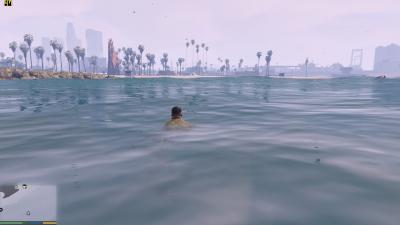
Today my Z5 (gtx860m version) and GTA v (5) made my day. Yeah by default GTA V set the settings to high settings and the fps is amazing im getting higher than 30fps. Attached image checkout. Thanks Illegear for the awesome machine. Temperature part not too hot.
  miong93 Prince J miong93 Prince JThis post has been edited by MgrSagaaboyz: Apr 23 2015, 06:21 PM Attached thumbnail(s) 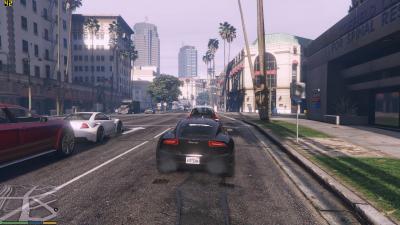


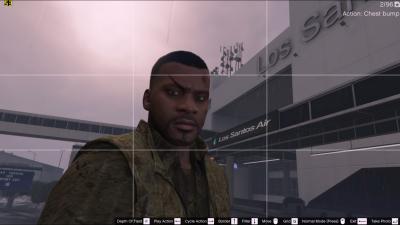
|
|
|
Apr 24 2015, 09:09 PM
Return to original view | Post
#100
|
|
Junior Member
101 posts Joined: Dec 2014
|
QUOTE(killerl @ Apr 24 2015, 07:35 PM) I just playing the gta v in illegear z5 gtx 960m, i get laggy when I driving a car is a high speed. Why ? I set all the graphics setting to normal and off AA & SMAA still the same.  Never had that problem yet on mine. If you are downloading from skidrow you need to check the compatibility settings and the check which gpu the game using (sometime launcher will run on intel if not recognized the game). Seems you already fixed the problem. Cheers Never had that problem yet on mine. If you are downloading from skidrow you need to check the compatibility settings and the check which gpu the game using (sometime launcher will run on intel if not recognized the game). Seems you already fixed the problem. Cheers |
|
Topic ClosedOptions
|
| Change to: |  0.0586sec 0.0586sec
 0.42 0.42
 7 queries 7 queries
 GZIP Disabled GZIP Disabled
Time is now: 3rd December 2025 - 09:19 PM |
 Quote
Quote