Welcome Guest ( Log In | Register )

Bump Topic Topic Closed RSS Feed
9 Pages « < 5 6 7 8 9 >Bottom

Outline · [ Standard ] · Linear+

 illegear z5 discussion thread, anything and everything about the beast

views
     
MgrSagaaboyz
post May 21 2015, 02:49 PM

Getting Started
**
Junior Member
101 posts

Joined: Dec 2014
QUOTE(christ14 @ May 21 2015, 02:34 PM)
so is playable then? any stuttering
*
No Stuttering when playing. But got stuttering when use fraps for recording. You will not have stuttering if you use Nvidia Shadowplay for recording.

Will be uploading video soon.

This post has been edited by MgrSagaaboyz: May 21 2015, 02:49 PM
MgrSagaaboyz
post May 25 2015, 08:56 PM

Getting Started
**
Junior Member
101 posts

Joined: Dec 2014
QUOTE(Prince J @ May 25 2015, 01:19 PM)
Same one, the purpose of providing this is many customers don't have external dvd rom for drivers installation.

The order queue is quite long and we are trying our best to ship as soon as possible.

Appreciate your patience.
*
It will be more easier if you upload them as individual files, so we choose the driver that we want. Since the file size is huge so can't make it download 3.25gb at once.
MgrSagaaboyz
post May 26 2015, 07:55 AM

Getting Started
**
Junior Member
101 posts

Joined: Dec 2014
QUOTE(wadudd @ May 25 2015, 10:22 PM)
Hi, i just a noobie , but i interest about z5 with GTX 960m ,can it support GTA V? and what about other/minor spec? ty
*
GTA V Working fine for me in medium high settings on Z5 GTX860M version. Im getting 30 to 40 fps in game. So which means of course GTX960M will be able to play GTA V in high/ultra settings.
MgrSagaaboyz
post May 27 2015, 12:48 PM

Getting Started
**
Junior Member
101 posts

Joined: Dec 2014
QUOTE(ahzhen988 @ May 27 2015, 11:47 AM)
Ok i will try for it.Hopefully it is work  thumbup.gif
*
I updated my hard disk driver when encountered similar problem with my External hard disk. I have encounter similar scenarios like told by most of the users, I have listed them here:-

1st issue : One of my right port not detecting my 3.0 usb hard diak but working fine with my 2.0 usb pendrive. Which concludes that it may have not enough power on that particular port. Fixed it by shut down for few minutes + unplugged electric.

2nd issue: My external hard disk 3.0 usb stopped working, external hdd works on 2.0 usb only but not turning to 3.0 usb <-- (checked using LED indicator on HDD and file transfer speed.). Tried restarting couple of times and tried updating windows but problem not solved. At last solved by re installing updated HDD driver that comes with it. Then works fine as before.

Usually it will be fixed on restart. If no then I would suggest you to update your USB drivers to the latest one and try and try changing to different usb cables. I think the usb port not have enough power to transfer data or maybe other probs.


Or maybe (just a second thought, no heart fillings)
-> maybe your MicroUSB port on samsung s3 has oxidation issue which will cause your mobile with the problems.

if you found that your s3 have that oxidation problem on MicroUSB port then check out this video https://www.youtube.com/watch?v=pmpmH4NyG-4

icon_rolleyes.gif All the best

This post has been edited by MgrSagaaboyz: May 27 2015, 01:01 PM

MgrSagaaboyz
post Jun 2 2015, 07:22 AM

Getting Started
**
Junior Member
101 posts

Joined: Dec 2014
QUOTE(kennykong85 @ Jun 1 2015, 04:29 PM)
sorry ya hehe as I am from the stone age.
1 more stupid qs as I believe some1 asked this previously but I cant trace it back,

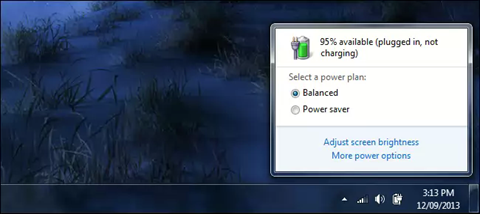
my Z5 when I plug in the charger it will continue to charge till 100%. how do I make it to stop charging at 90% or 95%. as I am downloading the GTA from steam it might take the a day or 2 to complete, I dun wanna leave the battery at 100% . I guess it will reduce the life span right?
*
You need to unplug your z5 after fully charge for about the battery percentage reduce to 98 or 99 and then plug back to power then you will the message plugged, not charging. If its starts to continue charge after awhile then you need to restart your z5 and then try the same method. Most of the time when I power my Z5 I will connect it to power before turning windows on, so automatically it will show plugged but not charging.
MgrSagaaboyz
post Jun 2 2015, 11:35 AM

Getting Started
**
Junior Member
101 posts

Joined: Dec 2014
QUOTE(kennykong85 @ Jun 2 2015, 09:50 AM)
ok got it thanks a lot.! yesterday I leave it on for whole night to dl the GTA v. I have change the setting to "never go to sleep" this morning I wake up and when I check on it, it has actually fall as sleep lol. seems like I am not doing the correct setting.
*
Usually if your battery is more than 90-95% then when plugging power cable by default it will show the "not charging" message which means its not using or charging your battery power but using the power directly from the plugged in cable. If your battery has lower than 90% of battery then it will starts to charge until it become full (100%). So once it reach 95% and more, you can unplug the cable and wait for a while till your battery indicator shows you the estimation remaining hours of your laptop battery power and now you have to plugged it back. Now by default it will not charge.

user posted image

This post has been edited by MgrSagaaboyz: Jun 2 2015, 11:41 AM
MgrSagaaboyz
post Jun 2 2015, 11:39 AM

Getting Started
**
Junior Member
101 posts

Joined: Dec 2014
QUOTE(kennykong85 @ Jun 2 2015, 09:50 AM)
ok got it thanks a lot.! yesterday I leave it on for whole night to dl the GTA v. I have change the setting to "never go to sleep" this morning I wake up and when I check on it, it has actually fall as sleep lol. seems like I am not doing the correct setting.
*
user posted image

Change it to never sleep under plugged in

This post has been edited by MgrSagaaboyz: Jun 2 2015, 11:42 AM
MgrSagaaboyz
post Jun 2 2015, 11:55 AM

Getting Started
**
Junior Member
101 posts

Joined: Dec 2014
QUOTE(kennykong85 @ May 31 2015, 01:05 PM)
Any z5 user using any laptop cooling pad (worth to get 1?) currently downloading gta v from steam! Waiting eagerly on my 1st gam3.
*
Playing GTA V on gtx860m getting 75-85 °C temp without using turbo fan mode. But its fine no problem so far.
MgrSagaaboyz
post Jun 2 2015, 06:42 PM

Getting Started
**
Junior Member
101 posts

Joined: Dec 2014
QUOTE(christ14 @ Jun 2 2015, 03:46 PM)
like my previous post i did mention i followed some pointers given but it still charged to full even after restart etc. nothing works like what they said and it still went to 100%  rclxub.gif i was so frustrated that i dont really care and just let it run lah cuz i cant pinpoint the problem as to why most of the guys here can and i cant lol icon_question.gif
*
If thats the case and then I will try to make a video on how to do like that tutorial today.

MgrSagaaboyz
post Jun 2 2015, 10:22 PM

Getting Started
**
Junior Member
101 posts

Joined: Dec 2014
QUOTE(christ14 @ Jun 2 2015, 10:19 PM)
finally, after persistently trial and error, restarts, pluggings, offs and ons, i got it! rclxms.gif

steps i remembered, it was 100%, i unplugged it, play music (so i could drop it to 97% ish faster), plug it in, and switch on the adapter
*
thumbup.gif thumbup.gif Finally u did it.
MgrSagaaboyz
post Jun 2 2015, 10:40 PM

Getting Started
**
Junior Member
101 posts

Joined: Dec 2014
QUOTE(YangWeiLim85 @ Jun 2 2015, 10:22 PM)
Should use High Power/Balanced?
Any different?
*
There are two options one is Balanced and another one is Power Saver and another one is High Performance

Power Saver usually you use it when you r using battering only and not plugged in and this setting will reduce processor’s clock speed and display brightness with the intention of increasing battery life

Balanced option is where the system will set the clock speed based on requirement by the required running application, so it will set up the clock speed according to required applications only. (I will suggest this so it is balance between high and low).

High Performance is where the settings will set to full clock speed (maximum) based on the required running programs and this setting will use full power, if you use this when not plugged in, then your battery will be empty very fast.


**What is Clock Speed? -> The CPU requires a fixed number of clock ticks (or clock cycles) to execute each instruction. The faster the clock, the more instructions the CPU can execute per second. Clock speeds are expressed in megahertz (MHz) or gigahertz ((GHz)
MgrSagaaboyz
post Jun 2 2015, 11:31 PM

Getting Started
**
Junior Member
101 posts

Joined: Dec 2014
QUOTE(kennykong85 @ Jun 2 2015, 11:12 PM)
hi adil. can you teach me how to set the setting. when I am running the GTA V , I cant even run/ aim properly as it is too lag for me. I don't know what is the best setting for me (I set it at normal setting when I 1st run the game)

any advice would be appreciate
*
Try to do the setting using the nvidia Experience so it will optimize your gta v with the recommended setting. As for me right now im playing it in medium high settings. Do you mind to send pic of your settings so i can guide the settings to change.
MgrSagaaboyz
post Jun 3 2015, 12:21 AM

Getting Started
**
Junior Member
101 posts

Joined: Dec 2014
QUOTE(YangWeiLim85 @ Jun 3 2015, 12:09 AM)
Thanks.
But,normally i will plug in the ac, so for using with ac use balance better?
I just scary, later play game the process speed still lock at medium.
*
Balanced is just enough so it can set the clockspeed if and only if needed. Since you r playing games then balanced is enough, playing games in balanced mode will not affect anything. In balance mode you should not have to worry but you should worry if you r using power saving mode.
MgrSagaaboyz
post Jun 3 2015, 08:58 AM

Getting Started
**
Junior Member
101 posts

Joined: Dec 2014
QUOTE(kennykong85 @ Jun 3 2015, 08:36 AM)
i will screen shot and show it tonight.

basically I run the game twice to test it out
1st time: without doing the nvdia performance optimizing, run the game without alter any setting, and I end up super lag + shuttering lag.

2nd time: I did tweak the battery power setting to high performance, and then I also did nvdia performance optimizing -> result is still the same. too lag that I can barely and aim at the hostage... grrr!
whats wrong with me.

*I m using gtx 960
*
Try update your Nvidia driver and see whether that maybe causes it or no. But its should be ok to play in balanced mode.
MgrSagaaboyz
post Jun 3 2015, 12:07 PM

Getting Started
**
Junior Member
101 posts

Joined: Dec 2014
QUOTE(kennykong85 @ Jun 3 2015, 09:14 AM)
do I need to turn off "vsync" ? I google around and some ppl said its becoz of that causing the lag and shuttering lag. but thanks anyway. I will test it another around after work today.

and oh yes, my graphic card driver is up-to-date. (special thanks to adil, prince-j and his crew, they help me to install all the necessary drivers) THUMB UP!
*
Hey I found your problem. The reason for the problem that you not able to play the gta v game is because you are playing that game on your Intel HD Graphics. Do remember that your z5 has 2 graphic card which means it uses the the nvidia optimus technology to find out to use which graphics card needed to use for which program. By default Z5 will be using Intel HD graphics for all normal uses this implemented to reduce the usage of cpu which will not reduce battery while using it, if the program or a particular app required and needed a high graphics then it will use Nvidia gtx 960m... graphics card. If your GTA V is not detected as a game by your system or nvidia (usually this happens with some pirated games), then the system by default will execute that program under Intel HD graphics, this means that you are not using nvidia gtx 860 to run the game. Thats is why you are not able to play that game smoothly.

The fix is whenever you want to play Steps : right click on the game icon and select switch graphic card... and select gtx graphics manually. So the program will be executing under your gtx graphics.

This is my assumption, this could be the problem.

Happy Gaming. thumbup.gif thumbup.gif

This post has been edited by MgrSagaaboyz: Jun 3 2015, 12:56 PM
MgrSagaaboyz
post Jun 3 2015, 05:25 PM

Getting Started
**
Junior Member
101 posts

Joined: Dec 2014
QUOTE(Unomi @ Jun 3 2015, 05:00 PM)
may i know what program is the best to check my graphic card and processor temperature?
*
MSI Afterburner Program

Download: http://gaming.msi.com/features/afterburner

Tutorial: https://www.youtube.com/watch?v=wrlgaRI6wVI

This post has been edited by MgrSagaaboyz: Jun 3 2015, 05:27 PM
MgrSagaaboyz
post Jun 3 2015, 06:38 PM

Getting Started
**
Junior Member
101 posts

Joined: Dec 2014
QUOTE(kennykong85 @ Jun 3 2015, 06:13 PM)
after I change to gtx960 and re run the game. the lag still exist////
*
Send your GTA V settings screenshot
MgrSagaaboyz
post Jun 3 2015, 07:41 PM

Getting Started
**
Junior Member
101 posts

Joined: Dec 2014
QUOTE(kennykong85 @ Jun 3 2015, 07:33 PM)
thanks saga. Adil has fixed it for me!thanks every1!

tested on normal setting and it rocks the my world!!! testing high setting soon!!! WUUHOO!
*
What was the problem?
MgrSagaaboyz
post Jun 3 2015, 09:48 PM

Getting Started
**
Junior Member
101 posts

Joined: Dec 2014
QUOTE(kennykong85 @ Jun 3 2015, 09:42 PM)
I didn't set the setting correctly, like u said I am using the internal graphic card, not the gtx960 that's why lag/
*
Exactly as I suspected drool.gif

So did you set the gtx960 as default for GTA V.

Happy Gaming rclxm9.gif
MgrSagaaboyz
post Jun 4 2015, 12:59 AM

Getting Started
**
Junior Member
101 posts

Joined: Dec 2014
QUOTE(Unomi @ Jun 4 2015, 12:06 AM)
mind asking my x5 is seagate hybrid drive, does it mean i have a 8gb ssd?
*
no u dont have 8gb ssd in your seagate hybrid drive but it is just 8gb cache ssd memory and you not able to see that as a separate drive for storing permanent data.

Hybrid Drive is SSHD which means (Solid State Hybrid Drive) and it is the combination of SSD + HDD. The hybrid drive caches frequently used data on its own little internal "SSD". When you're accessing that data, performance will be virtually identical to an SSD. When you're accessing data that is only rarely used, performance will not be as good. Once the cache disk is full, then it will starts deleting and replacing the old with new accessed data. The internal SSD is in a small amount of volume and not enough to contain more data in it and it is not like the real ssd and hybrid drive ssd is little slower. These SSHD Hybrid Drive has 1* TB of mechanical space and only 8 GB of solid-state cache memory.

So theoretically Operating System (OS) is one of the frequently used data, so that should run pretty much as on an SSD memory, since it is used frequently and will be stored in the cache, For example the Boot Time fast and some other things ...


* subject to change

This post has been edited by MgrSagaaboyz: Jun 4 2015, 01:04 AM

9 Pages « < 5 6 7 8 9 >Top
Topic ClosedOptions
 

Change to:
| Lo-Fi Version
0.0534sec    0.39    7 queries    GZIP Disabled
Time is now: 5th December 2025 - 01:47 PM