

QUOTE(xVentrusx @ Aug 15 2015, 04:04 PM)
any update on when win10 drivers will be out?

BIOS is completed, waiting for drivers certified by factory.illegear z5 discussion thread, anything and everything about the beast
|
|
 Aug 15 2015, 04:23 PM Aug 15 2015, 04:23 PM
Show posts by this member only | IPv6 | Post
#2141
|
 
Senior Member
1,272 posts Joined: May 2010 From: Team ILLEGEAR  
|
QUOTE(xVentrusx @ Aug 15 2015, 04:04 PM) any update on when win10 drivers will be out? BIOS is completed, waiting for drivers certified by factory. |
|
|
|
|
|
Aug 15 2015, 10:22 PM
|

Junior Member
103 posts Joined: Jul 2010 From: Penang
|
Prince J, a couple questions about my new Z5:
1. The rightmost strip (2-3 cm) of my touchpad does not work. It doesn't detect any touches at all. 2. After putting my laptop to sleep, it cannot wake up. Hitting the power key results in the screen backlight coming on, but nothing showing up on screen. A forced power cycle fixes the issue till the next time the laptop goes to sleep again. 3. Might be related to #1, the multi-finger scroll function on the touchpad seems wonky. Sometimes it doesn't quite detect me scrolling, sometimes it jumps a page or more when I scroll just a little bit. I've installed all drivers provided on the cd. This post has been edited by wahming: Aug 15 2015, 10:25 PM |
|
|
Aug 16 2015, 01:28 PM
|
|
Junior Member
6 posts Joined: Mar 2015
|
Hello, I face the bluescreen when i using my z5. I not sure what happen, it appear bluescreen suddenly. This is first time and now my z5 is launch normal now.
Attached thumbnail(s) 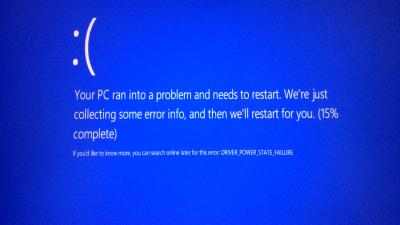
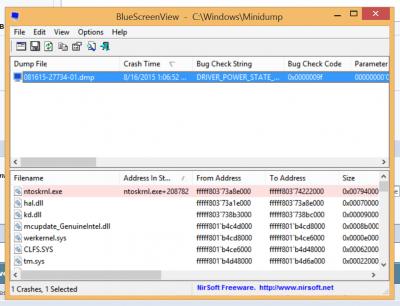
|
|
|
Aug 16 2015, 01:36 PM
|

Junior Member
101 posts Joined: Dec 2014
|
QUOTE(killerl @ Aug 16 2015, 01:28 PM) Hello, I face the bluescreen when i using my z5. I not sure what happen, it appear bluescreen suddenly. This is first time and now my z5 is launch normal now. I was also getting similar type of BSOD. It happen whenever I play Assassins Creed Unity on gtx860m version in low-medium settings. |
|
|
Aug 16 2015, 07:20 PM
|

Senior Member
1,547 posts Joined: May 2007 From: Selangor
|
QUOTE(Prince J @ Aug 15 2015, 04:23 PM) BIOS is completed, waiting for drivers certified by factory.  Cant wait to upgrade my machine to window 10  |
|
|
Aug 16 2015, 08:32 PM
|

Senior Member
1,567 posts Joined: Jul 2011 From: Grand Ol' Lady
|
QUOTE(bananalow @ Aug 16 2015, 07:20 PM) Cant wait to upgrade my machine to window 10 |
|
|
|
|
|
Aug 16 2015, 11:01 PM
|
|
Senior Member
1,124 posts Joined: Oct 2004
|
what is the cheapest price?
|
|
|
Aug 16 2015, 11:28 PM
|
|
Junior Member
48 posts Joined: Oct 2014
|
QUOTE(chilskater @ Aug 16 2015, 11:01 PM) what is the cheapest price? Illegear Z5/Q5 - RM4199 without os. |
|
|
Aug 17 2015, 06:45 AM
|
|
Senior Member
1,272 posts Joined: May 2010 From: Team ILLEGEAR
|
QUOTE(wahming @ Aug 15 2015, 10:22 PM) Prince J, a couple questions about my new Z5: 1. That's the touchpad scrolling part, you can adjust the scrolling area size in touchpad control panel located in bottom right hand corner.1. The rightmost strip (2-3 cm) of my touchpad does not work. It doesn't detect any touches at all. 2. After putting my laptop to sleep, it cannot wake up. Hitting the power key results in the screen backlight coming on, but nothing showing up on screen. A forced power cycle fixes the issue till the next time the laptop goes to sleep again. 3. Might be related to #1, the multi-finger scroll function on the touchpad seems wonky. Sometimes it doesn't quite detect me scrolling, sometimes it jumps a page or more when I scroll just a little bit. I've installed all drivers provided on the cd. 2. This is pretty much related to the OS, please pm us your serial. 3. Please use side of the touchpad to scroll, and you can configure your scrolling pattern in touchpad control panel. QUOTE(killerl @ Aug 16 2015, 01:28 PM) Hello, I face the bluescreen when i using my z5. I not sure what happen, it appear bluescreen suddenly. This is first time and now my z5 is launch normal now. Driver power state failure, may I know how frequent did this happen? What's your OS version? What's your Z5 specification?QUOTE(chilskater @ Aug 16 2015, 11:01 PM) what is the cheapest price? Please visit http://store.illegear.com/z-series/99-illegear-z5.html |
|
|
Aug 17 2015, 07:49 AM
|
|
Junior Member
103 posts Joined: Jul 2010 From: Penang
|
QUOTE(Prince J @ Aug 17 2015, 06:45 AM) 1. That's the touchpad scrolling part, you can adjust the scrolling area size in touchpad control panel located in bottom right hand corner. It's not. Touchpad already configured, the area just to the left of that 'dead' area can scroll. But the rightmost area cannot scroll.3. Please use side of the touchpad to scroll, and you can configure your scrolling pattern in touchpad control panel. QUOTE(Prince J @ Aug 17 2015, 06:45 AM) 2. This is pretty much related to the OS, please pm us your serial. Do you mean Windows key? I bought the no-Windows version though. Currently running original unactivated Windows 8.This post has been edited by wahming: Aug 17 2015, 07:49 AM |
|
|
Aug 17 2015, 08:11 AM
|
|
Junior Member
6 posts Joined: Mar 2015
|
QUOTE(Prince J @ Aug 17 2015, 06:45 AM) 1. That's the touchpad scrolling part, you can adjust the scrolling area size in touchpad control panel located in bottom right hand corner. Hello Prince J,2. This is pretty much related to the OS, please pm us your serial. 3. Please use side of the touchpad to scroll, and you can configure your scrolling pattern in touchpad control panel. Driver power state failure, may I know how frequent did this happen? What's your OS version? What's your Z5 specification? Please visit http://store.illegear.com/z-series/99-illegear-z5.html At that time ti was extracting the Watch Dogs Bad Blood in the background and i also reading the website using chome then suddenly the blue screen appear. Mine is z5 GTX960M, 1TB 7200rpm HDD, 8GB RAM, Windows 8.1 latest. |
|
|
Aug 17 2015, 08:56 PM
Show posts by this member only | IPv6 | Post
#2152
|
|
Junior Member
101 posts Joined: Dec 2014
|
Are you guys playing counterfeit games and planning to upgrade to windows 10???
read this before getting install http://www.theverge.com/2015/8/17/9164153/...rivacy-concerns This post has been edited by MgrSagaaboyz: Aug 17 2015, 09:42 PM |
|
|
Aug 17 2015, 09:49 PM
|
|
Junior Member
6 posts Joined: Mar 2015
|
QUOTE(Prince J @ Aug 17 2015, 06:45 AM) 1. That's the touchpad scrolling part, you can adjust the scrolling area size in touchpad control panel located in bottom right hand corner. I get the same bluescreen 2 times today. It go bluesreen even i'm just using chrome only (after finish 1 game of dota2 and closed already.) any solution Prince J ? Below are the latest bluescreen list.2. This is pretty much related to the OS, please pm us your serial. 3. Please use side of the touchpad to scroll, and you can configure your scrolling pattern in touchpad control panel. Driver power state failure, may I know how frequent did this happen? What's your OS version? What's your Z5 specification? Please visit http://store.illegear.com/z-series/99-illegear-z5.html This post has been edited by killerl: Aug 17 2015, 09:56 PM Attached thumbnail(s) 
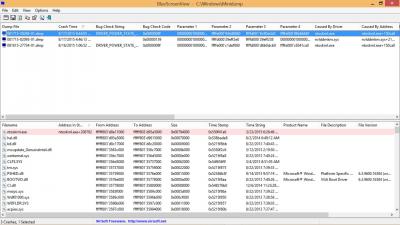
|
|
|
|
|
|
Aug 18 2015, 09:53 AM
Show posts by this member only | IPv6 | Post
#2154
|
|
Newbie
0 posts Joined: Jun 2015
|
If I wanna buy windows 10 home for my z5 how much will it cost?
|
|
|
Aug 18 2015, 12:07 PM
Show posts by this member only | IPv6 | Post
#2155
|
|
Senior Member
1,272 posts Joined: May 2010 From: Team ILLEGEAR
|
QUOTE(wahming @ Aug 17 2015, 07:49 AM) It's not. Touchpad already configured, the area just to the left of that 'dead' area can scroll. But the rightmost area cannot scroll. Hi wahming,Do you mean Windows key? I bought the no-Windows version though. Currently running original unactivated Windows 8. The rightmost area is for scrolling, I think something is wrong in the touchpad setting. Are you able to drop by our office and let us help you to configure? QUOTE(killerl @ Aug 17 2015, 09:49 PM) I get the same bluescreen 2 times today. It go bluesreen even i'm just using chrome only (after finish 1 game of dota2 and closed already.) any solution Prince J ? Below are the latest bluescreen list. Hi,Can you try updating Intel HD 4600 and Nvidia driver to the latest? QUOTE(Yihua @ Aug 18 2015, 09:53 AM) If I wanna buy windows 10 home for my z5 how much will it cost? RM399 for Windows 10 Home 64bit. |
|
|
Aug 18 2015, 12:31 PM
Show posts by this member only | IPv6 | Post
#2156
|

Newbie
0 posts Joined: Aug 2015
|
Hello everyone - I'm the new member with Team Illegear. You can also PM me for any inquiries.
 |
|
|
Aug 18 2015, 01:04 PM
|
|
Senior Member
1,567 posts Joined: Jul 2011 From: Grand Ol' Lady
|
 female name female name  like this those have problem sure visit studio often hahah like this those have problem sure visit studio often hahah |
|
|
Aug 18 2015, 01:06 PM
|

Senior Member
3,928 posts Joined: Jan 2012
|
QUOTE(christ14 @ Aug 18 2015, 01:04 PM) female name like this those have problem sure visit studio often hahah |
|
|
Aug 18 2015, 05:02 PM
|

Junior Member
51 posts Joined: Dec 2014
|
anyone here play lanun fifa 15 win8.1?
|
|
|
Aug 18 2015, 05:44 PM
Show posts by this member only | IPv6 | Post
#2160
|
|
Newbie
0 posts Joined: Jun 2015
|
QUOTE(Prince J @ Aug 18 2015, 12:07 PM) RM399 for Windows 10 Home 64bit. |
|
Topic ClosedOptions
|
| Change to: |  0.0437sec 0.0437sec
 0.43 0.43
 6 queries 6 queries
 GZIP Disabled GZIP Disabled
Time is now: 5th December 2025 - 08:55 AM |
 Quote
Quote