


First Z5 customer with Windows 10!
illegear z5 discussion thread, anything and everything about the beast
|
|
 Aug 18 2015, 05:45 PM Aug 18 2015, 05:45 PM
|
 
Senior Member
1,272 posts Joined: May 2010 From: Team ILLEGEAR  
|
First Z5 customer with Windows 10! |
|
|
|
|
|
Aug 18 2015, 05:57 PM
|

Newbie
3 posts Joined: Apr 2015
|
QUOTE(Prince J @ Aug 18 2015, 05:45 PM) First Z5 customer with Windows 10!  This post has been edited by YangWeiLim85: Aug 18 2015, 10:15 PM |
|
|
Aug 19 2015, 07:40 AM
|
|
Junior Member
6 posts Joined: Mar 2015
|
QUOTE(Prince J @ Aug 18 2015, 12:07 PM) Hi wahming, Hello Prince J,The rightmost area is for scrolling, I think something is wrong in the touchpad setting. Are you able to drop by our office and let us help you to configure? Hi, Can you try updating Intel HD 4600 and Nvidia driver to the latest? RM399 for Windows 10 Home 64bit. How to check my Intel 4600 is up-to-date ? I always use this software below to check the latest intel driver but that 3 ~ 4 driver always have to update even i already update before. Attached thumbnail(s) 
|
|
|
Aug 19 2015, 07:10 PM
Show posts by this member only | IPv6 | Post
#2164
|

Junior Member
4 posts Joined: Nov 2014
|
Got my Z5 back today with a new ram.
 Sent it last saturday and got a message saying i could already collect it at that exact day, didnt expect it to be so fast though. went and collect it today. MrChin and Staff was friendly and helpful, although i didn't talk much.  Will definitely return.  This post has been edited by AceJunior: Aug 19 2015, 07:12 PM |
|
|
Aug 20 2015, 10:51 AM
Show posts by this member only | IPv6 | Post
#2165
|
|
Senior Member
1,272 posts Joined: May 2010 From: Team ILLEGEAR
|
QUOTE(YangWeiLim85 @ Aug 18 2015, 05:57 PM) Window 10 Driver ready for Z5 to upgrade? Yes. Beta versions are available, we are waiting for factory approval so we can upload them and provide download.QUOTE(killerl @ Aug 19 2015, 07:40 AM) Hello Prince J, Hi killerl,How to check my Intel 4600 is up-to-date ? I always use this software below to check the latest intel driver but that 3 ~ 4 driver always have to update even i already update before. Can you advise what drivers you have installed in your Z5? What's your serial? QUOTE(AceJunior @ Aug 19 2015, 07:10 PM) Got my Z5 back today with a new ram. Hi AceJunior, Sent it last saturday and got a message saying i could already collect it at that exact day, didnt expect it to be so fast though. went and collect it today. MrChin and Staff was friendly and helpful, although i didn't talk much. Will definitely return. We did 5 hours Memtest and the new ram seems alright. Do let us know if you get any error again |
|
|
Aug 20 2015, 02:00 PM
|
|
Junior Member
6 posts Joined: Mar 2015
|
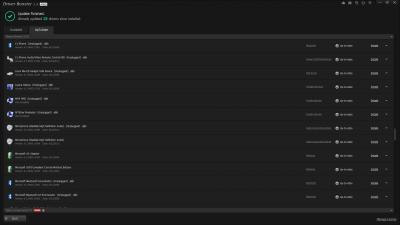
QUOTE(Prince J @ Aug 20 2015, 10:51 AM) Yes. Beta versions are available, we are waiting for factory approval so we can upload them and provide download. My Serial number is IT1C10805N and below are the driver installed in my pc list by driver booster.Hi killerl, Can you advise what drivers you have installed in your Z5? What's your serial? Hi AceJunior, We did 5 hours Memtest and the new ram seems alright. Do let us know if you get any error again Attached thumbnail(s) 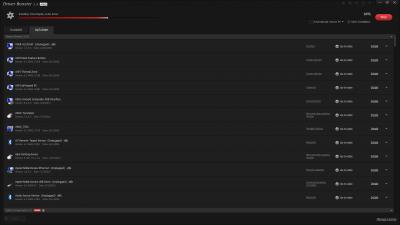




|
|
|
|
|
|
Aug 21 2015, 10:39 AM
Show posts by this member only | IPv6 | Post
#2167
|
|
Senior Member
1,272 posts Joined: May 2010 From: Team ILLEGEAR
|
QUOTE(killerl @ Aug 20 2015, 02:00 PM) My Serial number is IT1C10805N and below are the driver installed in my pc list by driver booster. Hi killerl,If possible can you send your laptop to us for few days checking? Your laptop OS is installed by your own right? |
|
|
Aug 21 2015, 06:09 PM
|

Senior Member
1,562 posts Joined: May 2012
|
Sign me up ! Jz got my hands on my brand new z5 GTX970 today ! finally, after all those sleepless nights just for my exam finals !
This post has been edited by BlizzardCraft: Aug 21 2015, 06:48 PM |
|
|
Aug 21 2015, 07:23 PM
|
|
Junior Member
6 posts Joined: Mar 2015
|
QUOTE(Prince J @ Aug 21 2015, 10:39 AM) Hi killerl, When i get the laptop already have windows 8.1 but not in full version. Can i try to format myself ? If after format did the warranty still available ? Because i have some busy this few months, so if possible i try to fix myself first.If possible can you send your laptop to us for few days checking? Your laptop OS is installed by your own right? |
|
|
Aug 21 2015, 07:25 PM
|
|
Senior Member
1,562 posts Joined: May 2012
|
anyone having this problem ?
 the other program de letters all very clear but only installers and spotify letters is blurry. |
|
|
Aug 21 2015, 07:33 PM
Show posts by this member only | IPv6 | Post
#2171
|
|
Senior Member
1,272 posts Joined: May 2010 From: Team ILLEGEAR
|
QUOTE(BlizzardCraft @ Aug 21 2015, 07:25 PM) anyone having this problem ? Hi,the other program de letters all very clear but only installers and spotify letters is blurry. This can solve your problem Control Panel -> Display -> Adjust cleartype text / set custom text size. |
|
|
Aug 21 2015, 07:34 PM
Show posts by this member only | IPv6 | Post
#2172
|
|
Senior Member
1,272 posts Joined: May 2010 From: Team ILLEGEAR
|
QUOTE(killerl @ Aug 21 2015, 07:23 PM) When i get the laptop already have windows 8.1 but not in full version. Can i try to format myself ? If after format did the warranty still available ? Because i have some busy this few months, so if possible i try to fix myself first. Hi killerl,That's fine. You can also bring it back to us for reformat. |
|
|
Aug 21 2015, 10:39 PM
|
|
Senior Member
1,562 posts Joined: May 2012
|
QUOTE(Prince J @ Aug 21 2015, 07:33 PM) Hi, tried tat already but still no difference, even the garena messanger's text also blur wor..This can solve your problem Control Panel -> Display -> Adjust cleartype text / set custom text size. |
|
|
|
|
|
Aug 21 2015, 11:04 PM
|
|
Junior Member
6 posts Joined: Mar 2015
|
QUOTE(Prince J @ Aug 21 2015, 07:34 PM) Hi killerl, Thank Prince J, but i will try to plan a date or i just do it myself first then if still having the same problem only i send to you check.That's fine. You can also bring it back to us for reformat. |
|
|
Aug 21 2015, 11:07 PM
|

Senior Member
1,344 posts Joined: Jan 2013
|
QUOTE(BlizzardCraft @ Aug 21 2015, 10:39 PM) tried tat already but still no difference, even the garena messanger's text also blur wor.. For me, I solve with following steps:Right-click the application and then click Properties. On the Compatibility tab, select Disable Display Scaling On High DPI Settings, and then click OK. |
|
|
Aug 21 2015, 11:12 PM
|
|
Senior Member
1,562 posts Joined: May 2012
|
QUOTE(huislaw @ Aug 21 2015, 11:07 PM) For me, I solve with following steps: thanks thanks !! Right-click the application and then click Properties. On the Compatibility tab, select Disable Display Scaling On High DPI Settings, and then click OK.  but how about those text while we install thing, cant right? but how about those text while we install thing, cant right? |
|
|
Aug 22 2015, 12:34 AM
|
|
Senior Member
1,344 posts Joined: Jan 2013
|
QUOTE(BlizzardCraft @ Aug 21 2015, 11:12 PM) thanks thanks !! Not so sure but how about those text while we install thing, cant right? |
|
|
Aug 22 2015, 11:08 AM
|

Senior Member
1,567 posts Joined: Jul 2011 From: Grand Ol' Lady
|
lol i brought that up previously too, but idm it liao, as long other stuff clear
|
|
|
Aug 22 2015, 12:05 PM
|
|
Senior Member
1,562 posts Joined: May 2012
|
btw anybody asked bfore why the subwoofer is on the left but not the center ?
on a side note, the speaker damn clear... unlike my N56VZ Asus model, when i go all max volume there's no air exploding sound QUOTE(christ14 @ Aug 22 2015, 11:08 AM) lol i brought that up previously too, but idm it liao, as long other stuff clear so only applications can be clear right? imo those installer stuff, if u tweak the properties of the installer then can d... but then meh its jz installers xDThis post has been edited by BlizzardCraft: Aug 22 2015, 12:06 PM |
|
|
Aug 22 2015, 12:47 PM
|
|
Senior Member
1,567 posts Joined: Jul 2011 From: Grand Ol' Lady
|
QUOTE(BlizzardCraft @ Aug 22 2015, 12:05 PM) btw anybody asked bfore why the subwoofer is on the left but not the center ? my point exactly, was posting several posts here for answers and what not but then again i re think about it... this only happens in installers so why do i even give a F lolon a side note, the speaker damn clear... unlike my N56VZ Asus model, when i go all max volume there's no air exploding sound so only applications can be clear right? imo those installer stuff, if u tweak the properties of the installer then can d... but then meh its jz installers xD |
|
Topic ClosedOptions
|
| Change to: |  0.0295sec 0.0295sec
 1.05 1.05
 6 queries 6 queries
 GZIP Disabled GZIP Disabled
Time is now: 2nd December 2025 - 06:01 PM |
 Quote
Quote