

QUOTE(jamrock @ Jul 19 2018, 03:58 PM)
3

Ok not 6.Panasonic Viera TV Fan Club V.5, Plasma, LCD & LED
|
|
 Jul 19 2018, 04:47 PM Jul 19 2018, 04:47 PM
Show posts by this member only | IPv6 | Post
#1181
|
 
Senior Member
2,525 posts Joined: Sep 2013  
|
QUOTE(jamrock @ Jul 19 2018, 03:58 PM) 3 Ok not 6. |
|
|
|
|
|
Jul 19 2018, 08:18 PM
|

All Stars
18,503 posts Joined: Oct 2007 From: P.Jaya
|
FX series on SenQ...
TH-49FX600K.....RM2,500.00 TH-55FX600K.....RM3,050.00 |
|
|
Jul 19 2018, 10:57 PM
Show posts by this member only | IPv6 | Post
#1183
|

Junior Member
318 posts Joined: Nov 2005 From: OKR
|
QUOTE(stasio @ Jul 19 2018, 08:18 PM) FX series on SenQ... hi ,im new here. wanted to get a UHD smart tv for my new house. but i am dilemma of getting 49 inches or 55 inches?TH-49FX600K.....RM2,500.00 TH-55FX600K.....RM3,050.00 may i know whats the the recommended seating distance for the both sizes? btw, is android tv good? |
|
|
Jul 20 2018, 03:45 AM
|
|
All Stars
18,503 posts Joined: Oct 2007 From: P.Jaya
|
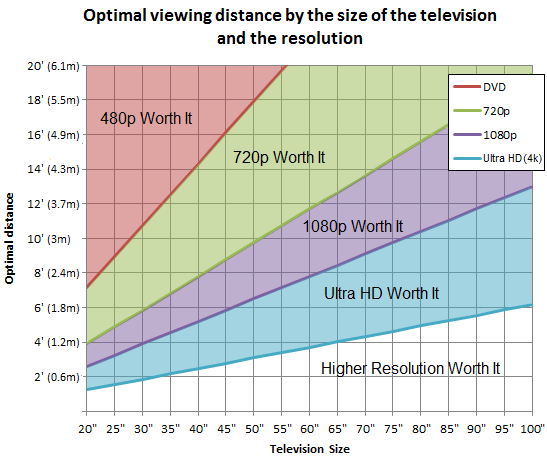 or https://www.rtings.com/tv/reviews/by-size/s...ce-relationship This post has been edited by stasio: Jul 20 2018, 03:45 AM |
|
|
Jul 20 2018, 11:02 AM
|
|
Senior Member
2,525 posts Joined: Sep 2013
|
QUOTE(jamrock @ Jul 19 2018, 03:58 PM) 3 This is not 3+3?Attached thumbnail(s) 
|
|
|
Jul 22 2018, 11:38 AM
|
|
All Stars
11,308 posts Joined: Feb 2008
|
Panasonic TH65FZ950K - is this the beginning of budget OLED panels?
|
|
|
|
|
|
Jul 22 2018, 11:41 AM
|

Senior Member
3,858 posts Joined: Jan 2008
|
QUOTE(idoblu @ Jul 22 2018, 11:38 AM) Panasonic TH65FZ950K - is this the beginning of budget OLED panels? Hv they announced pricing yet? |
|
|
Jul 22 2018, 11:49 AM
|
|
All Stars
11,308 posts Joined: Feb 2008
|
QUOTE(anfieldude @ Jul 22 2018, 11:41 AM) Hv they announced pricing yet? I saw at Aeon selling 15,599They should start producing oled TVs without all the gimmicks. This post has been edited by idoblu: Jul 22 2018, 11:50 AM |
|
|
Jul 31 2018, 05:08 PM
|
|
Junior Member
68 posts Joined: Dec 2010
|
To who are still think want to buy 2017 or 2018 model, I found this info :
"Later this year, Panasonic will add support for Amazon Alexa and Google Assistant to all of its 2018 OLED and LCD TVs via a software update" at https://www.flatpanelshd.com/article.php?su...l&id=1520424154 |
|
|
Aug 3 2018, 10:49 AM
|

Senior Member
540 posts Joined: Aug 2007
|
HI Guys, I just bought TH43E410K recently and the adaptive backlight dimming is really really annoying.
Is there a way to turn the feature off. I have been searching the menu for hours but couldn't find the option. Internet guide advice to turn off C.A.T.S but my menu doesn't have this option. I called the service center but it seems like not much help from there. Please help  |
|
|
Aug 3 2018, 11:02 AM
|

All Stars
13,191 posts Joined: Jul 2006
|
QUOTE(cllee86 @ Aug 3 2018, 10:49 AM) HI Guys, I just bought TH43E410K recently and the adaptive backlight dimming is really really annoying. find got this AGC autoo gain controlIs there a way to turn the feature off. I have been searching the menu for hours but couldn't find the option. Internet guide advice to turn off C.A.T.S but my menu doesn't have this option. I called the service center but it seems like not much help from there. Please help |
|
|
Aug 3 2018, 11:21 AM
|
|
Senior Member
540 posts Joined: Aug 2007
|
QUOTE(ktek @ Aug 3 2018, 11:02 AM) find got this AGC autoo gain control I have been searching for hours but I couldn't find Auto Gain Control anywhere in the menu. Here's the screen shot of the menu. 
|
|
|
Aug 3 2018, 11:35 AM
|
|
Junior Member
68 posts Joined: Dec 2010
|
QUOTE(cllee86 @ Aug 3 2018, 10:49 AM) HI Guys, I just bought TH43E410K recently and the adaptive backlight dimming is really really annoying. what problem with the adaptive backlight dimming ?Is there a way to turn the feature off. I have been searching the menu for hours but couldn't find the option. Internet guide advice to turn off C.A.T.S but my menu doesn't have this option. I called the service center but it seems like not much help from there. Please help |
|
|
|
|
|
Aug 3 2018, 11:42 AM
|
|
Senior Member
540 posts Joined: Aug 2007
|
QUOTE(mun2020 @ Aug 3 2018, 11:35 AM) what problem with the adaptive backlight dimming ? It is constantly adjusting the brightness making it extremely annoying when watching movie or playing games. |
|
|
Aug 3 2018, 01:17 PM
|
|
All Stars
13,191 posts Joined: Jul 2006
|
QUOTE(cllee86 @ Aug 3 2018, 11:42 AM) It is constantly adjusting the brightness making it extremely annoying when watching movie or playing games. Last section got enable advance?Final way is stick a black tape to block sensor |
|
|
Aug 3 2018, 01:53 PM
|
|
Senior Member
540 posts Joined: Aug 2007
|
QUOTE(ktek @ Aug 3 2018, 01:17 PM) Last section got enable advance? No enable advance feature. I was hoping Panasonic Sales and Service can answer me but I doubt they can help. The first advice they gave me is to turn the backlight to 0 Final way is stick a black tape to block sensor  Where's the sensor? Worth it if it works. |
|
|
Aug 3 2018, 02:24 PM
|
|
Junior Member
68 posts Joined: Dec 2010
|
QUOTE(cllee86 @ Aug 3 2018, 11:42 AM) It is constantly adjusting the brightness making it extremely annoying when watching movie or playing games. I see, mine one is local dimming, different technology.If other Panasonic 4K model, there is a function called adaptive backlight control, that you can turn off. But from your screen capture, I dont see that |
|
|
Aug 3 2018, 02:36 PM
|
|
Senior Member
540 posts Joined: Aug 2007
|
QUOTE(mun2020 @ Aug 3 2018, 02:24 PM) I see, mine one is local dimming, different technology. Yea I have research and local dimming work completely different from back light dimming. If other Panasonic 4K model, there is a function called adaptive backlight control, that you can turn off. But from your screen capture, I dont see that The menu is extremely limited and I have spent hours searching how to turn off the adaptive control. My only hope is Panasonic have this secret menu in the TV where u can turn off adaptive backlight. Else I'm gonna sell the TV and start a campaign to boycott Panasonic TV  |
|
|
Aug 3 2018, 03:35 PM
|

All Stars
29,764 posts Joined: Jan 2009 From: Johor, Malaysia. 
|
QUOTE(cllee86 @ Aug 3 2018, 02:36 PM) Yea I have research and local dimming work completely different from back light dimming. If you choose standard instead of cinema mode, would this have option to turn off th he approv adaptive sensor?The menu is extremely limited and I have spent hours searching how to turn off the adaptive control. My only hope is Panasonic have this secret menu in the TV where u can turn off adaptive backlight. Else I'm gonna sell the TV and start a campaign to boycott Panasonic TV Give it a trial. |
|
|
Aug 3 2018, 04:16 PM
|
|
Senior Member
540 posts Joined: Aug 2007
|
QUOTE(Andrewtst @ Aug 3 2018, 03:35 PM) If you choose standard instead of cinema mode, would this have option to turn off th he approv adaptive sensor? Standard setting makes the colors look horrible. But the brightness level doesn't shifts as much in standard mode. Give it a trial. Only true cinema mode retains the original colors from the source. I don't understand why manufactures setup their display like this. |
| Change to: |  0.0232sec 0.0232sec
 0.68 0.68
 6 queries 6 queries
 GZIP Disabled GZIP Disabled
Time is now: 4th December 2025 - 05:21 AM |
 Quote
Quote