Welcome Guest ( Log In | Register )

87 Pages « < 76 77 78 79 80 > » Bottom

Outline · [ Standard ] · Linear+

 MSI Gaming Notebook Thread V3

views
     
arunm17
post Dec 4 2018, 09:55 AM

New Member
*
Junior Member
32 posts

Joined: Feb 2006
From: Selangor


i am thinking of getting the MSI GE75 Raider (GTX1060) version, what is your opinion about this laptop?

I am having a dilemma of either buying Asus ROG Strix SCAR II or MSI GE75 Raider?

Please help to enlighten me?

Thank you,
Arun
ZM Fong
post Dec 4 2018, 10:37 AM

Laptop advisor
*******
Senior Member
8,240 posts

Joined: Apr 2017
QUOTE(arunm17 @ Dec 4 2018, 09:55 AM)
i am thinking of getting the MSI GE75 Raider (GTX1060) version, what is your opinion about this laptop?

I am having a dilemma of either buying Asus ROG Strix SCAR II or MSI GE75 Raider?

Please help to enlighten me?

Thank you,
Arun
*
Why not GE73? Pretty much the same
GL504GM also good but cannot handle the heat of 1070
arunm17
post Dec 4 2018, 10:54 AM

New Member
*
Junior Member
32 posts

Joined: Feb 2006
From: Selangor


QUOTE(ZM Fong @ Dec 4 2018, 10:37 AM)
Why not GE73? Pretty much the same
GL504GM also good but cannot handle the heat of 1070
*
since the latest GE75 has slim bezels, thus why!
arunm17
post Dec 4 2018, 10:54 AM

New Member
*
Junior Member
32 posts

Joined: Feb 2006
From: Selangor


I heard some comments from the sales people, the following comments are:

1. The power brick will continue to charge the battery even after you leave the laptop to charge overnight, the power brick cutoff or switch off after the battery is fully charged, is this true for MSI?

2. The FAN controller is auto adjusted based on the CPU temp but manual control. If its set in overboost thus when you switch off and on later, then it will continue to run in overboost mode. There is no proper fan control via App?

3. The keyboard is each a RGB light by its own, does it bleed?

4. Does the screen bleed?

Anyone has these things in your laptop?
popout
post Dec 5 2018, 09:58 AM

New Member
*
Newbie
20 posts

Joined: Oct 2009
QUOTE(arunm17 @ Dec 4 2018, 10:54 AM)
I heard some comments from the sales people, the following comments are:

1. The power brick will continue to charge the battery even after you leave the laptop to charge overnight, the power brick cutoff or switch off after the battery is fully charged, is this true for MSI?

2. The FAN controller is auto adjusted based on the CPU temp but manual control. If its set in overboost thus when you switch off and on later, then it will continue to run in overboost mode. There is no proper fan control via App?

3. The keyboard is each a RGB light by its own, does it bleed?

4. Does the screen bleed?

Anyone has these things in your laptop?
*
To answers your question
1. Yes the power will stop charging when it reached 90% threshold , i think for all modem computer nowdays not only MSI
2. Basically if you put the fan in auto mode the computer will sense the temperature itself to turn the cooler booster on or off, you can do the
adjustment in the dragon centre , there is a manual bypass physical button to spool up the fan to 5k rpm on the chassis , once you turn on it will
run forever unless you turn off
3. So far there is no bleed issue for the RGB steel series Keyboard
4. there is almost no screen bleed , unless the old GT with G sync panel

For me i will go for GE63 or 73 instead of GE75 cause the GE75 price is higher , off cause you got think bezel and killer extend network , the rest is the same thing with GE63 or 73 , and offcourse the GE 75 no more steel series RGB light strip on part A (if you really like BLING BLING , go for GE63 or 73) Of cause the the GE 63 or 73 you need to take care the hinge as well


arunm17
post Dec 5 2018, 10:07 AM

New Member
*
Junior Member
32 posts

Joined: Feb 2006
From: Selangor


QUOTE(popout @ Dec 5 2018, 09:58 AM)
To answers your question
1. Yes the power will stop charging when it reached 90% threshold , i think for all modem computer nowdays  not only MSI
2. Basically if you put the fan in auto mode the computer will sense the temperature itself to turn the cooler booster on or off, you can do the
    adjustment in the dragon centre , there is a manual bypass physical button to spool up the fan to 5k rpm on the chassis , once you turn on it will
    run forever unless you turn off
3. So far there is no bleed issue for the RGB steel series Keyboard
4. there is almost no screen bleed , unless the old GT with G sync panel

For me i will go for GE63 or 73 instead of GE75 cause the GE75 price is higher , off cause you got think bezel and killer extend network , the rest is the same thing with GE63 or 73 , and offcourse the GE 75 no more steel series  RGB light strip on part A (if you really like BLING BLING , go for GE63 or 73) Of cause the the GE 63 or 73 you need to take care the hinge as well
*
tq so much for your time for explaining. I will consider the GE73 model and further analysis is needed. smile.gif
popout
post Dec 5 2018, 10:30 AM

New Member
*
Newbie
20 posts

Joined: Oct 2009
QUOTE(arunm17 @ Dec 5 2018, 10:07 AM)
tq so much for your time for explaining. I will consider the GE73 model and further analysis is needed. smile.gif
*
Oh ya for got one more thing monitor GE63 and 73 running 120 Hz while new GE75 running 144 Hz monitor you might consider the monitor too
ZM Fong
post Dec 5 2018, 07:01 PM

Laptop advisor
*******
Senior Member
8,240 posts

Joined: Apr 2017
QUOTE(popout @ Dec 5 2018, 10:30 AM)
Oh ya for got one more thing monitor GE63 and 73 running 120 Hz while new GE75 running 144 Hz monitor you might consider the monitor too
*
I doubt you can notice any difference
Eluuna
post Dec 6 2018, 12:39 PM

Getting Started
**
Junior Member
110 posts

Joined: May 2012
QUOTE(ZM Fong @ Dec 5 2018, 07:01 PM)
I doubt you can notice any difference
*
If you play long enough on Fps game, eventually you will notice the difference between 120 and 144
Eluuna
post Dec 6 2018, 12:43 PM

Getting Started
**
Junior Member
110 posts

Joined: May 2012
QUOTE(arunm17 @ Dec 4 2018, 10:54 AM)
since the latest GE75 has slim bezels, thus why!
*
True, the Thin bezel quite mesmerizing, but the overall spec nearly the same and now the older raider is cheaper biggrin.gif
Fries
post Dec 13 2018, 11:23 PM

Casual
***
Junior Member
328 posts

Joined: Jan 2003
From: KL
gl63 can use optane? read some comments in lazada saying it's incompatible


This post has been edited by Fries: Dec 13 2018, 11:27 PM
GrandElf
post Dec 18 2018, 02:10 PM

HyunA
******
Senior Member
1,154 posts

Joined: Nov 2005
From: Merseyside RED


Dear all msi sifu... My msi laptop is getting more n more slower day by day...
My model is msi ge70 2pe apache Pro... Is it my model already irrelevant and need to change?
Its so Lagg for me to play Dota2 now.. And also sometimes for loading nox emulator as well...

Any advise?
popout
post Dec 18 2018, 03:30 PM

New Member
*
Newbie
20 posts

Joined: Oct 2009
QUOTE(GrandElf @ Dec 18 2018, 02:10 PM)
Dear all msi sifu... My msi laptop is getting more n more slower day by day...
My model is msi ge70 2pe apache Pro... Is it my model already irrelevant and need to change?
Its so Lagg for me to play Dota2 now.. And also sometimes for loading nox emulator as well...

Any advise?
*
The laptop install SSD ? and RAM how many GB plus is possible check the temperature of the CPU and GPU , if abnormal hot mean you need to clean the fan and re patch the thermal paste

popout
post Dec 18 2018, 03:32 PM

New Member
*
Newbie
20 posts

Joined: Oct 2009
QUOTE(Fries @ Dec 13 2018, 11:23 PM)
gl63 can use optane? read some comments in lazada saying it's incompatible
*
FOR GL63 i tried before optane really will cause unstable in older BIOS version , sometime failure to boot up . But i haven't try the latest BIOS update . The best way is to use M.2 SSD hassle free

TyroneS
post Dec 18 2018, 03:47 PM

Casual
***
Junior Member
431 posts

Joined: Aug 2012
QUOTE(dexterdan @ Nov 22 2018, 10:08 PM)
user posted image

Is this laptop worth buying ? Mainly i just used it for Lightroom/PS , occasionally Premiere Pro.

budget 3000-3,500
*
if you want smooth preview before rendering, u need at least 8gb of ram.
1050ti enought for smooth preview d.
and best way install your OS in SSD as main drive.

QUOTE(GrandElf @ Dec 18 2018, 02:10 PM)
Dear all msi sifu... My msi laptop is getting more n more slower day by day...
My model is msi ge70 2pe apache Pro... Is it my model already irrelevant and need to change?
Its so Lagg for me to play Dota2 now.. And also sometimes for loading nox emulator as well...

Any advise?
*
did you use SSD as main drive, games on other drive?
overheating issue?
updated the latest GPU driver?
make sure the game run on your GTX GPU,
sometime battery saving mode or did not plug the powerplug will run in Intel GPU only.

however, confirmed all above~
open task manager and set on top,
roll to CPU usage and run dota2 replay in high graphic.
check on your CPU Ghz...
Normal should be 3.xGhz~4.xGhz
if it drop to 0.xGhz or 1.xGhz mean it's overheating,
and you need replace the thermal paste d.

my GS70 also become lag after sometime gaming and after change thermal and under air-conditioner room,
1hours++ no lagging issue more.
my gs70 spec 4710hq+970m3gb+16gbram+256ssd+1tb hdd for refer.

Cimo
post Dec 22 2018, 06:37 AM

Casual
***
Junior Member
324 posts

Joined: Jul 2005
From: Kuala Lumpur


Hi, my GS70 notebook started to produce loud noises, which I believe coming from the CPU or GPU fan. Is this repairable? Could anyone help to point out to a shop either in KL or in Kuantan that I could send my laptop to to get this repaired?
lkm1989
post Dec 26 2018, 12:02 PM

New Member
*
Junior Member
47 posts

Joined: Jul 2012
From: Kuala Lumpur


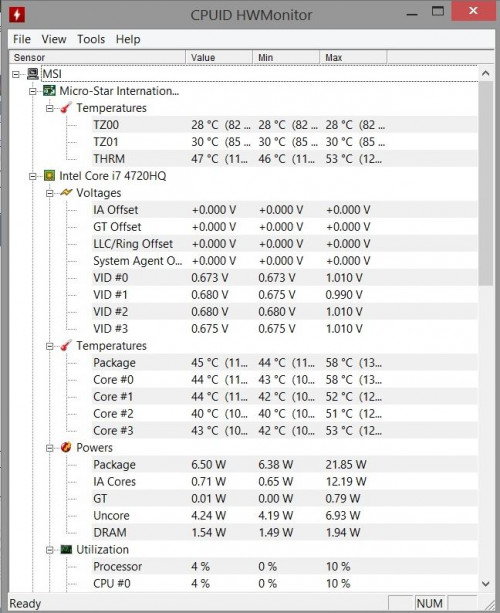
i had change my thermal paste on my GS60 with coolermaster mastergel maker, now the idle temp is around 40c for both CPU n GPU, ounce it run on games, the temp will rise up to around 90c, if the fan stuck or getting slow you could try use wd40, it works all the time.

user posted image
Eluuna
post Dec 28 2018, 10:37 AM

Getting Started
**
Junior Member
110 posts

Joined: May 2012
QUOTE(Cimo @ Dec 22 2018, 06:37 AM)
Hi, my GS70 notebook started to produce loud noises, which I believe coming from the CPU or GPU fan. Is this repairable? Could anyone help to point out to a shop either in KL or in Kuantan that I could send my laptop to to get this repaired?
*
Yea it's repairable, or maybe some dust just clock inside your fan. As for I know MSI have a service center inside lowyat 4th Floor called Highpoint.
Cimo
post Dec 28 2018, 03:19 PM

Casual
***
Junior Member
324 posts

Joined: Jul 2005
From: Kuala Lumpur


QUOTE(Eluuna @ Dec 28 2018, 10:37 AM)
Yea it's repairable, or maybe some dust just clock inside your fan. As for I know MSI have a service center inside lowyat 4th Floor called Highpoint.
*
Thanks for the info. Will check it out then.
GrandElf
post Dec 28 2018, 04:00 PM

HyunA
******
Senior Member
1,154 posts

Joined: Nov 2005
From: Merseyside RED


QUOTE(TyroneS @ Dec 18 2018, 03:47 PM)
did you use SSD as main drive, games on other drive?
overheating issue?
updated the latest GPU driver?
make sure the game run on your GTX GPU,
sometime battery saving mode or did not plug the powerplug will run in Intel GPU only.

however, confirmed all above~
open task manager and set on top,
roll to CPU usage and run dota2 replay in high graphic.
check on your CPU Ghz...
Normal should be 3.xGhz~4.xGhz
if it drop to 0.xGhz or 1.xGhz mean it's overheating,
and you need replace the thermal paste d.

my GS70 also become lag after sometime gaming and after change thermal and under air-conditioner room,
1hours++ no lagging issue more.
my gs70 spec 4710hq+970m3gb+16gbram+256ssd+1tb hdd for refer.
*
Thanks for the replied.....I'm not using SSD as my main drive...just normal 1TB HDD.....RAM is 8GB....

Still with window 8......Is it worth to do the upgrade? I shall change to window 10 as well right?

Still thinking should I upgrade or not because I forgot to mentioned that my screen monitor also have 2 vertical line after 3 years......zzzz


87 Pages « < 76 77 78 79 80 > » Top
 

Change to:
| Lo-Fi Version
0.0270sec    1.05    6 queries    GZIP Disabled
Time is now: 1st December 2025 - 09:17 AM