Welcome Guest ( Log In | Register )

Bump Topic Topic Closed RSS Feed
9 Pages « < 2 3 4 5 6 > » Bottom

Outline · [ Standard ] · Linear+

 astro byond V12

views
     
joshhd
post Jun 26 2016, 01:01 AM

Look at all my stars!!
*******
Senior Member
7,792 posts

Joined: Dec 2014
From: Malaysia


QUOTE(skylinelover @ Jun 25 2016, 10:10 PM)
puk man

i ask my father 2 cut off the sports but he doesnt want cut off argh vmad.gif  bangwall.gif

from 146 need paying 156 with super pack 4 ranting.gif  ranting.gif

he cannot survive without EPL live...that was his reasoning dang it
*
Let him be if he wants to maintain his Sports Pack... Unless, you are the one that pay the bill.
joshhd
post Jul 12 2016, 09:41 PM

Look at all my stars!!
*******
Senior Member
7,792 posts

Joined: Dec 2014
From: Malaysia


QUOTE(PhakFuhZai @ Jul 10 2016, 09:09 PM)
yea i can understand if the decoder and card is legit

just wondering if the stream was cracked and can be viewed freely
*
What are the channels you're referring to? Do list down a few if possible.
joshhd
post Jul 21 2016, 02:28 AM

Look at all my stars!!
*******
Senior Member
7,792 posts

Joined: Dec 2014
From: Malaysia


QUOTE(engtat @ Jul 20 2016, 05:48 PM)
My understanding of this is, must be same address (same house)?
*
By right, it needs to be the same house.

However if you don't mind doing "not so legal but they don't really care" stuff, you take the second decoder to your parents house after the installation is made, and just "Plug n Play" with the satellite cable and all.

Because it is a satellite TV, it doesn't matter what location where you watch. Most importantly, the satellite dish is properly adjusted and it is ready to use as you plug in.
joshhd
post Jul 27 2016, 09:42 PM

Look at all my stars!!
*******
Senior Member
7,792 posts

Joined: Dec 2014
From: Malaysia


QUOTE(ckalvin @ Jul 25 2016, 10:38 AM)
Called IPTV department, the answer i got is not quite satisfied.
1) If I sign up the IPTV plan, new 2 years contract for the bundle (Astro and Maxis together!!) even tho my existing astro plan already no more contract.
2) If I signup maxis fiber myself, it is still satellite as they are separate system.  to watch using fiber, must sign them up as a bundle....

So I guess I will go for option 2, that's it.
*
With Astro IPTV, you can have hybrid installation, where your decoder will be connected to your satellite dish and IP (Internet) to watch Astro channels.
So whenever your internet is down, you can change to satellite mode to continue watching Astro, as if it is for backup.

However, hybrid installation will only be available if the Fibre or VDSL (for high rise only) provider of your area is under TM, not by Maxis or TIME.
If your main fibre network in your area is under Maxis or TIME Fibre (regardless of landed property or high rise), hybrid installation will not be available for you.
joshhd
post Aug 6 2016, 11:41 PM

Look at all my stars!!
*******
Senior Member
7,792 posts

Joined: Dec 2014
From: Malaysia


QUOTE(ronnie @ Aug 2 2016, 12:44 PM)
Hybrid installation has a different decoder or just a decoder settings ?
Can Astro IPTV record more than 2 shows and watch one other channels ?
*
Hybrid mode is just the decoder operation mode for your account type.
You will be using the latest model of Astro PVR decoder (with built-in WiFi) if you subscribe to Astro IPTV, so you will get the same PVR functions as Astro B.yond PVR.

You can only record maximum 2 channels at a time, while you can watch your recorded programme.
Once you recorded 2 channels, you can only watch that 2 channels that you're currently recording and you can't watch other channels, unless you stop recording either one of the channel that you are currently recording.
Example now you're recording AXN HD and Astro SuperSport HD at the same time. So, you can only switch channels between AXN HD and Astro SuperSport HD only, and you can't switch to other channels for that decoder.
joshhd
post Aug 6 2016, 11:58 PM

Look at all my stars!!
*******
Senior Member
7,792 posts

Joined: Dec 2014
From: Malaysia


QUOTE(smileguy @ Aug 5 2016, 04:24 PM)
Are u sure astro using MPEG4 for SD ? The PQ doesnt reflect that at all !
*
No.... It will be wise if Astro switches to MPEG-4 for SD channels if they make the decision to discontinue using the old Astro decoder (not B.yond decoder) and all Astro customers have to use B.yond decoder to continue watching Astro. For the time being, it is impossible that Astro using MPEG-4 for SD channels because old Astro decoder only supports MPEG-2 (according to the User Manual book) while B.yond decoders support both MPEG-2 and MPEG-4.
joshhd
post Aug 6 2016, 11:59 PM

Look at all my stars!!
*******
Senior Member
7,792 posts

Joined: Dec 2014
From: Malaysia


QUOTE(pokemon @ Aug 3 2016, 10:45 PM)
Those who are using multi-room at different locations shouldn't upgrade their second/third decoder to PVR and connecting it to internet.  Astro can trace the locations of all connected PVRs.
*
May you share, where did you get this info?
joshhd
post Aug 26 2016, 11:28 PM

Look at all my stars!!
*******
Senior Member
7,792 posts

Joined: Dec 2014
From: Malaysia


QUOTE(Darth Vaper @ Aug 25 2016, 05:58 PM)
Does it exist? I mean high quality iptv service? And does it stream at minimum 50fps and in HD?

2 things it must have...all the Bein channels for EPL/La Liga AND Sky Sports.
*
No.. That "kind" of IPTV service does not stream in 50 fps like what you watch on usual TV channels.
It is stream in 25 fps instead.

In terms of video quality, HD indeed is available, but the video bitrate (or basically video quality) won't be as high as what you watch on Astro's HD channels.
The video quality is just "good enough".
joshhd
post Sep 5 2016, 02:58 PM

Look at all my stars!!
*******
Senior Member
7,792 posts

Joined: Dec 2014
From: Malaysia


QUOTE(POYOZER @ Sep 5 2016, 10:25 AM)
i planning to subscribe 3 Astro decoders in one account. Is that possible?
*
Yes you can. You can do it with Multiroom.
joshhd
post Sep 5 2016, 03:25 PM

Look at all my stars!!
*******
Senior Member
7,792 posts

Joined: Dec 2014
From: Malaysia


QUOTE(hifzil @ Sep 5 2016, 02:12 PM)
just now i terminate my account. the CS said keep the decoder just in case i want reactivate my account. no contract for reactivate. is it correct? i thought after terminate they will come and collect those stuff.  hmm.gif
*
If your 12 months (HD decoder) or 24 months (PVR decoder) contract has over, Astro will not come to your house to collect back the decoder, unless you are migrating from Malaysia to overseas.

Why? This is a new tactic by Astro, which it brings win-win to both customers and for them. Previously if you cancel Astro, they will come and collect back the decoder and they won't allow you to keep the decoder, or else pay penalty fees. But now, things changed.

Because at any point of time, you can reactivate back your Astro account without needing to resubscribe as a new subscription again, which for Astro's side, they can save manpower because they don't have to tell installer to visit your premises to do the installation again or collect back the equipment if you cancel Astro.
Also, few months later after you've terminated the service, Astro might call you again. For what, if you ask? They MIGHT offer you kinds of offers such as free previews for hundred over channels including HD by paying only Family pack price for the next few months (DO NOTE THAT THIS IS JUST AN EXAMPLE). I know this because many customers received this kind of "never-hear-before" promos after they've terminated their service few months later. Their main purpose of doing this is because they want to pull back those customers that had their service terminated no matter what.

But, let say you are migrating to other countries, Astro will collect back the decoder from you because there is no reason for them and for you keep it while you are no longer staying in Malaysia. (Sarcastically, they can't offer you such free preview promos as I mentioned above because you're no longer staying in Malaysia, so they can't have "advantage over you" anymore)

So this is why Astro want the decoder to stay in your hands (provided that your decoder contract has over), instead of returning it to them.

Hope my explanation satisfy your curiosity. smile.gif

And, can you share it to us, when Astro CS asked why do you want to terminate Astro, what did you tell them?

This post has been edited by joshhd: Sep 5 2016, 03:32 PM
joshhd
post Sep 5 2016, 03:29 PM

Look at all my stars!!
*******
Senior Member
7,792 posts

Joined: Dec 2014
From: Malaysia


QUOTE(scsoo @ Sep 5 2016, 02:31 PM)
Lately again my Astro seem to get interference on certain channels... last time its due to the LNB misaligned slightly say the technician.. same issue again? this issue we cannot troubleshoot on our own right? need Astro technician to come and realign again the LNB?
*
Can you perform the Transponder Scan on your decoder, and then send the picture here to see which satellite(s) you are unable to get the signal.
You can troubleshoot and solve it by yourself if you know how to realign LNB by yourself.

1) Press "home" on your remote, then go Settings>STB Diagnostics
2) Go to "Tuner" tab, then press the Green button on your remote to initiate Transponder Scan
3) Press "Yes, continue" and the scan will begin.

Take complete pictures showing all transponders frequencies shown on your TV screen, including Strength % and Quality %.
joshhd
post Sep 5 2016, 11:33 PM

Look at all my stars!!
*******
Senior Member
7,792 posts

Joined: Dec 2014
From: Malaysia


QUOTE(hifzil @ Sep 5 2016, 04:10 PM)
thanks for the explanation.  thumbup.gif
its a win win situation customer might reactivate it without contract.

i just told them "i dont watch astro much nowadays"  laugh.gif
and they did offer basic package + 3 month free preview channel.
*
They offered you basic package + 3 month free preview channel?
Hah... See? I knew they will do that! They are trying to not "letting you go". Hahahaha...
joshhd
post Sep 6 2016, 02:07 AM

Look at all my stars!!
*******
Senior Member
7,792 posts

Joined: Dec 2014
From: Malaysia


QUOTE(scsoo @ Sep 5 2016, 03:36 PM)
Will try it when I reach home tonight...
To realign the LNB I need to get access to it right? What you mean is to physically align it right?
I need to get to the satellite dish itself to align right?[attachmentid=7466881][attachmentid=7466881]
*
Sorry for late reply.

Based on the transponder scan results, unfortunately yes, satellite dish realignment is required.

Whenever you are experiencing technical difficulties and you want Astro to send technicians to your premises to assist you on this, you need to know that:
If your Astro subscription is RM100 or below per month, Technical Service Fee of RM53 will be imposed for the Astro technical team to visit your premises each time.
If your Astro subscription is RM100 and above per month, Astro call this as "premium customer", therefore NO Technical Service Fee, meaning that they can settle your technical related problems for you, free of charge.

If your Astro subscription is RM100 and above, why not just tell Astro and let them do it for you? If your Astro bill is RM100 or below, well....... (you know the answer)

Note: I can only give you advice on realigning the satellite dish and the LNB but I will not hold responsible if any undesirable things occur.

Before you begin, tune to any of these channels: HBO 411, Astro Wah Lai Toi 311, Bloomberg 519, ABO Tayangan Hebat 130, CTI Asia 316 (it doesn't matter even if you didn't subscribe the channels)

Once you are already watching on the channels listed above, press home>Settings>STB Diagnostics. Perhaps you shall ask someone to keep an eye on "Strength %" on Tuner 1 (and also Tuner 2 if you are using PVR decoder) by telling you the signal Strength reading(s) while you're adjusting the dish/LNB. Based on your transponder scan results, the Strength % when you're watching on the channels listed above should be around 70%.

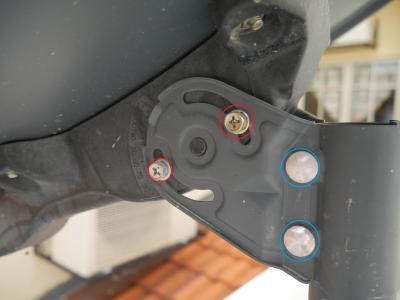
Firstly, I advise you to adjust the satellite dish first. Loosen the 2 hexagon nuts for adjusting the dish azimuth (highlighted in blue) until it is good enough to move the dish in left/right position. Do not loosen till the nut come out.
Attached Image
Once you notice that you are able to adjust (move) the dish in left/right position, stop loosening the nut and begin adjust the dish in left/right position, very slowly, bit by bit, while ask the one that is currently keep an eye on the Strength % your TV screen to tell you what is the current Strength % reading. Keep adjusting until the Strength % reading is minimum 80% and above. Try your very best to adjust the highest Strength % as you can. The higher the better. Of course, if you adjust until the signal Strength is 0%, just reverse back to the position you've adjusted earlier to get back the signal.

If you've tried very hard to adjust left/right position of the dish but Strength % isn't go any higher than 80%, then you may need to adjust the dish elevation by loosening the screws highlighted in red based on the picture above. As usual, loosen it until you can align the dish upwards/downwards and not letting the screws to fall out, slowly move upwards/downwards bit by bit until Strength reading is 80% and above.

The Astro satellite dish location you saw above is within Klang Valley area. The elevation reading appear on the picture is around 77 degrees as you can the scale reading on the dish holder. If you stay around Klang Valley area as well, you can take the picture as a reference for you to adjust the elevation accordingly. If you are living in other states, the elevation may be slightly higher or lower than 77 degrees (approx).

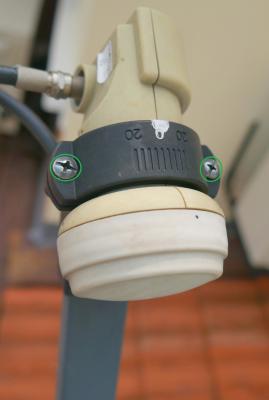
If still doesn't go above 80%, realign the LNB. Loosen the screws (highlighted in green) until it is good enough to turn the whole LNB around.
Attached Image
While you turn the whole LNB around, with the "astro" logo on the dish facing towards your face, take the LNB output cable port as a guide for pointing the "clock position" as it should be around 2 o' clock to 4 'o clock position. Tip: Pointing towards exactly 12 o' clock or 6 o' clock will result in complete 0% signal.

-----

If you've got the Strength reading of 80% and above, tighten all the nuts/screws very tightly while still continue to make sure the Strength % readings maintains the same and does not drop as you tighten it. Once it is done, try go to the channels that you are unable to watch previously. If you are able to watch the channels, congratulations.
However, If you get the Strength % reading of 90% and above, bravo! Thumbs up!

To make sure the issue is completely solved, do perform transponder scan again, make sure all the transponder frequencies has the Strength % of 80% and above. If you got a few ones that has the readings of slightly lower such as around 75%, well erm... it should be fine. However there are some selected frequencies where it is supposed to be no signal at all. Don't worry, this is normal.


Tips:
1) Aligning a satellite dish requires a lot of patience and time. Please don't be in a rush to align the dish.
2) Always align the dish slowly because satellite signals are sensitive. You may get strong signals easily but at the same time you can lose the signals easily. So make sure you tighten the nuts and screws very tightly after finish the dish/LNB alignment.
3) Safety comes first. Be careful especially when you're climbing up to the rooftop when aligning the dish.
4) The higher the Strength %, you won't experience rain fade that quick compared if your Strength % is lower. (Just if you don't know, rain fade is a term where you tend to lose satellite signals when it heavy rains)
5) If you adjust the dish/LNB until the signal Strength is 0%, just reverse back to the position you've adjusted earlier to get back the signal.


Hope my guide can help you to solve your signal issue.

joshhd
post Sep 8 2016, 07:09 AM

Look at all my stars!!
*******
Senior Member
7,792 posts

Joined: Dec 2014
From: Malaysia


QUOTE(linkinstreet @ Sep 8 2016, 12:39 AM)
Eh wtf. 841 is Eurosport HD. Since when they added this?

user posted image
*
Did you screenshot this? How did you screenshot that?
joshhd
post Sep 9 2016, 07:54 PM

Look at all my stars!!
*******
Senior Member
7,792 posts

Joined: Dec 2014
From: Malaysia


QUOTE(linkinstreet @ Sep 8 2016, 11:29 PM)
Oh well at least that's something. Now I need to draft a complaint email on why the WWE Network is an hour delay from the US. I want my fucking CWC live dammit
*
It's not WWE's fault. It's Astro is the one that delayed the feed for 1 hour because of Malaysian TV censorship set by the government. So you can't really blame Astro for that, because every TV broadcasters have to conform the media censorship board.
joshhd
post Sep 9 2016, 08:54 PM

Look at all my stars!!
*******
Senior Member
7,792 posts

Joined: Dec 2014
From: Malaysia


QUOTE(linkinstreet @ Sep 9 2016, 08:52 PM)
Ironically 5 minutes is sufficient for PPVs. The delay is actually Astro wanting to inject their ads in the network too. Why not just 5 minutes delay all programming, esepcially those live specials like Takeover and CWC
*
Normal Astro... The things they love to do is slot in ads and make money from advertisers. This is not something new after all.
joshhd
post Sep 9 2016, 10:11 PM

Look at all my stars!!
*******
Senior Member
7,792 posts

Joined: Dec 2014
From: Malaysia


QUOTE(fronaldo @ Sep 9 2016, 10:07 PM)
Eurosport HD only until 13th Sep because of US Open..Haih..Another temporary
And i think feed from for BeIn back to normal..Last time i watch it's in sync with real time..You can watch this early morning to check..Sociedad vs Espanyol 2.45am
*
Next time when you see Sports Pack increase another RM5 or RM8, you could expect that Astro will provide Eurosport in HD.
Just like what Astro did when they increase RM8.48 and then Astro SuperSport 4 HD and BeIn HD will appear.
Astro Arena HD is part of Family HD pack (not under Sports pack), but the HD version was launch at the same day as Astro SuperSport 4 HD.
joshhd
post Sep 10 2016, 02:51 AM

Look at all my stars!!
*******
Senior Member
7,792 posts

Joined: Dec 2014
From: Malaysia


QUOTE(Foxngn @ Sep 10 2016, 01:03 AM)
Refer to my pic, anyone knows why the words suddenly become so big ? I pressed other option on the remote, but nothing had been shown to me.... although I still can nagivate channel and adjust volume
*
It's a software glitch. Try reboot your decoder and it should be back to normal.
joshhd
post Sep 12 2016, 12:53 AM

Look at all my stars!!
*******
Senior Member
7,792 posts

Joined: Dec 2014
From: Malaysia


QUOTE(starship1 @ Sep 12 2016, 12:14 AM)
Guys

i subscribe to astro sports HD on IPTV but cant watch Eurosports HD 841.want to watch the US Open live on HD any feedback and helps will be appreciated and monthly charges seems to have increase too
*
What error message did you saw? "...not included in your subscription"?
Did you subscribe to Sports pack? Because you need that to watch Eurosport HD. But do note that it is a temporary HD channel, not permanent.
joshhd
post Sep 19 2016, 09:56 PM

Look at all my stars!!
*******
Senior Member
7,792 posts

Joined: Dec 2014
From: Malaysia


QUOTE(matt_rix @ Sep 19 2016, 08:28 PM)
so i tried to upgrade to byond today via the web. and this came out.

user posted image
dozens of choice for the box without stating any details for average joe like me...

Which one should i choose?
*
Can you screenshot the entire page, showing every single decoders?
Cuz it seems that this picture only show half, and there's still more down there.

This post has been edited by joshhd: Sep 19 2016, 09:57 PM

9 Pages « < 2 3 4 5 6 > » Top
Topic ClosedOptions
 

Change to:
| Lo-Fi Version
0.0833sec    0.53    7 queries    GZIP Disabled
Time is now: 4th December 2025 - 11:56 AM