Welcome Guest ( Log In | Register )

10 Pages « < 3 4 5 6 7 > » Bottom

Outline · [ Standard ] · Linear+

 Xiaomi Redmi 1S Discussion Thread V2, THE MID-END GODPHONE

views
     
bluecat68
post Sep 8 2014, 09:10 PM

Casual
***
Junior Member
361 posts

Joined: Dec 2008


QUOTE(xperiaVuser @ Sep 8 2014, 08:59 PM)
Then I've no idea what's wrong with your phone  sweat.gif  the link to the guide posted by imbibug is quite clear already.

You can try asking in that thread posted by helloansuman. ohhh MrBigMi is that you?
*
Already do that. Yes MrBigMi is me sweat.gif
bluecat68
post Sep 8 2014, 09:39 PM

Casual
***
Junior Member
361 posts

Joined: Dec 2008


QUOTE(imbibug @ Sep 8 2014, 09:34 PM)
Minimal ADB and Fastboot is not the same as Miflash. Miflash has a windows gui but also threw up many alarms from my antivirus/malware apps. The Minimal ADB is a much smaller download and installed much faster.

The path variable looks ok. Really strange.

I just connected my phone in fastboot mode and it shows up as "Android phone" under device manager. And the windows usb device icon shows up in the taskbar. I rebooted my phone by taking out the battery and replacing it and did not encounter any issues.
*
Ic. So thats mean my computer cant detect the phone at all. So thats why the flash fail. I dont have any thing like "Android phone" or usb device icon in the taskbar at all.

Just nothing. At first i thought its my antivirus / firewall block the device but even i exit those program it still the same.

Super strange. May be i should send my phone to any phone repair shop and pay them to flash for me sweat.gif
bluecat68
post Sep 9 2014, 02:22 AM

Casual
***
Junior Member
361 posts

Joined: Dec 2008


Hi all am back rclxms.gif

First of all after i format my pc finally happy to say the pc can detect my phone which is in fastboot mode so i can flash it with the fastboot v36 rom .. so far so good. This is good news.

But then the bad news is that i still cant configure my SIM card's contacts even after doing this ... so now this make me suspect actually its my SIM card somehow has some kind of denied access to the contacts, so if i want to import it to the phone yes i can do that but if i want to delete it then cannot (all contacts become read only or something like that).

I try to open the sim with MyPhoneExplorer but no luck .. the phone didnt has the "charge only" option when i plug in the usb cable & yes i already enable the "USB Debugging" mode.

Right now I believe my phone or firmware or everything else is ok .. the problem is the SIM card, looks like it has some kind of lock, not sure how it happen though sweat.gif

By the way thanks to everyone who try to help. AM fine & i still alive laugh.gif

This post has been edited by bluecat68: Sep 9 2014, 02:23 AM
bluecat68
post Sep 9 2014, 08:24 AM

Casual
***
Junior Member
361 posts

Joined: Dec 2008


QUOTE(hongchai888 @ Sep 9 2014, 08:18 AM)
Just "add" ram like I did from 1gb to 2gb will do. You just need a class 10 SD card and its easy like abc. The best part is its free if you know how  thumbup.gif

You can see my ram now is 1874MB  biggrin.gif  biggrin.gif
user posted image

Multitasking with Sygic, Kuwo, Screen filter, Facebook, Messenger, Opera, Whatsapp and Wechat running in the background
user posted image

Playing Real Racing 3 while listening to my Kuwo favorite song without crash, what can be more enjoyably than this biggrin.gif
user posted image

And again, playing Dead Trigger 2 while listening to song, no more scary  tongue.gif
user posted image
*
So actually 1s can add ram ?? class 10 sd card ya .. sound very expensive hmm.gif

By the way how long you guys charge the new battery for the first time ya ??

Thanks first.
bluecat68
post Sep 9 2014, 09:22 AM

Casual
***
Junior Member
361 posts

Joined: Dec 2008


QUOTE(WeSLeY @ Sep 9 2014, 09:02 AM)
Relax... this is normal
*
Yeah mine also go to thailand & hong kong too cool2.gif
bluecat68
post Sep 9 2014, 04:55 PM

Casual
***
Junior Member
361 posts

Joined: Dec 2008


QUOTE(coolstore @ Sep 9 2014, 10:44 AM)
class 10 kingston also much cheaper already, the 32GB one
*
Much cheaper mean how much ?? You know RM500 is also much cheaper than RM1000 sweat.gif

QUOTE(hongchai888 @ Sep 9 2014, 12:06 PM)
Before I "add" ram it even crash, now smooth like water. Later I will tell how to do when free, its easy.

Listen to Aerosmith - I Don't Wanna Miss a Thing while playing Fifa 14  tongue.gif
user posted image
*
Really damn smooth ga ?? So good ?? Wait for your "Simple step by step tutorial" drool.gif

QUOTE(xperiaVuser @ Sep 9 2014, 02:55 PM)
Good to hear all is good now smile.gif  just use Gmail/google account to manage your contact, easier that way.
*
Ok but not sure how to do that .. nvr do that before. By the way I usually prefer to backup to hardisk. I dont want web site know too much of my privacy.

QUOTE(delang @ Sep 9 2014, 04:11 PM)
+1
always use google contact, super easy especially when changing phone.
why dont u put ur sim into another android phone & export all sim contact to google.
and import back to 1S
u can manage via contacts.google.com  flex.gif  flex.gif
*
Actually i can import new contact to SIM or export existing contact from SIM but the thing is for some reason i cant delete them. shakehead.gif

Anyway the phone is ok for me. Yesterday testing to listen song & go google play or browsing abit but nothing happen, at least in that 5-10mins time, no hang no crash.

bluecat68
post Sep 9 2014, 06:41 PM

Casual
***
Junior Member
361 posts

Joined: Dec 2008


QUOTE(WeSLeY @ Sep 9 2014, 04:51 PM)
So we all should download this TW global version right now despite most of us is Malaysian ??

Thanks first.
bluecat68
post Sep 9 2014, 11:09 PM

Casual
***
Junior Member
361 posts

Joined: Dec 2008


QUOTE(xperiaVuser @ Sep 9 2014, 10:45 PM)
It is the same full ROM posted up by Katz on the English MIUI forums http://en.miui.com/thread-40592-1-1.html .
*
So should i flash this rom also ?? Mine is v36 right now whistling.gif
bluecat68
post Sep 9 2014, 11:28 PM

Casual
***
Junior Member
361 posts

Joined: Dec 2008


QUOTE(xperiaVuser @ Sep 9 2014, 11:17 PM)
Don't see why you shouldn't.  smile.gif  I'm actually surprised some people are still on v27  laugh.gif
*
So normal flash already enough right ?? No need fastboot method ya ??
bluecat68
post Sep 9 2014, 11:36 PM

Casual
***
Junior Member
361 posts

Joined: Dec 2008


QUOTE(xperiaVuser @ Sep 9 2014, 11:31 PM)
Yup just normal flash. Use the updater app to do it.

Copy full ROM to the 'downloaded_rom' folder in phone internal memory>updater app: choose 'select update package'>navigate to 'downloaded_rom' folder, choose the full ROM file>OK, phone will update and reboot.
*
Yeah got it. Thanks rclxms.gif
bluecat68
post Sep 10 2014, 12:19 AM

Casual
***
Junior Member
361 posts

Joined: Dec 2008


Ok done flash to that v37 global rom ..not sure whats the different. Hopefully wont cause me problem.
bluecat68
post Sep 10 2014, 12:36 AM

Casual
***
Junior Member
361 posts

Joined: Dec 2008


QUOTE(coklatua @ Sep 10 2014, 12:27 AM)
Test the RAM management.
Open music+play some heavy games. rclxms.gif
*
I not sure which one is heavy game woo ... those game got weight ga ?? laugh.gif
bluecat68
post Sep 10 2014, 12:58 AM

Casual
***
Junior Member
361 posts

Joined: Dec 2008


QUOTE(coklatua @ Sep 10 2014, 12:49 AM)
No lah. V37 should have better RAM management imo.
Ya lo,,
More GB more weight. laugh.gif
Example of heavy games,
-Clash Of Clan
-Real Racing 3
-GTA
-Modern Combat
-Fifa
U just need good internet connection to download it. laugh.gif
*
Nvm la lazy la, wait someone else test la. You see i dont use phone to play game de la. Me super light phone user laugh.gif
bluecat68
post Sep 10 2014, 09:05 AM

Casual
***
Junior Member
361 posts

Joined: Dec 2008


QUOTE(coklatua @ Sep 10 2014, 01:02 AM)
I wish I can become like you. Super Light user. But, my hand always itching for games. laugh.gif
*
I do play game but just prefer to play on pc thumbup.gif

QUOTE(WeSLeY @ Sep 10 2014, 08:16 AM)
Is not TW's Global version. this is official Global ROM (TW using same as us) and right now only TW MIUI site able to download...
*
Ic. Understood.

The more i use this phone the more i feel the phone is ok other than getting this "Unfortunately, the process android.process.acore has stopped" error message everytime i do something related to my SIM card.

I found that i actually cannot edit / add / delete any contact number which is store in my SIM card.

Really weird. I might actually need to go amcorp mall for a check. Trouble sweat.gif sweat.gif sweat.gif

But other than that the phone is ok.
bluecat68
post Sep 10 2014, 09:57 AM

Casual
***
Junior Member
361 posts

Joined: Dec 2008


QUOTE(WeSLeY @ Sep 10 2014, 09:27 AM)
Save contact to google contact better than SIM card tongue.gif easy recovery and sync whenever u switch  phone.. contact in SIM card if gone means forever gone
*
Yeah i know that already thanks to all you guys but then the problem is not about where to sync but i just cant edit or add or delete my SIM card contact using the phone itself.. I cant configure or organize my SIM card contact list at all.

Meaning if my SIM card now has 50 contacts then it stay 50 contacts forever .. i cant delete some of them .. cant edit some of them and cant add in new contact as well unless i use the SIM card with other phone sweat.gif sweat.gif sweat.gif

Also i have no problem to connect the phone to pc & gain access like this =>
Attached Image

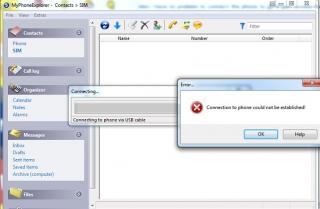
But MyPhoneExplorer show this error when i trying to connect it to phone =>
Attached Image

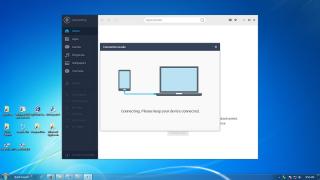
And my phone is detected by Mobogenie if i plug the phone in thru usb cable like this =>
Attached Image

but fail to connect & the screen stay forever like this =>
Attached Image

I suspect it has something to do with the adb.exe *32 (Google android Bridge) which wont shut down itself even if i close the software, i have to manually close it thru task manager or else the phone is not safe to unplug.

And yes i already enable the "USB Debugging" option.
Attached Image

Very headache right now shakehead.gif shakehead.gif shakehead.gif

This post has been edited by bluecat68: Sep 10 2014, 09:59 AM
bluecat68
post Sep 10 2014, 10:47 AM

Casual
***
Junior Member
361 posts

Joined: Dec 2008


QUOTE(WeSLeY @ Sep 10 2014, 10:41 AM)
found my phone dun hv option to edit SIM contact also
*
Contacts -> Settings (Menu) -> Organize contacts -> Configure SIM card. Then either edit or delete SIM contact there. But i got error message everytime i do that shakehead.gif shakehead.gif shakehead.gif

By the way just found out my phone need some driver when connected to pc ... and online search driver didnt help.
Attached Image
bluecat68
post Sep 10 2014, 11:36 AM

Casual
***
Junior Member
361 posts

Joined: Dec 2008


QUOTE(WeSLeY @ Sep 10 2014, 11:29 AM)
Ya... i using the same steps as well... only can delete but no edit... n most time... got error msg
*
Am sorry but i must say i a bit happy to found out am not alone in this one sweat.gif

Only my case is more serious. Cant add / edit / delete and error msg happen 100% of the time sweat.gif

I will go Amcorp Mall Xiaomi service center later and screw them kuat kuat laugh.gif

This post has been edited by bluecat68: Sep 10 2014, 11:38 AM
bluecat68
post Sep 10 2014, 04:23 PM

Casual
***
Junior Member
361 posts

Joined: Dec 2008


QUOTE(xperiaVuser @ Sep 10 2014, 01:29 PM)
I have no issues deleting contacts from 'Configure SIM card'.

You can try installing 'Sim Contacts' from Google Play. See if it works, it still doesn't then it's your sim card problem. Go to your service provider to change a new sim.
*
I already try delete sim contact with my old old SE W595 phone and didnt has any problem so the sim card should be ok.

But its ok i lazy to try this try that any more; Already send the phone to their Amcorp Mall service centre & will get the phone back not later than friday or if they cant fix it i will get a new one since i own this phone for less than 1 week.

Thats it. So just wait for their call sweat.gif

This post has been edited by bluecat68: Sep 10 2014, 04:24 PM
bluecat68
post Sep 11 2014, 01:01 AM

Casual
***
Junior Member
361 posts

Joined: Dec 2008


QUOTE(hongchai888 @ Sep 10 2014, 08:41 PM)
Just finished hardcore test lol. I think that's it, scare will spoil the phone and mmc. I am using 8GB mmc for the swap only.

Best result as below, I open Kuwo + TTpod + Build in music player + huge size Racing game at the same time, its running smooth without lag. But when I try put in another music player, the game crash before race start  yawn.gif  yawn.gif

user posted image
*
Since i dont play any size of game with phone so your solution should be more than enough for me.
We all wait wait here to know the trick drool.gif drool.gif drool.gif

Many many thanks first thumbup.gif

This post has been edited by bluecat68: Sep 11 2014, 01:02 AM
bluecat68
post Sep 11 2014, 09:41 AM

Casual
***
Junior Member
361 posts

Joined: Dec 2008


QUOTE(GodJesterZ @ Sep 11 2014, 06:45 AM)
What I did is reinstall the drivers.
*
Mmm the thing is i dont know how to re-install driver. Some more software like "MyPhoneExplorer" or "Mobogenie" can detect my phone but cannot connect .. so i decide just send to repair or they will give me a new one drool.gif

QUOTE(hongchai888 @ Sep 11 2014, 09:31 AM)
8 GB MMC = less cost if anything happen to the mmc  tongue.gif
Nobody say it was a secret  sweat.gif  sweat.gif . Yes I notice the tutorial above but I found it a bit complicated for a beginner Android user like me. Below is what I did in "easier" way. Source : shared by my expert friend

I am not responsible in any way for damaging your device. Although this is fully tested method do it at your own risk.

Step 1) Buy a class 10 memory card. I am using 8GB for the swap because I feel +1GB memory is more than enough for my usage.

Step 2) Download Roehsoft Ram Expander, it cost RM 15 in Playstore, pay or download the xxxx version from this website : http://9androidapps.com/, your choice.

Step 3) Install and open the software, first adjust the SWPFILE value to the memory size you would like to "add", you can see my value is set to 1000MB because I think it is good enough for my phone. Max you could go is 4000MB. Next set the SWAPPINESS value between 40 - 99. The higher the value the faster the Swap process, hence more chance to damage your sd card  sweat.gif . I am using 70 here, so far so good.
user posted image

Step 4) Take a look at the RAM FREE value, it shown your current ram information. Finally touch the SWAP ACTIV at the top, wait for it to process. You're done , now refer to the bottom TOTAL FREE value and see your phone fly  thumbup.gif

The software also come with a widget that display memory infor. Just go to your widget screen and drag it out to the home screen.
user posted image

This is not a full solution for our phone ram issue, still hope Xiaomi could rectify it soonest possible. Thanks for reading.
*
Looks promising enough for light user like me drool.gif Many many thanks for the sharing thumbup.gif
By the way how fast is the degradation of the card if we swap like this ?? the card die in one month ?? hmm.gif

This post has been edited by bluecat68: Sep 11 2014, 09:42 AM

10 Pages « < 3 4 5 6 7 > » Top
 

Change to:
| Lo-Fi Version
0.0525sec    0.31    7 queries    GZIP Disabled
Time is now: 9th December 2025 - 03:23 AM