


By the way whats Cloud messaging ?? I click cancel when it ask me if i want to sync or enable or something like that for this feature ..
Thanks.
Xiaomi Redmi 1S Discussion Thread V2, THE MID-END GODPHONE
|
|
 Sep 7 2014, 11:56 AM Sep 7 2014, 11:56 AM
Return to original view | IPv6 | Post
#61
|
 
Junior Member
361 posts Joined: Dec 2008  
|
Ok just update to v37. Try to check my sim contact but all the name in sim contact show differently ... all mess up. Also when i try to import contact from SD card it say "No vCard file found on the SD card" .. I sense nightmare. My previous phone is Sony Ericsson Xperia x8 so i guess thats the reason the contact name go so mess up and x8 contact file in SD in not readable by Xiaomi 1s. Damn happy now
By the way whats Cloud messaging ?? I click cancel when it ask me if i want to sync or enable or something like that for this feature .. Thanks. |
|
|
|
|
|
Sep 7 2014, 12:15 PM
Return to original view | IPv6 | Post
#62
|
|
Junior Member
361 posts Joined: Dec 2008
|
QUOTE(Anonymous34 @ Sep 7 2014, 12:01 PM) Xperia X8 is not meant for human So i guess its no harm i click 'cancel' when phone asking if i want to sync or enable that Cloud Messaging ya ?? Normal messaging + whatapp + wechat already enough for me. Cloud Messaging is equivalent to iMessage. While Cloud Sync is equivalent to iCloud.  Now its a huge pain in my ass i have to take time to correct all the mess up contact name  SD card contact lists cant read in this phone also mean i have to go around to ask for people phone number again |
|
|
Sep 7 2014, 12:21 PM
Return to original view | IPv6 | Post
#63
|
|
Junior Member
361 posts Joined: Dec 2008
|
QUOTE(Anonymous34 @ Sep 7 2014, 12:16 PM) Kesian, you should have synced all contacts to Google Account. Thats how we do bro. Am a idiot when talking about phone .. mean i dont know actually i can do that  Guess later i should register the Miui web site to look for manual guide or step by step tutorial for start using this phone |
|
|
Sep 7 2014, 12:29 PM
Return to original view | IPv6 | Post
#64
|
|
Junior Member
361 posts Joined: Dec 2008
|
And i get "Unfortunately, the process android.process.acore has stopped" when i trying to add new contact. This just great.
Looks like i need to spend lot of times googling in these few day just to find out how to make this thing work |
|
|
Sep 7 2014, 12:40 PM
Return to original view | IPv6 | Post
#65
|
|
Junior Member
361 posts Joined: Dec 2008
|
QUOTE(xperiaVuser @ Sep 7 2014, 12:35 PM) Import the vcard to your google first, then sync it to the same google account on your phone. Ok now how to import the vcard to google ?? In fact I dont even know how to find my vcard using this 1s Goto gmail>contacts>import>use the same gmail(google account) on the phone>sync Headache right now Anyway thanks for the tips  |
|
|
Sep 7 2014, 12:53 PM
Return to original view | IPv6 | Post
#66
|
|
Junior Member
361 posts Joined: Dec 2008
|
QUOTE(xperiaVuser @ Sep 7 2014, 12:45 PM) Here's a simple guide, follow this link https://support.google.com/mail/answer/1837...f_topic=3397492 ok good good. will try it later cause almost time to go out for work. Thanks first for the links You can skip step 1 and 2 since you have the vcard already. |
|
|
|
|
|
Sep 7 2014, 08:10 PM
Return to original view | Post
#67
|
|
Junior Member
361 posts Joined: Dec 2008
|
Ok guys i get this "New Sim Card detected" everytime i start the phone it the message say:
"Looks like you've switched Sim cards. An activation message will be sent to enable cloud messaging. You may incur regular fees from your mobile service provider." So now i should click OK or Cancel ?? By the way whats this Cloud messaging has to do with the sim card ?? Also every time i try to add a new contact i get error "Unfortunately, the process android.process.acore has stopped" .. so what the hack is this all mess ?? Thanks first This post has been edited by bluecat68: Sep 7 2014, 08:11 PM |
|
|
Sep 7 2014, 09:13 PM
Return to original view | Post
#68
|
|
Junior Member
361 posts Joined: Dec 2008
|
QUOTE(xperiaVuser @ Sep 7 2014, 08:48 PM) Goto Settings>Apps>Select 'All' tab>Scroll down to 'Contacts and dialer' and 'Contacts Storage'> Clear 'data' for both of them. I think you will lose your contacts by doing so. Easier if you import your vcards into your Gmail (google account) first, and edit your contacts in gmail then sync. Or should i root the phone first ??If that doesn't work, you might have to factory reset the phone. |
|
|
Sep 7 2014, 11:11 PM
Return to original view | Post
#69
|
|
Junior Member
361 posts Joined: Dec 2008
|
Ok i think my previous problem is solve. Thanks to @xperiaVuser but then i mess up that 2 screen protector. Looks like have to get another when go pasar malam.
By the way do i really need to enable the cloud messaging ?? It ask me everytime i start the phone. Thanks first. |
|
|
Sep 8 2014, 01:09 AM
Return to original view | Post
#70
|
|
Junior Member
361 posts Joined: Dec 2008
|
Ok now another similar problem. I try to configure sim card & delete some contact but same error "Unfortunately, the process android.process.acore has stopped" come again.
This time what should i do ?? Thanks first. |
|
|
Sep 8 2014, 10:52 AM
Return to original view | Post
#71
|
|
Junior Member
361 posts Joined: Dec 2008
|
QUOTE(Anonymous34 @ Sep 8 2014, 01:11 AM) Worse come to worse, flash a new ROM, you have no choice bro. Thats mean i have to root my phone first is it ??QUOTE(xperiaVuser @ Sep 8 2014, 06:46 AM) Where is this 'configure sim card' option? Try to import contacts from sim to phone first, then only do the editing on the phone. Contacts -> Settings -> Organize contacts -> configure SIM card. By the way I ask few times already but no one answer me this. Everytime i start my phone the Mi CLoud will ask me to send something to 33488 to activate my sim card. Is this really necessary ?? Yeah i know i can import number from Sim to phone & then edit number from there but 1) There is a delete option to delete any sim number -> "configure sim card" but error occur. 2) Sim number & phone number appear to together in the contact list. Also if i can flash the phone without root so which version i should download ?? 1. Redmi 1s-WCDMA/CDMA China - Version: JHCCNBF37.0 (V5) ?? 2. Redmi 1s-TD - Version: JHFCNBF18.0 (V5)?? or 3. Redmi 1s-WCDMA Global - Version: JHCMIBF36.0 (V5) ?? Thanks first |
|
|
Sep 8 2014, 11:14 AM
Return to original view | Post
#72
|
|
Junior Member
361 posts Joined: Dec 2008
|
By the way i not quite understand why post like #3 is talking about Samsung phone
|
|
|
Sep 8 2014, 11:45 AM
Return to original view | Post
#73
|
|
Junior Member
361 posts Joined: Dec 2008
|
Screenshot for my problem:
1. Select the messy contact name that i want to delete 
2. Choose delete 
3. Yeah 
This post has been edited by bluecat68: Sep 8 2014, 11:51 AM |
|
|
|
|
|
Sep 8 2014, 01:29 PM
Return to original view | Post
#74
|
|
Junior Member
361 posts Joined: Dec 2008
|
QUOTE(imbibug @ Sep 8 2014, 01:20 PM) You don't have to root your phone for some rom flashes. I first update the version thru wifi and i think mine is China version cause its v37. I didn't not create an account for Mi cloud (choose skip option when booting for the 1st time), I think I just denied access for that app so it never asked me again. Editing numbers on the sim card works without any errors for me. It better to reflash your new phone because the stock rom may be old and buggy. The TD version is only for China, it won't work for phones in Malaysia or elsewhere. The WCDMA China version is configured with Chinese apps/language for China market. The WDMA global one will work for Malaysian customers but it still comes with some extra Chinese apps I think. Procedure to flash redmi 1s ================ I prefer the Malaysian rom instead of the global one above because it comes without any extra Chinese apps and has google apps preinstalled without too much junk. The latest version is 36. http://en.miui.com/thread-36919-1-1.html Recovery Rom: Redmi 1S WCDMA Stable Version (Global) JHCMIBF36.0 Fastboot Rom: Redmi 1S WCDMA Stable Version (Malaysia) JHCMIBF36.0 (* applicable for Malaysia Rom) Fastboot method- I use this because its simple and I get to wipe everything: --------------------------------------------------------------------------------------- Download the fastboot rom since it will allow you to wipe the phone. Download the fastboot driver here: https://drive.google.com/file/d/0B1eqnVInak...dit?usp=sharing Follow the simple procedures on this page: http://en.miui.com/forum.php?mod=viewthread&tid=38688 What you have to do mainly is install the driver and set the path then extract the rom to a directory on the harddisk, before switching on the phone using the right buttons and connecting it via usb cable to the pc. I chose flash_all.bat to wipe everything since theres nothing to keep on the new phone. Update method- Easiest method but will not delete junk/unwanted apps on the phone -------------------------------------------------------------------------------------------------- I think the "Recovery Rom: Redmi 1S WCDMA Stable Version (Global) JHCMIBF36.0" above should work using the update method. Version 37.0 WCDMA Global is available but its here: http://bigota.d.miui.com/JHCMIBF37.0/miui_...8300ab2_4.3.zip Follow the procedure here: http://en.miui.com/thread-11242-1-1.html All you have to do is copy the zip file to the sd card and run the update from the menu. The menu is found in the updater app - select update package. Just downloaded the Global v36 (Recovery Rom) so lets see what it can do for me. Also how to @ someone user name actually ?? Thanks. |
|
|
Sep 8 2014, 02:32 PM
Return to original view | Post
#75
|
|
Junior Member
361 posts Joined: Dec 2008
|
QUOTE(boonsheng @ Sep 8 2014, 10:39 AM) why got the word 3g.. as i had close the data alrd Mine also same show My Maxis 3G even the data is off. I bet the 3G here is mean our sim card is 3G enable  |
|
|
Sep 8 2014, 03:27 PM
Return to original view | Post
#76
|
|
Junior Member
361 posts Joined: Dec 2008
|
Mmm my nightmare is continue .. try to flash the phone with fastboot rom (Malaysia v36) but no luck, click the flash_all but nothing, a cmd windows pop-up & close immediately.
If i drag the flash_all bat to the cmd windows and press enter i get this --> 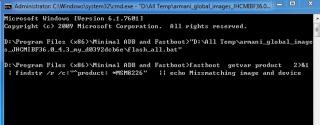
"echo missmatching image & device" !!?? I wonder should i enable usb debugging ?? Pls advise. Thank you. This post has been edited by bluecat68: Sep 8 2014, 03:39 PM |
|
|
Sep 8 2014, 05:05 PM
Return to original view | Post
#77
|
|
Junior Member
361 posts Joined: Dec 2008
|
QUOTE(imbibug @ Sep 8 2014, 04:54 PM) It doesn't look like an error, just the command echoing to the screen. The fastboot will take time (5 minutes?)to complete and if you interrupt it halfway, it will be messed up and the only way to fix it would be to perform a fastboot flash (the other flash method may not work). @imbibug Mmm lets make it clear step by step. First are you saying the fastboot screen will stay like this --> 
for like 5 mins ?? This post has been edited by bluecat68: Sep 8 2014, 05:05 PM |
|
|
Sep 8 2014, 08:05 PM
Return to original view | Post
#78
|
|
Junior Member
361 posts Joined: Dec 2008
|
QUOTE(imbibug @ Sep 8 2014, 05:36 PM) I'm not sure. I only looked at the command window and it was scrolling while the fastboot flash was running. It will take several minutes and will reboot at the end. If you interrupt anything, it will be messed up. Let the phone reboot at the end and don't touch anything until it finishes. Ok. I shut phone off, switch it on by Vol+Power, connect usb but nothing come out from pc & then i try to flash n then the cmd windows stay like this forever ... The sequence is shut phone off, switch it on using vol- and pwr, connect usb cable, let the device be recognize by pc (not sure about this), run flash_all.bat. Then wait. 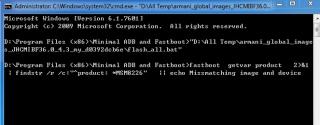
QUOTE(Anonymous34 @ Sep 8 2014, 06:49 PM) I ALREADY SAID MI FLASH. I already do flash with the Global version Recovery rom v36 ... its flash without any problem but error still there. Thats why i try to do fastboot flash. |
|
|
Sep 8 2014, 08:48 PM
Return to original view | Post
#79
|
|
Junior Member
361 posts Joined: Dec 2008
|
QUOTE(xperiaVuser @ Sep 8 2014, 08:28 PM) Are you using the Mi Flash Tool to flash the 'fastboot' ROM? Yes. The "Minimal ADB and Fastboot" which suggest on that page.QUOTE(imbibug @ Sep 8 2014, 08:32 PM) From the picture you posted, the cmd window hung at the very first line and did not proceed furthur which is strange. No flashing took place, so your phone should be able to boot normally I think. If i type path in cmd i get this .. is this correct ??Did you correctly set the path? If you open a command window and run the command "path", you should see c:\program files (x86)\Minimal ADB and Fastboot within the output. If the path is set correctly trying copying the flash_all.bat file in the images directory (maybe the unzip program did not recreate the directories properly) where all the rom files are (directory with gpt*bin files) and run the copied flash_all.bat. Its also suggested in the this thread: http://en.miui.com/forum.php?mod=viewthread&tid=38688 Make sure your phone has enough juice before flashing. 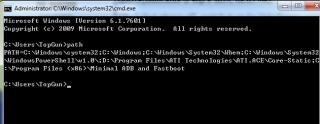
QUOTE(imbibug @ Sep 8 2014, 08:39 PM) bluecat68 I think I figured out your flashing problem. There must not be any spaces in your rom directory on the harddisk. And there is a space where you put your rom "D:\ALL TEMP" so stick it in D:\TEMP instead. Not quite. I actually try to just put it on D drive but still no luck.Headache By the way when i plug in usb cable in fastboot mode my computer didnt show up anything, is that normal ?? This post has been edited by bluecat68: Sep 8 2014, 08:50 PM |
|
|
Sep 8 2014, 08:59 PM
Return to original view | Post
#80
|
|
Junior Member
361 posts Joined: Dec 2008
|
QUOTE(boonsheng @ Sep 8 2014, 08:56 PM) what is the purpose of rooting ur xiaomi? Not root but flash .. not dislike but the phone not allow me to configure my SIM card contacts .. always get error.u dislike the ori ver? No choice |
| Change to: |  0.0445sec 0.0445sec
 0.31 0.31
 7 queries 7 queries
 GZIP Disabled GZIP Disabled
Time is now: 10th December 2025 - 04:51 AM |
 Quote
Quote