Welcome Guest ( Log In | Register )

Bump Topic Topic Closed RSS Feed
131 Pages « < 120 121 122 123 124 > » Bottom

Outline · [ Standard ] · Linear+

 OnePlus One Official Thread v4, the ONE.. now on Android 4.4.4

views
     
facktura
post Aug 17 2014, 01:36 AM

Regular
******
Senior Member
1,566 posts

Joined: Jun 2013


noob question, i wanna restore to factory setting after updated to 4.4.4 but how to make sure it wipes everyhting including pictures and music and all? i noticed i couldnt select "delete all pictures and music files" like previous android phone i have before?
Haters_Gonna_H8
post Aug 17 2014, 01:39 AM

:hehe:
*******
Senior Member
2,663 posts

Joined: Aug 2012


QUOTE(facktura @ Aug 17 2014, 01:36 AM)
noob question, i wanna restore to factory setting after updated to 4.4.4 but how to make sure it wipes everyhting including pictures and music and all? i noticed i couldnt select "delete all pictures and music files" like previous android phone i have before?
*
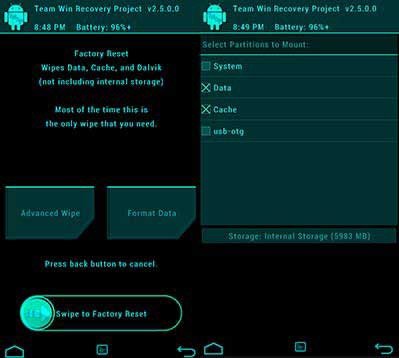
in twrp mode, wipe > 2 buttons :

user posted image

in advanced wipe > wipe everything

lagi best > also do format

then prepare later get :No OS detected. WIN!!!

This post has been edited by Haters_Gonna_H8: Aug 17 2014, 01:44 AM
xxdesire
post Aug 17 2014, 01:40 AM

Iris Heart-sama ❤
*******
Senior Member
3,354 posts

Joined: Oct 2011


QUOTE(facktura @ Aug 17 2014, 01:36 AM)
noob question, i wanna restore to factory setting after updated to 4.4.4 but how to make sure it wipes everyhting including pictures and music and all? i noticed i couldnt select "delete all pictures and music files" like previous android phone i have before?
*
Settings > Factory reset.
If you use custom recovery like TWRP > Wipe > factory reset or Wipe > advanced > tick all

LOL! Realized, thanks to Haters_Gonna_H8, better to do factory reset. Or if you just want to wipe the sdcard (music/photo/etc) then wipe > advanced > internal storage.

This post has been edited by xxdesire: Aug 17 2014, 01:47 AM
alucard89
post Aug 17 2014, 01:41 AM

Look at all my stars!!
*******
Senior Member
4,454 posts

Joined: Apr 2006
QUOTE(Chyan @ Aug 17 2014, 01:25 AM)
I recommend you guys to use a [url= toolkit[/url] for these stuffs. Easier. Straight forward. No hassle. It downloads the file straight off the cmd commands.
*
QUOTE(xxdesire @ Aug 17 2014, 01:29 AM)
Uncheck the "Update CM recovery" at Settings > Developers Settings.
Install via fastboot,
CODE
fastboot flash recovery recovery.img

Go recovery > flash franco kernel.
*
Thank you sifus, successfully flashed twrp and installed the kernel notworthy.gif
Missed that part.
Gonna charge it full again and see how it performs
Also, for those with great battery life, do you guys set the performance to power save or just 'balance' in the settings?
duck v3
post Aug 17 2014, 01:44 AM

Getting Started
**
Junior Member
220 posts

Joined: Mar 2013


forgot to ask.. if i flash twrp or cwm recovery, still can ota right?
or does it already come with cwm
Haters_Gonna_H8
post Aug 17 2014, 01:45 AM

:hehe:
*******
Senior Member
2,663 posts

Joined: Aug 2012


QUOTE(duck v3 @ Aug 17 2014, 01:44 AM)
forgot to ask.. if i flash twrp or cwm recovery, still can ota right?
or does it already come with cwm
*
both can get ota, but someone mentioned before, using twrp to flash has the risk some button will not function. he recommended using phils recovery.

but for me, sideload using pc. safest.
facktura
post Aug 17 2014, 01:47 AM

Regular
******
Senior Member
1,566 posts

Joined: Jun 2013


QUOTE(xxdesire @ Aug 17 2014, 01:40 AM)
Settings > Factory reset.
If you use custom recovery like TWRP > Wipe > factory reset or Wipe > advanced > tick all
*
well i did, but somehow when i checked file manager the folder created for previously installed apps are still there. how to wipe clean all like a new phone? non rooted device im using. blush.gif
Haters_Gonna_H8
post Aug 17 2014, 01:48 AM

:hehe:
*******
Senior Member
2,663 posts

Joined: Aug 2012


QUOTE(facktura @ Aug 17 2014, 01:47 AM)
well i did, but somehow when i checked file manager the folder created for previously installed apps are still there. how to wipe clean all like a new phone? non rooted device im using.  blush.gif
*
already say, format
duck v3
post Aug 17 2014, 01:48 AM

Getting Started
**
Junior Member
220 posts

Joined: Mar 2013


QUOTE(Haters_Gonna_H8 @ Aug 17 2014, 01:45 AM)
both can get ota, but someone mentioned before, using twrp to flash has the risk some button will not function. he recommended using phils recovery.

but for me, sideload using pc. safest.
*
by phils , u mean this?
http://forum.xda-developers.com/showthread.php?t=2780894
Haters_Gonna_H8
post Aug 17 2014, 01:49 AM

:hehe:
*******
Senior Member
2,663 posts

Joined: Aug 2012


QUOTE(duck v3 @ Aug 17 2014, 01:48 AM)
yes. there's so many custom recovery out there. u want safe. pc + sideload smile.gif
duck v3
post Aug 17 2014, 01:52 AM

Getting Started
**
Junior Member
220 posts

Joined: Mar 2013


QUOTE(Haters_Gonna_H8 @ Aug 17 2014, 01:49 AM)
yes. there's so many custom recovery out there. u want safe. pc + sideload  smile.gif
*
ahhh icic, what about the stock recovery?

xxdesire
post Aug 17 2014, 01:54 AM

Iris Heart-sama ❤
*******
Senior Member
3,354 posts

Joined: Oct 2011


QUOTE(facktura @ Aug 17 2014, 01:47 AM)
well i did, but somehow when i checked file manager the folder created for previously installed apps are still there. how to wipe clean all like a new phone? non rooted device im using.  blush.gif
*
Which method you use?
Wipe > advanced > tick internal storage
Haters_Gonna_H8
post Aug 17 2014, 01:55 AM

:hehe:
*******
Senior Member
2,663 posts

Joined: Aug 2012


QUOTE(duck v3 @ Aug 17 2014, 01:52 AM)
ahhh icic, what about the stock recovery?
*
can also, for stock recovery for CM11s aka CM recovery u can flash update using it and u can also use the sideload.


facktura
post Aug 17 2014, 02:00 AM

Regular
******
Senior Member
1,566 posts

Joined: Jun 2013


QUOTE(xxdesire @ Aug 17 2014, 01:54 AM)
Which method you use?
Wipe > advanced > tick internal storage
*
i've checked there is no "wipe internal storage" also to tick.
alucard89
post Aug 17 2014, 02:02 AM

Look at all my stars!!
*******
Senior Member
4,454 posts

Joined: Apr 2006
QUOTE(facktura @ Aug 17 2014, 02:00 AM)
i've checked there is no "wipe internal storage" also to tick.
*
I guess you'll need cwm recovery for that option.
Haters_Gonna_H8
post Aug 17 2014, 02:04 AM

:hehe:
*******
Senior Member
2,663 posts

Joined: Aug 2012


QUOTE(facktura @ Aug 17 2014, 02:00 AM)
i've checked there is no "wipe internal storage" also to tick.
*
abang. internal storage is not the sd card.
alucard89
post Aug 17 2014, 02:04 AM

Look at all my stars!!
*******
Senior Member
4,454 posts

Joined: Apr 2006
QUOTE(Haters_Gonna_H8 @ Aug 17 2014, 01:49 AM)
yes. there's so many custom recovery out there. u want safe. pc + sideload  smile.gif
*
Also better to use phillips CWM then?
When you mentioned some buttons might not be working, is it after flashing zip/updates or factory reset with TWRP?
ConTechMi
post Aug 17 2014, 02:04 AM

Casual
***
Junior Member
482 posts

Joined: Aug 2014
QUOTE(alucard89 @ Aug 16 2014, 09:32 PM)
Well, fully charged my phone, browse on 3g for a few minutes and turned airplane mode on, after a few hours
Battery dropped to 90% with nothing running in the background
That's not normal rite?

Can I still get ota updates if I change kernel?
*
you can still get OTA even u rooted and flash franco kernel as long system by CM.

QUOTE(alucard89 @ Aug 16 2014, 11:01 PM)
Guys, if I want the flash franco's kernel
Do I have to get it rooted, install trwp/cwm, then flash it?
Or just use fastboot?
*
yes it required you to root your phone and with trwp/cwm.

QUOTE(aserap @ Aug 16 2014, 11:15 PM)
actually im on the same dillema as u, start reading from 9 till now, still very confusing, the last time im flashing
my device is samsung galaxy s2 aftr tht im going ios. if someone can answer this both of us will really appreciate it

maybe we should install twrp and thn flash it.... bt im nt very sure about it
*
go go go~

tested again... confirmed battery drain issue in my OPO.. 92% in 15h 20m and SOT only 3 hours.... sad.gif
80/20 on Wifi/Data+GPS.

give me back my 1 day + 4-5 hours SOT please.. lol!
ok will flash franco tomorrow..

Haters_Gonna_H8
post Aug 17 2014, 02:06 AM

:hehe:
*******
Senior Member
2,663 posts

Joined: Aug 2012


QUOTE(ConTechMi @ Aug 17 2014, 02:04 AM)
you can still get OTA even u rooted and flash franco kernel as long system by CM.
yes it required you to root your phone and with trwp/cwm.
go go go~

tested again... confirmed battery drain issue in my OPO.. 92% in 15h 20m and SOT only 3 hours.... sad.gif
80/20 on Wifi/Data+GPS.

give me back my 1 day + 4-5 hours SOT please.. lol!
ok will flash franco tomorrow..
*
hahaha. u guys are really tempting me to use franco kernel. laugh.gif


xxdesire
post Aug 17 2014, 02:07 AM

Iris Heart-sama ❤
*******
Senior Member
3,354 posts

Joined: Oct 2011


QUOTE(facktura @ Aug 17 2014, 02:00 AM)
i've checked there is no "wipe internal storage" also to tick.
*
What version of TWRP are you using? afaik, latest (2.7.0.1) have it.
Btw, do wipe > format data

QUOTE(Haters_Gonna_H8 @ Aug 17 2014, 02:04 AM)
abang. internal storage is not the sd card.
*
Oh you're right. Haha. This is what it does to someone brain if they don't get enough sleep tongue.gif

131 Pages « < 120 121 122 123 124 > » Top
Topic ClosedOptions
 

Change to:
| Lo-Fi Version
0.0319sec    0.41    6 queries    GZIP Disabled
Time is now: 16th December 2025 - 02:57 PM