Welcome Guest ( Log In | Register )

88 Pages « < 31 32 33 34 35 > » Bottom

Outline · [ Standard ] · Linear+

 Huawei MediaPad X1 - Official Thread V2, Kitkat is here !! R002C234B007 Taiwan

views
     
McWes
post Sep 2 2014, 05:45 PM

Casual
***
Junior Member
322 posts

Joined: May 2012
I am facing trouble in updating by using SD card. I have extract the dload and put at the root directory of SD card. but failed. the file I download from Taiwan webside.
rocki85
post Sep 3 2014, 04:16 PM

Getting Started
**
Junior Member
269 posts

Joined: Oct 2010


QUOTE(shah6630 @ Aug 31 2014, 02:54 AM)
@rocki85
try factory reset?
*
factory reset but still same, then i leave it off for few days
now can detect wifi but seems the signal is a bit poorer than before
maybe it's just my feeling
sordanny
post Sep 4 2014, 10:44 AM

Look at all my stars!!
*******
Senior Member
3,009 posts

Joined: Jul 2008
From: The land of the free and the home of the brave!


QUOTE(McWes @ Sep 2 2014, 05:45 PM)
I am facing trouble in updating by using SD card. I have extract the dload and put at the root directory of SD card. but failed. the file I download from Taiwan webside.
*
Make sure your SD card is in FAT32 format, and also at least 5GB free space
Trigger the update by: settings -> updates -> system updates -> local update

I have posted a guide in Chinese few pages back, search for that post
McWes
post Sep 4 2014, 03:17 PM

Casual
***
Junior Member
322 posts

Joined: May 2012
QUOTE(sordanny @ Sep 4 2014, 10:44 AM)
Make sure your SD card is in FAT32 format, and also at least 5GB free space
Trigger the update by: settings -> updates -> system updates -> local update

I have posted a guide in Chinese few pages back, search for that post
*
yes. I did all as you mentioned. but still failed.
sordanny
post Sep 4 2014, 04:57 PM

Look at all my stars!!
*******
Senior Member
3,009 posts

Joined: Jul 2008
From: The land of the free and the home of the brave!


QUOTE(McWes @ Sep 4 2014, 03:17 PM)
yes. I did all as you mentioned. but still failed.
*
The contents of the .zip file u downloaded must be extracted to the root of the SD card folder. It will always contain a folder "dload"

If u have already created the folder "dload" maybe try deleting the existing "dload" folder and use the one extracted from the .zip file instead
benny888
post Sep 5 2014, 01:50 PM

Gadget Freak
Group Icon
Elite
27,801 posts

Joined: Jun 2007
From: Johor


Had been trying to download B006 firmware past 2 days... Now on my 6th attempt. Previous 5 always got disconnected at around 250-450 MB !! Hopeless internet services from P1 at my side ( max is only 5-6 Mbps !!)
If still failed I will probably do it on my next trip to Spore ( my son's place) and tap in the higher download speeds there ( average 40-50 Mbps!)

Haven't touch this phablet a month already. Had been using it past 6 hours n still amazed at its battery life. Had been mainly on internet stuffs ( browsing, RSS, Facebook, email, tweeter n about 50+ whatsapp) battery at 28% SOT 4 hours ...if I continue this with similar usage , this means 14 hours SOT to empty

Attached Image Attached Image


This post has been edited by benny888: Sep 5 2014, 02:17 PM
benny888
post Sep 5 2014, 09:51 PM

Gadget Freak
Group Icon
Elite
27,801 posts

Joined: Jun 2007
From: Johor


Finally managed to download the B006 firmware. Updating it was a breeze - I just copied over the dload folder to the ext SDcard and reboot the phone to install the firmware
You will see a scrolll of yellow lined text showing the installation progress

Attached Image Attached Image Attached Image

Took out the ext SDcard and restarted the phone : necessary to avoid reinstallation again as it will detect the dload folder. I rename the folder in the PC

I was prompted to update firmware again , this time to B007. Took the update and similar process started as in B006

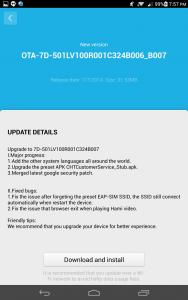
Attached Image Attached Image Attached Image

After successful boot, I used Root Genius program to root the phablet

I read somewhere some users feedback fonts/or icons too big after the update ?? I don't seemed to notice this . It still looks the same to me
Finally reinstalled back all my stuffs through Titanium Backup. All other 3rd party added stuffs in the internal memory remained intact and only all your apps will be wiped clean only

benny888
post Sep 6 2014, 10:26 AM

Gadget Freak
Group Icon
Elite
27,801 posts

Joined: Jun 2007
From: Johor


Just found out kitKat firmware available for download :

http://forum.xda-developers.com/huawei-med...l-b102-t2868549

As usual I will try it
un_id
post Sep 6 2014, 12:22 PM

music is soul's food
*******
Senior Member
7,106 posts

Joined: Sep 2010
QUOTE(benny888 @ Sep 6 2014, 10:26 AM)
Just found out kitKat firmware available for download :

http://forum.xda-developers.com/huawei-med...l-b102-t2868549

As usual I will try it
*
Thanks for sharing uncle..

I'm still hoping to get official update soon.. Else, I might let go this device this month.. Now I'm still 50:50.. Love the overall features of this device especially the super long battery life, but waiting for update disappointed me
benny888
post Sep 6 2014, 01:27 PM

Gadget Freak
Group Icon
Elite
27,801 posts

Joined: Jun 2007
From: Johor


Just successfully flash to kitkat firmware
You need to copy the update.app into folder dload on ext sdcard. Update the firmware through setting/system update/local update

Attached Image


benny888
post Sep 6 2014, 01:28 PM

Gadget Freak
Group Icon
Elite
27,801 posts

Joined: Jun 2007
From: Johor


QUOTE(un_id @ Sep 6 2014, 12:22 PM)
Thanks for sharing uncle..

I'm still hoping to get official update soon.. Else, I might let go this device this month.. Now I'm still 50:50.. Love the overall features of this device especially the super long battery life, but waiting for update disappointed me
*
Why need to wait? Is easy to flash it yourself
chinkc
post Sep 6 2014, 01:29 PM

New Member
*
Junior Member
41 posts

Joined: Oct 2009
QUOTE(benny888 @ Sep 6 2014, 01:27 PM)
Just successfully flash to kitkat firmware
You need to copy the update.app into folder dload on ext sdcard. Update the firmware through setting/system update/local update

Attached Image
*
Sir,

I unable to download the firmware from the german site. it seem has been block. would you mind to post the firmware you have downloaded share with me? thank!

benny888
post Sep 6 2014, 01:35 PM

Gadget Freak
Group Icon
Elite
27,801 posts

Joined: Jun 2007
From: Johor


QUOTE(chinkc @ Sep 6 2014, 01:29 PM)
Sir,

I unable to download the firmware from the german site. it seem has been block. would you mind to post the firmware you have downloaded share with me? thank!
*
My internet speeds is horribly slow n max is 5-6 Mbps only.. Upload will be even worse..it will take me many hours to upload it
Anyway i will try . Is a close to 1gb file
chinkc
post Sep 6 2014, 01:45 PM

New Member
*
Junior Member
41 posts

Joined: Oct 2009
QUOTE(benny888 @ Sep 6 2014, 01:35 PM)
My internet speeds is horribly slow n max is 5-6 Mbps only.. Upload will be even worse..it will take me many hours to upload it
Anyway i will try . Is a close to 1gb file
*
Appreciate you help sir.
ttkyy
post Sep 6 2014, 04:09 PM

On my way
****
Senior Member
571 posts

Joined: Dec 2008
From: KL


QUOTE(benny888 @ Sep 6 2014, 01:27 PM)
Just successfully flash to kitkat firmware
You need to copy the update.app into folder dload on ext sdcard. Update the firmware through setting/system update/local update

Attached Image
*
Oh yeah....kitkat at last.
benny888
post Sep 6 2014, 04:36 PM

Gadget Freak
Group Icon
Elite
27,801 posts

Joined: Jun 2007
From: Johor


QUOTE(ttkyy @ Sep 6 2014, 04:09 PM)
Oh yeah....kitkat at last.
*
Uploading now at 30% and hope it doesn't get broken anytime
I failed to root using root genius n phone keep restarting several times during rooting process
Tested with oneclickroot, vroot and towelroot - all failed
Those who wish to update do bear this in mind first
Andrewtst
post Sep 6 2014, 05:27 PM

Forgiveness is Happiness
*********
All Stars
29,764 posts

Joined: Jan 2009
From: Johor, Malaysia.


QUOTE(benny888 @ Sep 6 2014, 04:36 PM)
Uploading now at 30% and hope it doesn't get broken anytime
I failed to root using root genius n phone keep restarting several times during rooting process
Tested with oneclickroot, vroot and towelroot - all failed
Those who wish to update do bear this in mind first
*
Suggest you terminate the P1, it is the worst data line in Malaysia. Cannot use one. Last time I got use, pure nightmare.
benny888
post Sep 6 2014, 05:42 PM

Gadget Freak
Group Icon
Elite
27,801 posts

Joined: Jun 2007
From: Johor


QUOTE(Andrewtst @ Sep 6 2014, 05:27 PM)
Suggest you terminate the P1, it is the worst data line in Malaysia. Cannot use one. Last time I got use, pure nightmare.
*
I would like to but is still the best in BP. Streamyx is worse averaging maximum 1 Mbps only. No other choices available. TM Unifi due 2013 now delayed indefinitely.
tongaz86
post Sep 6 2014, 05:48 PM

Regular
******
Senior Member
1,750 posts

Joined: Sep 2011


QUOTE(benny888 @ Sep 6 2014, 04:36 PM)
Uploading now at 30% and hope it doesn't get broken anytime
I failed to root using root genius n phone keep restarting several times during rooting process
Tested with oneclickroot, vroot and towelroot - all failed
Those who wish to update do bear this in mind first
*
What change in KK?

And any improvement compared to JB in term of smoothness?
benny888
post Sep 6 2014, 07:15 PM

Gadget Freak
Group Icon
Elite
27,801 posts

Joined: Jun 2007
From: Johor


QUOTE(chinkc @ Sep 6 2014, 01:29 PM)
Sir,

I unable to download the firmware from the german site. it seem has been block. would you mind to post the firmware you have downloaded share with me? thank!
*
Wow - took me 5.5 hours to upload - Download link :
http://1drv.ms/1qvpHqu

QUOTE(tongaz86 @ Sep 6 2014, 05:48 PM)
What change in KK?

And any improvement compared to JB in term of smoothness?
*
Outlook looks the same ; seems slightly smoother but I did not test it long. Reverted back to B007 firmware since I couldn't root it. I read in the german forums some guys managed to root using Root Genius and even on VRoot. If so, no idea what happen on my set !! Set now given back to my missus and was 2 days on my hand . Will probably try again later in few days time. And those users who reported double tap to work doesn't work ? It works very well - you have to manually set it to be ON at Settings/All/Motion Control

This post has been edited by benny888: Sep 6 2014, 07:22 PM

88 Pages « < 31 32 33 34 35 > » Top
 

Change to:
| Lo-Fi Version
0.0360sec    0.37    6 queries    GZIP Disabled
Time is now: 3rd December 2025 - 09:41 AM