Welcome Guest ( Log In | Register )

Bump Topic Topic Closed RSS Feed
5 Pages < 1 2 3 4 > » Bottom

Outline · [ Standard ] · Linear+

TIME TIME Fibre Broadband™ v2.0, 500 Mbps into the future

views
     
kmrdeva
post May 29 2015, 12:56 PM

Look at all my stars!!
*******
Senior Member
4,783 posts

Joined: Jan 2003
QUOTE(Ree73 @ May 29 2015, 12:36 PM)
Let me have a wild guess:
*
Quite spot on actually, buddy.

In theory the N66U claims 450 on 2.4GHz and 450 on 5.0GHz. Real world performance will definitely differ.

QUOTE
Yes, LAN cable can get full 50mbps line

Yes, all wired links at home are on gigabit LAN, can achieve full internet speed as per package.

QUOTE
I think you are using wireless n 2.4G or wireless n 5G to connect.

Can't say for sure, both 2.4 and 5.0 have the same SSID name. Different better ka?

QUOTE
Yeap, wireless n drop while far away from the source.

The N66U has quite an impressive wireless range, IMHO. I can still get 1-5Mbps outside my home, near the condo lifts (20m from my front door). Even in the garbage room and staircase, where I usually go for my puff-puff session.

QUOTE
You should be able to get better speed using TPlink av600, for example, you should able to get around 170mbps. perhaps your power too noisy?

Yep, am using a TP-Link pair of AV600 units. The TP-Link utility says 200-250Mbps link speed but I think it's more like 100++. Looking forward to upgrade to the newer AV1200 models.

QUOTE
Might be due to distance? can get better rate while in the same room


Ha ha, yes. But i can't sh1t in the hall ma.. tongue.gif
kmrdeva
post May 29 2015, 01:21 PM

Look at all my stars!!
*******
Senior Member
4,783 posts

Joined: Jan 2003
QUOTE(Ree73 @ May 29 2015, 01:09 PM)
Haiyo, I see your problem d...

For SSID on 2 band, please split out the 2.4G and 5G, so you know which band you are connect to. 5G can fetch you 130mbps, 2.4G can fetch you 100mbps on wifi based on your router.

I tell you la, wireless n can go very far. I can receive my friend signal in >100 meter away lo, can even get his 8mbps time speed in full.

I think your house power line got prob ler, you should get 130mbps average.

Since your house power line so noisy, you should buy wireless receiver instead... I can get a >100mbps to 180mbps via my asus PCE AC68 receiver smile.gif (FYI, my router can go to 200mbps)
*
OK, buddy. Thanks for the tips i.e. FOC consultancy wink.gif

I see about 130-170 Mbps over the PowerLine connection. I may just go wireless if it'll give me better speeds than the homeplug link - I've got an N600 dual band Asus USB dongle lying about, will try it.

Wow, you've got a super router there.. Which brand and model?
kmrdeva
post May 29 2015, 01:35 PM

Look at all my stars!!
*******
Senior Member
4,783 posts

Joined: Jan 2003
QUOTE(Ree73 @ May 29 2015, 01:28 PM)
All in my signature... Tplink D9, can turn into modem or router... Speed on par as TPlink C9 and minus the GUI control panel.

Client site I am using Asus PCE AC68.
*
Cool! My next upgrade will be AC network. Next year, perhaps.
kmrdeva
post May 29 2015, 01:51 PM

Look at all my stars!!
*******
Senior Member
4,783 posts

Joined: Jan 2003
QUOTE(Ree73 @ May 29 2015, 01:45 PM)
Don't like those WIFI marketing number... 300 to 1900... the real fact is, we only getting 3X speed gain...

But if use wireless ac to connect to wireless N, the distance is superb.
*
3X sounds delicious smile.gif

Your last sentence not too clear, AC has better range than N?

kmrdeva
post May 30 2015, 08:40 AM

Look at all my stars!!
*******
Senior Member
4,783 posts

Joined: Jan 2003
Still have a bunch of tp-link routers as wifi access points in my office. Cheap and relatively stable. Used a bunch of tp-link routers for years when I had streamyx at home, also cheap and stable. Way better than the stock routers from TM, IMHO.

Now using an Asus n66u router with my time connection. Recently upgraded from Asus n56u. Not cheap, also stable and I feel, better than tp-link in general.
kmrdeva
post Jun 9 2015, 11:59 AM

Look at all my stars!!
*******
Senior Member
4,783 posts

Joined: Jan 2003
I've always used Google DNS. Unrestricted web browsing and music/video streaming (eg. YouTube and IPTV) performance and experience are most important to me. Downloads (P2P and hosted storage) are secondary requirements and I don't need super speeds..
kmrdeva
post Jun 9 2015, 03:00 PM

Look at all my stars!!
*******
Senior Member
4,783 posts

Joined: Jan 2003
QUOTE(sordanny @ Jun 9 2015, 01:56 PM)
Can u test to see whether Google DNS has big impact on your download speed please
Thanks bro  smile.gif
*
Can.. Do pm me some links for download testing. If possible, I will share results here.
kmrdeva
post Jun 10 2015, 05:23 PM

Look at all my stars!!
*******
Senior Member
4,783 posts

Joined: Jan 2003
QUOTE(sordanny @ Jun 10 2015, 05:12 PM)
Bro, appreciate if u can test with downloading from the below speedtest files, using TIME default DNS vs Google DNS 
http://ovh.net/files/
http://speed.hetzner.de/

Please download the speedtest files with IDM or other download manager to obtain the best result. Thanks bro
*
OK will test when I get home tonite. I will use FDM as I do not have IDM. Are these the Time DNS server IPs?

203.121.16.85
203.121.16.120

P/S Will have to set DNS server settings statically on my PC before download tests.
kmrdeva
post Jun 10 2015, 08:59 PM

Look at all my stars!!
*******
Senior Member
4,783 posts

Joined: Jan 2003
QUOTE(jjj2 @ Jun 10 2015, 06:24 PM)
Though yes but set it to auto as it might not be the same always due to security concerns.
*
Thanks for the tip, bro.

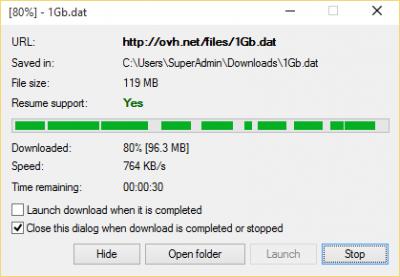
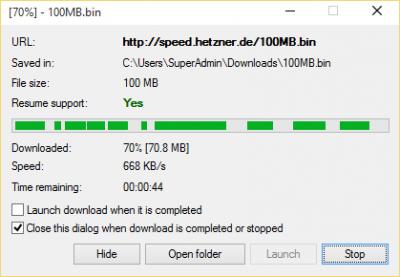
Personally I don't see a big difference in downloads from the 2 test sites given, with either Google or Time DNS. As I understand it, DNS is used only to resolve human readable domains and hostnames to IP addresses that routers can route to/from.

Once resolved, DNS does not really come into play for actual connectivity and downloads or uploads. DNS lookup results are also cached locally, I think.

Note : I've tested with 100MB downloads, lazy to try the bigger files tongue.gif

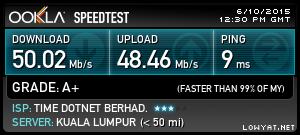
Speedtest result - auto server selection:

Attached Image

Google DNS:

Attached Image

Attached Image

Time DNS:

Attached Image

Attached Image

This post has been edited by kmrdeva: Jun 10 2015, 09:04 PM
kmrdeva
post Jun 12 2015, 01:49 PM

Look at all my stars!!
*******
Senior Member
4,783 posts

Joined: Jan 2003
QUOTE(Matrix @ Jun 12 2015, 01:44 PM)
I am not so concerned about the download speed of the FTP, it's the NETFLIX which is my main bread&butter which is jalating. Used to stream NETFLIX to TWO devices at same time also no problem last time. sad.gif
*
Hi, Netflix only accessible via VPN, no? Mind sharing which VPN service you are using?
kmrdeva
post Jun 12 2015, 02:40 PM

Look at all my stars!!
*******
Senior Member
4,783 posts

Joined: Jan 2003
QUOTE(Matrix @ Jun 12 2015, 01:50 PM)
Currently i am using UNOTELLY. It is not a VPN, it's a DNS service. Usually DNS are cheaper.
*
Ah, I think I tried unotelly before. Not too bad. Will consider if I ever plan to sign up for Netflix. TQ smile.gif
kmrdeva
post Jun 12 2015, 03:46 PM

Look at all my stars!!
*******
Senior Member
4,783 posts

Joined: Jan 2003
QUOTE(jjj2 @ Jun 12 2015, 03:41 PM)
I use PureVPN.....
*
Hmm.. USD50 per year. Can consider too. TQ.
kmrdeva
post Jun 14 2015, 04:56 PM

Look at all my stars!!
*******
Senior Member
4,783 posts

Joined: Jan 2003
Fibre cut happened where? Whole penang island down?
kmrdeva
post Jun 14 2015, 05:39 PM

Look at all my stars!!
*******
Senior Member
4,783 posts

Joined: Jan 2003
QUOTE(jjj2 @ Jun 14 2015, 05:30 PM)
Thanks Bro..

We need feedback from others especially those staying at Gurney and Tg. Bungah area..

Reboot your ONU & Router, thanks.
*


seems to be up in tg bungah. I can VPN to my home router now..

This post has been edited by kmrdeva: Jun 14 2015, 05:39 PM
kmrdeva
post Jun 14 2015, 09:11 PM

Look at all my stars!!
*******
Senior Member
4,783 posts

Joined: Jan 2003
Tg Bungah down, too..
kmrdeva
post Jun 16 2015, 10:48 PM

Look at all my stars!!
*******
Senior Member
4,783 posts

Joined: Jan 2003
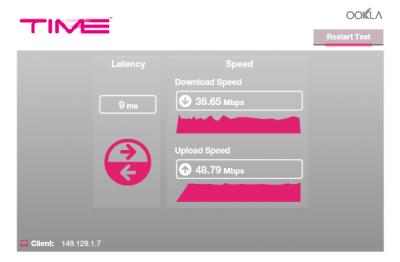
Is there a problem with the Time connection in Penang, specifically Tanjung Bungah area? I'm seeing pretty poor speedtest results ever since the recent unexpected downtime on Sunday..

Note : I used to get 48-50Mbps up and down before Sunday afternoon..

Attached Image

Attached Image


This post has been edited by kmrdeva: Jun 16 2015, 10:49 PM
kmrdeva
post Jun 17 2015, 08:25 AM

Look at all my stars!!
*******
Senior Member
4,783 posts

Joined: Jan 2003
Thanks for the call, @yeapch. Things back to normal speeds this morning for me, 49 down 48 up. Hmm, probably network congestion last nite. Will monitor.
kmrdeva
post Jun 17 2015, 02:27 PM

Look at all my stars!!
*******
Senior Member
4,783 posts

Joined: Jan 2003
QUOTE(mintgadget @ Jun 17 2015, 02:11 PM)
you are in the same boat as me every night for the past 3 weeks slow down. After 12am back to normal. Every time I call customer service asked for same crap ping 8.8.8.8 connect direct modem.. fed up... hoping the problem go away by itself but i believe that is wishful thinking. even my neighbour is complaining too.. i also recommend him to port to time from unifi... how la so embarrassing... been on time past 3 years no issues only lately
*
Have been on Time fibre since Dec 2013, from 8Mb to 15Mb to 100Mb (quota habis too quickly lol) till recently on 50Mb. I've only started to notice issues after Time revised the monthly subscription fees and I upgraded to the 50Mb plan. I'm unsure is there is a problem with congestion (e.g. number of users in my condo > Time's line capacity) or a problem with the cabling to my home. Not using Time's stock router so I can rule this out, for now.
kmrdeva
post Jun 17 2015, 03:29 PM

Look at all my stars!!
*******
Senior Member
4,783 posts

Joined: Jan 2003
QUOTE(jjj2 @ Jun 17 2015, 03:08 PM)
No. of Users/Time's line capacity issue is not a concern as Time has a strict measure to counter this.
There are many factors affecting this especially when you are on 'high speed'.
*
That's why it's an X-File case to me now. Same equipment in use, no change in networking setup in my home, no heavy downloads - I only watch IPTV streams, Youtube and FB video, occasional torrent downloads. Most of the time the biggest usage at home is email and work-related activities (e.g. VPN, remote support).

First week+ of 50Mb was superb, everything super fast and smooth. Only in the last week or so have things been a bit janky.

This post has been edited by kmrdeva: Jun 17 2015, 03:30 PM
kmrdeva
post Jun 17 2015, 04:15 PM

Look at all my stars!!
*******
Senior Member
4,783 posts

Joined: Jan 2003
QUOTE(jjj2 @ Jun 17 2015, 03:32 PM)
Yes, last week there was some glitches reported too. Anyways, hope can pay you a visit... Cheers smile.gif
*
Yeah, I'll monitor for a few days and see how things go. So, u wanna meet at my office or home, soon? wink.gif

This post has been edited by kmrdeva: Jun 17 2015, 04:15 PM

5 Pages < 1 2 3 4 > » Top
Topic ClosedOptions
 

Change to:
| Lo-Fi Version
0.0901sec    0.41    7 queries    GZIP Disabled
Time is now: 10th December 2025 - 11:31 AM