

TMNUT advance upgrade its upload speed to 10mbps and dl 30mbps.
What is TIME doing? 20mbps up and down with nothing else?
This post has been edited by Ree73: Feb 1 2016, 08:41 PM
TIME TIME Fibre Broadband™ v2.0, 500 Mbps into the future
TIME TIME Fibre Broadband™ v2.0, 500 Mbps into the future
|
|
 Feb 1 2016, 08:39 PM Feb 1 2016, 08:39 PM
Return to original view | Post
#121
|
 
Senior Member
761 posts Joined: Jan 2003 
|
TMNUT advance upgrade its upload speed to 10mbps and dl 30mbps.
What is TIME doing? 20mbps up and down with nothing else? This post has been edited by Ree73: Feb 1 2016, 08:41 PM |
|
|
|
|
|
Feb 5 2016, 08:18 AM
Return to original view | Post
#122
|
|
Senior Member
761 posts Joined: Jan 2003
|
hope the new package like lower the $ will be auto instead of resign the package again
This post has been edited by Ree73: Feb 5 2016, 08:19 AM |
|
|
Mar 2 2016, 12:22 PM
Return to original view | Post
#123
|
|
Senior Member
761 posts Joined: Jan 2003
|
march already, no new package announcement?
|
|
|
Mar 24 2016, 03:09 PM
Return to original view | Post
#124
|
|
Senior Member
761 posts Joined: Jan 2003
|
Yeap, please check my area speed.
I suppose to get 300mbps for upload and download BUT I am getting DL: 130mbps and UL: 291 mbps (this is ok for up but my down is not acceptable) Dont tell me that my router is not fast enough as i am getting 300mbps down but not up. I am using AC1900 router. Thanks |
|
|
Mar 24 2016, 03:31 PM
Return to original view | Post
#125
|
|
Senior Member
761 posts Joined: Jan 2003
|
QUOTE(Braxton @ Mar 24 2016, 03:26 PM) Try on Lan see what u reading you get. I dont think is the WIFI issue as i can get upload at 300mbps.on night TIME my router same as u just get 3x-6x on dl but LAN full speed   I try ookla to time server, i am getting UL:120mbps dl and DL:290. Test singtel i am getting UP:160mbps and DL:290. Previously i am checking the speed from time speed test with UP:120mbs and DL:290. Will do more testing on reboot the modem and might need to find my long cable to connect... |
|
|
Mar 24 2016, 03:32 PM
Return to original view | Post
#126
|
|
Senior Member
761 posts Joined: Jan 2003
|
what do you need me to ping? and tracert to where?
Thanks |
|
|
|
|
|
Mar 24 2016, 03:40 PM
Return to original view | Post
#127
|
|
Senior Member
761 posts Joined: Jan 2003
|
Yeap, already sent the tracert and ping result to you... everything looks perfect.
I am testing the speed test on time speed test, the DL speed is not acceptable... |
|
|
Mar 24 2016, 03:42 PM
Return to original view | Post
#128
|
|
Senior Member
761 posts Joined: Jan 2003
|
Yeap, i have some doubts on the new free upgrade thingy. the $ will remain the same lifetime? Or the $ will change to new rate once contract is over?
|
|
|
Mar 24 2016, 03:44 PM
Return to original view | Post
#129
|
|
Senior Member
761 posts Joined: Jan 2003
|
but there is a penalty by downgrade? like need to pay installation fee again?
|
|
|
Mar 24 2016, 04:40 PM
Return to original view | Post
#130
|
|
Senior Member
761 posts Joined: Jan 2003
|
QUOTE(Braxton @ Mar 24 2016, 03:51 PM) why not you just try via LAN first You are right, use my laptop to pull a cable to it, can get UL:300 DL:270then you will know is wifi issue or not btw if LAN can full, but wifi can't not 100% is router issue, still need to check i use app check my phone can communicate with router o 2xxMb but peak hour i only get 3x-4x speed test result, but that time LAN is full speed Retune my AC receiver and WIFI on router... Manage to bring up the UL:230 and DL:290. Will need to tune more and hope to get near to 300  Anyone can get a rock solid WIFI speed to 300mbps and 500mbps? maybe can share the setting here  |
|
|
Mar 24 2016, 05:04 PM
Return to original view | Post
#131
|
|
Senior Member
761 posts Joined: Jan 2003
|
My area no one using AC... I can test all channel...
|
|
|
Mar 24 2016, 05:31 PM
Return to original view | Post
#132
|
|
Senior Member
761 posts Joined: Jan 2003
|
After some research, i dont think any WIFI AC router can break the 300mbps!!!
Even the best AC class also, it will only hit 240 to 280 mbps!!! Thinking of downgrade unless we are going to change receiver to WIFI AD |
|
|
Mar 24 2016, 05:49 PM
Return to original view | Post
#133
|
|
Senior Member
761 posts Joined: Jan 2003
|
alo, you all are wrong d... the marketing said can reach 3200 on AC, 1900 on AC... all is marketing...
Please refer here... http://www.smallnetbuilder.com/tools/chart...-ghz-profile-dn Click on 5G UPLINK / DOWNLINK... it show the throughtput... ini baru accurate |
|
|
|
|
|
Mar 24 2016, 05:51 PM
Return to original view | Post
#134
|
|
Senior Member
761 posts Joined: Jan 2003
|
Later i will use my HP to test on the AC... see can get 300mbps or not
|
|
|
Mar 24 2016, 06:03 PM
Return to original view | Post
#135
|
|
Senior Member
761 posts Joined: Jan 2003
|
step aside AC can reach 300mbps to 500mbps 1st... Anyone able to get BT download to 300mbps and 500mbps? I am using NAS cable to DL but the speed like normal only... around 100mbps. Wonder if time capped the BT?
|
|
|
Mar 24 2016, 06:54 PM
Return to original view | Post
#136
|
|
Senior Member
761 posts Joined: Jan 2003
|
haiyo. you all 1 time dl 10 to 20 torrent file la... mah can hit the max dl lo
|
|
|
Mar 24 2016, 06:55 PM
Return to original view | Post
#137
|
|
Senior Member
761 posts Joined: Jan 2003
|
Tried on my HP on the WIFI AC speed, can get DL speed at 240mbps but UL around 120mbps... Suspecting router modem WIFI issue, will change setting plus maybe dl the latest driver
|
|
|
Mar 24 2016, 07:35 PM
Return to original view | Post
#138
|
|
Senior Member
761 posts Joined: Jan 2003
|
QUOTE(mohamadfazli @ Mar 24 2016, 05:32 PM) There are no use cases for 300mbps unless you are constantly transferring large files over the internet. Once in a blue moon... for me. FINALLY, after some setting like close the AP isolation in router.Set the AC band on 149 and with 80MHz... Manage to get D:288mbps and U:292mbps  This post has been edited by Ree73: Mar 24 2016, 07:36 PM Attached thumbnail(s) 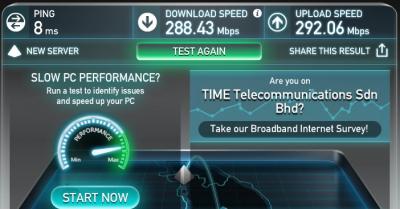
|
|
|
Mar 24 2016, 07:48 PM
Return to original view | Post
#139
|
|
Senior Member
761 posts Joined: Jan 2003
|
but notice that speedtest only can max out within malaysia or singapore. But this rate might drop to 220mbps from time to time.
Notice that undersea cable to korea, etc... also quite slow??? This post has been edited by Ree73: Mar 24 2016, 07:50 PM |
|
|
Mar 25 2016, 08:29 AM
Return to original view | Post
#140
|
|
Senior Member
761 posts Joined: Jan 2003
|
While manage to get desktop WIFI AC to reach 300mbps.
I have a quick try on HP but the DL:180mbps and UL 240mbps... will need to do the tuning again later today |
|
Topic ClosedOptions
|
| Change to: |  0.0691sec 0.0691sec
 0.59 0.59
 7 queries 7 queries
 GZIP Disabled GZIP Disabled
Time is now: 10th December 2025 - 03:05 PM |
 Quote
Quote