Welcome Guest ( Log In | Register )

14 Pages « < 4 5 6 7 8 > » Bottom

Outline · [ Standard ] · Linear+

Unifi dlink DIR-850L unifi firmware, firmware that support unifi

views
     
vamfire
post Sep 23 2017, 11:16 PM

Getting Started
**
Junior Member
171 posts

Joined: Feb 2005
From: North South East West


Wah? U guys even the settings cannot save?

What browser did u guys use? I use chrome browser and it works fine, I remembered reading somewhere that other browser might cause that save issue...

And, it's best practice after flashing the firmware, reset the router to factory default settings, I encountered no internet also at first but after done that, set everything again, now all good except the things i mentioned b4...

user posted image

This post has been edited by vamfire: Sep 23 2017, 11:23 PM
Eterman
post Sep 23 2017, 11:24 PM

Casual
***
Junior Member
490 posts

Joined: Aug 2006


QUOTE(anoobist @ Sep 23 2017, 11:12 PM)
How to reflash. Teach me masterrrr
*
i use dlink recovery mode to re-flash 2.08TM, since the usual interface only allows upgrade

i learned from this site : http://forums.dlink.com/index.php?topic=44909.0

preparation :
-download 2.08TM firmware on your computer
-connect your computer to router using LAN cable
-set your computer's ethernet ip to static ip 192.168.0.2

assess recovery mode :
-power off your router
-use a pin ( or something similar) and poke/press the reset button
-while hold-press the reset button for 3-5 seconds, press the power button while hold-press the reset button until you see the power indicator is in amber colour and blinking ( now router is in recovery mode )

re-flash 2.08TM firmware
-on your computer, open up browser and login to 192.168.0.1
-it will show Dlink Recovery mode
-click select to choose the 2.08TM firmware, and then click upload
-wait until the process finish, it will autorestart
-check the version, it should say 2.08TM rclxms.gif

setup unifi and wifi settings
-since the router is reset, all settings are lost
-you will need to re-enter all unifi settings and personal settings again.

It worked for me, i hoped it works for you icon_rolleyes.gif

--------------------------------------------------------------------------------------------------------------------------------------------

QUOTE(vamfire @ Sep 23 2017, 11:16 PM)
Wah? U guys even the settings cannot save?

What browser did u guys use? I use chrome browser and it works fine, I remembered reading somewhere that other browser might cause that save issue...

And, it's best practice after flashing the firmware, reset the router to factory default settings, I encountered no internet also at first but after done that, set everything again, now all good except the things i mentioned b4...
*
So nice, my router i reset also can't connect to internet bangwall.gif doh.gif

This post has been edited by Eterman: Sep 23 2017, 11:27 PM
anoobist
post Sep 23 2017, 11:32 PM

Getting Started
**
Junior Member
74 posts

Joined: May 2013
QUOTE(Eterman @ Sep 23 2017, 11:24 PM)
i use dlink recovery mode to re-flash 2.08TM, since the usual interface only allows upgrade

i learned from this site : http://forums.dlink.com/index.php?topic=44909.0

preparation :
-download 2.08TM firmware on your computer
-connect your computer to router using LAN cable
-set your computer's ethernet ip to static ip 192.168.0.2

assess recovery mode :
-power off your router
-use a pin ( or something similar) and poke/press the reset button
-while hold-press the reset button for 3-5 seconds, press the power button while hold-press the reset button until you see the power indicator is in amber colour and blinking ( now router is in recovery mode )

re-flash 2.08TM firmware
-on your computer, open up browser and login to 192.168.0.1
-it will show Dlink Recovery mode
-click select to choose the 2.08TM firmware, and then click upload
-wait until the process finish, it will autorestart
-check the version, it should say 2.08TM  rclxms.gif

setup unifi and wifi settings
-since the router is reset, all settings are lost
-you will need to re-enter all unifi settings and personal settings again.

It worked for me, i hoped it works for you  icon_rolleyes.gif

--------------------------------------------------------------------------------------------------------------------------------------------
So nice, my router i reset also can't connect to internet  bangwall.gif  doh.gif
*
Thank you. And thank you all biggrin.gif
anoobist
post Sep 23 2017, 11:32 PM

Getting Started
**
Junior Member
74 posts

Joined: May 2013
QUOTE(vamfire @ Sep 23 2017, 11:16 PM)
Wah? U guys even the settings cannot save?

What browser did u guys use? I use chrome browser and it works fine, I remembered reading somewhere that other browser might cause that save issue...

And, it's best practice after flashing the firmware, reset the router to factory default settings, I encountered no internet also at first but after done that, set everything again, now all good except the things i mentioned b4...

user posted image
*
I was using Chrome sad.gif
socratesman
post Sep 24 2017, 02:01 PM

Regular
******
Senior Member
1,807 posts

Joined: Jan 2003
From: KL
So better wait for Dlnk Msia to upload new TM-certified firmware....
cucubud
post Sep 26 2017, 05:27 PM

Super Moderator
*******
Senior Member
3,076 posts

Joined: Jan 2008


Anyone updated their firmware to V2.10?
http://www.dlink.com.my/securityadvisory-msia/

SilentVampire
post Sep 26 2017, 05:52 PM

Networking Enthusiast
*******
Senior Member
5,714 posts

Joined: Mar 2007


QUOTE(cucubud @ Sep 26 2017, 05:27 PM)
Anyone updated their firmware to V2.10?
http://www.dlink.com.my/securityadvisory-msia/
*
You should wait until your ISP-specific firmware is released. There have been reported problems with the retail firmware if your DLink Dir-850L is provided by TM or Time.
vamfire
post Sep 26 2017, 10:03 PM

Getting Started
**
Junior Member
171 posts

Joined: Feb 2005
From: North South East West


QUOTE(cucubud @ Sep 26 2017, 05:27 PM)
Anyone updated their firmware to V2.10?
http://www.dlink.com.my/securityadvisory-msia/
*
I've updated my router using that retail firmware, so far everything is good except cannot save client name & reserved ip for connected clients...

So, it's kinda annoying if you need/use reserved ip address in your LAN network but in exchange for added security, I can live without that for this time being...

Waiting for TM to release their certified firmware as well, hopefully everything will work normally...
cucubud
post Sep 27 2017, 08:08 AM

Super Moderator
*******
Senior Member
3,076 posts

Joined: Jan 2008


QUOTE(SilentVampire @ Sep 26 2017, 05:52 PM)
You should wait until your ISP-specific firmware is released. There have been reported problems with the retail firmware if your DLink Dir-850L is provided by TM or Time.
*
QUOTE(vamfire @ Sep 26 2017, 10:03 PM)
I've updated my router using that retail firmware, so far everything is good except cannot save client name & reserved ip for connected clients...

So, it's kinda annoying if you need/use reserved ip address in your LAN network but in exchange for added security, I can live without that for this time being...

Waiting for TM to release their certified firmware as well, hopefully everything will work normally...
*
Thanks guys for your comments.
Will wait for TM to release their version.
Currently mine is on V2.08 and it seems stable without any issue.
shadow1143
post Sep 27 2017, 01:27 PM

Getting Started
**
Junior Member
235 posts

Joined: Feb 2012
QUOTE(vamfire @ Sep 26 2017, 10:03 PM)
I've updated my router using that retail firmware, so far everything is good except cannot save client name & reserved ip for connected clients...

So, it's kinda annoying if you need/use reserved ip address in your LAN network but in exchange for added security, I can live without that for this time being...

Waiting for TM to release their certified firmware as well, hopefully everything will work normally...
*
I've updated to 2.10 but unfortunately it doesn't work , whenever I change my internet mode to unifi -PPPoE it will revert back to PPPoE automatically , so I guess I have to revert back to 2.08 version
Lineage
post Sep 27 2017, 01:44 PM

the Chaotic Throne
*******
Senior Member
4,524 posts

Joined: Oct 2007
From: ~Still finding the place~


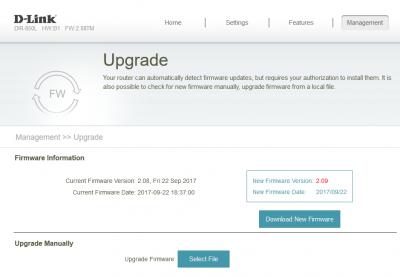
Updated to 2.09..I use the updater in router..

Attached Image

After updated to 2.09, SSID forced to have @unifi at the back..

Attached Image

Attached Image

After updated to 2.09, noticed that Whatsapp send out message sometimes will delay.. ranting.gif

By the way, order new router to replace this shitty router.. wink.gif

This post has been edited by Lineage: Sep 27 2017, 02:26 PM
SilentVampire
post Sep 27 2017, 02:10 PM

Networking Enthusiast
*******
Senior Member
5,714 posts

Joined: Mar 2007


QUOTE(Lineage @ Sep 27 2017, 01:44 PM)

After updated to 2.09, noticed that Whatsapp send out message sometimes will delay..  ranting.gif

By the way, order new router to replace this shitty router..  wink.gif
*
rclxms.gif rclxms.gif

What new router?
Lineage
post Sep 27 2017, 02:26 PM

the Chaotic Throne
*******
Senior Member
4,524 posts

Joined: Oct 2007
From: ~Still finding the place~


QUOTE(SilentVampire @ Sep 27 2017, 02:10 PM)
rclxms.gif  rclxms.gif

What new router?
*
TP-Link Archer C9 biggrin.gif
SilentVampire
post Sep 27 2017, 02:27 PM

Networking Enthusiast
*******
Senior Member
5,714 posts

Joined: Mar 2007


QUOTE(Lineage @ Sep 27 2017, 02:26 PM)
TP-Link Archer C9  biggrin.gif
*
Good choice bro. It will definitely be an improvement over the rubbish bin router.
Lineage
post Sep 27 2017, 02:38 PM

the Chaotic Throne
*******
Senior Member
4,524 posts

Joined: Oct 2007
From: ~Still finding the place~


QUOTE(SilentVampire @ Sep 27 2017, 02:27 PM)
Good choice bro. It will definitely be an improvement over the rubbish bin router.
*
Hope the wifi coverage can cover my room perfectly..since it got beamforming technology..
birain
post Sep 27 2017, 03:21 PM

良い一日を
******
Senior Member
1,448 posts

Joined: Apr 2007
QUOTE(Lineage @ Sep 27 2017, 01:44 PM)
Updated to 2.09..I use the updater in router..
» Click to show Spoiler - click again to hide... «

After updated to 2.09, SSID forced to have @unifi at the back..
» Click to show Spoiler - click again to hide... «

After updated to 2.09, noticed that Whatsapp send out message sometimes will delay..  ranting.gif

By the way, order new router to replace this shitty router..  wink.gif
*
no more SSID name as you like? sweat.gif
Lineage
post Sep 27 2017, 04:03 PM

the Chaotic Throne
*******
Senior Member
4,524 posts

Joined: Oct 2007
From: ~Still finding the place~


QUOTE(birain @ Sep 27 2017, 03:21 PM)
no more SSID name as you like? sweat.gif
*
Can..you still can put the name as you like but will force u to put @unifi at the back.. sweat.gif
vamfire
post Sep 27 2017, 04:34 PM

Getting Started
**
Junior Member
171 posts

Joined: Feb 2005
From: North South East West


Firmware v2.09? Is this official TM firmware?

From the snapshot looks like one because got 'TM' letters, but no official annoucement or update at dlink.my or even TM

This post has been edited by vamfire: Sep 27 2017, 04:37 PM
Lineage
post Sep 27 2017, 04:40 PM

the Chaotic Throne
*******
Senior Member
4,524 posts

Joined: Oct 2007
From: ~Still finding the place~


QUOTE(vamfire @ Sep 27 2017, 04:34 PM)
Firmware v2.09? Is this official TM firmware?

From the snapshot looks like one because got 'TM' letters, but no official annoucement or update at dlink.my or even TM
*
I've no idea..i just press the "Check for new firmware"..and it pop out new firmware..i just download and install.. laugh.gif
gotnet
post Sep 30 2017, 05:01 PM

New Member
*
Junior Member
43 posts

Joined: Mar 2009
Hey guys i updated to the retail firmware 2.10. I tried to downgrade it to 2.08 TM but it says failed. How do i fix this?

14 Pages « < 4 5 6 7 8 > » Top
 

Change to:
| Lo-Fi Version
0.0223sec    0.25    6 queries    GZIP Disabled
Time is now: 3rd December 2025 - 01:59 PM