


Streamyx Update Riger DB120-WL (using TP-Link Firmware), Remove Backdoors!
Streamyx Update Riger DB120-WL (using TP-Link Firmware), Remove Backdoors!
|
|
 Sep 2 2016, 01:30 AM Sep 2 2016, 01:30 AM
|
 
Junior Member
5 posts Joined: Apr 2012 
|
Nevermind, it worked now. Thanks for the guide
|
|
|
|
|
|
Sep 20 2016, 03:02 PM
|

Junior Member
61 posts Joined: Jan 2003 
|
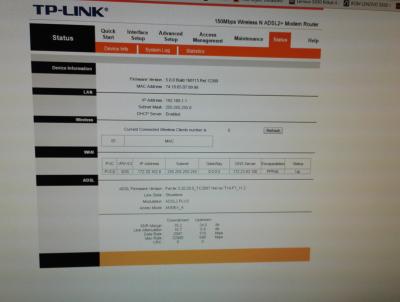
guy, i follow all the step n restore to factory setting, but now i cant get online, both LAN pc o wireless. wat should i do o wat i missed?
|
|
|
Sep 20 2016, 03:19 PM
|
|
Junior Member
61 posts Joined: Jan 2003
|
my modem DSL is off, internet light is on, is tat got something wrong?
|
|
|
Sep 20 2016, 06:00 PM
|
|
Junior Member
61 posts Joined: Jan 2003
|
solve already, cos the tm gv me wrong password
|
|
|
Oct 29 2016, 10:16 PM
|
|
Newbie
2 posts Joined: Oct 2016
|
QUOTE(kiritoffx @ Jan 22 2015, 11:52 AM) thx.. mine only after restart the router a few times Mine still not working after changing location ,help please![attachmentid=4311736]  |
|
|
Oct 29 2016, 10:22 PM
|
|
Newbie
2 posts Joined: Oct 2016
|
Help!!I did everything now my wifi isn't working.help me pls!
|
|
|
|
|
|
Dec 26 2016, 04:09 AM
|
|
Newbie
3 posts Joined: Dec 2016
|
QUOTE(Anime4000 @ May 15 2014, 03:35 AM) Good news for DB120-WL user! stren89 make me curious and I start research about Riger DB120-WL hardware used. what will happen if i use the V6 firmware instead of V5, because V6 and above only has support to IPv6 addresses...This will improve your DB120-WL Ethernet, Wireless and ADSL by using latest driver provided by TP-Link, straight improve DB120-WL efficiency. Click here to see inside Riger DB120-WL! I have 2 Riger DB120-WL at home, I got extra one because I accept TM upgrade offer last time. Before proceed, take this precaution. 1. This applicable only Riger DB120-WL (Silver) with Firmware Riger V .4 installed by default. 2. Before proceed updating, please connect your computer directly via LAN Cable to DB120-WL 3. This may void your warranty (maybe not, since you didn't open the case) 4. Doing at your own risk! If your DB120-WL still have warranty and scare get broken, I suggest you follow, stren89 guide. Important Change! You need to accept this awkward changes, because LED driver operate at different signal. You need to learn: » Click to show Spoiler - click again to hide... « Easy Guide start here: Read carefully to avoid invalid or mistake during updating 1. Download Firmware Download TP-LINK TD-W8951ND v5 firmware from TP-Link Websites 2. Extract Open zip file and then open "TD-W8951ND_V5_140226" folder and extract (simply click once and drag) [attachmentid=3971330] 3. Login Note: Do this only when computer connected via LAN Cable (Hardwired) Username: tmadmin Password: Adm@**** (**** is the last 4 HEX digit of MAC Address, eg: D1E3 => Adm@D1E3, you can find bottom of your DB120-WL) [attachmentid=3971328] 4. Click maintenance After successful login, click maintenance and then click Firmware, until you see this page: [attachmentid=3971332] 5. Choose firmware Click New Firmware Location: "Browse" button and then locate back where you extract just now, and then open that folder and choose "ras" file [attachmentid=3971333] 6. Proceed! Click "UPGRADE" button! and wait until you see a progress bar! [attachmentid=3971335] 7. Update complete Once progress bar reach 100% and it will redirect to new TP-Link login page! Please login using previous username and password (it's look awkward when login using tmadmin under TP-Link page, lol) [attachmentid=3971336] 8. Finished! Well done, now you have working DB120-WL with TP-Link Firmware! TP-Link will use your previous configuration. [attachmentid=3971337] Extra: Improve Wireless Backdoor + Device Security After flashing and login with old password "Adm@XXXX", simply reset to factory default, this will: 1. Remove extra Virtual or Guest Wireless/AP, leaving only one. 2. Using default TP-Link settings, including default username and password (admin, admin) 3. Overall stability! NO INTERNET AFTER FLASH!? Follow this guide by ngeseng how to configure Streamyx ADSL VCI/VPI Here what I done... [attachmentid=3971339] [attachmentid=3971341] |
|
|
Dec 26 2016, 04:11 AM
|
|
Newbie
3 posts Joined: Dec 2016
|
QUOTE(ah be @ Sep 20 2016, 03:02 PM) guy, i follow all the step n restore to factory setting, but now i cant get online, both LAN pc o wireless. wat should i do o wat i missed? you need to reconfigure the modem, means set up the wireless interface and internet connetion protocol
make sure you know your streamyx id and password. you can do it via Interface Tab |
|
|
Dec 26 2016, 04:15 AM
|
|
Newbie
3 posts Joined: Dec 2016
|
QUOTE(J!MMY @ Sep 2 2016, 01:02 AM) Just followed the guide and upgraded, after setting up dsl lights off but Internet light won't go off. Changed vci/vpi, disabled pvc1-7, but still no internet. Sifu help pls set up the PPPoE LLC and use the right stremyx id and password |
|
|
Feb 14 2017, 07:50 PM
|

Senior Member
591 posts Joined: Jan 2003
|
Using the old firmware, not yet upgrade to tplink
I actually mac filter 3 mac, however changing ssid, changing the encryption type, do all the changes, still all those mac latching on. Damnit. Teruk la this tm router. Considering to uograde firmware |
|
|
Mar 10 2017, 02:12 PM
|

Senior Member
1,787 posts Joined: Nov 2008
|
i got two extra DB120-WL silver, can it use as wifi repeater? else i think it can dump to rubbish bin d
|
|
|
Mar 10 2017, 04:46 PM
|

Senior Member
2,400 posts Joined: Jul 2009 From: /dev/null
|
QUOTE(ZzZzz... @ Mar 10 2017, 02:12 PM) i got two extra DB120-WL silver, can it use as wifi repeater? else i think it can dump to rubbish bin d can |
|
|
Mar 10 2017, 08:52 PM
|
|
Senior Member
1,787 posts Joined: Nov 2008
|
QUOTE(Anime4000 @ Mar 10 2017, 04:46 PM) can do you mean by update to TP-LINK TD-W8951ND v5 firmware can enable the repeater feature? |
|
|
|
|
|
Mar 10 2017, 10:07 PM
|

Junior Member
340 posts Joined: Mar 2007 From: Malaysia
|
this riger and innacom 3410 which better?
|
|
|
Jun 7 2017, 11:44 AM
Show posts by this member only | IPv6 | Post
#195
|

Junior Member
142 posts Joined: Oct 2012 From: Kota Kinabalu
|
does this work with Riger_V.6 firmware?
|
|
|
Jun 8 2017, 05:42 AM
|
|
Senior Member
2,400 posts Joined: Jul 2009 From: /dev/null
|
QUOTE(KL_menJERIT @ Mar 10 2017, 10:07 PM) this riger and innacom 3410 which better? Riger much better software and hardware |
|
|
Sep 11 2017, 04:26 PM
|
|
Newbie
15 posts Joined: Sep 2017
|
Hello - i'm not a tech savvy and need some help/info. I'm having Riger 4 DB120-WL. My area only supports Streamyx 4mbps and the connection get slow due to hackers. I was informed by TM technical support to buy TP Link modem as it's not easy to hack. But i saw these thread on TP Link firmware. Will this block those intruders? Thank you for your reply.
|
|
|
Sep 11 2017, 11:02 PM
|
|
Senior Member
2,400 posts Joined: Jul 2009 From: /dev/null
|
QUOTE(Indrani @ Sep 11 2017, 04:26 PM) Hello - i'm not a tech savvy and need some help/info. I'm having Riger 4 DB120-WL. My area only supports Streamyx 4mbps and the connection get slow due to hackers. I was informed by TM technical support to buy TP Link modem as it's not easy to hack. But i saw these thread on TP Link firmware. Will this block those intruders? Thank you for your reply. yes, after flash, reset to factory, you are good to go  |
|
|
Oct 1 2017, 01:07 AM
|

All Stars
10,479 posts Joined: Jan 2003 From: Sarawak
|
I have a Riger 120 that cannot be powered up. It's not the power adapter issue. TM gave me the Innatech 7100. Externally, both look the same. But internally, I'm not sure because the interface looks different. Is it possible to swap the parts from Innatech to Riger to revive the Riger?
Really wanna try custom firmware. I doubt there's custom firmware for my current Innatech. (I love custom firmware after using ROOter on my TPLink MR3420) This post has been edited by Skylinestar: Oct 1 2017, 01:09 AM |
|
|
Oct 1 2017, 03:41 PM
|
|
Senior Member
2,400 posts Joined: Jul 2009 From: /dev/null
|
I dont have Innatech Router to experiment with, if you look into hardware, if same, "might" can apply custom firmware
|
| Change to: |  0.0294sec 0.0294sec
 0.37 0.37
 6 queries 6 queries
 GZIP Disabled GZIP Disabled
Time is now: 21st December 2025 - 11:51 PM |
 Quote
Quote

